La migration de site et la gestion de redirections 301 font partie des chantiers les plus techniques en SEO. Les méthodes classiques : matches exacts, fuzzy matching et vérifications manuelles ont longtemps dominé. Maintenant, l’analyse sémantique par embeddings vectoriels (modèles LLM tels que OpenAI, Gemini, Ollama, voire Llama3) s’impose comme la nouvelle frontière pour mapper les anciennes URLs vers leurs meilleurs équivalents.
L’approche embeddings va plus loin qu’une simple comparaison textuelle, elle capture l’intention et le sens des pages, réduisant les faux positifs et permettant d’automatiser à grande échelle (par exemple, des migrations de milliers ou millions d’URLs).
Mais attention : cette technique gagne à être utilisée en complément du fuzzy matching et toujours avec validation humaine.
Qu’est-ce que l’analyse sémantique par embeddings vectoriels ?
L’analyse sémantique par embeddings vectoriels consiste à représenter des textes (mots, phrases, pages…) sous forme de vecteurs numériques dans un espace multidimensionnel. Chaque dimension de ce vecteur encode un aspect particulier du sens du texte : ainsi, deux textes ayant une signification ou une intention similaires auront des vecteurs proches dans cet espace, même si leurs mots ou leur structure diffèrent.
Les modèles d’embeddings modernes (issus du machine learning et du traitement automatique des langues, tels que Word2Vec, BERT, ou les LLMs comme OpenAI ou Gemini) sont capables de “comprendre” le contexte et la signification profonde du contenu, bien au-delà d’une simple correspondance de mots-clés. C’est ce qui permet, lors d’une migration SEO, de comparer des pages qui n’ont pas nécessairement une ressemblance textuelle mais qui remplissent le même rôle, la même intention de recherche, ou répondent à une problématique similaire.
En SEO, l’analyse sémantique par embeddings vectoriels révolutionne le mapping :
- Elle permet d’identifier quelles pages sont “les plus proches” en termes de sens,
- Facilite le regroupement automatique de contenus similaires,
- Et rend possible une automatisation fiable du plan de redirections à grande échelle.
Par exemple, une page sur “chaussures de course” peut être rapproché d’une page “baskets pour le running” car leurs contenus sont proches dans l’espace vectoriel, même si les mots diffèrent.
1) Choisir un fournisseur d’IA pour les embeddings
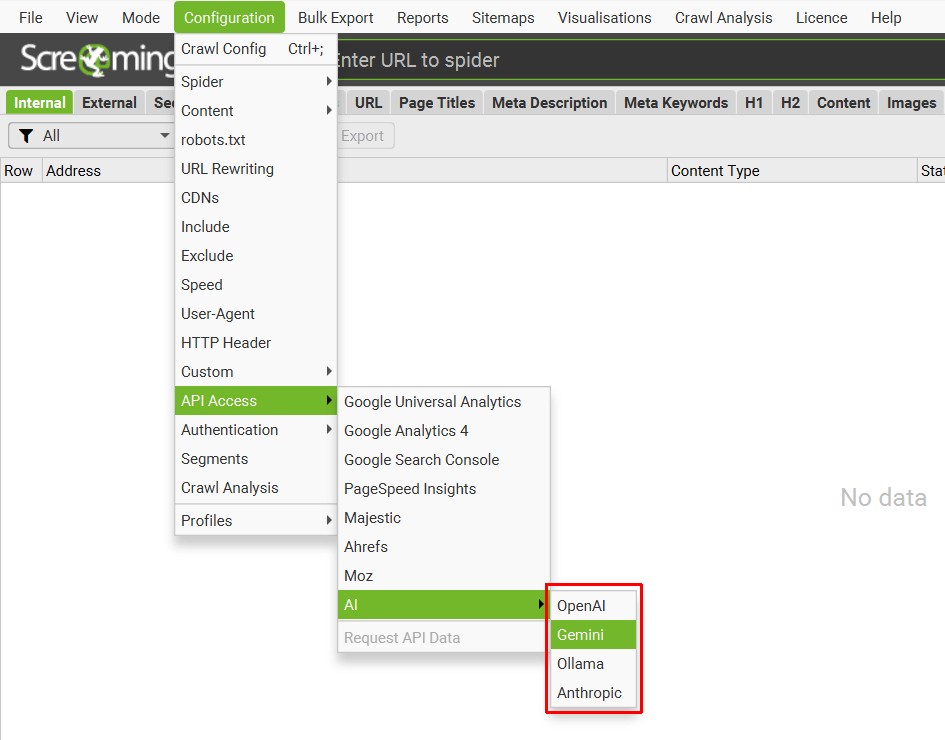
- Screaming Frog prend en charge OpenAI, Gemini, Ollama…
- Astuce : Sur des projets exigeants, Ollama/Llama3 donne des résultats pertinents et rapides en local.
Veillez bien à :
- Prévoir des quotas API (gros volumes = coût important).
- Tester les modèles selon le type de contenus (e-com, éditorial, technique).
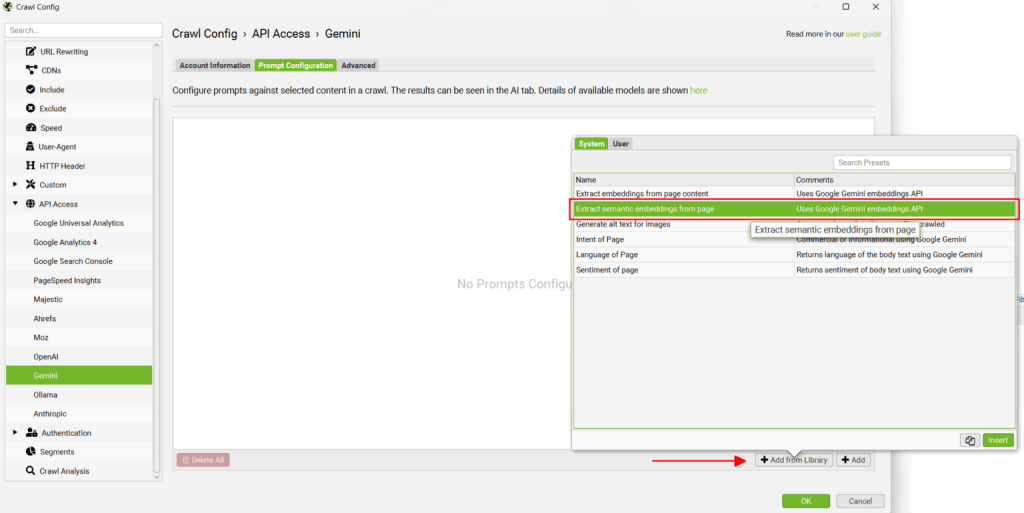
2) Ajouter le prompt d’embeddings depuis la bibliothèque
- Privilégier un prompt qui analyse la zone principale de la page (éviter d’envoyer le menu, le footer…).
- Plus la zone d’analyse est précise, plus la recommandation de redirection sera qualitative (en cas de doute, customiser la configuration).
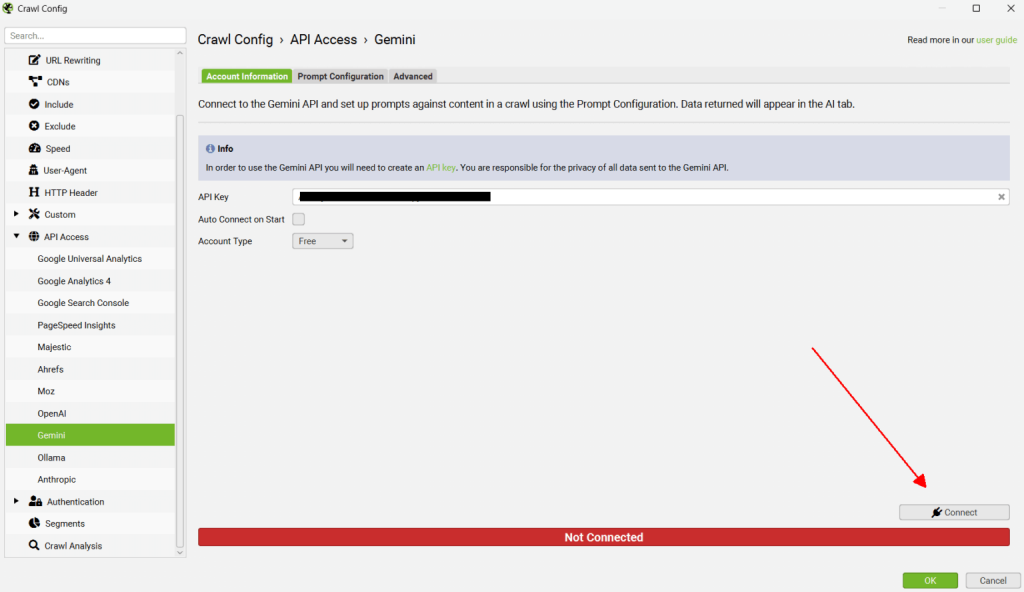
3) Connecter Screaming Frog à l’API
- Toujours valider la connexion avant le crawl.
- Tip : pour les très gros sites, batcher les URLs ou crawler de nuit (évite la surcharge et le throttling).
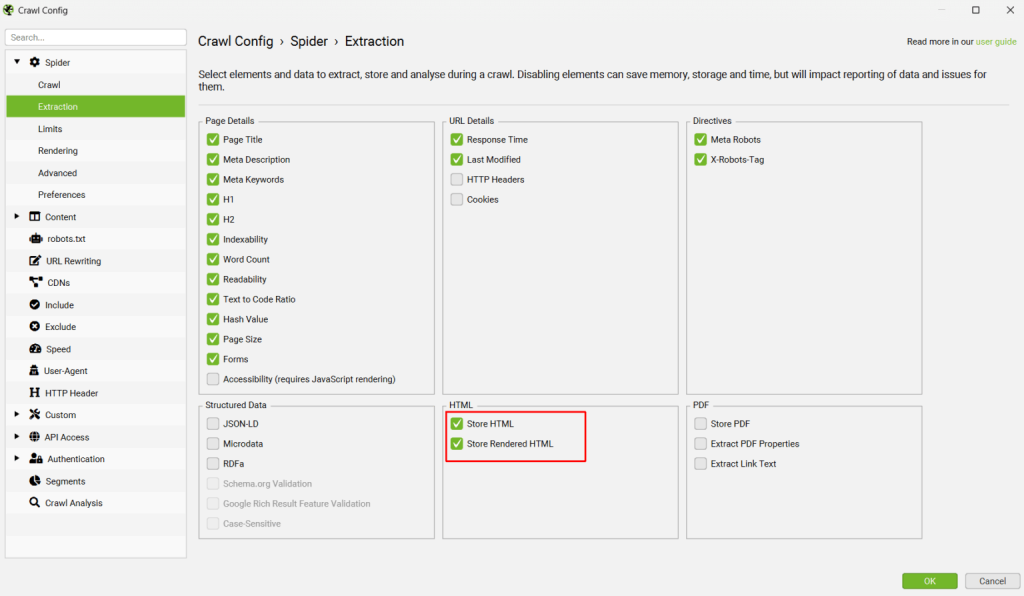
4) Activer « Store HTML » et « Store Rendered HTML »
- Utile pour les sites en JavaScript, SPAs…
- Tip expert : la combinaison des deux (« HTML brut » et « HTML rendu ») permet de détecter les différences entre contenu “off-page” et “in-page”.
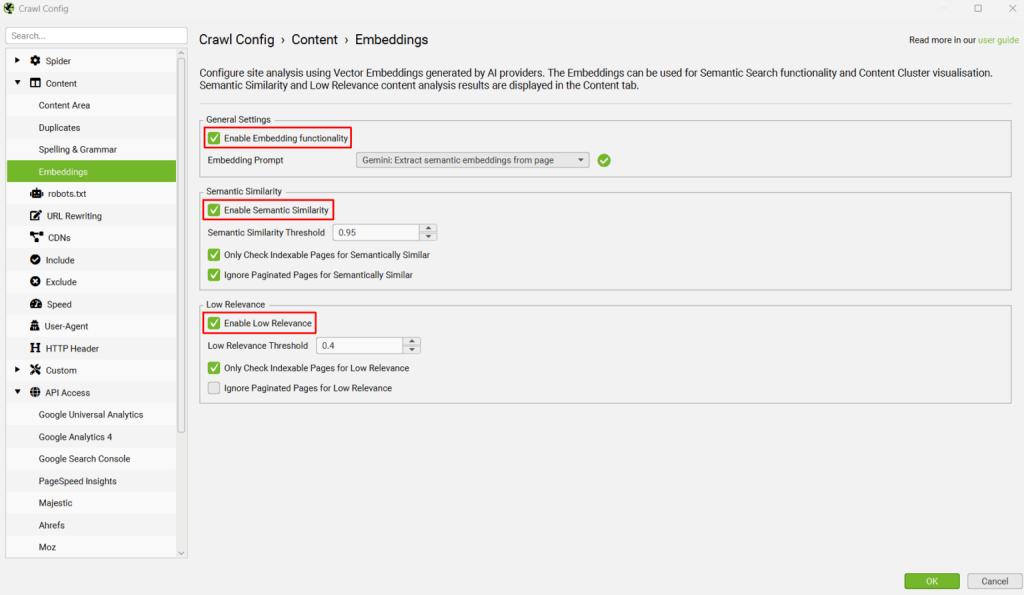
5) Activer les fonctionnalités embeddings
- En plus de « Semantic Similarity », activer l’indicateur « Low Relevance » permet d’identifier les contenus isolés ou “orphelins” (super utile en migration pour éviter les Soft 404).
- Sur un mapping international ou éditorial complexe, filtrez les résultats par langue ou catégorie via l’outil.
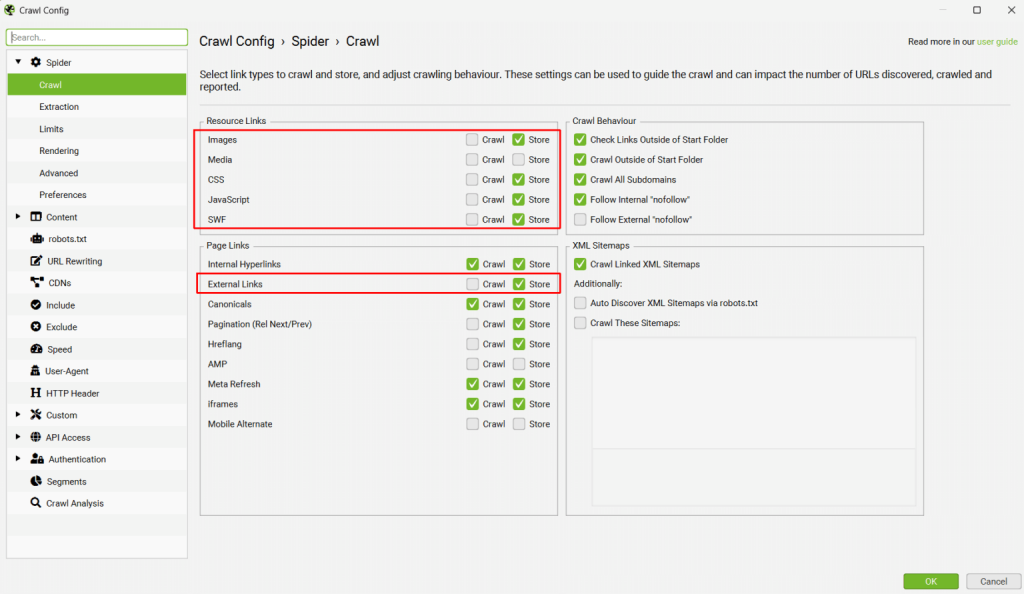
6) Désactiver le crawl des ressources inutiles
- Pour optimiser : désactiver le crawl des images, JS, CSS et liens externes (gagnez du temps, réduisez la facture API).
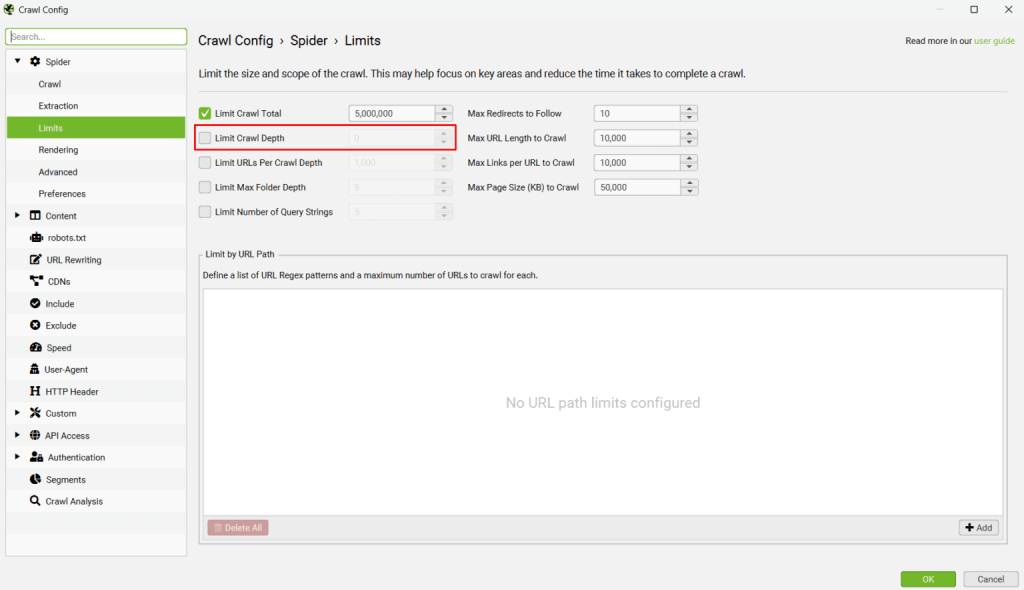
7) Crawler les anciens et nouveaux sites en parallèle
- Mode “List” : importez les listes d’URLs, anciennes et nouvelles.
- Sur un gros volume (>10 000 pages), pensez à découper en plusieurs crawls pour monitorer la performance et la stabilité.
8) Lancer l’analyse du crawl
Pour pouvoir remplir les filtres “Semantically Similar” et “Low Relevance Content” dans l’onglet Content, il est nécessaire de lancer une analyse du crawl une fois le crawl terminé.
- Dans le menu, cliquez sur “Crawl Analysis”, puis “Start”.
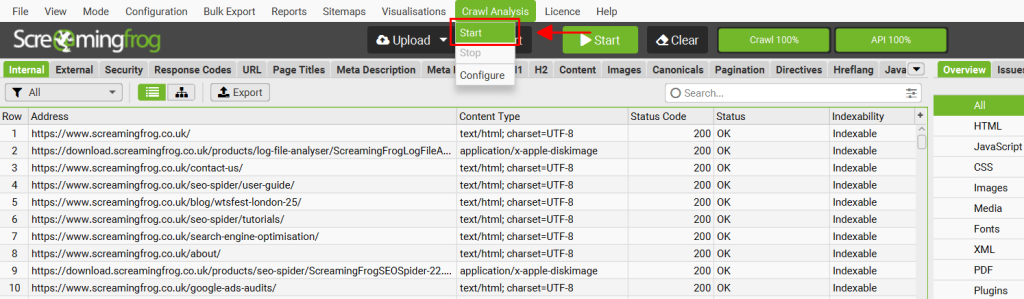
Notez qu’il est également possible de lancer automatiquement l’analyse à la fin du crawl, en sélectionnant “auto-analyse at end of crawl” dans le menu de configuration.
9) Voir et exploiter les correspondances
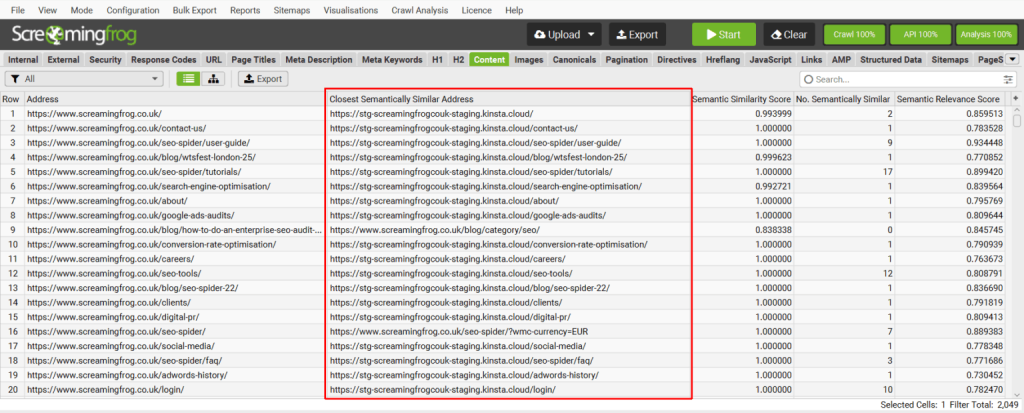
- Portez une attention toute particulière à la colonne « Closest Semantically Similar Address » : c’est le hot spot du mapping.
- Triez par “Semantic Similarity Score” : > 0,95 = excellent match / entre 0,8 et 0,95 = à auditer / < 0,8 = à surveiller ou matcher manuellement.
- Utilisez le bulk export pour faire vos fichiers de redirections (.csv, .xlsx).
Quelques astuces supplémentaires
- Combiner les techniques : Fuzzy matching et embeddings donnent de meilleurs résultats ensemble, surtout sur des cas complexes (catégories, profondeurs, migrations atypiques).
- Enrichir les données : Ajoutez aux embeddings d’autres attributs (title, H1, SKU, breadcrumb…) pour améliorer la pertinence des matches.
- Filtrer par année/metadata : Si vous avez “publish_year” ou toute métadonnée utile, filtrez dans vos résultats pour améliorer la fraîcheur et la pertinence.
- Automatiser la validation : Utilisez des scripts python ou Colab pour accélérer la validation (voir le notebook partagé par iPullRank ou le script Chris Lever).
10) Utiliser les duplicatas/alternatives
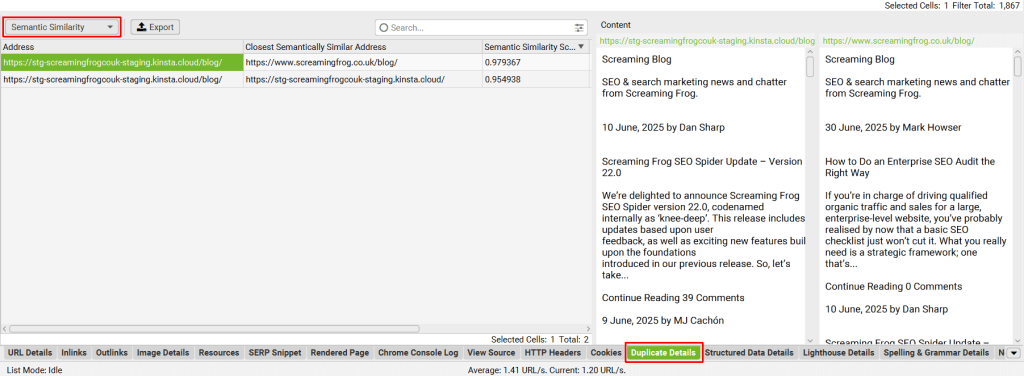
- La colonne “No. Semantically Similar” indique combien il existe d’alternatives.
- Toujours examiner les “second best matches” en cas de doute ou de faible score.
- Pour prévenir les boucles de redirection, vérifiez que le match trouvé n’est pas déjà présent sur l’ancien domaine.
Options et outils alternatifs
- Python scripts / Colab : pour extraire embeddings et matcher en local (cf. Collabs iPullRank, Chris Lever).
- Fuzzy Matching avancé : Google Sheets, Rapid301, apps open source.
- Redirection Mapper : outils comme TF-IDF Matcher ou l’app en ligne citée par Chris Lever.
Conclusion & Tips
L’utilisation des embeddings pour le mapping des redirections est une évolution majeure pour l’automatisation des migrations SEO à grande échelle.
Bien qu’imparfaite, cette technique, associée au fuzzy matching et à une revue humaine, permet de :
- Dramatiquement accélérer le process,
- Réduire les erreurs et Soft 404,
- Pérenniser le transfert de popularité des anciennes URLs.
À retenir : Les meilleures pratiques combinent jugement expert, enrichissement des données par d’autres champs, et outils hybrides pour gagner du temps ET en précision.
Vous souhaitez confier l’audit SEO de votre site à des experts ?
- 1Site web
- 2Nombre d’URL
- 3Votre besoin
- 4Vos spécificités
- 5Vos coordonnées
- 6Estimation
L’expertise Abondance c’est :
 +2 000 audits Réalisés pour des PME, ETI et grands comptes.
 15+ ans d’expérience Consultants seniors & ambassadeurs Abondance.
 Méthode éprouvée Feuille de route priorisée, actions concrètes.
L’article “Créer un plan de redirections avec Screaming Frog et les embeddings vectoriels” a été publié sur le site Abondance.


