Far from random, notifications from the Google app and the Discover feed follow an algorithmic logic of formidable precision. This article by Damien Andell (1492.vision) decodes for the first time the "secret grammar" that governs these alerts: a complex system where technical codes, Knowledge Graph and temporal entities combine to push the right content at the very second.
Beyond the technical side, this investigation highlights a challenge for modern SEO: the shift from query-based visibility to entity- and context-based visibility. Discover how Google structures its notifications behind the scenes and how this "push" channel becomes an essential acquisition lever for those who know how to speak the language of entities.
What are these notifications for?
Google app notifications have nothing to do with chance.
They have two objectives:
- Notify you at the right time (start of a match, end-of-day stock market summary, weather alert…),
- Do it for topics that interest you (followed teams, companies on your watchlist, topics you frequently read about, etc.).
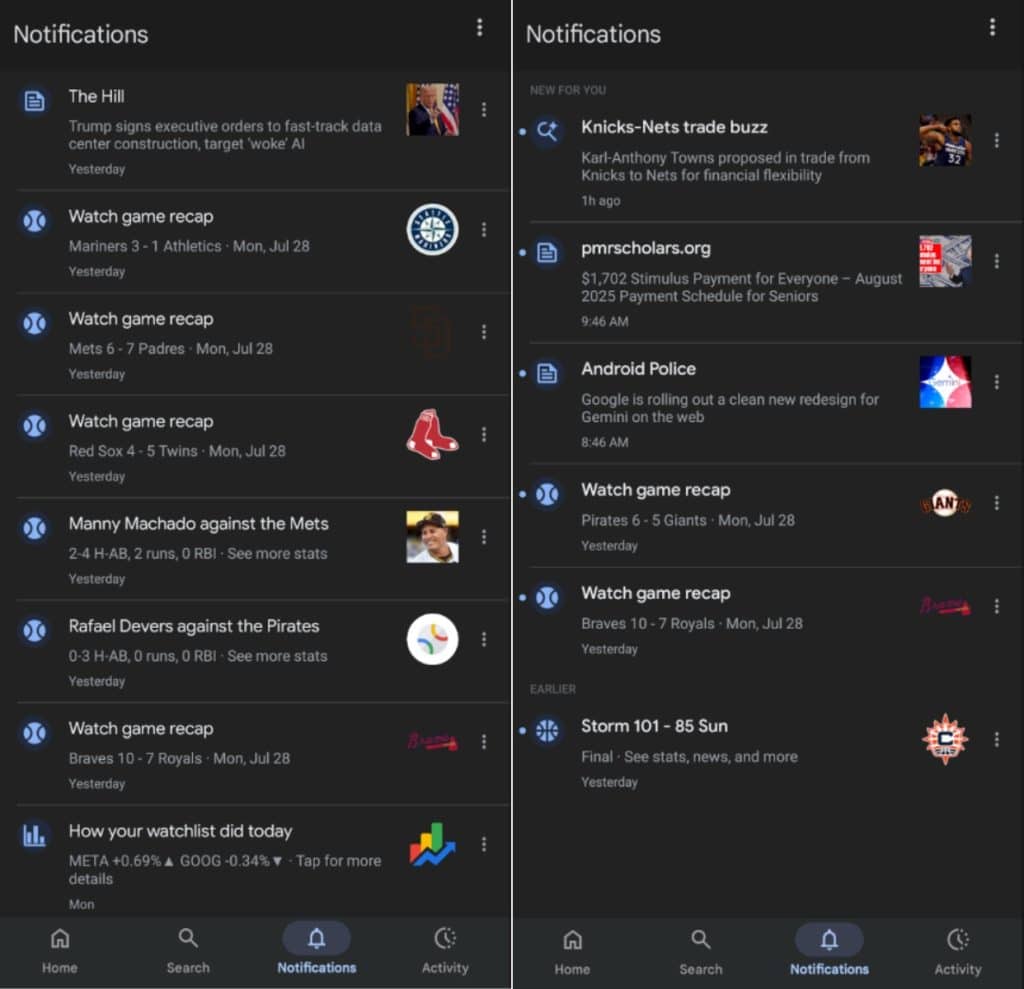
The secret grammar of Google notifications
Our investigation revealed the existence of a complex internal coding system. Each notification carries a technical signature that reveals its true nature. Let's take a concrete example:
and.now.ni.sp.sc.lnLet's decode this mysterious chain together:
and  . now . ni . sp . sc . ln
  |     |    |    |    |    └─► Line-ups (compositions d'équipes)
  |     |    |    |    └──────── Score
  |     |    |    └───────────── Sports (verticale)
  |     |    └────────────────── Notification Inbox
  |     └──────────────────────── App "Now/Discover"
  └────────────────────────────── Device Android
This internal grammar structures the whole system. We identified 8 major families of notifications, each with its own rules and triggers:
Main categories of notifications
| Internal chain (source) | Plaintext reading | Notification example |
| and now ni tp str | Top Story – hot news / breaking news | "Explosion in Paris: follow the situation live" |
| and now ni ge co | Automatically generated content – AI summary (Search Generative Experience / "AI mode") | "Google AI drives growth – Alphabet +14% revenue" |
| and now ni cr pa | Crisis and Public Alerts | Severe thunderstorm alert NWS, earthquake USGS… |
| and now ni fi dr | Financial — Daily Recap | "How your watch-list did today" (META ▲ 0.69% …) |
| and now ni fi st | Finance — Stock Trigger (threshold crossed, large change) | "TSLA just went up 5%" |
| and now ni we al | Weather Alert (severe weather) | "Severe Thunderstorm Warning – New Jersey" |
| and now ni sp sc as | Sports / Scores / Athlete Stats | Shohei Ohtani: 3 HR, 6 RBI |
| and.now.ni.sp.sc.ln | Sports / Scores / Line-ups | See line-ups: PSV vs Athletic Club |
| and.now.ni.sp.sc.lv | Sports / League Videos (day recap) | MLB recap 07/24/25 – video |
| and.now.ni.sp.sc.vd | Sports / Video Highlights | Lakers @ Warriors – highlights (YouTube) |
| and.now.ni.sp.sc.ft | Sports / Full Time (final score) | PSV 1-1 Athletic Club – FT |
| And Now — Live Sports Score Update | Sports / Live Update (goal, basket, set) | «  Mbappé scores (1-0) Mbappé scores (1-0) |
| And Now — Live Sports Score Tracker | Sports / Transfers & Rumours | Tottenham close to signing Ekitike €79m |
| and.now.ni.sp.sc.tm | Sports / Team News (injuries, suspensions) | Kevin De Bruyne out for 3 weeks |
"Subscribed" vs "Suggestion" : In the interface, you can see mentions like SUBSCRIBED (you explicitly follow a topic: team, theme…) or UNSPECIFIED (opportunistic suggestion). That tells you whether the alert is linked to a follow-up or to a recommendation.
How does Google decide to alert you?
- Entity matching (Knowledge Graph): each article, video or alert is tagged with a set of MIDs (KG identifiers).
- Your history : clicks, searches, explicit subscriptions (Follow).
- Real-time : some channels (sports, weather, finance) include event streams -> immediate triggers.
The role of entities (MIDs)
- One entity corresponds to a topic in the Knowledge Graph → identifier /m/... or /g/....
- Each card is labeled with 1 to N entities.
- The algorithm cross-references:
- Your followed or guessed interests (SUBSCRIBED vs UNSPECIFIED).
- The freshness of the event (live scores, weather alerts, stock market...).
For SEO professionals
- The importance of being correctly identified in the Knowledge Graph
- The need for real-time data in certain verticals
- A new visibility channel to leverage
Example "Steam Deck"
- Article: “Steam Deck 2 rumored …”
- Main entity: /g/11rs2pn_gy (Steam Deck).
- Secondary entities: AMD, Valve, etc.
- Menu ··· from the card → “Turn off notifications for Steam Deck » → unsubscribing from the entity.
Complete example: entities detected for the article "Steam Deck 2 rumored to be in the works"
| Entity (MID) | Open Knowledge Graph view |
| /g/11rs2pn_gy (Steam Deck) | https://www.google.com/search?kgmid=/g/11rs2pn_gy |
| /g/11cst2qg52 (Valve) | https://www.google.com/search?kgmid=/g/11cst2qg52 |
| /g/11bc5fcjw7 (AMD) | https://www.google.com/search?kgmid=/g/11bc5fcjw7 |
| /g/12135z7p (Tom's Guide) | https://www.google.com/search?kgmid=/g/12135z7p |
| /g/11gy4q9nx8 (Darragh Murphy) | https://www.google.com/search?kgmid=/g/11gy4q9nx8 |
| /m/0266r31 (AMD APU) | https://www.google.com/search?kgmid=/m/0266r31 |
| /m/0g5q45d (APU – Accelerated Processing Unit) | Google search link: https://www.google.com/search?kgmid=/m/0g5q45d |
| /m/0z64 Advanced Micro Devices (AMD) | Google search link: https://www.google.com/search?kgmid=/m/0z64 |
| /m/0dwl2 (Valve Corporation: Video game developer) | Google search link: https://www.google.com/search?kgmid=/m/0dwl2 |
| /m/03pby (Handheld console) | Google search link: https://www.google.com/search?kgmid=/m/03pby |
Quick read: the first line is the entity pivot (Steam Deck), the following ones are technical concepts (AMD Ryzen, RDNA 3, APU), economic (USD) or contextual (Valve, Rumour).
Google cross-references this basket with your history to decide whether the notification deserves to be pushed.
Example "NBA Highlights"
- Notification type: SPORTS_VIDEO_HIGHLIGHTS_NOTIF.
- Contains:
- YouTube ID VCRpaok-lOE.
- Team entity + entity moment /<mid_match><2025-07-24T00:00-06:00> to link all content from the same match.
- The notification links to a Google SERP and Google associates the video with the match corresponding to the query.
The hidden innovation: 'moment' entities
Our most surprising discovery concerns a previously unknown mechanism: the timestamped entities. Google does not just identify static topics. It creates temporary entities for one-off events.
The format is revealing:
/m/09p142025-07-24T00:00-06:00This channel combines:
- A base entity ID (/m/09p14 could be a sports team)
- An exact timestamp in ISO 8601 format
What's it for? This “moment” entity instantly aggregates all content related to a specific event: the July 24 match, its video highlights, player statistics, analysis articles… Everything is tied together by this unique time key.
This mechanism allows Google to send you a goal notification, then offer you the match highlights a few hours later, while maintaining perfect coherence.
The Sports case: why do notifications arrive 'right on time'?
Cards Sports are "timed" to key moments : pre-match (lineups), live (score), post-match (highlights). Result:
- Before : "See lineups..."
- During : "Live score..."
- After : "Video highlights…"
The little extra (in simple terms): "key moment"
To group all what talks about the same event (lineup, score, video, recap), Google sometimes assigns a “moment” identifier to the subject, e.g.: /m/09p14 2025-07-24T00:00-06:00 → /m/09p14 (MLB) + date/time = the "key" to match day. Useful for deduplicate notifications and the order at the right time.
Behind the scenes at Google: new revelations about how Search and Discover work
AI Mode (AI-generated content): how does it work?
Sometimes the notification doesn't open an article, but a AI summary (AI Mode): title + short paragraph generated by AI, based on recent sources.
Example
- Source detected : finance.yahoo.com
- Title : "Google AI drives growth"
- Snippet : "Alphabet’s AI focus drives 14% revenue increase…"
- Main topic Alphabet Inc (/g/11bwcf511s)
- Other related topics : company, products, competitors, concepts (some /m/, /g/ and sometimes /t/).
Just remember that AI Mode summarizes the information on a topic you follow or frequently consult, from a reliable source identified, and offers you a ready-to-consume summary.
Finance (watchlist): the daily roundup
If you have a watchlist on Google Finance, you'll often see a notification at the end of the day: "How your watchlist did today" (e.g. "META +0.69% ▲, GOOG −0.34% ▼"). The link opens the page Watchlist and the timing corresponds to the close : when the trading day ends, the notification arrives.
Weather / emergency alerts (Public Alerts)
Example: "Severe Thunderstorm Warning for New Jersey, New York". It's the category Crisis and Public Alerts. What's in it for you: speed and localization. You don't have to do anything; these alerts are priority.
How does Google decide which notification appears first?
Let's simplify as much as possible: Google puts on the starting line all the notifications eligible now (time window, not expired, not already 'dismissed'). Then it mainly ranks by "time sensitivity" : the one that arrives at the right moment moves ahead for you.
Concretely:
- Each notification has a window (e.g., "pre-match" 30 min before, "live" during, "post-match" just after).
- The closer you are closer to the key moment, the notification is higher priority.
- In case of a tie, the more recent takes precedence.
- Your actions ("not interested", "disable this topic", "less of this") affect the following.
Important : your followed topics (teams, companies…) are used to select the right notifications for you. Theorder of display, for its part, is primarily a matter of timing.
Your actions: what they change
In the “three dots” menu of a notification:
- "Not interested" / "Less of this type" : you will see more less in the future on this topic.
- "Turn off notifications for [topic]" : stop for this topic (e.g., a specific team).
- "Send feedback" : return to Google (optional).
These actions are taken into account for later (Discover and Notifications).
Concrete mini-scenarios
Football match (PSV – Athletic Club)
- 1 hour before: "See lineups" (likely lineups → open as soon as confirmed).
- During: "Live score" (goal, equalizer, half-time...).
- After: Video highlights (YouTube recap). It all revolves around same event : no spam, just the right tile at the right moment.
AI summary (AI Mode) on Alphabet
- Detected source: a finance media outlet.
- Main topic: Alphabet.
- Do you follow Google/AI? You receive a concise summary with title + snippet generated, without having to open 10 articles.
Stock watchlist
- At the end of the day: a clear summary of your list of stocks (rise/fall).
- One tap: you land in Google Finance for details.
Quick FAQ
"Is it 'real-time' ?"
- For sports, weather or emergencies: yes, notifications are synchronized with events (goal, kick-off, alert…). For the stock market, it's more the end of day. For AI (AI Mode), it's as relevant news unfolds on your topics.
What is a MID (/m/, /g/, /t/)?
- A topic identifier. /m/ and /g/ are the most common and often viewable via kgmid=. /t/ also exist but are internal and rarely exploitable publicly.
A useful link to view a topic's profile?
- https://www.google.com/search?kgmid=<paste the identifier> Ex. Alphabet: https://www.google.com/search?kgmid=/g/11bwcf511s
Quick tips to better manage your notifications
- Follow explicitly the topics that matter (teams, companies).
- Use Less of this type when the notification is not useful to you.
- For an overly frequent topic, click "Turn off notifications for [topic]".
- Also check the system settings notification settings of the Google app (sound, vibration, lock screen summary).

Key points to remember (TL;DR)
- Google doesn't rely on a single entity : it mixes all content entities + your interests.
- The "moment" entities Timestamped items allow following a match or a trading session in real time.
- Your click history strengthens or weakens these signals over time.
The article “Google Notifications (Google App / Discover): what's really happening” was published on the site Abondance.


