Pour de nombreuses entreprises, créer de l’engagement sur LinkedIn est une véritable quête. Avec plus de 600 millions d’utilisateurs et des personnes connectées quotidiennement, le réseau social professionnel est un vrai terrain de jeu pour développer sa notoriété et se rendre visible.
Cela sans compter sur la réputation de Linkedin lui-même qui est connu pour son sérieux et ses beaux résultats en matière de recrutement. Bien sûr, encore faut-il être visible et attirer l’attention des bonnes personnes.
Heureusement, nous avons compilé pour vous 5 techniques pour booster votre engagement sur Linkedin.
Néanmoins, avant la présentation des 5 techniques, il est indispensable de comprendre ce qu’est l’engagement sur Linkedin et il faut également savoir le mesurer pour en obtenir le meilleur résultat.
Qu’est-ce que l’engagement sur les réseaux sociaux ?
L’objectif des publications sur les réseaux sociaux, et notamment sur Linkedin, est vraisemblablement de gagner en notoriété ainsi qu’en visibilité. Ces dernières peuvent s’afficher via les réactions, les commentaires et les partages, et ce sont ensuite ces interactions qui forment l’engagement !
Qu’il s’agisse ainsi de Linkedin ou autre réseau social, on peut définir le terme d’engagement comme la propension des clients ou des consommateurs à interagir avec les publications d’une entreprise, sur ses produits ou services.
Pour suivre les réactions sur les publications, l’engagement peut se mesurer grâce à un indicateur de performance appelé taux d’engagement et il y a de grands avantages à connaitre ce résultat.
Néanmoins, il ne s’agit pas seulement de mesurer le taux d’engagement afin d’obtenir un résultat, mais vous aurez également la possibilité d’influencer ce dernier en publiant des contenus adaptés afin de générer des interactions. Vous pourrez par la suite répondre à ces interactions, d’où l’intérêt de l’engagement. Une étude révèle que les réponses aux commentaires ainsi que l’étude des centres d’intérêts des visiteurs permet de pousser ces derniers à dépenser jusqu’à 20 à 40 % en plus.
Pourquoi mesurer l’engagement sur Linkedin ?
Le taux d’engagement vous permet de connaitre le niveau de satisfaction et d’appréciation des clients par rapport à votre activité ! Vous devez donc vous intéresser aux résultats, car c’est à travers ces derniers que vous pourrez connaitre l’efficacité de votre stratégie marketing.
En effet, le niveau d’interaction de votre audience par rapport à vos publications vous aide à comprendre ce que vos leads et clients recherchent, et vous pourrez répondre à leurs besoins.
De plus, l’étude de l’engagement vous permet de gagner en visibilité sur les réseaux sociaux, et cela pourra faire augmenter votre nombre de trafics ou de prospects.
Concernant les publications, vous pourrez bien les planifier en faisant des regroupements par période par exemple. Vous aurez notamment connaissance des publications qui ont le plus de succès et la bonne interprétation du résultat vous servira d’une arme redoutable pour atteindre les cibles sur vos prochains contenus.
En résumé sur ce point, le taux d’engagement est un outil qui permet de développer votre activité via les réseaux sociaux.
Vous devez cependant savoir, comment mesurer ce taux d’engagement.
Les techniques pour mesurer le taux d’engagement sur Linkedin
Si auparavant le calcul du taux se faisait juste à partir des résultats d’interaction comme les mentions j’aime et les commentaires, il évolue actuellement en même temps que les réseaux sociaux. D’autres facteurs peuvent en effet être pris en compte désormais, et l’objectif sera de vous offrir un résultat le plus proche de la réalité par rapport au comportement de vos leads, clients ou simples visiteurs.
Les deux principales méthodes retenues comme les plus efficaces sont les suivantes :
Le calcul entre interactions et abonnés
Cette première option est la méthode classique qui consiste tout simplement à diviser le nombre total de commentaires et de réactions par le nombre de relations que vous regroupez sur Linkedin. Vous allez ensuite multiplier le résultat par 100 afin d’obtenir le véritable taux d’engagement. Il est utile de rappeler que le style de réaction à retenir peut s’afficher par un j’aime, j’adore, soutien, bravo, intéressant, etc.
En résumé : le taux d’engagement = [(réactions + commentaires) / le nombre d’abonnés] x 100.
La méthode est assez simpliste, mais elle vous permet de rapidement obtenir le résultat de la tendance. Aussi, vous pouvez vous baser sur ce résultat pour faire votre étude de marché, en analysant et en calculant les taux d’engagement de la concurrence.
Le calcul entre portée réelle et interactions
Il s’agit de la méthode récente, qui consiste à calculer la portée réelle de vos publications pour obtenir le résultat du taux d’engagement.
La formule est la suivante : le taux d’engagement = [(réactions + commentaires) / portée réelle] x 100
Le résultat de cette méthode est pertinent, car le calcul ne prend en compte que l’ensemble de vos relations ayant été réellement en contact avec la publication concernée.
En effet, ce n’est pas le nombre total de vos abonnés qui auront l’occasion de voir votre publication. Il y aura une partie qui n’en aura pas eu connaissance, car le flux de contenu sur Linkedin ne conserve pas longtemps les posts sur le fil d’actualité. De ce fait, on peut en conclure que cette méthode est à la fois la plus exacte et la plus efficace.
Quel est le bon taux d’engagement ?
Après avoir fait le calcul, vous pouvez vous demander si le résultat est un bon taux ou non ! Un taux d’engagement de 2 à 5 % est déjà excellent sur certains sites, et il est déjà suffisant à partir de 1 % pour d’autres. Mais en réalité, l’appréciation du résultat devra être par rapport à l’atteinte de vos objectifs et vous devez donc instaurer vos propres pourcentages et faire des comparaisons.
Il s’agira tout d’abord d’analyser le nombre de vues sur les posts ! Si l’augmentation de ce nombre a été l’objectif, faites en sorte de toujours l’améliorer en vous basant sur les horaires de publication par exemple.
Par contre, si l’objectif a été de générer des clients, faites votre analyse par rapport au nombre de nouveaux clients et cherchez à améliorer le contenu de vos publications pour obtenir un meilleur résultat.
Les 5 techniques pour booster votre engagement Linkedin
1. Misez sur de belles images

Comme pour tout réseau social, Linkedin n’échappe pas à la règle. Les images ont toute leur importance pour capter l’attention des utilisateurs prêts à scroller plus vite que la lumière.
Et sans surprise, les publications contenant des images reçoivent plus de commentaires.
Si vous vous demandez quoi publier, misez sur la simplicité. Utilisez de beaux visuels, respectant votre charte graphique et les standards de publication Linkedin. Et si la technique vous fait peur, sachez que ça n’est pas une excuse !
Pour vos photos, n’hésitez pas à utiliser des banques d’images libres de droit comme :
Et si Photoshop n’est pas votre ami, reposez vous sur Canva, un logiciel gratuit qui vous permettra de réaliser en quelques clics de très beaux visuels avec les couleurs de votre marque.
À lire aussi : Le guide 2020 des tailles de visuels sur les réseaux sociaux
2. Publiez régulièrement

Sur Linkedin, vous avez la possibilité de publier des articles régulièrement. Cela vous aidera à asseoir votre expertise et vous positionner en leader.
Pour optimiser cette action efficace mais chronophage, restez attentif à vos statistiques. Vous pourrez ainsi mieux déterminer :
- Quelle est votre audience sur Linkedin
- Quels sont les postes occupés par vos lecteurs
- Comment ils ont découvert votre article
Pour booster l’engagement de vos articles, mentionnez à chaque fois votre marque et insérez des appels à l’action afin d’inciter vos lecteurs à commenter et partager. Comme toujours, le moyen le plus efficace d’obtenir ce que vous voulez, c’est de demander.
À lire aussi : Profil Linkedin : quels sont les KPI à suivre ?
3. Travaillez la clarté de votre message
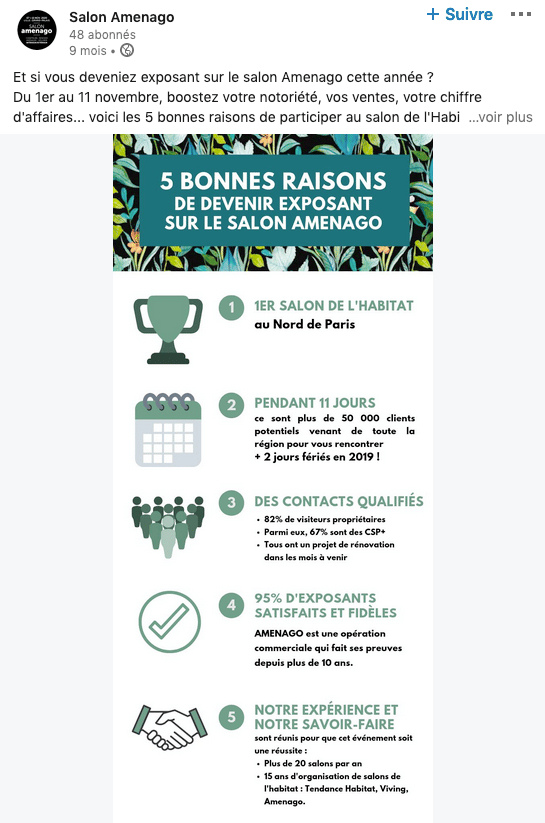
Linkedin est un réseau à part. Votre audience sur cette plateforme n’est probablement pas la même que sur vos autres médias sociaux. Cela suppose donc d’adapter votre ton à votre audience sur Linkedin.
Pour cela, il n’y a pas de mystère, vous devez passer par une phase de test. Pour trouver l’approche qui parle le plus à votre audience, vous pouvez testez différentes manières de diffuser votre message.
Concernant le ton :
- Humoristique
- Informatif
- Sérieux
- Cynique
Le format :
- Article long
- Article court
- Infographie
Veillez également à ce que vos visuels viennent enrichir vos publications et apportent une plus-value. Il est possible d’utiliser l’outil d’A/B testing fourni par Linkedin.
À lire aussi : LinkedIn : 5 façons de rendre un post viral
4. Misez sur les vidéos

Si les autres réseaux sociaux ont depuis longtemps intégré la vidéo, Linkedin est en retard sur ce terrain. Et c’est plutôt une bonne nouvelle pour vous. Cela signifie qu’il y a encore des places à prendre pour se rendre visible.
Comment utiliser la vidéo sur ce réseau social professionnel ? Voici quelques idées :
- Filmez vos locaux et présentez-les à vos abonnés
- Présentez un nouveau produit
- Partagez votre expertise
- Présentez vos équipes
Ce média est en pleine expansion. Une enquête menée par Wyzowl a démontré que 38% des marketers ont publié du contenu vidéo sur Linkedin. Les trois quarts estiment qu’il s’agit d’une stratégie efficace.
Qui plus est, la vidéo est mise en avant par l’algorithme de Linkedin alors pourquoi s’en priver ?
À lire aussi : Pourquoi la vidéo est essentielle pour l’engagement ?
5. Choisissez la bonne heure de publication

Enfin, conseil de bon sens mais toujours utile, il se peut que votre engagement soit faible pour la simple et bonne raison que votre audience ne voit pas vos publications.
Si Facebook, Instagram et autre Twitter sont souvent interdits au travail, Linkedin est pour sa part, le plus souvent, autorisé. Ce qui signifie que votre audience est active en journée et en semaine, avec une période optimale du mardi au jeudi.
Selon une étude Oberlo, voici ce qui a été observé :
- Partages et clics les plus élevés : mardi, de 11h à 12h.
- Engagement le plus bas : 22h-6h
- Meilleur moment pour poster : 10h-12h et 17h-18h.
- Période de pointe d’utilisation : 12h et 17h-18h.
À lire aussi : LinkedIn Analytics : le guide pour analyser et optimiser votre marketing B2B
Notre astuce
Vous voilà prêt à être sous le feu des projecteurs ! Et pour vous accompagner dans votre stratégie social média, n’oubliez pas que vous pouvez faire appel à un community manager en déposant votre projet gratuitement sur Codeur.com


