La structure de vos pages web est importante pour le référencement naturel. Elle permet notamment aux moteurs de recherche, comme Google, de comprendre de quoi parlent vos pages et joue un rôle prépondérant dans leur référencement.
Les balises <h1>, <h2>, <h3> jusqu’à <h6> permettent de structurer vos contenus. Si vous sous-traitez votre rédaction web, comme sur Redacteur.com par exemple, vous pouvez demander à vous faire livrer vos textes directement au format HTML avec ces balises déjà configurées.
Mais comment contrôler si vos pages respectent bien la bonne structure ? Découvrons ensemble comment faire.
Titre, sous-titres et organisation de page
Vous le savez si vous lisez régulièrement nos articles, une page doit être correctement structurée techniquement pour bien se référencer sur les moteurs de recherche. La structure d’une page, c’est le moment où se mélangent technique et sémantique.
En effet, l’organisation de votre page permet à Google de structurer le contenu d’une page web. Comme s’il lisait un livre, le moteur de recherche va comprendre le titre de la page (h1), comment est organisé votre contenu (h2) et ses éventuelles sous parties (h3, h4, h5, h6).
Comment doivent être organisés les titres Hn ?
Comme un livre, un mémoire ou une thèse, une page web doit être organisée de manière logique.
H1 : le titre de la page
On attend un seul titre H1 dans une page web. C’est littéralement le titre de votre page. Pourquoi en avoir deux ? Il est essentiel et il est évidemment conseillé d’y inclure le mot-clé principal de votre article ou de votre page web sur lequel vous espérez vous référencer.
H2 : les sous-parties principales
Viennent ensuite les H2. Ils sont en principe aussi obligatoires, puisqu’ils viennent organiser le contenu. Une page dispose rarement d’un simple H1, sauf dans les rares cas d’une page qui n’a pas vocation à se référencer, comme une page de contact ou un formulaire.
En revanche, il faut penser à en avoir au moins deux. Comme pour une thèse, il est évident que vous n’allez pas développer qu’un seul point pour argumenter. En SEO, c’est pareil ! Pensez à structurer vos propos en plusieurs parties.
H3 à H6 : organisez votre contenu en sous-parties
En fonction de la profondeur du sujet, vous pouvez vouloir créer des sous-parties. Rien de bien compliqué donc, mais pensez à bien organiser votre contenu comme vous le feriez pour un document Word. Ici encore, on évitera de mettre des titres isolés, c’est à dire un titre seul titre de niveau inférieur.
Par exemple, si votre article contient un H1 et quatre H2, vous pouvez ensuite aller dans le détail pour développer le contenu de vos H2 avec des H3. Mais il n’y a pas de raison de mettre un seul H3 sous un H2. Dans ce cas, le titre H2 se suffit à lui-même.
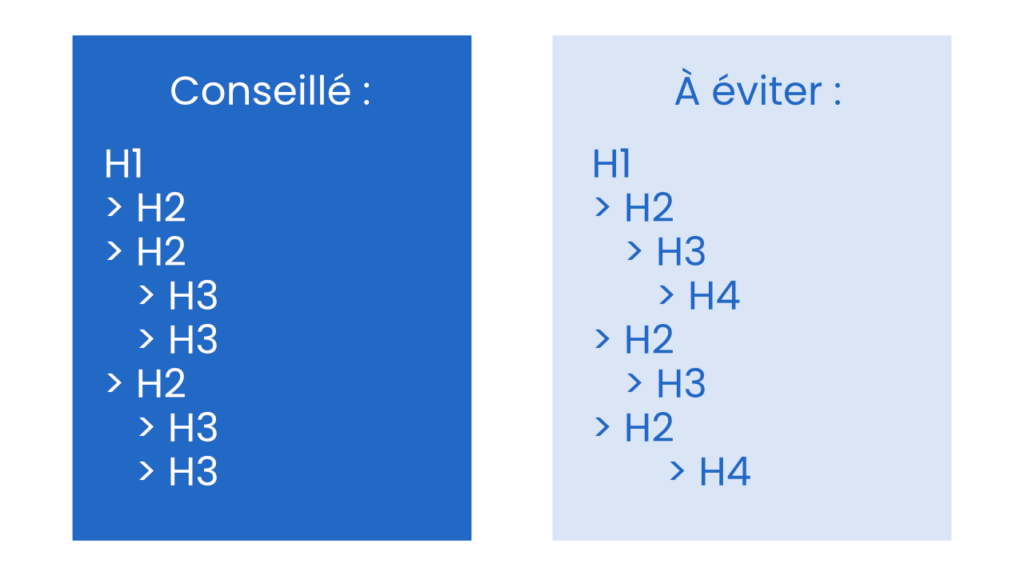
Une image vaut mille mots et le schéma suivant vous explique visuellement la marche à suivre :
Les choses à éviter dans votre structure de page
Voici la liste des différents éléments à éviter dans votre structure de page.
Plusieurs H1
Un livre n’a qu’un seul titre. Vos pages web aussi. Pensez également à différencier votre balise title de votre titre H1. La balise title peut avoir un côté plus “marketing” pour inciter les internautes à cliquer sur votre site. Intégrez une date ou des superlatifs pour favoriser le taux de clic !
Les balises Hn isolées
Contrairement à la balise H1, les autres balises vont au minimum par pair. Comme dans l’exemple en image ci-dessus, ne mettez pas une seule balise H3 sous une balise H2. Pour reprendre la comparaison du livre, imaginez-vous un livre avec un seul chapitre ?
Les sauts de balises
Il faut également éviter à tout prix les sauts de balises. Par exemple, si vous avez une balise H2, si vous avez besoin de segmenter le contenu, il vous faudra au minimum deux balises H3. Ne mettez pas directement des balises H4.
Il arrive parfois, que pour des raisons esthétiques, on utilise le mauvais balisage. Il est essentiel de bien respecter l’ordre des balises. N’hésitez pas à vous rapprocher de votre développeur web ou de votre agence web si la mise en page de votre titre ne convient pas.
Comment vérifier si les balises de titres de vos pages sont bien organisées ?
Nous vous proposons 3 méthodes pour analyser cela.
Vérifier le code source de la page
Lorsque vous naviguez sur votre site, vous pouvez effectuer un clic droit avec votre souris puis sélectionner “Afficher le code source de la page“. Si vous êtes à l’aise avec le code, vous pouvez facilement identifier les balises HTML correspondant à vos titres. Mais cette méthode n’est pas la plus simple, car cela reste peu lisible.
Utiliser le plugin Chrome headingsMap
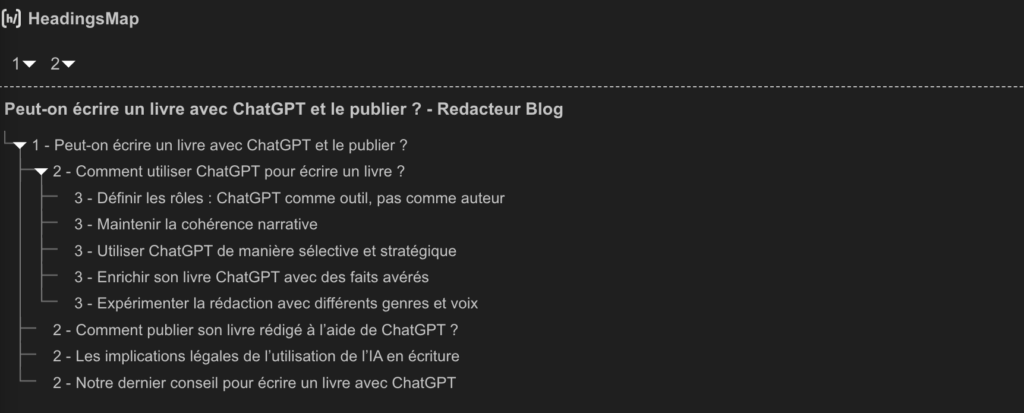
Le plugin gratuit pour Google Chrome HeadingsMap vous permet en un clic d’obtenir la liste des titres Hn et leur organisation. Dans l’exemple ci-dessous, vous pouvez donc voir en gros la balise title, suivie du H1 et des H2. On constate que le premier H2 est suivi de 5 H3. Ici, nous avons donc un article correctement organisé.
Si des problèmes sont présents au niveau de l’organisation de votre page, les titres problématiques seront affichés en rouge. Dans l’exemple suivant, on voit que le titre H5 est identifié comme étant en erreur. On devrait effectivement avoir un titre H3.
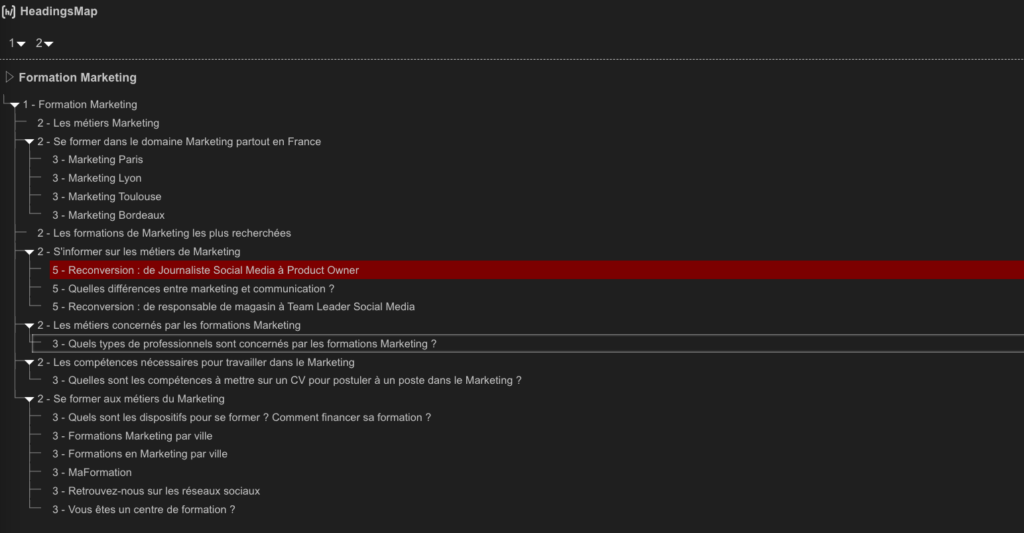
À noter que les titres H5 suivants ne sont pas mis en rouge, mais doivent être corrigés également. On notera aussi que le titre H3 surligné en blanc (car nous avons cliqué dessus) n’est pas identifié par l’outil comme étant une erreur. Mais c’est un titre isolé et il est recommandé d’éviter d’avoir des sous-titres isolés.
Utiliser un crawler comme Screaming Frog
Enfin, il est possible d’utiliser un crawler. Cet outil permet de naviguer sur toutes les pages de votre site et de faire remonter les erreurs. Il comprend notamment l’analyse des titres. L’outil est gratuit pour le crawl de 500 URLs, mais même un site modeste peut disposer de plus d’URL à crawler (les images et les liens externes comptent dans le total). En version payante, ces outils sont chers (239€ pour une licence de 1 an avec Screaming Frog).
Ainsi, si vous avez peu de pages ou si vous débutez, nous vous conseillons plutôt de commencer à regarder vos pages avec le plugin Chrome qui a l’avantage d’être gratuit. Les crawlers sont plus complexes à utiliser et vous fournissent des informations qui vont bien au-delà de la simple analyse de la structure Hn des pages.
Optimisez vos titres Hn
Vous avez maintenant les clés pour organiser techniquement vos balises Hn correctement.
N’oubliez pas également de les optimiser sémantiquement pour le référencement naturel. Pour cela, intégrez votre mot-clé principal et vos mots-clés secondaires dedans.
Pour vous simplifier la vie, vous pouvez également confier votre rédaction web à Redacteur.com en passant commande en quelques clics directement sur notre site !
L’article Comment contrôler la structure Hn de vos pages ? est apparu en premier sur Redacteur.com.


