L’European Accessibility Act (EAA) est entrée en vigueur le 28 juin 2025 et marque un changement important dans l’Union européenne. Elle définit des exigences d’accessibilité pour les personnes en situation de handicap et ne concerne pas que les organisations publiques. Découvrons ensemble.
Ce qu’il faut retenir :
- À partir du 28 juin 2025, certains produits – ordinateurs, smartphones, liseuses – et services – commerce électronique, médias audiovisuels, services bancaires… – doivent répondre à de nouvelles exigences en matière d’accessibilité.
- Les exemptions concernent les petites entreprises prestataires de services de moins de 10 salariés ou de moins de 2 M€ de chiffre d’affaires annuel.
- La plupart des bonnes pratiques SEO servent les enjeux d’accessibilité, mais il est toujours bon de connaître les exigences européennes pour rendre vos sites et applications accessibles.
Cet article au format audio 

Qu’est ce que l’European Accessibility Act (Loi Européenne sur l’Accessibilité)
L’European Accessibility Act (Loi européenne sur l’accessibilité, Directive 2019/882/UE) est une législation de l’Union européenne qui impose, à partir de juin 2025, des exigences minimales d’accessibilité pour certains produits et services essentiels (notamment numériques) afin de garantir l’accès des personnes en situation de handicap.
Elle s’applique à tous les produits et services créés à partir de juin 2025. Pour les produits et services déjà existants, la date limite est fixée au 28 juin 2030, à laquelle ils devront être conformes aux exigences d’accessibilité.
Quels services et quelles entreprises sont visés ?
Sont concernés :
- les sites marchands,
- les apps mobiles,
- les services bancaires,
- les bornes interactives,
- les liseuses,
- les systèmes de réservation,
- ou encore les outils de communication digitale.
Autrement dit : une bonne partie des interfaces web utilisées au quotidien. Et par ricochet, ce sont les métiers de l’écosystème numérique tout entier qui sont concernés : développement, contenu, UX, SEO inclus.
Les petites entreprises prestataires de services (moins de 10 salariés et moins de 2 millions d’euros de chiffre d’affaires) sont exemptées de l’obligation de se conformer à la directive. Mais cette exemption ne s’applique pas aux petites entreprises fabriquant des produits (smartphones, ordinateurs, liseuses, terminaux de paiement, etc.), qui restent soumises aux obligations d’accessibilité.
Les exigences de conformité pour les sites web et les applications évoluent
PUCR : voici un nouvel acronyme à mémoriser. Les sites web et applications mobiles doivent en effet être :
- Perceptibles : l’information et les composants de l’interface utilisateur doivent être présentés de façon à être perceptibles par tous les utilisateurs.
- Utilisables : les composants de l’interface et la navigation doivent être utilisables par tous. Exemples : navigation clavier, temps suffisant pour lire/utiliser le contenu, absence de contenu provoquant des crises, etc.
- Compréhensibles : l’information et le fonctionnement de l’interface doivent être compréhensibles.
- Robustes : le contenu doit être suffisamment robuste pour être interprété de manière fiable par une large variété d’agents utilisateurs, y compris les technologies d’assistance.
 Perceptibles : l’information et les composants de l’interface utilisateur doivent être présentés de façon à être perceptibles par tous les utilisateurs.
 Utilisables : les composants de l’interface et la navigation doivent être utilisables par tous. Exemples : navigation clavier, temps suffisant pour lire/utiliser le contenu, absence de contenu provoquant des crises, etc.
 Compréhensibles : l’information et le fonctionnement de l’interface doivent être compréhensibles.
 Robustes : le contenu doit être suffisamment robuste pour être interprété de manière fiable par une large variété d’agents utilisateurs, y compris les technologies d’assistance.
Ce que ça change pour le SEO
Rassurez-vous, les bonnes pratiques SEO servent déjà les enjeux d’accessibilité : structure logique des contenus, textes alternatifs pertinents, clarté des liens, compatibilité mobile… Pour se plier à cette nouvelle obligation réglementaire, il faudra respecter les recommandations des WCAG 2.1 (niveau AA) et être en mesure de documenter cette conformité à tout moment (ça ne vous rappelle pas l’arrivée du RGPD ?).
Voici des exemples détaillés d’exigences techniques, appliquées au SEO :
| Principe WCAG/EN 301 549 | Exigence technique (accessibilité) |
|---|---|
| Perceptible | Toutes les images informatives doivent comporter un attribut alt décrivant leur fonction ou leur contenu. |
| Perceptible | Le contraste entre le texte et l’arrière-plan doit être d’au moins 4,5:1 pour améliorer la lisibilité. |
| Perceptible | Les titres doivent être hiérarchisés logiquement (balises H1, H2, H3), les listes doivent utiliser les balises <ul>, <ol>, <li>. |
| Utilisable | Tous les éléments interactifs doivent être accessibles au clavier et indiquer visuellement le focus. |
| Compréhensible | La langue principale du document doit être spécifiée dans la balise <html lang="fr"> |
| Compréhensible | Chaque champ doit avoir un label explicite lié par l’attribut for. |
| Robuste | Le code doit être conforme aux standards et compatible avec les technologies d’assistance (code HTML valide, ARIA, etc.). |
Un audit SEO à compléter ?
Pas besoin de révolutionner vos audits du jour au lendemain. Mais intégrer quelques repères d’accessibilité dans vos grilles d’analyse peut désormais faire sens. Exemples concrets :
- Repérer les zones non structurées ou visuellement claires mais invisibles pour les technologies d’assistance.
- Vérifier la hiérarchie réelle des titres HTML, au-delà de l’apparence.
- Identifier les contenus médias sans alternative textuelle ni transcription.
- Analyser les contrastes de couleurs, surtout pour les boutons et les CTA.
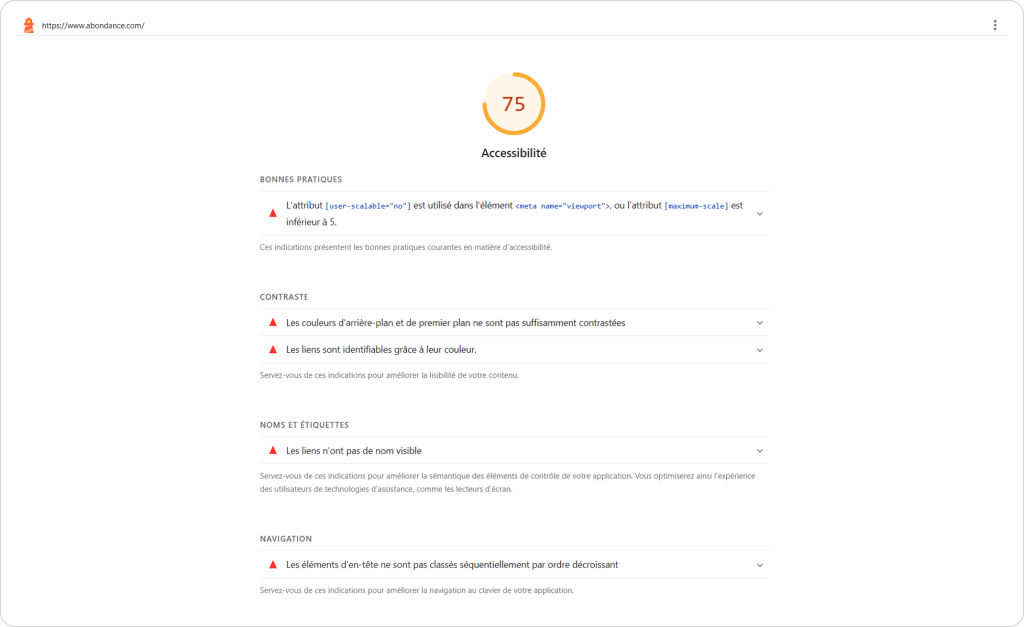
Si vous débutez, sachez que Google Lighthouse inclut un rapport d’accessibilité, vous permettant de mettre un premier pied dans ces enjeux :
L’article “European Accessibility Act : ces nouvelles exigences d’accessibilité web en vigueur depuis le 28 juin 2025” a été publié sur le site Abondance.


