Vous vous en servez sans doute, parfois sans même vous en rendre compte que ce soit sur des sites marchands ou sur des sites de restauration, voire d’hôtellerie : la navigation à facettes est devenue la norme, surtout pour les gros sites internet, dotés de très nombreuses pages.
Le terme peut faire peur alors que ce n’est qu’un système qui facilite la vie de l’utilisateur, en l’aidant à affiner une recherche à l’aide d’une série de filtres lui permettant de trier le contenu.
Si la navigation à facettes est très populaire auprès des utilisateurs comme de ceux qui la mettent en place, elle peut s’avérer piégeuse d’un point de vue référencement.
Qu’est-ce que la navigation à facettes ?
Dans le détail, la navigation à facettes est un moyen de naviguer à l’intérieur d’un site internet permettant de trouver plus rapidement ce que l’on recherche, en s’aidant de plusieurs filtres basés sur les attributs des annonces.
Voici quelques exemples de sites sur lesquels vous rencontrez ce type de filtres :
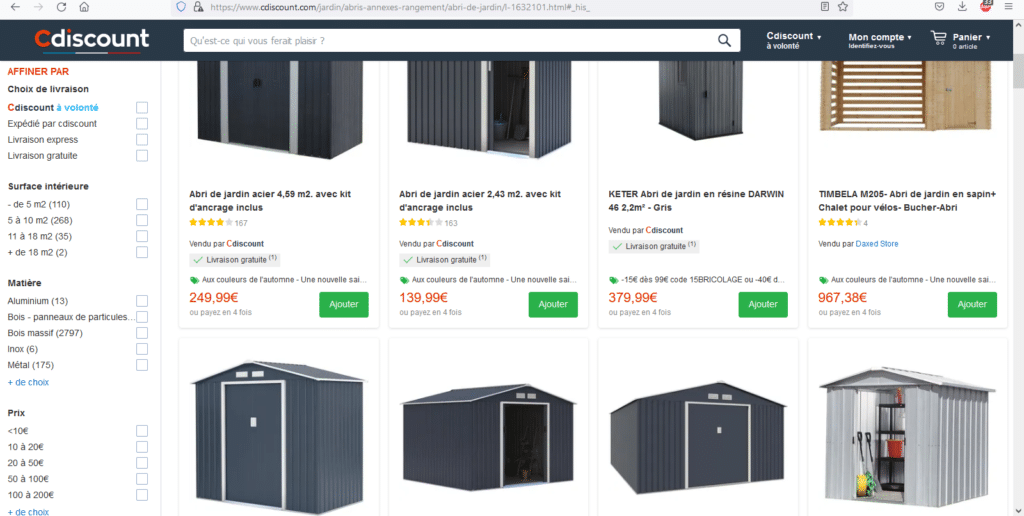
- Sites de commerce en ligne comme Cdiscount.com
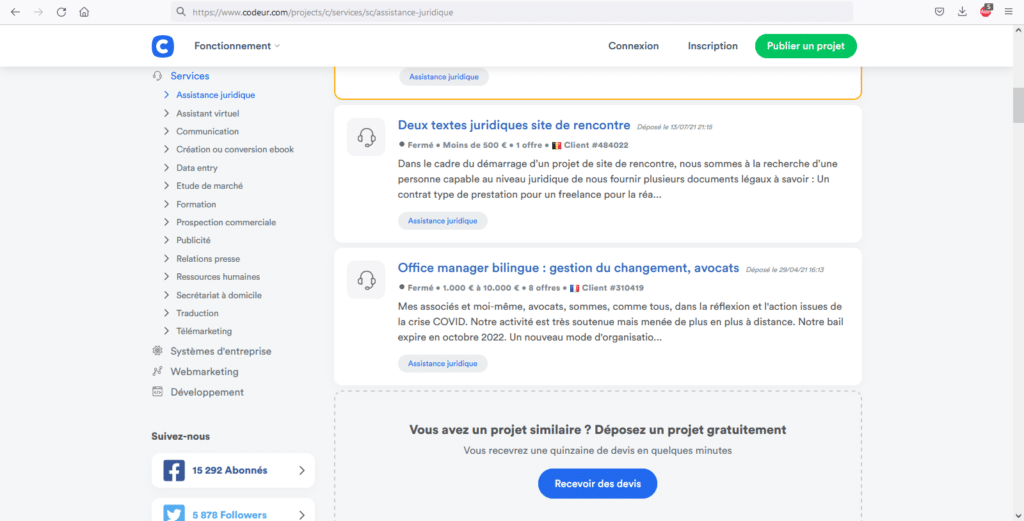
- Sites de recrutement comme Codeur.com
- Sites de réservation ou d’hôtellerie, comme Airbnb
Sur ces sites, la navigation à facettes fonctionne en filtrant les listes des pages de catégories par leurs attributs. Comme nous l’avons mentionné, les listes seront souvent des caractéristiques de produits (taille, matière, couleur…), des types d’emplois ou de profils recherchés (développeur WordPress, graphiste…), ou encore classe d’hôtel, type de vols…
Une fois que les administrateurs du site ont déterminé les attributs qui leur semblent pertinents, le site affiche ces attributs à l’utilisateur sous forme de liste :
Lorsqu’un utilisateur sélectionne un ou plusieurs filtres, il va généralement se passer l’une de ces 4 choses, selon le site sur lequel il se trouve :
- La page se met à jour instantanément, et reflète la sélection de l’utilisateur sans rechargement de page (grâce à JavaScript)
- La page est rechargée, et affiche le contenu correspondant à la sélection (sans JavaScript).
- Rien ne se passe : tant que l’utilisateur n’a pas validé son choix et cliqué sur le bouton « Appliquer ». Au clic, si le site utilise le Javascript, la page se met alors à jour toute seule (et dans le cas contraire, elle se recharge pour appliquer les filtres).
Si les deux premières options ont une UX similaire, celle-ci est différente de la troisième option, souvent retenue en fonction de la probabilité que l’utilisateur utilise plus d’un filtre : si on s’attend à ce que l’utilisateur applique plusieurs filtres, il est logique de ne pas les appliquer immédiatement et de ne mettre à jour les listes qu’une fois la série de filtres validée par un clic sur un bouton « appliquer ».
Que se passe-t-il alors ? A ce stade, l’URL peut :
- Ne rien faire : Le contenu se met à jour sans que l’URL ne soit modifiée.
- Se voir ajouter des paramètres, comme « ?colour=black&brand=apple ».
- Identifier les facettes appliquées en ajoutant une #, par exemple #colour=black.
- Devenir une nouvelle URL : par exemple sur Codeur.com, choisir la facette « assistance juridique » amène sur une nouvelle page, finissant par /assistance-juridique
La navigation à facette et le SEO
Par son amélioration de l’UX et l’importance que donne Google à cette dernière, la navigation à facettes fait partie des bonnes pratiques.
Elle a de nombreux autres avantages en SEO, à condition qu’elle soit bien mise en œuvre : si vous ne réfléchissez pas avant de mettre en place une telle méthode, vous risquez aussi de nuire gravement à votre référencement.
En effet, la navigation à facette, si elle est mal appliqué, comporte son lot de problèmes :
Duplicate Content
On parle de contenu dupliqué lorsque le même contenu ou un contenu similaire est accessible sur plusieurs URL. Les filtres sont réputés pour créer des URL avec du contenu dupliqué, les pages de filtrage étant des copies proches de la page originale, mais avec des listings différents.
Le duplicate content pose des problèmes notamment de cannibalisation des mots-clés.
Index bloat
Lorsque les moteurs de recherche indexent des pages de votre site qui n’ont aucune de valeur de recherche, on parle « d’index bloat ».
On vient de voir que la navigation à facettes peut créer des millions d’URL indexables sans contenu unique, mais elle peut également créer des variantes de pages qui n’apportent aucune valeur dans l’index des moteurs de recherche.
Reprenons l’exemple de Cdiscount : Est-ce qu’un utilisateur rechercherait directement dans Google un abri de jardin de plus de 16m², en aluminium, pour un prix situé entre 10 et 20€ ? Évidemment non.
Mais si votre site fait référencer ce genre de pages, alors qu’elles ne répondent à aucune demande de recherche, et qu’elles sont de faible qualité voire dans le cas présent vides, votre référencement va subir un impact négatif.
Gaspillage de budget Crawl
Google ne consacre qu’une quantité limitée de ressources à l’exploration de votre site. C’est ce que l’on appelle le budget d’exploration.
Certaines implémentations de navigation à facettes créent un lien explorable pour chaque combinaison disponible. Sans reparler de « l’index bloat », cela signifie que vous générez potentiellement des millions d’URL à explorer par Google, et que vous devez vous inquiéter d’optimiser votre budget Crawl.
Dilution du PageRank
Le PageRank est divisé par le nombre total de liens sur la page.
Cela pose un problème inhérent à la navigation à facettes, car un grand nombre d’entre elles génèrent de nombreux liens internes : au lieu que le PageRank soit transmis aux pages importantes de produits (ou de catégories), il sera transmis aux liens trouvés dans vos filtres, ce qui ne contribuera pas à améliorer le trafic issu de la recherche organique.
Vous le voyez, de nombreux problèmes surgissent avec la navigation à facettes, qui pourtant en solutionne d’autres. Que vous ayez d’ores-et-déjà implémenté cette fonction sur votre site, ou que vous vous apprêtiez à le faire, il est primordial de réaliser un audit afin de déterminer quel type de navigation à facettes vous conviendra le mieux, à vous, à vos utilisateurs, et bien sûr, à Google.
Navigation à facette : les bonnes pratiques pour le SEO
Jusqu’à présent, on a surtout vu comment la navigation à facettes complique le référencement, voire lui est nuisible. Heureusement vous pouvez utiliser la navigation à facettes comme un moyen d’obtenir plus de trafic, si vous l’associez à une stratégie de mots-clés à longue traîne.
En effet, les URL « à facettes » sont le moyen idéal pour capter du trafic de longue traîne, puisque les facettes créent des versions plus précises de vos pages.
1. Identifiez des mots-clés et leurs variations pour la longue traîne
Inutile de vous réexpliquer comment trouver et utiliser des mots-clés de longue traîne : vous êtes de fidèles lecteurs et savez que le sujet a déjà été traité par le passé sur le blog de Codeur.com 🙂
2. Rendre ces pages indexables
Vous devez maintenant faire en sorte que ces pages puissent être explorées et indexées par Google. En fonction du type de navigation à facettes que vous avez retenu, vous pouvez le faire de différentes manières.
La navigation à facettes avec création de liens internes
Si vous avez mis en place une navigation à facettes qui crée des liens internes vers chaque facette, (ce qui n’est pas la configuration idéale…) vous devez vous assurer que ces URLs sont conformes à la norme :
- La balise canonical est auto-référentielle.
- La balise noindex est supprimée (le cas échéant)
- Toute autre règle « disallow » dans le fichier robots.txt est supprimée (ou que vous avez ajouté une règle « allow »).
- L’attribut « nofollow » sur les liens internes est supprimé (le cas échéant).
Ce que vous devez faire dépend de votre situation, il faut simplement que les moteurs de recherche puissent à la fois explorer et indexer ces pages.
La navigation à facettes Ajax
Si vous avez opté pour une navigation à facettes « AJAX », et donc sans liens internes spécifiques, vous devez créer une page de sous-catégorie, puisque la navigation à facettes ne génère pas de liens internes (et que vous ne pouvez donc pas l’utiliser pour créer ces pages à votre place).
La plupart des plateformes de commerce électronique prennent en charge la création de sous-catégories, mais idéalement, vous souhaitez disposer d’une fonctionnalité supplémentaire permettant de classer automatiquement les produits des sous-catégories sur une version filtrée de la catégorie parente, principalement pour éviter d’avoir à gérer chaque sous-catégorie manuellement. De cette façon, vous bénéficiez des avantages de la génération rapide de pages comme le fait la navigation à facettes tout en contournant les complications liées au référencement.
Par exemple, si vous souhaitez une sous-catégorie «abri de jardin aluminium 16m²», l’idéal serait d’hériter des listes de produits « abris de jardin » et « aluminium » en n’affichant que les produits qui ont également l’attribut « 16m² ».
Ici les principales complications concernent les configurations dans lesquelles vous choisissez une page à facettes qui n’est pas soumise aux contrôles d’indexation et d’exploration par défaut : techniquement, les pages « à facettes » sont dynamiques, et ne sont pas identiques à la création manuelle d’une sous-catégorie.
Une fonction personnalisée serait nécessaire pour garantir que les optimisations sur la page sont possibles avec les URL à facettes. Faites appel à un développeur si besoin !
3. Optimisez les URL pour la recherche
On termine par une évidence, mais les optimisations classiques de référencement, telles que créer des URL simples et lisibles, ou le soin apporté aux balises de titre, aux méta-descriptions et autres balises d’en-tête. Profitez-en pour rédiger un contenu unique, et n’oubliez pas d’ajouter ces URLs au sitemap XML.
Conclusion
Et voici comment on peut tirer partie de la navigation à facette.
Vous voulez adopter ce système de navigation sur votre site ? Faites appel à un professionnel : il saura optimiser l’expérience de navigation tout en prenant soin de votre SEO. Décrivez vos besoins sur Codeur.com pour recevoir les devis gratuits de développeurs web freelances (ou utilisez notre navigation à facette pour trouver votre freelance préféré 😉)


