Connaissez-vous l’outil PageSpeed Insights de Google ? Ce test de performance vous fournit un rapport détaillé, ainsi qu’une note entre 1 et 100. Découpé en 4 scores distincts, ce reporting indique les points positifs et les améliorations pour optimiser la vitesse de chargement de votre site Web, sur mobile et ordinateur.
Besoin d’aide pour augmenter les performances de vos pages Web ? Faites appel à un développeur web freelance sur Codeur.com.
Comment fonctionne PageSpeed Insights ? Quel est l’impact de votre note sur le référencement ? Comment améliorer vos performances ? On vous dit tout dans cet article !
Comment fonctionne PageSpeed Insights de Google ?

C’est très simple ! Il suffit de vous rendre sur la page du PageSpeed Google, de renseigner l’URL de votre site Web, puis, en quelques secondes, vous obtenez un rapport pour la version bureau et mobile.
Pour fournir un score détaillé entre 1 et 100, Page Speed Insights utilise les données de Lighthouse, un autre excellent outil SEO. Du coup, vous avez un aperçu de la situation des aspects techniques, mais aussi de l’expérience utilisateur sur vos pages.
Vous vous demandez pourquoi votre page met du temps à charger ? Il peut s’agir d’images trop lourdes, de requêtes en excès ou de scripts JavaScript à rallonge. Et grâce au système de couleurs, vous voyez immédiatement où concentrer vos efforts pour améliorer la vitesse de chargement, ainsi que votre référencement.
L’impact de Google PageSpeed Insights sur le SEO et l’UX
La vitesse et les performances de votre site ne sont pas seulement cruciales pour l’expérience utilisateur (UX), elles comptent aussi pour le référencement. Sachant que PageSpeed Insights est supervisé par Google, le géant des moteurs de recherche (on le rappelle !), vous comprenez pourquoi un score élevé influence votre visibilité sur les pages de résultats – du moins, chez Google.
Cependant, Google ne se focalise pas uniquement sur la note qui s’affiche au sommet de vos résultats PageSpeed. Même si afficher un 100/100 est une belle réussite, cela ne signifie pas automatiquement une pole position dans les SERPs.
Néanmoins, exploiter au maximum les retours de PageSpeed Insights vous aidera à booster votre référencement.
Les 4 scores de PageSpeed Insights de Google
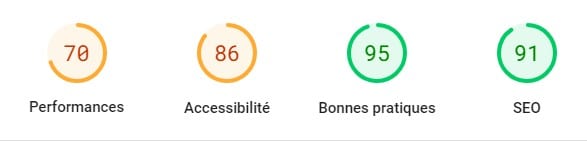
Les résultats fournis par PageSpeed se divisent en 4 catégories :
Performances
Indice le plus important, le score « Performances » reflète la rapidité avec laquelle votre site se charge et répond aux interactions des utilisateurs. Google mesure divers éléments comme le temps nécessaire pour afficher le premier contenu utile, la stabilité visuelle de la page ou encore le temps avant que la page ne devienne interactive.
Un score élevé indique que votre site offre une expérience utilisateur fluide et rapide, ce qui est primordial à l’ère numérique où chaque seconde compte, pour les internautes… et pour les moteurs de recherche !
Accessibilité
L’accessibilité concerne la capacité de votre site à être utilisable par tous, y compris les personnes ayant des handicaps visuels. Un bon score signifie que vos pages sont conçues pour être utilisées avec des outils d’assistance, comme les lecteurs d’écran, et respectent les standards d’accessibilité web.
Bonnes pratiques
Ce score évalue votre site selon des standards reconnus en matière de sécurité et de développement web moderne. Cela inclut des éléments tels que la sécurisation des connexions, la mise à jour des technologies utilisées et la prévention contre des pratiques vulnérables.
Une note de « Bonnes pratiques » élevée vous assure de fournir une expérience sécurisée à vos utilisateurs.
SEO
Le score SEO évalue la facilité avec laquelle les moteurs de recherche peuvent trouver et indexer vos pages. Il prend en compte des éléments tels que la structure de votre site, l’utilisation de balises appropriées et la pertinence du contenu. Une note SEO importante signifie que votre site est correctement optimisé pour être visible sur les moteurs de recherche, augmentant ainsi vos chances d’être découvert par de nouveaux visiteurs.
Nos conseils pour obtenir un score de performances de 100/100
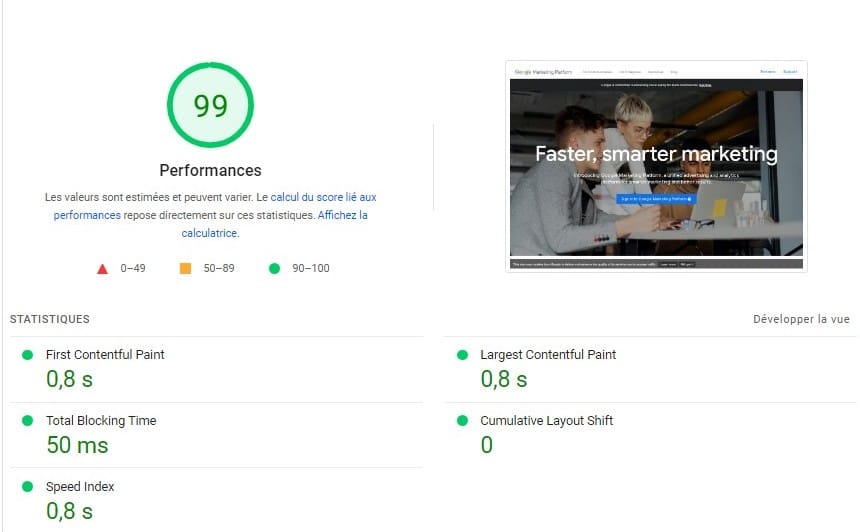
Obtenir un score parfait sur Google PageSpeed Insights nécessite une attention méticuleuse. Néanmoins, s’il y a un indicateur sur lequel se concentrer en priorité, c’est l’indice de « Performances ». Celui-ci influence directement l’expérience utilisateur, le référencement sur Google et le taux de conversion.
Voici nos conseils pour atteindre (ou vous rapprocher) du score tant convoité de 100/100 en termes de performances :
Supprimer les ressources qui retardent l’affichage
Les ressources JavaScript et CSS retardent parfois le chargement de votre page. En intégrant ces codes directement dans votre HTML ou en différant leur exécution, vous pouvez booster la rapidité d’affichage.
Par ailleurs, limitez le nombre d’éléments chargés par page en combinant des fichiers CSS/JS, en utilisant des sprites pour vos images et en évitant les redirections inutiles.
Vous pouvez utiliser la mise en charge différée (Lazy Loading) pour afficher les éléments uniquement lorsque c’est nécessaire, c’est-à-dire quand ils entrent dans le champ de vision de l’utilisateur.
Éviter de multiplier les demandes critiques
Le Chemin de Rendu Critique (CRP) désigne la séquence d’opérations que le navigateur doit effectuer pour afficher initialement le contenu visible d’une page web. Il concerne le chargement, le traitement et la mise en forme des ressources essentielles, telles que le HTML, le CSS et le JavaScript, nécessaires pour afficher la partie la plus importante d’une page.
Optimiser les images
Compressez vos images sans compromettre leur qualité. Pensez à utiliser des formats modernes comme WebP qui offrent une meilleure compression que les formats traditionnels comme JPEG ou PNG.
Minimiser le JavaScript et le CSS
Réduisez la taille de vos fichiers JS et CSS en supprimant les espaces blancs, les commentaires et en utilisant des outils de minification.
Mettre en cache navigateur
Configurez votre serveur pour qu’il fournisse des en-têtes de mise en cache, ce qui permet aux navigateurs de stocker localement des ressources fréquemment utilisées, réduisant ainsi les chargements ultérieurs.
Notre astuce pour avoir un bon score PageSpeed
Rappelez-vous que la perfection est une cible mobile. Même si vous atteignez 100/100 aujourd’hui, des mises à jour du site, des modifications de l’algorithme Google ou des évolutions technologiques pourraient influencer ce score à l’avenir. Gardez donc toujours un œil sur vos performances via PageSpeed Insights.
Pour améliorer votre stratégie SEO, n’hésitez pas à poster votre annonce pour trouver un freelance sur Codeur.com.


