Si votre activité consiste à traiter uniquement avec des clients proches de chez vous, alors vous allez devoir sérieusement vous pencher sur le référencement local. Et pour cause : 25% des requêtes effectuées sur Google ont un caractère local et 85% des internautes ont déjà recherché des entreprises de proximité sur les moteurs de recherche.
Mais ce qui a de remarquable dans les recherches locales, ce sont les taux de conversion, notamment sur smartphone : 88% des requêtes localisées sur téléphone se transforment en une visite ou un appel dans les 24 heures !
Maintenant que nous avons votre attention, voici 10 conseils incontournables pour optimiser votre SEO local et attirer des visiteurs de votre zone de chalandise.
Réalisez un audit de votre SEO local gratuitement Sponsorisé
Vous souhaitez améliorer votre visibilité locale ? Réalisez un audit SEO gratuit et instantané avec Digitaleo, le spécialiste de la communication de proximité.
Quand on sait que près de la moitié (46 %) des recherches Google sont destinées à trouver une entreprise locale, il convient de soigner son référencement local pour générer du trafic dans vos points de vente.
Afin de vous aiguiller dans cette démarche, la plateforme Saas Digitaleo a créé un outil d’audit qui analyse les leviers indispensables pour ressortir en 1ère position sur Google (presence management, avis clients, fiche Google Business Profile…) à travers des indicateurs clés : note moyenne, récence des avis, taux de complétude, taux d’engagement…
La plateforme va même plus loin en vous proposant de vous comparer à un concurrent de votre choix.
1. Géo-localisez votre SEO on-page
L’utilisation de mots-clés pertinents sur vos pages web, que ce soit dans les titres (h1, h2…) ou dans le corps du texte, est indispensable pour être bien référencé.
Toutefois, il peut être très difficile de vous démarque de vos concurrents sur certains mots-clés très compétitifs : prenons par exemple le mot « coiffeur », très recherché et très concurrentiel.
Un salon de coiffure aura beaucoup de mal à être bien classé dans les résultats de Google avec ce seul mot-clé (d’autant plus que ça ne serait pas forcément pertinent).
Mais en complétant le mot-clé par une ville (par exemple : « coiffeur lyon »), l’entreprise optimise largement son référencement local. Prenez donc toujours en compte la composante géographique dans votre SEO on-page.
2. Optimisez votre titre et votre meta-description
La balises <title> et la meta description n’ont pas nécessairement un impact direct sur le référencement local, mais ils ont en tout cas un rôle indirect indéniable.
Comprenez par là que ce sont ( le plus souvent) ces deux éléments qui vont s’afficher dans les résultats de recherche Google. C’est donc là-dessus que les internautes vont s’appuyer pour choisir sur quel lien cliquer.
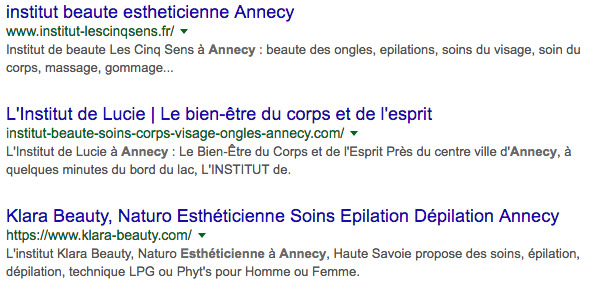
En indiquant votre emplacement dans vos balises <title> et meta description (ex : « Dentiste à Nantes »), vous augmentez considérablement vos chances de voir les internautes cliquer sur votre lien. Qui plus est, ces internautes ne seront pas déçus puisqu’ils trouveront exactement ce qu’ils cherchent à l’endroit qu’ils veulent.
Un signe positif pour Google qui pourrait, à terme, améliorer le ranking de votre site en constatant qu’il plaît aux personnes qui recherchent votre mot-clé.
3. Optimisez votre page Google My Business
Google a lancé Google My Business pour permettre aux commerces de proximité d’avoir une page de qualité regroupant leurs coordonnées, mais aussi des renseignements sur leur activité. Cette page qui ressemble fortement aux pages professionnelles de Google + est aussi localisée sur Google Maps.
Par conséquent, avoir un compte Google My Business permet aux entreprises locales d’apparaître de manière qualitative dans les recherches géolocalisées et d’offrir à leurs potentiels clients toutes les informations dont ils ont besoin : adresse, email, numéro de téléphone, plan, type de produits vendus, etc.
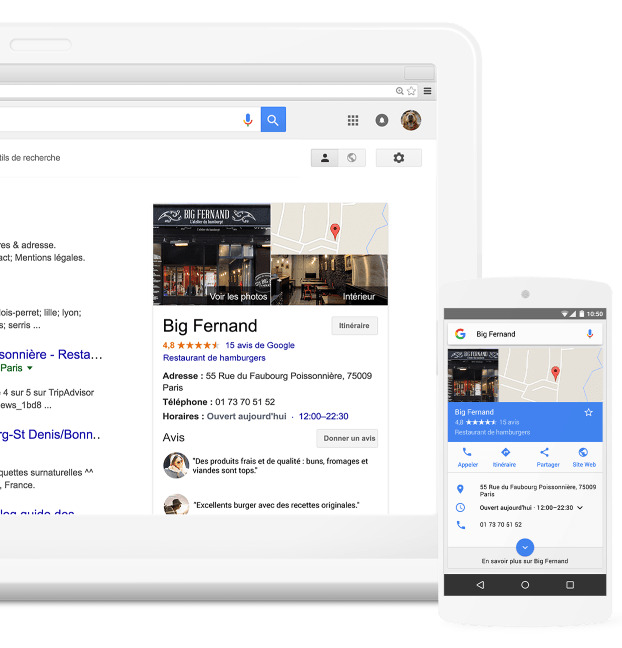
Pour optimiser votre page My Business, voici différentes astuces :
- Le B.A-ba : vérifiez que vous avez renseigné un nom d’entreprise, une adresse et un numéro de téléphone corrects ;
- Démarquez-vous avec des photos originales et de qualité ;
- Soyez le plus précis possible dans le choix de vos catégories (par exemple, préférez « Magasin de légumes frais » plutôt que « Boutique ») pour être pus facilement trouvable ;
- Mettez en avant les meilleurs avis laissés par les internautes et répondez aux avis négatifs de façon rassurante ;
- Proposez une visite virtuelle à 360° de votre établissement pour attirer encore plus de clients.
4. Soyez présent dans les annuaires locaux
Si les annuaires papier sont morts, les annuaires en ligne ont le vent en poupe !
Les PagesJaunes, Yelp ou encore TripAdvisor sont régulièrement consultés par les internautes en recherche d’un lieu spécifique dans leur secteur. Par ailleurs, ces sites leur permettent de laisser des avis, indiquant alors aux autres si les produits proposés sont de bonne qualité… ou pas !
Cependant, pour que cette stratégie soit efficace, veillez à ce que toutes les informations soient uniformes. C’est le meilleur moyen de renforcer votre référencement local et d’éviter de perdre des clients qui seront déboussolés face à des renseignements contradictoires.
5. Soignez les microformats de votre site
Pour augmenter votre référencement dans les recherches locales, vous devez donner quelques précisions à Google grâce aux microformats. Ces derniers sont des balises enrichies permettant aux moteurs de recherche de mieux comprendre la structure de votre site, pour mieux vous positionner.
Admettons que vous ayez un hôtel, situé au 3 rue des Jardins à Bordeaux. Voici le code à ajouter à votre site internet :
<div itemscope itemtype= »http://schema.org/Hotel »>
<span itemprop= »name »>Hotel</span>
<div itemprop= »address » itemscope itemtype= »http://schema.org/PostalAddress »>
<span itemprop= »streetAddress »>3 rue des Jardins</span>
<span itemprop= »addressLocality »>Bordeaux</span>,
<span itemprop= »addressRegion »> Bordeaux</span>
<span itemprop= »postalCode »>33000</span>
</div>
Google comprendra alors le type d’entreprise que vous avez et sera en mesure de le géolocaliser précisément sur une carte.
6. Encouragez les avis d’internautes
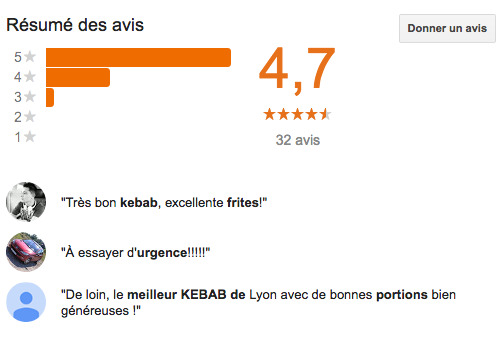
Comme nous l’avons dit plus haut, lorsque vous vous inscrivez sur des annuaires ou que vous créez une page Google My Business, vous vous exposez aux avis des internautes. Et c’est une bonne chose ! Mieux un établissement est noté sur les différents sites, plus il a de chances de remonter dans les résultats.
En encourageant vos clients satisfaits à vous noter et à donner leur avis, vous agissez positivement sur votre référencement local.
7. Développez un site mobile
Tous les points suivants seront inutiles si vous n’avez pas un site compatible avec les mobiles. En effet, 60% des recherches locales sont effectuées depuis un smartphone.
Qui plus est, la recherche vocale sur mobile est particulièrement utilisée pour trouver des entreprises à proximité.
Autant dire que si votre site est illisible sur un petit écran, vous risquez de perdre beaucoup de trafic et de chances de conversion.
8. Mettre en place un store locator
Nous vous avons parlé un peu plus haut de l’importance d’optimiser votre page Google My Business pour améliorer votre référencement local et aider les internautes à vous trouver facilement.
Mais mettre en place une stratégie store locator est également un moyen pertinent de maximiser son trafic en magasin. On vous explique pourquoi.
Le store locator est une carte interactive qui géolocalise des magasins ou points de vente physiques et aide l’internaute à trouver celui que se trouve le plus proche de chez lui. Simple d’utilisation, cette fonctionnalité se retrouve sur des sites web et/ou des applications mobile.
Cet outil utilise généralement la géolocalisation de l’utilisateur pour lui proposer le point de vente le plus proche de chez lui. Dans certains cas, l’utilisateur doit renseigner son code postal pour que s’affichent une liste d’établissements. Grâce au store locator on peut facilement retrouver les horaires d’ouvertures et les modalités d’accès à un établissement. C’est également un outil pratique pour vérifier la disponibilité d’un produit avant de se déplacer.
En sachant qu’en moyenne 90% des internautes effectuent une recherche sur le web avant de se rendre en magasin, les intérêts à mettre en place une stratégie store locator sont nombreux :
- maximiser votre trafic et vos ventes en magasin ;
- rassurer les internautes (en cas de SAV ils savent où vous trouver) ;
- optimiser votre seo local ;
- analyser votre trafic web en mesurant l’impact de vos conversions en magasin ;
Il existe de nombreux plug-in ou logiciels SaaS simple d’utilisation que vous pouvez d’ores et déjà ajouter à votre site internet pour booster votre référencement local. Les utilisateurs seront ravis s’ils se rendent compte que l’un de vos établissements se trouve à proximité de chez eux et n’hésiteront pas à vous rendre visite.
En général un store locator s’accompagne d’autres stratégies web-to-store ou app-to-store pour attirer un maximum de trafic vers des points de ventes physiques.
9. Utiliser des outils de présence management
Avant d’aborder comment le présence management vous aide à développer votre référencement local, commençons par définir ce qu’est le présence management proprement dit.
Le présence management ce sont ces précieux outils qui vous permettent de gérer et de mettre à jour toutes les informations pratiques de votre établissement à un seul endroit pour qu’elles se mettent à jour sur l’ensemble des canaux digitaux où vous êtes présent ( ex : Google My Business, Apple Plans, PagesJaunes…)
Pourquoi est-ce que c’est intéressant pour vous ? Parce que ces plateformes bénéficient déjà d’un référencement web optimal dont vous pouvez bénéficier facilement et gratuitement pour vous mettre en avant.
Ces canaux diffusent automatiquement les informations de votre établissement (adresse, horaires, numéro de téléphone…), boostent votre présence sur le web et votre seo local.Il est donc prépondérant pour vous de veillez à la cohérence et à l’homogénéité de ces informations. Auquel cas, vous pourriez faire face à la déception des internautes qui se rendraient à votre magasin parce qu’ils ont vu qu’il était « ouvert » sur le web alors que vous êtes fermé ce jour là.
Vous l’aurez compris, utiliser une stratégie de présence management vous permet de gagner un temps fou dans l’optimisation de votre seo local. Mais il vous permet surtout de vous assurer de la cohérence de vos informations sur les différents canaux digitaux que vous utilisez.
Nos conseils pour un présence management réussi
- Renseignez un maximum d’informations à propos de votre établissement ;
- Mettez régulièrement à jours vos informations (horaires d’ouverture, adresse, numéro de téléphone…) ;
- Créez une cohérence entre les informations que vous publiez sur ces différentes plateformes digitales ;
10. Mettre en place une stratégie web-to-store
Nous vous avons parlé des stores locator un plus haut et de l’important trafic qu’ils génèrent dans les points de vente physiques. Ils font généralement partie d’une stratégie plus globale qu’est le web-to-store.
Le web-to-store, qu’on appelle également ROPO (Research Online, Purchase Offline) est une stratégie qui a pour objectif de susciter l’intérêt des internautes sur le web pour les attirer dans des points de vente physiques.
Marketing digital et point de vente physique s’allient au travers du web-to-store pour proposer une expérience client encore plus qualitative aux consommateurs. C’est un bon moyen pour les marques de répondre aux différents besoins de leurs clients et de mieux les connaître.
Laissez-nous vous présenter 3 exemples de stratégies web-to-store qui fonctionnent et que vous pouvez mettre en place pour développer votre référencement local. Let’s go !
Le Click and Collect
Il s’est largement démocratisé ces dernières années avec la fermeture de nombreux commerces pendant la récente crise sanitaire. Le click and Collect consiste à effectuer ses achats en ligne et à les récupérer en magasin.
C’est un gain de temps précieux pour les consommateurs puisqu’ils ont déjà réglé en ligne, ils n’ont pas besoin d’attendre en caisse. En allant chercher leurs achats directement en magasin, ils évitent à la fois les frais et les délais de livraison.
Le Mobile to store
Cette stratégie est efficace car elle utilise les systèmes de géolocalisation pour orienter les potentiels consommateurs vers un point de vente en particulier.
À l’aide d’une action promotionnelle ou d’une publicité, vous pouvez cibler les consommateurs qui se trouvent dans votre zone de chalandise pour les attirer vers votre magasin.
Le Product locator
Sur un site web ou une application mobile, cette fonctionnalité permet aux internautes de s’assurer de la disponibilité d’un produit en magasin.
De nombreux magasins proposent aux clients de réserver leurs articles en ligne pour qu’ils puissent être sûrs de les retrouver en magasin. Dans ce cas, il devient un bon complément au Click and Collect.
Notre astuce pour améliorer votre référencement local
Avec ces 10 conseils, vous pourrez commencer à vous frayer un chemin vers le sommet du SEO local.
Pour aller encore plus loin dans votre stratégie de référencement, trouvez un consultant SEO freelance sur Codeur.com.


