Dernièrement, j’ai croisé Aymeric Bouillat au Lab FormaSEO, qui se tenait mercredi et jeudi à Nantes. Un vrai bon moment entre passionnés du search. Parmi les sujets qu’il portait avec enthousiasme : les données structurées.
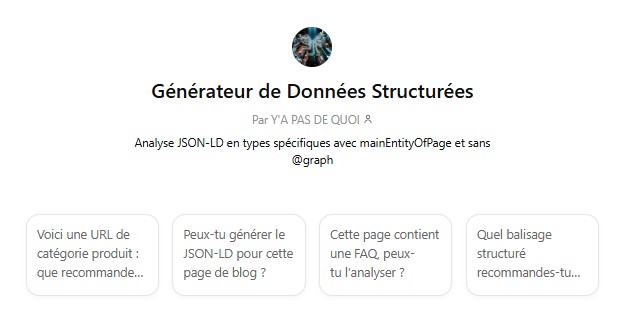
Au passage, il a même présenté un GPT personnalisé qu’il a conçu pour générer des schémas sans hallucination. Pratique, surtout quand on veut éviter les erreurs classiques ou les propriétés fantômes.
Et forcément, ça m’a donné envie de faire un point. Un guide utile, simple et concret pour les e-commerçants qui veulent intégrer les bonnes microdonnées, aux bons endroits.
Car à l’ère de l’IA générative, ces données structurées ne servent plus seulement à Google. Elles nourrissent aussi les LLM comme ceux d’OpenAI, Perplexity, Claude ou Mistral. Mieux structurer vos pages, c’est aussi mieux vous rendre compréhensible par les agents conversationnels.
1. Product
Décrit un produit individuel avec ses infos de base : nom, image, description, SKU, marque, etc.
{
"@context": "https://schema.org",
"@type": "Product",
"name": "Glutamine",
"image": [
"https://cdn.shopify.com/s/files/1/0274/3669/3508/products/glutamine-dijo.jpg?v=1678373123"
],
"description": "La Glutamine de Dijo est un complément alimentaire favorisant la santé intestinale, la récupération musculaire et la perméabilité intestinale.",
"sku": "GLUTAMINE",
"brand": {
"@type": "Brand",
"name": "Dijo"
},
"offers": {
"@type": "Offer",
"url": "https://www.dijo.fr/products/glutamine",
"priceCurrency": "EUR",
"price": "24.90",
"availability": "https://schema.org/InStock",
"itemCondition": "https://schema.org/NewCondition"
},
"mainEntityOfPage": "https://www.dijo.fr/products/glutamine"
} Ne suffit pas seul pour activer un affichage enrichi. Combinez-le avec
 Offer et éventuellement Review.
2. Offer
On reste sur du classique mais fondamental. Le schéma Offer vient enrichir le Product avec les infos commerciales : tarif, devise, dispo, condition du produit.
{
  "@context": "https://schema.org/",
  "@type": "Offer",
  "url": "https://www.example.com/tshirt-bio",
  "priceCurrency": "EUR",
  "price": "29.90",
  "priceValidUntil": "2025-12-31",
  "itemCondition": "https://schema.org/NewCondition",
  "availability": "https://schema.org/InStock",
  "seller": {
    "@type": "Organization",
    "name": "GreenStyle"
  }
}
Intégrez-le dans Product sous la propriété offers. Le champ priceValidUntil n’est pas obligatoire, mais il montre à Google que l’info est à jour.
3. Review + AggregateRating
Rien ne sert d’afficher 5 étoiles si elles ne sont pas sur la page. Google vérifie et peut même aller jusqu’à la pénalité dans certains cas (c’est tout de même très rare). Si vos produits sont bien notés (et que c’est visible), utilisez ce balisage.
{
  "@context": "https://schema.org/",
  "@type": "Product",
  "name": "T-shirt coton bio",
  "aggregateRating": {
    "@type": "AggregateRating",
    "ratingValue": "4.4",
    "reviewCount": "27"
  },
  "review": {
    "@type": "Review",
    "reviewRating": {
      "@type": "Rating",
      "ratingValue": "5"
    },
    "author": {
      "@type": "Person",
      "name": "Jean Dupont"
    },
    "reviewBody": "Excellent produit, agréable à porter et éthique."
  }
}
De préférence, affichez les étoiles visible au-dessus de la ligne de flottaison
4. MerchantReturnPolicy
Une politique de retour affichée clairement = un panier qui a plus de chances de passer.
{
  "@context": "https://schema.org",
  "@type": "MerchantReturnPolicy",
  "returnPolicyCategory": "https://schema.org/MerchantReturnFiniteReturnWindow",
  "merchantReturnDays": 30,
  "returnMethod": "https://schema.org/ReturnByMail",
  "returnFees": "https://schema.org/FreeReturn",
  "returnPolicyCountry": "FR"
}
Recommandé pour Google Merchant Center. Peut être imbriqué dans Product.
5. OfferShippingDetails
Spécifie les modalités de livraison (destinations, tarifs, délais).
{
  "@context": "https://schema.org",
  "@type": "OfferShippingDetails",
  "shippingDestination": {
    "@type": "DefinedRegion",
    "addressCountry": "FR"
  },
  "shippingRate": {
    "@type": "MonetaryAmount",
    "value": "4.90",
    "currency": "EUR"
  },
  "deliveryTime": {
    "@type": "ShippingDeliveryTime",
    "handlingTime": {
      "@type": "QuantitativeValue",
      "minValue": 1,
      "maxValue": 2,
      "unitCode": "d"
    },
    "transitTime": {
      "@type": "QuantitativeValue",
      "minValue": 2,
      "maxValue": 3,
      "unitCode": "d"
    }
  }
}
À utiliser en complément du schéma Offer. Compatible avec Merchant Center et utile en SEO sur les fiches produits.
6. ProductGroup
Permet de regrouper les variantes d’un produit (couleur, taille…).
{
  "@context": "https://schema.org",
  "@type": "ProductGroup",
  "name": "T-shirt coton bio",
  "description": "T-shirt unisexe décliné en plusieurs tailles et couleurs",
  "brand": {
    "@type": "Brand",
    "name": "GreenStyle"
  },
  "variesBy": "size, color",
  "hasVariant": [
    {
      "@type": "Product",
      "name": "T-shirt coton bio - Taille M - Bleu",
      "sku": "TSHIRT123-BLEU-M",
      "color": "Bleu",
      "size": "M"
    },
    {
      "@type": "Product",
      "name": "T-shirt coton bio - Taille L - Vert",
      "sku": "TSHIRT123-VERT-L",
      "color": "Vert",
      "size": "L"
    }
  ]
}
À privilégier si tu as une gestion avancée des déclinaisons produit (ex : marketplaces, grandes marques).
7. BreadcrumbList
Structurer la navigation aide les utilisateurs… et les moteurs.
{
  "@context": "https://schema.org",
  "@type": "BreadcrumbList",
  "itemListElement": [
    {
      "@type": "ListItem",
      "position": 1,
      "name": "Accueil",
      "item": "https://www.example.com"
    },
    {
      "@type": "ListItem",
      "position": 2,
      "name": "Vêtements",
      "item": "https://www.example.com/vetements"
    },
    {
      "@type": "ListItem",
      "position": 3,
      "name": "T-shirt coton bio",
      "item": "https://www.example.com/vetements/tshirt-bio"
    }
  ]
}
Ajoutez-le dans le header HTML ou dans le JSON-LD de chaque page produit, de préférence en haut de page avec une UX bien léchée pour faciliter la navigation via le fil d’Ariane pour vos internautes (pensez à la version mobile également)
8. Organization
Même sans point de vente, votre entreprise mérite une fiche propre. Le balisage Organization renforce la confiance.
{
  "@context": "https://schema.org",
  "@type": "Organization",
  "name": "DIJO",
  "legalName": "PROBIOPHARMA",
  "alternateName": "Dijo",
  "url": "https://www.dijo.fr",
  "logo": "https://www.dijo.fr/cdn/shop/files/logo-dijo.png",
  "founder": {
    "@type": "Person",
    "name": "Anouk Le Terrier"
  },
  "foundingDate": "2019",
  "address": {
    "@type": "PostalAddress",
    "streetAddress": "646 route des digues",
    "postalCode": "14123",
    "addressLocality": "Fleury-sur-Orne",
    "addressCountry": "FR"
  },
  "vatID": "FR30852588102",
  "iso6523Code": "0009:852588102",
  "mainEntityOfPage": "https://www.dijo.fr/policies/terms-of-sale"
}
À intégrer sur toutes les pages marques et juridique (ex : Qui sommes-nous ?)
9. LocalBusiness
Si vous avez des boutiques, c’est ici que ça se passe. Google adore les infos propres : adresse, horaires, téléphone.
{
  "@context": "https://schema.org",
  "@type": "AutoRepair",
  "name": "Carglass® Nantes Descartes",
  "image": "https://www.carglass.fr/sites/default/files/logo-carglass.svg",
  "url": "https://www.carglass.fr/centre/44000-100000001873346/nantes-descartes-ef-3339-connect",
  "telephone": "+33977402480",
  "address": {
    "@type": "PostalAddress",
    "streetAddress": "Rue Descartes, Parking Effia niveau 0, places 3 à 7",
    "addressLocality": "Nantes",
    "postalCode": "44000",
    "addressCountry": "FR"
  },
  "geo": {
    "@type": "GeoCoordinates",
    "latitude": 47.2375,
    "longitude": -1.5539
  },
  "openingHoursSpecification": [
    {
      "@type": "OpeningHoursSpecification",
      "dayOfWeek": [
        "Monday",
        "Tuesday",
        "Wednesday",
        "Thursday",
        "Friday",
        "Saturday"
      ],
      "opens": "08:30",
      "closes": "19:00"
    }
  ],
  "amenityFeature": [
    {
      "@type": "LocationFeatureSpecification",
      "name": "Wi-Fi",
      "value": true
    }
  ],
  "priceRange": "€€",
  "mainEntityOfPage": "https://www.carglass.fr/centre/44000-100000001873346/nantes-descartes-ef-3339-connect",
  "description": "Centre Carglass® à Nantes Descartes pour la réparation et le remplacement de vitrages automobiles : pare-brise, vitres latérales, lunettes arrière. Garantie à vie, déplacement gratuit, accompagnement avec votre assureur."
}
À dupliquer pour chaque fiche magasin.
10. WebSite + SearchAction
Déclare la fonctionnalité de recherche interne du site et peut faire apparaître un champ dans les résultats Google.
{
  "@context": "https://schema.org",
  "@type": "WebSite",
  "url": "https://www.example.com/",
  "potentialAction": {
    "@type": "SearchAction",
    "target": "https://www.example.com/recherche?q={search_term_string}",
    "query-input": "required name=search_term_string"
  }
}
Fonctionne uniquement si la recherche est réellement fonctionnelle sur le site pour les utilsateurs. Ne pas utiliser une URL statique (le target doit être dynamique avec le paramètre).
11. VideoObject
Une vidéo vaut mille descriptions.
{
  "@context": "https://schema.org",
  "@type": "VideoObject",
  "name": "Présentation du T-shirt GreenStyle",
  "description": "Découvrez les caractéristiques du t-shirt en coton bio GreenStyle",
  "thumbnailUrl": "https://www.example.com/images/video-thumb.jpg",
  "uploadDate": "2025-04-20T08:00:00+00:00",
  "duration": "PT1M45S",
  "contentUrl": "https://www.example.com/videos/tshirt-demo.mp4",
  "embedUrl": "https://www.youtube.com/embed/xyz123",
  "publisher": {
    "@type": "Organization",
    "name": "GreenStyle",
    "logo": {
      "@type": "ImageObject",
      "url": "https://www.example.com/logo.png",
      "width": 600,
      "height": 60
    }
  }
}
Le balisage VideoObject (et ses extensions comme Clip, BroadcastEvent, SeekToAction, etc.) doit être utilisé uniquement sur une page de type “watch page”, c’est-à-dire une page où la vidéo est l’élément principal du contenu.
Autres microdonnées utiles selon les cas
Voici quelques schémas secondaires qui peuvent s’avérer utiles selon la nature de votre activité :
- HowTo : pour les guides d’utilisation ou les tutoriels pratiques (ex : “comment monter ce meuble”)
- ProfilePage / Person : pour présenter les vendeurs tiers ou les auteurs d’avis
- Event : utile si vous organisez des ventes privées, salons, live shopping
- SoftwareApplication : si vous vendez des apps ou des plugins
- Book : pour les librairies ou les vendeurs d’ebooks
- ImageObject : pour des images avec crédits, dans un contexte créatif ou artistique
- WarrantyPromise : pour indiquer la durée de garantie des produits
- EnergyConsumptionDetails : pour les produits électroménagers
En bonus : ItemList
Un schéma pratique pour structurer une page catégorie ou une liste de résultats
{
  "@context": "https://schema.org",
  "@type": "ItemList",
  "name": "iPhone 13 reconditionnés",
  "description": "Découvrez tous les modèles d’iPhone 13 reconditionnés disponibles sur Largo.",
  "url": "https://www.largo.fr/iphone-13-reconditionne/",
  "itemListElement": [
    {
      "@type": "Product",
      "name": "iPhone 13 reconditionnés",
      "image": "https://www.largo.fr/wp-content/uploads/2023/06/iPhone-13-reconditionne.webp",
      "description": "Sélection d’iPhone 13 reconditionnés en différents coloris, capacités et états.",
      "aggregateRating": {
        "@type": "AggregateRating",
        "ratingValue": "4.6",
        "reviewCount": "320"
      },
      "offers": {
        "@type": "AggregateOffer",
        "offerCount": 48,
        "lowPrice": "399",
        "highPrice": "699",
        "priceCurrency": "EUR"
      }
    }
  ]
}
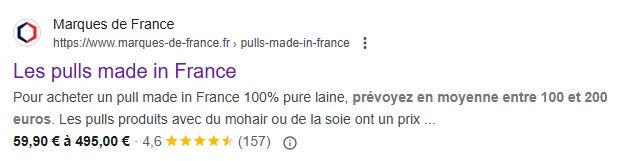
J’ai souvent tendance à utiliser un schéma product avec le prix haut, le prix bas et les différentes offres de la page de listing afin de faire ressortir les étoiles, le stock et une fourchette de prix sur Google
Pour tester vos schémas
Avant de mettre en ligne, validez vos schémas avec les deux outils recommandés :
- validator.schema.org
- search.google.com/test/rich-results (ma préférence personnelle : plus précis et plus proche de ce que Google prend vraiment en compte)
L’article “11 microdonnées e-commerce à implémenter sur votre boutique” a été publié sur le site Abondance.


