Sécuriser un site WordPress, qui est le système de gestion de contenu le plus utilisé au monde est primordial, car cette popularité fait de lui la cible préférée des hackers. Un site WordPress dont la sécurité n’aura pas été travaillée est une porte ouverte aux pirates souhaitant récupérer vos données ou tout simplement corrompre votre site web.
Il est important de mettre en place des bonnes pratiques de sécurités dès le début de la création de votre site pour ne pas avoir à combattre les intrusions à longueur de journée. La mise en place de plugins de sécurité n’impacte pas énormément le prix de votre site internet WordPress. Il est même possible de sécuriser votre site vous-même.
C’est pourquoi dans ce guide nous allons vous donner 13 bonnes pratiques simples pour assurer la sécurité de votre WordPress.
1. Sauvegarder régulièrement la base de données
Tous les sites possèdent une base de données dans laquelle les contenus sont conservés. Il est essentiel d’archiver ces données régulièrement, en cas de souci sur le site. Même si votre site est ultra-sécurisé, il est toujours bon d’avoir une sauvegarde de votre site au besoin car « on ne sait jamais ». Dites-vous bien que les plus gros sites du web qui dépensent énormément d’argent pour la sécurité de leur site sont parfois piratés, alors pourquoi pas le vôtre ?
Effectuer des sauvegardes régulières de votre site vous permettra de pouvoir remettre votre site en l’état, après correction de la vulnérabilité, si celui-ci venait à se faire pirater et corrompre.
Idéalement, nous vous recommandons d’effectuer une sauvegarde hebdomadaire. Assurez-vous de bien noter la date du jour de l’archivage sur le dossier de sauvegarde. En cas d’erreur, de piratage ou de perte du site, il vous sera possible de tout réintégrer rapidement et facilement.
Il existe pour cela diverses extensions vous permettant de faire des sauvegardes automatiques de vos fichiers, extensions, thèmes et autres. Voici deux extensions de sauvegarde populaires de WordPress :
Ces deux extensions vous permettent de créer des sauvegardes automatiques de votre base de données et de vos fichiers, puis de les stocker sur votre serveur ou le cloud (Dropbox, Azure, Google Drive, etc..), ou bien encore par un envoi de mail contenant votre sauvegarde.
2. Vérifier régulièrement les mises à jour
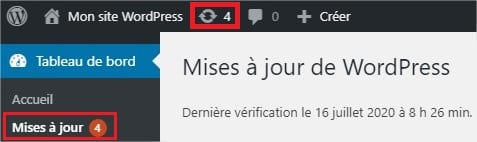
Pour protéger son site ou son blog WordPress, il faut procéder à des mises à jour régulières. Dès qu’une update est disponible, suivez nos conseils bien mettre à jour son site WordPress avant de l’installer.
Cette consigne est valable pour le CMS, mais aussi pour l’ensemble des plugins. De nouvelles failles sont révélées régulièrement, ce qui conduit les développeurs à proposer souvent des corrections. Une extension obsolète présente donc un risque important…
Quant aux mises à jour de votre plugin de sécurité, elles sont plus qu’essentielles ! Ces dernières tiennent notamment compte des nouveaux virus ou méthodes de piratage.
3. Installer un plugin de sécurité
Comme il existe des antivirus à installer sur son ordinateur, vous pouvez aussi ajouter un plugin antivirus pour assurer la sécurité de votre WordPress. Bien souvent, ces plugins protègent non seulement votre site des virus, mais ils surveillent également la sécurité globale de votre WordPress.
Une extension de sécurité vous permettra ainsi de gérer plusieurs aspects de la sécurité de votre WordPress facilement et de façon transparente pour vous. C’est une boîte à outil regroupant plusieurs outils pour sécuriser votre site. Parmi ces extensions de sécurité nous retrouverons :
- WordFence Security
- iThemes Security
- WP fail2ban
- Sucuri Security
- SecuPress
- All In One WP Security & Firewall
Pour exemple, WordFence vous permettra de :
- Surveiller le trafic de votre site pour bloquer le trafic malveillant
- Vous avertir des mises à jour disponibles sur votre WordPress
- Protéger votre système de connexion contre une attaque de force brute
- Vérifier vos fichiers pour détecter des malwares, urls non conformes, injections de code, mauvaises redirections, etc…
- Vérifier l’intégrité de vos fichiers
- Réparer vos fichiers au besoin
- Analyser votre site par rapport aux vulnérabilités connues
- Activer l’authentification à 2 étapes
- Bloquer les robots avec un système de CAPTCHA
D’autres fonctionnalités sont disponibles avec WordFence et la plupart des extensions de sécurités ont des fonctionnalités similaires. Ce sont des extensions très utiles et recommandés à installer. WordFence est à lui seul installé sur plus de 3 millions de WordPress à l’heure actuelle.
À lire aussi : 10 plugins de sécurité incontournables pour WordPress
4. Utiliser des extensions et thèmes officiels
L’utilisation d’extensions ou thèmes crackés est une mauvaise chose pour la sécurité de votre site.
Lorsque vous installez des versions non officielles, vous offrez potentiellement l’accès à votre site à n’importe qui. Les versions crackées n’étant pas validées par WordPress, il ne se peut que les personnes fournissant ces extensions et thèmes glissent à l’intérieur des fichiers des malwares, une porte d’accès à votre site ou tout autre code malveillant sans même que vous vous en rendiez compte.
Attention : De ce fait, vous pourriez vous faire voler vos données et offrir l’accès à des personnes malveillantes sans même le savoir !
C’est pourquoi il est fortement recommandé de ne jamais installer de versions crackées et toujours passer par l’ajout d’extensions et de thèmes officiel de WordPress ou des sociétés auxquelles vous auriez acheté un thème ou une extension.
5. Supprimer les extensions et thèmes inutilisés
Les thèmes et extensions sur WordPress sont la première porte d’entrée des hackers. Pour sécuriser votre site WordPress, vous devez être vigilants à ce que vous installez sur votre site.
Parfois, on installe des thèmes et extensions pour les tester ou pour une courte durée, pour ensuite les désactiver (dans le meilleur des cas) ou bien les oublier et les laisser de côté.
Ceci est un problème, encore plus si vous ne les mettez pas à jour ou si elles sont obsolètes, car ces extensions et thèmes inutilisés sont des potentielles portes d’entrées supplémentaires aux hackers et inutiles à votre site.
La bonne pratique sera donc de supprimer toute extension ou thème que vous n’utilisez plus pour réduire le risque de piratage de votre site web.
6. Modifier l’adresse de connexion
Pour réduire le risque de piratage et sécuriser votre site WordPress, il est également recommandé de modifier son adresse de connexion. Par défaut, WordPress vous propose mon-site.com/wp-admin. Ce qui facilite encore une fois le travail des hackers !
Vous pouvez changer cette URL en modifiant le le fichier .htaccess ou en utilisant une extension comme Custom Login URL. Cette deuxième solution est parfaite pour les personnes qui s’y connaissent peu ou pas du tout en code.
7. Supprimer le compte admin par défaut
Pour vous connecter à votre administration WordPress, l’identifiant admin est proposé par défaut. Il est donc massivement utilisé par les pirates pour accéder à votre site.
Évitez de leur faciliter la tâche et créez un identifiant personnel, impossible à deviner, avant de supprimer le compte admin.
Suivez notre tutoriel pas à pas pour modifier et supprimer un identifiant.
8. Activer l’authentification à 2 étapes
Cette option de sécurité proposée par différentes extensions permet de sécuriser votre système de connexion quasiment à 100% ! C’est une méthode peu contraignante et facile à mettre en place pour sécuriser un site WordPress alors pourquoi s’en passer ?
Dans la plupart des cas, la 2ème étape de connexion sera un code envoyé par SMS, un appel téléphonique ou une connexion requise via une application mobile. Le pirate devra donc connaître à la fois votre mot de passe et avoir accès au périphérique utilisé pour la seconde étape de connexion, ce qui est presque impossible.
Parmi les extensions proposant l’authentification à double facteur on pourra retrouver :
La plupart de ces extensions fonctionnent en paire avec leur propre application mobile vous permettant de gérer le système d’authentification à double étape et d’autoriser la connexion lorsqu’une connexion est initialisée avec ce même système.
9. Masquer la version de WordPress utilisée
Pour chaque version de WordPress, il existe des failles que les pirates se feront plaisir d’exploiter. Pour compliquer un peu la mission de ces intrus, pensez à masquer la version de WordPress que vous utilisez.
Le changement se fait à deux niveaux : dans le fichier version.php, ainsi que dans le fichier readme.html. Ce dernier est situé à la racine de votre WordPress et doit être supprimé !
Découvrez comment masquer la version de WordPress dans notre tutoriel dédié : comment protéger WordPress des attaques malveillantes ?
10. Empêcher la navigation dans les dossiers
Sur un site WordPress, par défaut, les dossiers sont accessibles à tous. Il est donc impératif de bloquer leur accès pour mieux les protéger.
Pour ce faire, il faut modifier les conditions d’accès via votre .htaccess ou opter pour un plugin comme Hide My WordPress.
11. Choisir un hébergeur sécurisé
Les failles de sécurités ne proviendront pas forcément que de votre site. Elles peuvent parfois provenir de votre hébergeur. Un grand nombre de sites WordPress ayant été piratés l’ont été à cause d’une faille de sécurité du côté de leur hébergeur et non de la sécurité même des sites.
Pour sécuriser votre site WordPress, il est donc important de bien choisir son hébergeur.
Pour cela vous pouvez déjà analyser les offres des hébergeurs selon 3 critères :
- Les serveurs de l’hébergeur disposent-ils d’un pare-feu et d’un antivirus ?
- Des sauvegardes automatiques sont-elles régulièrement effectuées ?
- Dans le cas d’un hébergement mutualisé, chaque compte est-il isolé des autres utilisateurs pour ne pas qu’un utilisateur infecté infecte les autres ?
Attention : Si votre hébergeur actuel ou futur ne respecte pas au moins ces 3 points clés vous pouvez passer votre chemin et changer pour un autre hébergeur.
12. Protéger la connexion à votre site avec un certificat SSL (HTTPS)

Vous aurez surement déjà vu le petit cadenas à côté de l’url d’un site et cette url précédée par « HTTPS ». Cela est possible car le site en question détient un certificat SSL. Ce certificat SSL permet d’activer le protocole HTTPS qui assure une connexion sécurisée entre le navigateur (client) et le serveur web.
Ce certificat est connu pour être important lorsque le site propose un système de paiement directement sur le site, cependant il est aussi utile pour d’autres raisons :
- En http, les données transférées entre le serveur et le navigateur ne sont pas cachées et sont transmisses en clair. Ceci n’est pas le cas lorsque vous utilisez le protocole HTTPS pour la transmission des données.
- Le certificat SSL a un impact sur votre référencement (SEO). Google affirme que c’est un facteur (légèrement) déterminant pour votre positionnement dans les recherches.
- Avec l’éducation digitale qui est de plus en plus commune, les gens ont pris l’habitude de vérifier que le petit cadenas soit présent sur les sites car ils ont souvent entendu que c’était un gage de sécurité. Avoir un certificat SSL améliore la confiance que les personnes ont en votre site web.
- En lien avec le point précédent, certains navigateurs web comme Chrome affiche désormais une mention « Non sécurisé » devant l’url des sites n’ayant pas de certificat SSL. Pire, parfois ils peuvent afficher une page de prévention avant l’accès au site qui peut potentiellement effrayer une grande majorité des visiteurs.
- Pour des raisons techniques, le protocole HTTPS se veut plus rapide que le HTTP. Vous pourrez éventuellement améliorer la vitesse de votre site WordPress simplement en y intégrant un certificat SSL.
Vous souhaitez installer un certificat SSL et passer votre WordPress en HTTPS ? Suivez notre tutoriel pas à pas !
13. Protégez-vous contre le DDoS
Le DDOS est une attaque par déni de service, cela consiste à rendre un système (ou site web) inaccessible en le ciblant avec plusieurs systèmes simultanément. Sécuriser un site WordPress contre les attaques DDoS permet d’éviter que celui-ci ne sois plus accessible en cas d’attaque.
Concrètement, plusieurs systèmes (ordinateurs ou serveurs) vont essayer d’effectuer en même temps des actions sur une cible précise (un site web par exemple) pour que celle-ci se retrouver surchargée de requêtes jusqu’à ne plus pouvoir les gérer et « crasher » rendant la cible hors service.
Pour prévenir ce genre d’attaques il existe des services (dont un plugin) à configurer sur votre site WordPress qui vont grâce à leur protection anti-DDoS atténuer les attaques de déni de service.
Parmi ces services de sécurité vous pouvez retrouver Cloudflare ou bien l’extension WordPress Sucuri Security.
Se faire accompagner pour sécuriser votre site WordPress
La sécurité est une partie importante à ne pas négliger lors de la création et la maintenance de votre site WordPress. Une intrusion dans votre base de données ou vos fichiers par un hacker, et votre site web est hors service rapidement… ce qui peut coûter plusieurs centaines voire milliers d’euros si votre site est une source de revenus.
C’est pourquoi il est indispensable de mettre en place le genre de bonnes pratiques vues tout au long de ce guide pour réduire les risques potentiels de piratage.
Pour sécuriser plus encore votre site WordPress, vous pouvez suivre en complément notre tutoriel complet : Comment protéger WordPress des attaques malveillantes ?
Si vous avez besoin d’aide pour sécuriser votre site WordPress, n’hésitez pas à poster une annonce gratuite sur Codeur.com pour trouver rapidement l’aide d’un freelance qui pourra vous aider.
À lire aussi : Mon site WordPress a été piraté : que faire ?


