Il est extrêmement fréquent d’utiliser des images sur son site web. Toutefois, au même titre qu’il est essentiel de choisir les bonnes images, il est important d’opter pour le bon texte pour la balise ALT de ces dernières.
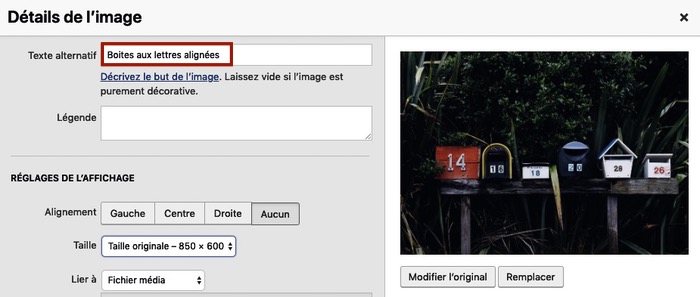
En effet, le texte alternatif (balise ALT) est celui qui permet de décrire une image aux personnes qui ne peuvent pas la voir (robots, personnes malvoyantes ou encore personnes utilisant un navigateur n’affichant pas certaines images) même s’il contribue aussi au référencement par image.
Afin de vous aider à disposer de balises ALT de qualité pour vos images, voici 6 règles à respecter.
1. Faites une description précise de l’image
Dans la balise ALT de votre image, ne vous contentez pas d’écrire un mot pour définir ce qu’elle représente. Il est effectivement question de positionner dans cette balise une description précise de l’image.
L’objectif est qu’une personne ne pouvant pas visionner l’image parvienne à se l’imaginer.
Ainsi, une balise ALT “gâteau au chocolat avec crème anglaise” sera meilleure qu’une balise ALT “gâteau”.
2. Soyez concis pour décrire l’image
Nulle question effectivement d’écrire un roman pour remplir une balise ALT. L’internaute attend de vous un texte alternatif à l’image qui doit se composer tout au plus de 100 caractères. Certains diront que c’est peu, mais cela est nettement suffisant pour décrire une image.
Reprenez notre balise “gâteau au chocolat avec crème anglaise”, elle est évocatrice et pourtant elle ne se compose que de 39 caractères !
À lire aussi : E-commerce : boostez vos ventes avec Pinterest
3. Intégrez votre mot-clé dans la balise ALT
Il est bien connu que la balise ALT joue un rôle dans le référencement de vos images, mais aussi des contenus dans lesquels elles sont positionnées.
Ne manquez donc jamais l’occasion d’insérer le mot-clé sur lequel vous souhaitez être positionné dans cette balise. Si vous ne le faites pas, les moteurs de recherche pourront chercher à interpréter vos images et risquent de vous positionner sur de mauvais mots-clés. Autant prendre soin de faire les choses par vous-même…
4. Évitez le bourrage de mots-clés dans la balise ALT
Comme nous venons de le voir, il est pertinent de placer un mot-clé dans la balise ALT, mais il ne faut pas en abuser.
Fut un temps où la mode était au bourrage de mots-clés dans la balise ALT. Autrement dit, cette dernière pouvait ressembler à cela : gâteau chocolat cake brownie crème anglaise fondant pâtisserie”. Sachez qu’une telle pratique est aujourd’hui à bannir.
5. Évitez l’erreur classique de la balise ALT du logo
Parmi les images les plus utilisées, on compte bien évidemment les logos d’entreprises, d’associations, etc.
La balise ALT de ce type d’image est souvent surprenante lorsque sont analysés les sites web. Très souvent, le logo est assorti d’une balise ALT “logo de la société”.
Alors certes, cela décrit bien ce qu’il y a sur l’image, mais il serait encore mieux de dire à l’internaute du logo de quelle société il s’agit en optant pour un texte alternatif “logo entreprise + nom de l’entreprise”.

6. Pensez à la balise ALT même pour vos boutons CTA
Ce n’est pas parce qu’une image représente “seulement” un bouton CTA – parfois un simple élément graphique avec un texte écrit sur un coloris uni – que vous devez passer outre la balise ALT.
En effet, les internautes qui ne peuvent voir l’élément visuel ont besoin de comprendre qu’il s’agit du bouton où cliquer pour réaliser une action. Or, c’est bien le texte alternatif qui doit leur fournir cette information.
Autrement dit, pour un bouton invitant à demander un devis gratuit, il faudra par exemple imaginer une balise ALT “demande de devis gratuit”. Simple, concis et évocateur…
À lire aussi : SEO : comment utiliser la balise canonical ?
Peu nombreux sont les blogueurs ou webmasters à tirer tout le potentiel de la balise ALT de leurs images. Pourtant, au-delà de son apport pour le référencement, cette balise s’inscrit surtout dans une logique d’amélioration de l’expérience de l’utilisateur qui parcourt votre site Internet.
C’est pourquoi vous seriez bien inspiré de mettre en application dès à présent les règles que nous vous avons présenté pour la rédaction des balises ALT des éléments visuels de votre site web.
À lire aussi : 25+ ressources et conseils pour booster votre référencement naturel
L’article SEO : 6 règles à respecter pour la balise Alt de vos images est apparu en premier sur Redacteur.com.


