« Je ne peux pas me mettre à la vidéo, je n’ai pas le matériel. » Si vous avez déjà prononcé cette phrase, alors vous avez dû oublier ce petit objet qui se trouve (probablement) dans votre poche en ce moment même.
Filmer avec un téléphone et obtenir un résultat qualitatif n’est plus du domaine de l’impossible, notamment parce que les caméras intégrées dans ces appareils ont fait de nets progrès. La qualité est d’ailleurs un facteur décisif pour le référencement d’une vidéo.
Toutefois, il y a un certain nombre de bonnes pratiques à connaître pour réussir une vidéo filmée avec un smartphone.
1. Concentrez-vous
Lors du tournage, préférez mettre votre téléphone en mode avion pour ne pas être dérangé par les notifications ou autres fonctionnalités de votre smartphone.
La concentration est l’un des éléments fondamentaux pour créer des vidéos de qualité.
2. Pensez à la lumière
En matière de vidéo, la lumière est extrêmement importante. Et figurez-vous que vous pouvez obtenir une lumière correcte sans posséder des projecteurs hors de prix.
Une astuce simple consiste à vous positionner face à une grande fenêtre bien exposée au soleil (avec le smartphone devant vous) : votre visage devrait ainsi être totalement illuminé.
En extérieur, vous pouvez compter sur la lumière naturelle du soleil pour éclairer votre sujet.
3. Stabilisez le téléphone
Filmer en tenant le téléphone à la main permet plus de mobilité et est parfois inévitable (par exemple, si vous voulez filmer quelque chose à l’improviste dans la rue).
Mais cela a l’inconvénient de faire trembler la caméra en permanence : même en étant immobile, vous ne parviendrez pas à rester parfaitement stable.
Préférez donc poser votre appareil sur un support, qu’il s’agisse d’un trépied, d’un meuble, ou du rebord d’une fenêtre.
4. Soyez très attentif au son
Gardez en tête que le son est au moins aussi important que l’image : si l’audio d’une vidéo est désagréable ou inaudible, même les effets spéciaux les plus incroyables n’empêcheront pas les spectateurs de partir.
Lorsque l’on filme avec un smartphone, le son est capturé par le micro intégré de l’appareil. Ces micros sont aujourd’hui de plutôt bonne qualité : on y obtient généralement un son propre, dépourvu de grésillements et tout à fait audible, à défaut d’être parfait.
Toutefois, leur portée laisse à désirer : essayez d’enregistrer votre voix en vous tenant à 5 mètres de votre téléphone et vous pourrez le constater par vous-même.
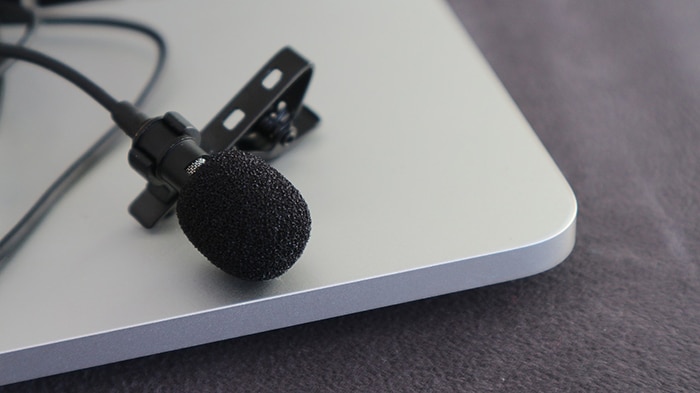
Pour un meilleur son, vous pouvez aussi tout simplement brancher un casque ou des écouteurs équipés d’un micro (ils sont généralement inclus de base avec votre smartphone).
5. Soignez le cadrage
Bien sûr, en fonction du type de vidéo que vous filmez, le cadrage nécessitera une quantité plus ou moins grande d’attention et de travail.
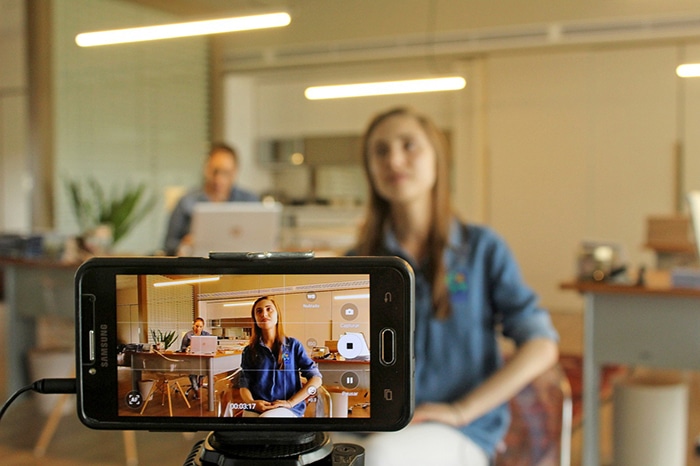
Prenons donc le cas le plus classique : une vidéo de type VLOG où vous vous filmez face caméra. Ici, l’attention doit être portée sur vous, ce qui signifie que vous devez occuper une bonne partie du cadre (et que le point doit être fait sur vous).
Malgré tout, ne négligez pas votre arrière-plan, qui doit aussi contribuer à définir l’ambiance, le ton de la vidéo. Plutôt que d’occuper une position parfaitement centrale, décalez-vous légèrement sur le côté : cela laisse plus de place pour votre arrière-plan.
6. Évitez le zoom
Le zoom est un effet qui peut vite devenir grotesque (et ce n’est pas pour rien qu’il n’est presque plus utilisé au cinéma).
C’est d’autant plus le cas avec les smartphones, qui sont pour la plupart dotés d’un zoom numérique (et non pas d’un zoom optique comme les caméscopes d’antan). Ce type de zoom a la particularité de pixelliser l’image et de créer une « illusion » de grossissement qui n’est pas très agréable à l’œil.
Comme dit plutôt, placez toujours l’appareil au plus près du sujet à filmer plutôt que d’utiliser le zoom.
7. Utilisez un logiciel de montage
Vous n’y échapperez pas : vous allez avoir besoin de faire un peu de montage pour obtenir une vidéo de bonne qualité.
Le montage a différents intérêts :
- Il permet de couper des séquences ratées ou inutiles que vous ne voulez pas conserver ;
- De rajouter des transitions et des interstices ;
- Mais aussi de donner du rythme à votre vidéo.
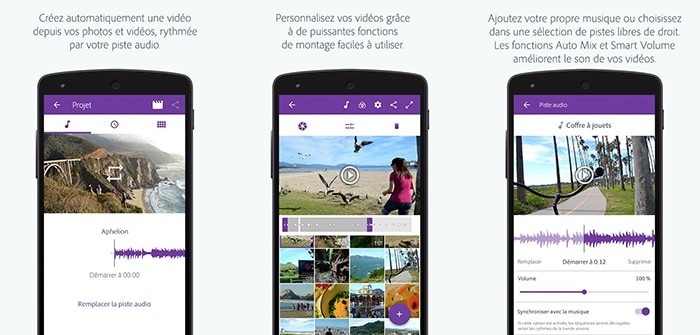
Il existe justement de très bonnes applications pour faire du montage vidéo directement depuis votre smartphone, comme Adobe Premiere Clip.
8. Quelques conseils
Pour terminer, voici quelques dernières recommandations pour assurer un bon tournage :
- Pensez à charger votre téléphone suffisamment pour toute la durée du tournage. Un manque de batterie vous forcerait à interrompre ce dernier.
- Si vous tournez en extérieur, essayez de prendre tous les plans le même jour. La lumière risque de ne pas être la même d’un jour à l’autre.
- Assurez-vous d’avoir un espace de stockage suffisant pour tous vos rushs. Si votre smartphone ne dispose pas de beaucoup d’espace, pensez à ajouter une carte SD. Souvent, beaucoup de rushs sont nécessaires pour choisir les plans qui apparaitront sur la vidéo finale.
- Enfin, il est conseillé de faire une sauvegarde externe de vos vidéos sur un serveur, un cloud ou un disque dur, pour ne pas perdre le fruit de plusieurs heures de travail.
Conclusion
Vous avez maintenant les clés en main pour créer des vidéos avec votre smartphone. Avec ces 8 conseils, n’ayez plus peur de créer vos propres vidéos avec un simple smartphone et de les partager sur les réseaux sociaux.
Toutefois, si vous souhaitez atteindre un niveau de qualité professionnel, sachez que vous pouvez trouver un monteur vidéo freelance sur Codeur.com.


