Même si vous estimez que le contenu de votre site est complet, ajouter une FAQ est forcément une bonne idée. Cette foire aux questions (FAQ) pourra aider votre audience à trouver des réponses clés sur votre entreprise et vos services.
En outre, elle est excellente pour le référencement de votre site. Non seulement parce que Google la met en avant, mais aussi parce qu’elle augmente la valeur de votre site !
Aujourd’hui, nous allons voir pourquoi une FAQ peut être bénéfique pour votre site internet et surtout comment rédiger une page réellement utile et efficace.
Pourquoi créer une page FAQ sur votre site ?
Commençons par le commencement : une foire aux questions, c’est une section de votre site web dans laquelle vous répondez aux demandes, aux inquiétudes ou aux objections dont vos clients vous font part fréquemment.
Qu’il s’agisse d’informations sur vos produits, vos services ou votre entreprise, c’est ici que les visiteurs doivent se rendre pour obtenir des réponses à toutes leurs interrogations (ou presque). Elle ne doit d’ailleurs pas être confondue avec la page “À propos”, qui a plutôt vocation à présenter votre entreprise et à raconter son histoire.
Mais quels sont les avantages d’une telle page pour un site web ? En voici une liste non exhaustive :
- Lever certaines inquiétudes que vos clients potentiels pourraient avoir ;
- Soulager votre support client en donnant les réponses aux questions les plus fréquentes ;
- Gagner la confiance de vos prospects en montrant que vous connaissez leurs problèmes et leurs inquiétudes.
- Améliorer votre référencement, de surcroît à l’heure de la recherche vocale qui favorise les contenus sous forme de question-réponse.
Voyons à présent comment rédiger une FAQ utile et pertinente qui apportera du trafic à votre site et augmentera vos conversions.
Les 2 types de FAQ qui existent
Et oui, il existe en réalité deux formats de foires aux questions. Et vous allez très vite comprendre la différence entre les deux.
Les FAQ informatives
Il s’agit là d’une “véritable” foire aux questions. Une page dédiée à répondre aux questions les plus courantes. Il n’y a dans ces pages aucune vocation particulière si ce n’est de répondre aux problématiques des internautes.
On peut les retrouver dans un espace client par exemple, ou sur un site qui propose un service ou des produits où les clients pourraient avoir des questions sur leur utilisation.
Ce type de FAQ n’a pour but que d’aider l’internaute.
Les FAQ à vocation SEO
Ici, la FAQ a pour objectif d’apporter des connaissances sur un sujet précis pour l’étoffer. Si la nuance entre les deux semble mince, elle ne l’est pas du tout. La FAQ SEO se veut optimisée pour enrichir la sémantique de la page.
On y retrouvera souvent le mot-clé principal ainsi que des mots-clés secondaires.
Bien souvent, ce type de FAQ propose seulement la question de visible et il faut cliquer pour dérouler la réponse. C’est simplement parce que son objectif n’est pas d’être visible directement par l’internaute, mais cible plutôt les moteurs de recherche.
Attention, la FAQ SEO doit être formatée avec des données structurées pour être prise en compte correctement.
Les FAQ sont-elles bonnes pour le référencement ?
Cela va donc dépendre du type de FAQ dont on parle. Une page de FAQ qui n’a vocation qu’à être une FAQ aura en principe peu d’intérêt d’un point de vue SEO.
Ce type de page parle en général de nombreux sujets différents et il n’y a pas un mot-clé qui ressort particulièrement dans ce marasme de questions.
En revanche, il est avéré qu’une FAQ bien travaillée au sein d’une page elle-même bien optimisée peut aider à référencer une page. Mais dans ce cas, il faut que les soient :
- optimisées sur des mots-clés pertinents
- proposent une expérience utilisateur optimale (UX)
- sont correctement balisées et structurées
Attention tout de même à ne pas tomber dans le piège de la FAQ présente sur toutes les pages de votre site. La présence d’une FAQ doit paraître naturelle et évidente et doit vraiment apporter une plus value à votre contenu sinon l’internaute (et le moteur de recherche) ne se laissera pas duper.
Si votre foire aux questions est prise en compte par les moteurs de recherche et qu’elle apparait sur la page de résultats, insérer une FAQ peut alors augmenter votre taux de clic (CTR) et vous différencier de la concurrence. Dans ce cas, elles apportent un fort bénéfice à votre référencement.
5 astuces pour réussir sa page FAQ
1. Trouver les bonnes questions
Pour qu’une FAQ soit réellement utilisée pour vos visiteurs, encore faut-il qu’elle réponde aux bonnes questions. Le premier endroit à inspecter est probablement votre boîte mail : celle où vous recevez quotidiennement des demandes, des suggestions ou des réclamations de vos prospects et clients.
Bien entendu, tous les autres supports d’interactions avec vos clients peuvent aussi vous apporter de précieuses informations : réseaux sociaux, échanges téléphoniques, commentaires sur vos articles de blog, forum…
Vous pourrez assez vite discerner les sujets les plus fréquemment abordés et les traiter dans votre FAQ.
Par ailleurs, vous devez être en mesure d’anticiper certains freins et objections que vos prospects n’exprimeraient pas par eux-mêmes, montrant par la même occasion votre connaissance de leurs besoins.
Dans l’optique de proposer une foire aux questions aussi complète que possible, soyez toujours à l’écoute et demandez des feedbacks à vos clients autant que possible.
Voici une liste de personnes que vous pouvez interroger pour réussir à les définir :
- Membres de l’équipe interne : Votre équipe de vente et les représentants du service clientèle interagissent avec les utilisateurs tous les jours ! Ce sont donc des ressources de choix pour établir votre FAQ. Organisez des entretiens avec les membres de l’équipe pour savoir quelles sont les questions les plus courantes et celles qui sont les plus susceptibles d’intéresser les internautes.
- Reddit, Quora, et autres forums : Bien qu’ils n’interagissent pas directement avec votre site, les forums comme Reddit et Quora sont d’excellentes sources pour identifier les tendances de l’industrie à partir des utilisateurs eux-mêmes.
- Site « Answer the Public » : Tapez le nom de votre entreprise dans cet outil performant et vous obtiendrez les questions les plus souvent posées sur le web. Les résultats Answer the Public affichent des questions qui sont étroitement liées à l’intention des utilisateurs. Utilisez les résultats pour fignoler votre FAQ
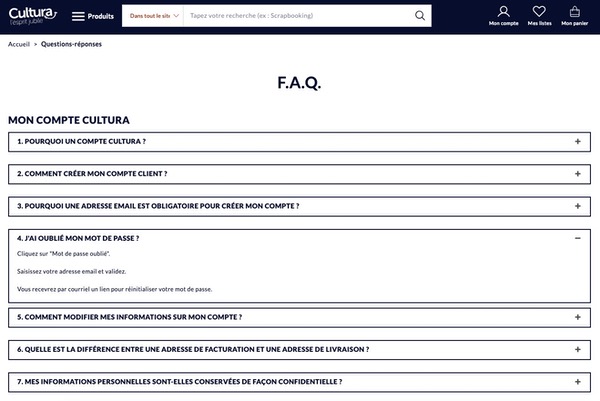
2. Donner les bonnes réponses
Là encore, vous pouvez puiser dans les ressources existantes (exemple : équipe de vente, conditions générales de vente, livres blancs). Ce faisant, vous pourrez être certain que les réponses sont exactes. D’ailleurs, de nombreuses réponses sont sûrement déjà présentes sur votre site. Le tout est de les rassembler et de les reformuler pour éviter le plagiat.
Lorsque vous rédigerez vos réponses, veillez à ce qu’elles soient complètes, courtes et précises. Les internautes lisent les pages FAQ pour trouver des réponses le plus vite possible. Incluez suffisamment d’informations pour répondre complètement à la question, mais essayez de ne pas dépasser 2-3 phrases pour chacune.
Répondez avec honnêteté, mais de manière positive
Par exemple, à la question “Combien coûte notre service ?”, ne vous contentez pas de rétorquer “50 € par mois”.
Expliquez plutôt pourquoi ce prix vaut la peine d’être payé : “Pour 50 € par mois, vous accédez non seulement à la totalité de notre service, mais vous bénéficiez aussi gratuitement d’une assistance 24h/24, etc.”
Intégrez un lien ou un call-to-action
Une FAQ couvre nécessairement des sujets très variés, et vous ne pouvez pas tous les aborder en long et en large au risque de rendre votre page très indigeste.
C’est pourquoi il est très intéressant de l’exploiter pour diriger vos lecteurs vers des contenus plus approfondis, comme des articles de blog. De ce fait, n’hésitez pas à faire usage de liens internes pour diriger les utilisateurs vers le contenu pertinent de votre site.
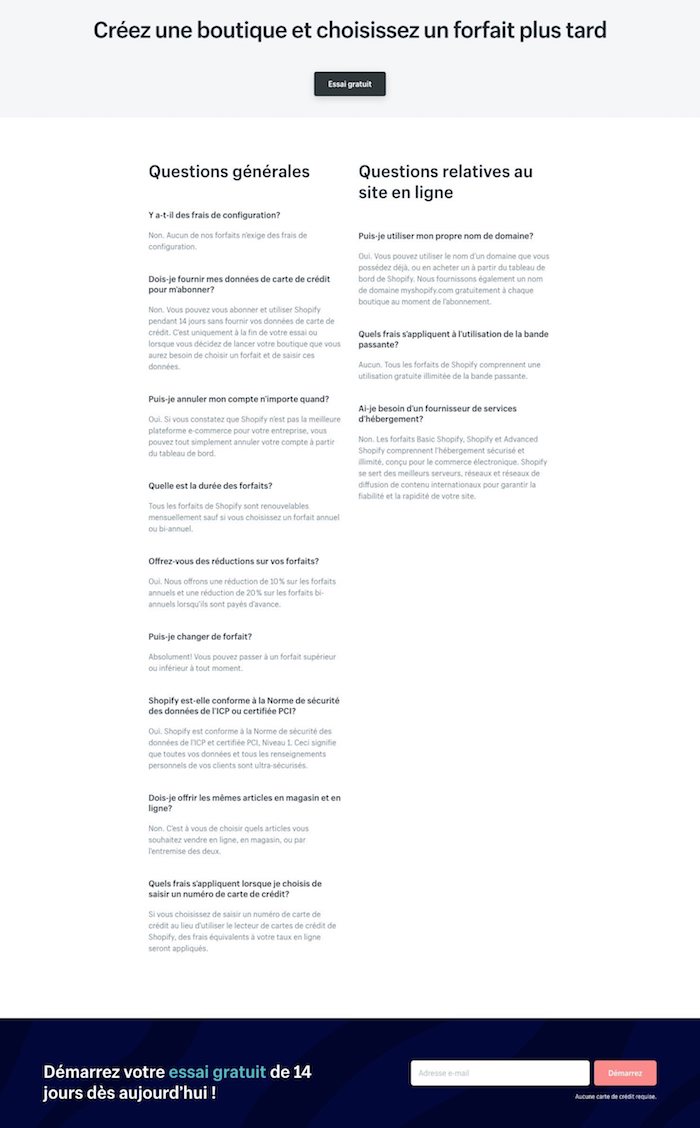
C’est aussi le moment idéal pour inciter votre visiteur à aller plus loin dans le processus d’achat, maintenant que vous l’avez rassuré avec votre foire aux questions. La page FAQ de Shopify, par exemple, met en avant une offre d’essai gratuit à deux reprises :
Intégrez des témoignages
Dans votre FAQ, vous allez affirmer un certain nombre de choses au sujet de votre entreprise et de votre offre. Mais les clients les plus méfiants pourraient ne pas être tout à fait convaincus…
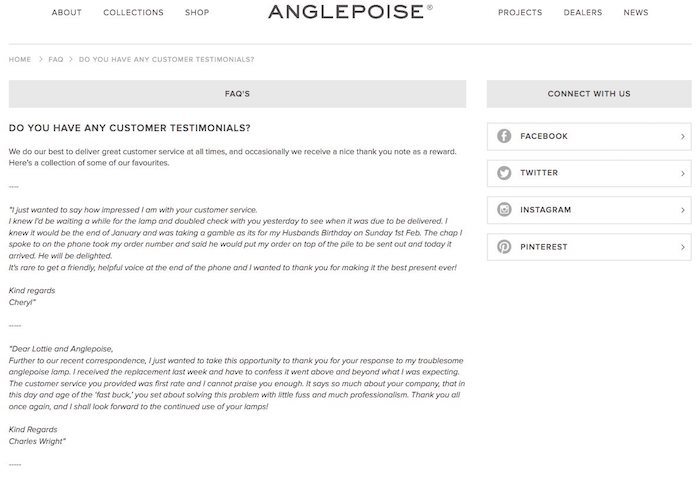
Alors, pourquoi ne pas laisser vos clients appuyer vos propos : inclure des témoignages dans votre FAQ permet de vous crédibiliser et d’augmenter encore son impact.
Le site Anglepoise est allé jusqu’à inclure une question intitulée “Avez-vous des témoignages clients ?” dans sa FAQ :
À lire : Comment récolter des avis et témoignages client sur son site ?
Triez par catégories
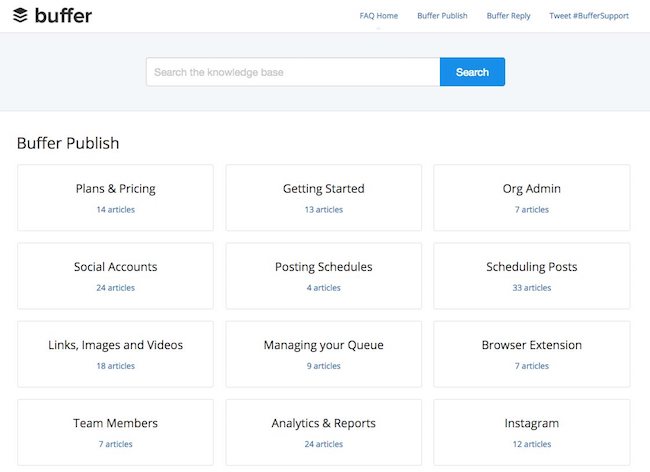
Si votre page FAQ contient de nombreuses questions, il peut être pertinent de trier ces dernières par catégories pour aider vos visiteurs à s’y retrouver.
C’est par exemple ce que fait Buffer :
Pour fournir des réponses complètes et précises à vos clients, n’hésitez pas à faire appel à un rédacteur professionnel. Certains sont même spécialisés dans la rédaction de FAQ !
3. Soigner l’UX de votre page FAQ
En plus de contenir les questions les plus fréquentes et les meilleures réponses, votre page FAQ doit être bien structurée. Ici encore, le but est de faire gagner du temps à vos clients.
Une erreur courante est de proposer toutes les questions sur une seule et même page FAQ. Cet UX n’est pas ergonomique, car les utilisateurs sont obligés de faire défiler la page à l’infini pour tomber sur l’information recherchée. Et en plus d’entraîner un taux de rebond élevé, il sera moins bien référencé par les moteurs de recherche.
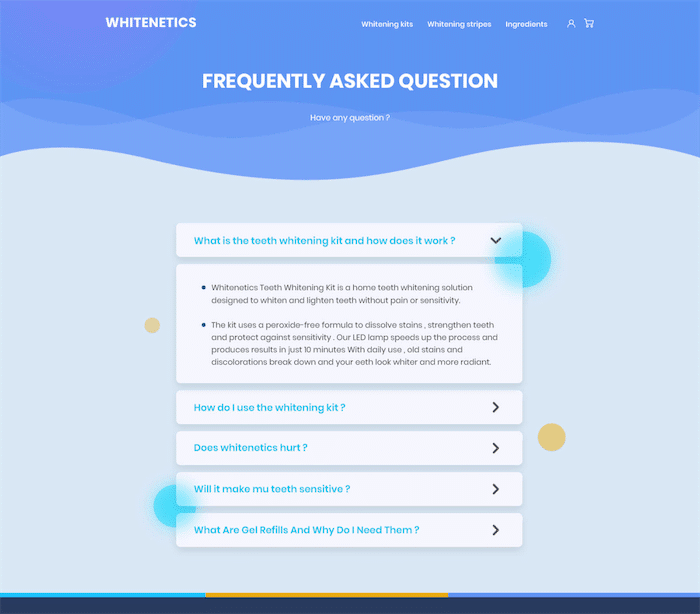
Pensez donc à diviser votre liste de questions en plusieurs pages FAQ, sous la forme de catégories. Cela permettra à la page principale de servir de point de repère et de créer une structure organisée.
Si vous disposez des ressources nécessaires, vous pouvez envisager d’ajouter une barre de recherche ! Côté SEO, la création de plusieurs pages FAQ vous permet de cibler des termes spécifiques pour chaque catégorie.
4. Optimiser le titre et les méta descriptions de vos pages FAQ
Ainsi, vous pouvez incorporer des mots clés dans la balise titre et la méta description de chaque page FAQ. Car ne l’oublions pas : les balises title jouent un rôle majeur dans votre stratégie de référencement ! Elles aident les moteurs de recherche à comprendre rapidement le contenu de votre page.
Bien que les méta descriptions ne soient pas un facteur de classement, elles ont un fort impact sur votre TDC. En optimisant ces deux facteurs majeurs de référencement, vous fournissez aux utilisateurs et à Google une explication claire du contenu de la page.
5. Bonus : comment créer une FAQ optimisée sur WordPress ?
Finalement, retenez que savoir coder n’est pas nécessaire pour créer une FAQ visible et optimisée. Du moins, en ayant connaissance du plug-in WordPress gratuit « FAQ Schema For Pages And Posts ».
En effet, ce plug-in vous aidera à créer votre FAQ en total no-code et de renseigner toutes les questions et réponses que vous souhaitez.
À lire aussi : Comment ajouter une FAQ sur WordPress ?
Notre conseil pour réussir une FAQ
Votre page FAQ ne doit pas être prise à la légère : elle mérite de recevoir un investissement conséquent de votre part. En retour, elle saura rassurer les visiteurs de votre site et augmenter votre taux de conversion, tout en soulageant votre service client.
L’enjeu est de taille, c’est pourquoi il est important de confier sa rédaction à un professionnel : trouvez dès maintenant un rédacteur web freelance sur Redacteur.com.
L’article Comment réussir une page FAQ ? est apparu en premier sur Redacteur.com.


