Google vient de mettre à jour sa documentation avec des ajustements qui peuvent impacter les pratiques des propriétaires de sites web et les SEO. De la taille des favicons aux paramètres d’URL, en passant par Google Trends, voilà tout ce qu’il faut savoir pour être à jour !
Ce qu’il faut retenir :
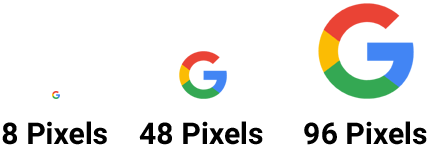
- Google recommande désormais des favicons d’au moins 48×48 pixels, avec un ratio 1:1, pour une meilleure qualité visuelle dans les SERP.
- Google conseille l’utilisation des symboles « = » pour séparer les paires clé-valeur et « & » pour lier plusieurs paramètres d’URL.
- La nouvelle documentation Google Trends montre comment analyser les tendances de recherche pour mieux comprendre ce que votre audience recherche, identifier les sujets émergents et planifier des contenus pertinents.
Mettre à jour vos favicons : résolution et ratio
Google insiste sur l’importance d’un favicon clair et bien dimensionné, ce petit symbole qui représente votre site dans les navigateurs et dans les résultats de recherche. Désormais, même si la taille minimale reste de 8x8px, il est fortement recommandé de viser au moins 48x48px pour une meilleure lisibilité. Agrandissez vos favicon !
Cette mise à jour ajoute aussi une exigence : le favicon doit être carré (un ratio 1:1) pour garantir une apparence nette, peu importe l’endroit où il s’affiche.
Un favicon bien pensé et bien dimensionné aide votre site à se démarquer visuellement parmi les résultats de recherche, tout en facilitant sa reconnaissance par les utilisateurs.
Révisions des pratiques de structuration d’URL : les bons réflexes
Google simplifie les consignes sur l’utilisation des paramètres d’URL afin de rendre le crawl et l’indexation plus efficaces. La recommandation est claire : utilisez des signes « = » pour séparer les paires clé-valeur et « & » pour relier plusieurs paramètres. Le moteur de recherche déconseille l’utilisation de séparateurs alternatifs tels que deux points et parenthèses ou les virgules simples ou doubles.
Ces choix permettent aux moteurs de recherche de comprendre vos URLs sans confusion, et ils peuvent éviter des problèmes de duplication de contenu ou de gaspillage du budget crawl.
Les paramètres d’URL sont absolument vitaux, surtout pour les sites de e-commerce ou les sites dynamiques, où ils contrôlent des éléments comme les filtres de produits ou les identifiants de sessions. En appliquant ces conseils, vous assurez un meilleur accès aux pages de votre site, ce qui peut aussi améliorer votre SEO de manière indirecte.
Prenez le temps de vérifier la structure de vos URLs et envisagez des redirections si elles nécessitent des ajustements. Pour les nouveaux sites, il est conseillé d’intégrer ces bonnes pratiques dès le départ afin d’éviter des complications futures.
Google Trends : un outil stratégique pour comprendre les recherches des utilisateurs
La nouvelle documentation de Google sur Google Trends va vous aider à exploiter cet outil dans votre stratégie de contenu. Google Trends offre deux fonctions principales : la possibilité d’explorer les tendances générales ou spécifiques grâce à l’outil Explore, et un suivi en temps réel des sujets populaires avec l’outil “Trending now”. Ces fonctionnalités permettent de comprendre l’intérêt du public pour différents sujets et de suivre les tendances de recherche en fonction des régions.
L’outil peut vous guider pour adapter vos contenus aux intérêts saisonniers ou régionaux de votre audience. Par exemple, si vous gérez un site e-commerce de mode, vous pouvez vous renseigner sur les tendances saisonnières pour ajuster votre inventaire ou promouvoir les articles en vogue.
Google Trends peut également vous donner une vision de la perception de votre marque sur le web. En observant les mots associés aux recherches de votre marque, vous pouvez adapter votre stratégie et ajuster vos contenus pour mieux répondre aux attentes de votre audience.
L’article “Google met à jour sa documentation SEO : 3 changements clés à connaître !” a été publié sur le site Abondance.


