Les serveurs DNS publics et gratuits permettent de se connecter en toute sécurité, et offrent en prime la possibilité d’accélérer votre vitesse d’accès à internet.
Le DNS (Domain Name System) est un protocole traduisant les adresses IP des sites internet en des noms de domaine, que vous saisissez dans votre navigateur pour accéder à ces sites.
Bien sûr, votre fournisseur d’accès à Internet vous attribue déjà des serveurs DNS, mais ceux-ci sont rarement les plus performants et peuvent poser d’autres problèmes.
C’est pourquoi le passage à un autres serveur DNS peut apporter un bénéfice, avec souvent une navigation plus réactive doublé d’un taux de disponibilité de 100 %.
Certains de ces services peuvent également bloquer l’accès à des sites d’hameçonnage ou infectés, et quelques-uns proposent même de filtrer du contenu pour adultes, afin de préserver vos enfants de ce que le Web ne devrait pas leur proposer…
Bien sûr les DNS « par défaut » de votre FAI ne sont pas forcément les pires, et tous les fournisseurs ne seront pas nécessairement meilleurs que ceux que vous utilisez déjà, mais si vous souhaiter en changer, cet article présente quelques-uns des meilleurs serveurs DNS.
Les outils de cet article ont été sélectionnés par notre équipe et ne sont pas sponsorisés. Découvrez comment sponsoriser votre outil.
Pourquoi changer de serveurs DNS ?
Nous l’avons évoqué brièvement en introduction, mais il existe de multiples raisons pour lesquelles vous pouvez avoir besoin de changer votre serveur DNS :
- L’utilisation d’un autre serveur DNS que celui de votre opérateur peut vous aider à débloquer un contenu bloqué dans votre pays.
- Selon l’emplacement du serveur DNS que vous choisirez, vous pouvez obtenir de meilleures performances de connexion.
- L’utilisation d’un serveur DNS alternatif permet également de s’assurer que votre FAI ne peut pas enregistrer votre historique de navigation sur Internet, par exemple pour vous proposer des publicités ou vendre vos données.
- L’utilisation de certains serveurs DNS vous protégera également contre les attaques de sécurité telles que les ransomwares, le phishing, les logiciels malveillants, etc.
- De nombreux internautes se plaignent que les DNS proposés par leur fournisseur d’accès sont lents et contribuent à ralentir la navigation générale.
- Utiliser des serveurs DNS publics permettent d’empêcher l’enregistrement de votre activité sur le Web, afin d’avoir une expérience de navigation plus privée.
- Cela permet aussi le blocage de certains sites Web, dans le cadre d’un contrôle parental par exemple.
Attention : tous les serveurs DNS ne proposent pas les mêmes services, alors renseignez-vous sur le site du fournisseur DNS pour vous assurer qu’il fera (ou ne fera pas) ce que vous recherchez.
Enfin (même si j’espère que ça va de soi), si les serveurs DNS sont en majorités gratuits, ils ne vous donnent pas un accès à Internet et vous aurez toujours besoin d’un fournisseur d’accès à Internet pour vous connecter.
Rappelons que les serveurs DNS ne font que traduire des adresses IP en noms de domaine afin que nous puissions accéder aux sites en pianotant un nom lisible par l’homme, au lieu d’une adresse IP sous forme de chiffres qu’il nous serait impossible à mémoriser.
1. Cloudflare DNS
Cloudflare est l’une des plus grandes entreprises au monde travaillant dans le domaine de la performance et de la sécurité du web.
Depuis 2018, l’entreprise propose un service DNS, reconnu comme l’un des meilleurs serveurs DNS gratuits que vous pouvez utiliser aujourd’hui. Ce serveur DNS est en effet l’un des serveurs DNS les plus rapides, et l’un des plus respectueux de la vie privée disponibles sur le web.
Commençons par le fait que la société n’enregistre jamais votre adresse IP : oui, celle que votre fournisseur d’accès utilise pour suivre vos habitudes sur Internet. La société a même engagé une société pour auditer ses systèmes chaque année, afin de s’assurer qu’elle tient ses promesses en matière de confidentialité !
Ensuite, Cloudflare revendique un gain vitesse par rapport aux autres fournisseurs de DNS de plus de 28 %.
Cloudflare est pour finir très facile à configurer. Il ne vous faudra que quelques minutes pour configurer vos préférences DNS.
Adresses IP de Cloudflare DNS : 1.1.1.1, 1.0.0.1
2. Google Public DNS
Lancé en décembre 2009, le service « Google Public DNS » est probablement l’un des serveurs DNS publics et gratuits les plus connus au monde. Comme c’est souvent le cas, Google essaie de rendre Internet plus fiable et plus sûr.
Selon le géant du Web, Google Public DNS protège les utilisateurs contre divers types d’attaques de phishing, en particulier si vous utilisez un matériel ancien pour accéder à l’internet.
L’un des avantages notables que vous obtenez en passant à Google Public DNS, c’est donc une sécurité accrue mais également une vitesse optimisée puisque Google utilise le routage « Anycast » pour trouver le serveur le plus proche pour l’interaction des données, garantissant que vous recevez les informations dans les plus brefs délais.
Bien que cela nécessite un peu plus de connaissance dans la configuration, Google Public DNS prend également en charge les adresses IPv6. Dans l’ensemble, c’est une très bonne option pour quiconque souhaite essayer un serveur DNS tiers.
Adresses IP de Google DNS : 8.8.8.8, 8.8.4.4
3. OpenDNS
Fourni par Cisco, un géant dans le domaine des réseaux, OpenDNS est un autre service gratuit qui vous donne non seulement le moyen d’accéder à Internet de manière rapide et sûre, mais également de prévenir les attaques de sites piratés, ou falsifiés.
OpenDNS bloque en effet les sites d’hameçonnage ainsi que ceux qui ont été signalés comme infectés par des logiciels malveillants. Tout comme celui de Google, OpenDNS utilise le routage « Anycast » pour diriger votre connexion vers les serveurs les plus proches dans le but de vous offrir des temps de chargement plus rapides.
Ses serveurs sont répartis sur trois continents et OpenDNS est doté de technologies d’autoréparation, une technologie conçue contre la défaillance de presque tous les aspects du système, et pouvant résister aux perturbations éventuelles de son infrastructure, sans entraîner de problème pour les utilisateurs.
Si vous voulez un service DNS reconnu et qui ne vous laissera jamais tomber, optez pour OpenDNS.
Adresses IP pour OpenDNS : 208.67.222.222, 208.67.220.220
4. AdGuard DNS
Populaire et gratuit, AdGuard DNS est un serveur DNS que vous pouvez utiliser sur les appareils Windows, macOS, Android et iOS. Avec AdGuard DNS, vous pouvez bloquer les trackers et autres outils d’analyse, qui sont toujours à l’affût pour comprendre vos habitudes de navigation sur le Web, à l’échelle du système.
Et s’il est surtout connu pour bloquer les publicités, il a plus que ça dans sa musette : il peut également bloquer les contenus pour adultes ainsi que les sites Web malveillants (qui tentent de vous rediriger vers d’autres sites douteux).
Grâce au mode de protection de la famille, vous pouvez imposer une recherche sécurisée dans divers navigateurs Web. En fait, le moteur de recherche ne renverra plus aucun site possédant du contenu pour adultes.
Vous n’avez pas besoin d’installer une application pour obtenir toutes les fonctionnalités d’Adguard puisqu’il suffit de le configurer manuellement. Tout comme Cloudflare, AdGuard n’enregistre pas les requêtes DNS, ni les actions ou l’historique de ses utilisateurs.
Si parmi vos critères figurent la garantie de la confidentialité de vos activités sur le web, AdGuard DNS est l’un des meilleurs serveurs DNS gratuits pour lesquels vous pouvez opter.
Adresses IP pour Adguard DNS : 176.103.130.130 (par défaut), 176.103.130.132 (avec la « protection familiale »)
5. Yandex DNS
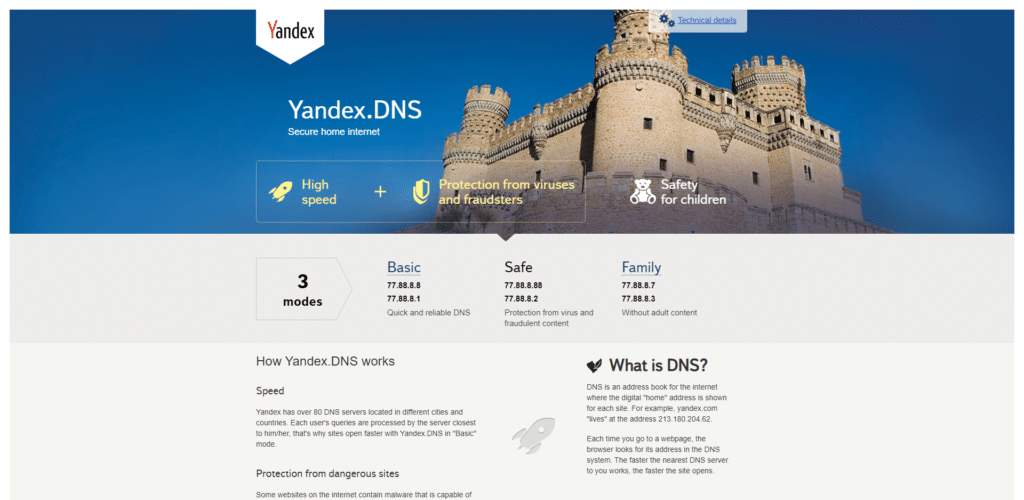
Yandex DNS est un serveur DNS très complet et si vous êtes à la recherche d’un DNS alternatif, capable d’offrir des performances fiables dans la plupart des domaines, le tout sans vous coûter un bras, celui-ci peut répondre à vos besoins.
Outre le fait qu’il soit Russe, ce qui distingue ce serveur DNS des autres c’est probablement qu’il offre une multitude de fonctionnalités : et avec un tel éventail vient la liberté de tout personnaliser en fonction de vos besoins. En outre, il fait également partie des serveurs les plus rapides, ce qui peut jouer un rôle dans votre choix.
À l’image d’AdGuard, Yandex DNS propose le filtrage de contenu, permettant aux utilisateurs d’interdire les contenus offensants ou pour adultes.
Yandex DNS dispose également d’une fonction de protection robuste qui bloque les logiciels malveillants et les robots.
Pour répondre à des besoins différents, il est proposé en trois versions différentes : basique, sécurisé et familial. Alors que le mode de base offre un DNS rapide et fiable, le mode sécurisé dispose d’une protection contre les virus et les fraudeurs. Quant au mode familial, il est conçu pour tenir à distance le jeune public des contenus pour adultes.
Adresses IP pour Yandex DNS : 77.88.8.8, 77.88.8.1, 77.88.8.2
6. Quad9 DNS
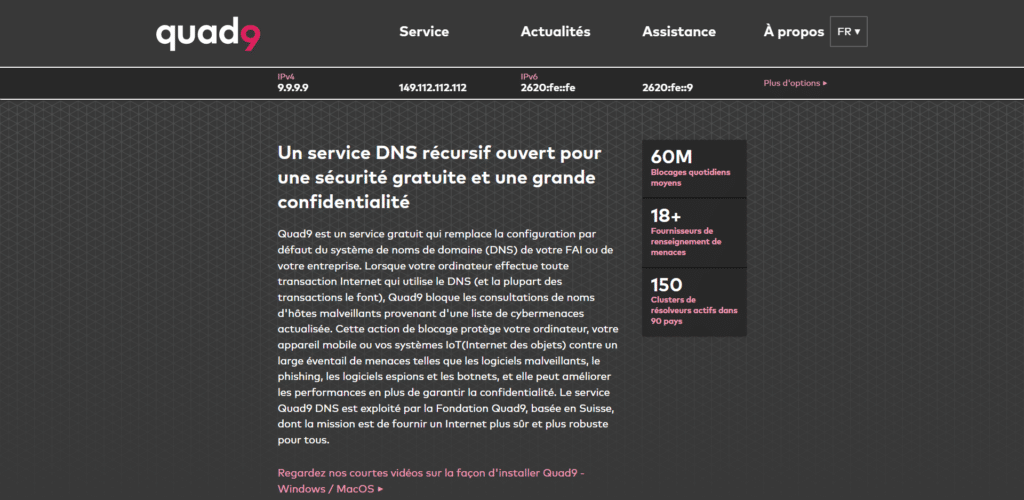
Quad9 DNS est le dernier serveur DNS public présenté dans cet article, mais cela ne signifie pas qu’il ne mérite pas votre attention, bien au contraire ! Tout comme les autres serveurs DNS de cette liste Quad9 achemine vos requêtes DNS à travers un réseau sécurisé de serveurs dans le monde entier.
Une fois configuré, le système vous protège de nombreuses menaces, grâce au recours de plus d’une douzaine d’entreprises de cybersécurité de premier plan. Il fournit donc une protection en temps réel et vous empêche d’accéder à des sites Web douteux : à chaque fois que ses serveurs DNS trouvent un site Web infecté ou cloné, ils bloquent votre connexion pour que votre appareil et vos données restent en sécurité.
Quad9 DNS est très facile à configurer et ne nécessite aucune installation de logiciel. Si aucun des autres serveurs DNS ne répond à vos besoins, vous pouvez vous tourner vers celui-ci les yeux fermés.
Adresses IP pour Quad9 DNS : 9.9.9.9
7. Comodo Secure DNS 

Comodo Secure DNS est proposé par Comodo, une entreprise réputée dans le domaine de la cybersécurité. Ce service DNS est conçu pour offrir une expérience de navigation sûre et rapide. Comodo utilise des technologies avancées pour bloquer les sites malveillants, les logiciels espions et les attaques de phishing avant qu’ils n’atteignent votre appareil.
Contrairement aux DNS par défaut de nombreux FAI, Comodo Secure DNS optimise également le temps de réponse grâce à un routage intelligent et des serveurs situés stratégiquement à travers le monde. Que vous soyez un utilisateur individuel ou une petite entreprise, ce DNS garantit une navigation plus sécurisée.
Adresses IP : 8.26.56.26 (primaire), 8.20.247.20 (secondaire)
8. CleanBrowsing DNS
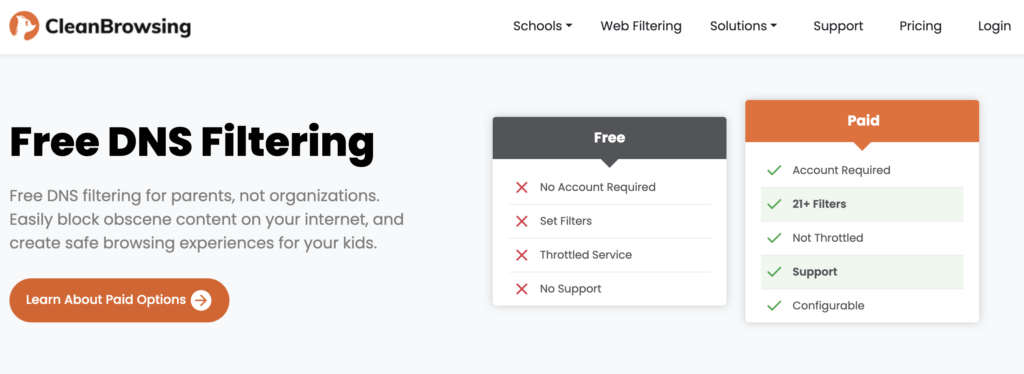
CleanBrowsing est une entreprise axée sur la sécurité familiale et l’éducation, offrant des solutions DNS adaptées aux parents, enseignants et administrateurs réseau. Ce serveur DNS est parfait pour créer un environnement en ligne sécurisé, grâce à ses puissants filtres de contenu.
En plus de bloquer les sites pour adultes, CleanBrowsing protège également contre les logiciels malveillants et les traqueurs. Avec des configurations adaptées aux différents types d’utilisateurs, il garantit une navigation propre et sans distractions, idéale pour les familles et les écoles.
Il propose une version gratuite et une version payante. Cette dernière propose des filtres supplémentaires pour bloquer certains contenus afin de sécuriser l’accès à internet pour la famille et les enfants par exemple.
Adresses IP : 185.228.168.9 (primaire), 185.228.169.9 (secondaire)
9. DNS.Watch
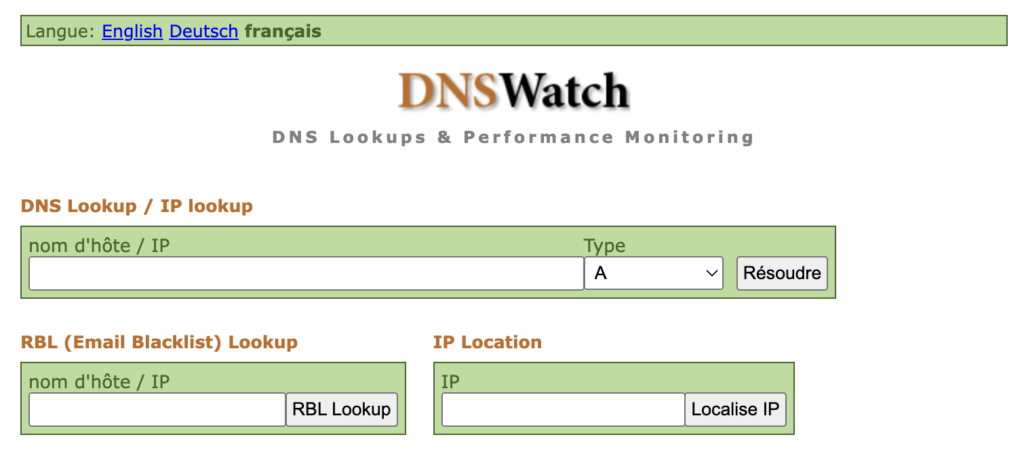
DNS.Watch est un service indépendant, idéal pour ceux qui recherchent une expérience en ligne non censurée. Contrairement à de nombreux DNS qui enregistrent les données des utilisateurs, DNS.Watch s’engage à ne pas conserver de journaux de vos requêtes, garantissant ainsi un haut niveau de confidentialité.
Ce service DNS est également apprécié pour sa rapidité et sa simplicité d’utilisation, ne nécessitant aucune inscription. Avec des serveurs situés en Europe, il offre une navigation stable et sans restrictions.
Adresses IP : 84.200.69.80 (primaire), 84.200.70.40 (secondaire)
10. OpenNIC DNS
OpenNIC est une organisation communautaire dédiée à la gestion d’un système DNS alternatif, libre et non censuré. En plus de fournir un accès rapide à Internet, OpenNIC permet de naviguer sur des domaines alternatifs qui ne sont pas accessibles via les DNS conventionnels.
Cette initiative vise à préserver la neutralité du web et à offrir un contrôle accru aux utilisateurs. Grâce à son infrastructure décentralisée, OpenNIC est une excellente option pour les personnes soucieuses de liberté numérique.
Adresses IP : 38.103.195.4, 138.197.140.189
11. UncensoredDNS

Hébergé au Danemark par une organisation à but non lucratif, UncensoredDNS est un service conçu pour fournir une navigation Internet sans censure. Ce DNS est parfait pour les utilisateurs qui souhaitent contourner les restrictions imposées par les FAI ou les gouvernements.
En plus de respecter la vie privée des utilisateurs, UncensoredDNS ne conserve aucun journal de leurs activités. Il est une solution simple et efficace pour ceux qui recherchent une navigation libre et anonyme.
Adresses IP : 91.239.100.100 (primaire), 89.233.43.71 (secondaire)
12. SafeDNS
SafeDNS, une entreprise spécialisée dans les solutions de filtrage Internet, propose un service DNS robuste pour sécuriser la navigation en ligne. Ce service convient parfaitement aux entreprises, aux écoles et aux foyers grâce à ses options de filtrage personnalisables.
SafeDNS bloque les sites malveillants, les logiciels espions et les contenus inappropriés. Avec une interface conviviale et des outils puissants, il aide les utilisateurs à protéger leurs réseaux sans effort.
Safe DNS propose une version d’essai gratuite pour ses solutions payantes les plus avancées.
Adresses IP : 195.46.39.39 (primaire), 195.46.39.40 (secondaire)
13. Verisign Public DNS
Verisign, un nom reconnu dans la gestion de domaines et les services de sécurité en ligne, propose un service DNS public axé sur la stabilité et la confidentialité. Contrairement à de nombreux autres services DNS, Verisign ne vend pas vos données de navigation et ne redirige pas vos requêtes.
Ce service DNS est idéal pour ceux qui cherchent une alternative fiable et sécurisée, avec une vitesse de réponse rapide et une disponibilité continue.
Adresses IP : 64.6.64.6 (primaire), 64.6.65.6 (secondaire)
14. Neustar UltraDNS Public
Neustar est une entreprise leader dans la gestion des données et la cybersécurité. Son service DNS public UltraDNS est conçu pour offrir une navigation rapide et sécurisée. Avec des fonctionnalités avancées telles que le filtrage de contenu et la protection contre les cybermenaces, ce service est particulièrement adapté aux foyers et aux entreprises.
Neustar propose également des options personnalisables pour répondre à divers besoins en matière de contrôle parental ou de filtrage d’entreprise.
Adresses IP : 156.154.70.1 (primaire), 156.154.71.1 (secondaire)
15. Control D
Control D est une solution moderne de DNS qui met l’accent sur la personnalisation. En plus de fournir une navigation rapide, ce service permet aux utilisateurs de configurer des règles spécifiques pour bloquer les publicités, les traqueurs et d’autres types de contenu indésirable.
Que vous soyez un particulier ou une entreprise, Control D offre une flexibilité inégalée pour contrôler votre expérience en ligne.
Le DNS gratuit correspond à la plupart des besoins grand public, mais il existe également des plans payants en fonction des besoins spécifiques en fonction de la cible (écoles, entreprises…).
Adresses IP : 76.76.2.0 (primaire), 76.76.10.0 (secondaire)
16. NextDNS
NextDNS est un service DNS innovant qui combine sécurité, confidentialité et contrôle parental avancé. Ce DNS bloque automatiquement les menaces en ligne, les traqueurs et les publicités, tout en protégeant votre confidentialité.
Compatible avec une large gamme d’appareils et de systèmes, NextDNS permet une navigation optimisée et sécurisée. Ses fonctionnalités sont particulièrement appréciées des utilisateurs soucieux de protéger leurs données personnelles.
Next DNS propose une version gratuite limitée à 300 000 requêtes par mois, une version payante à 1,99€ par mois illimitée et une version entreprise à 19,90€ par mois avec un support dédié.
Adresses IP : 45.90.28.13 (primaire), 45.90.30.13 (secondaire)
Notre conseil pour choisir votre DNS
Essayez plusieurs DNS pour trouver celui qui correspond le mieux à vos usages et échangez avec la communauté pour comprendre les spécificités techniques de l’un ou de l’autre.
Si vous n’avez pas le temps ou les compétences pour votre passage à un autre serveur DNS, pensez à demander l’aide d’un freelance sur Codeur.com !


