Entre l’intelligence artificielle de Bing et ChatGPT, votre cœur balance ? Si vous êtes curieux de connaître les différences, similarités et utilisations possibles de ces deux IA, vous êtes au bon endroit !
Vous cherchez à automatiser certains processus ou à gagner du temps dans votre quotidien ? Faites appel à un assistant virtuel freelance sur Codeur.com pour vous accompagner dans le développement de votre activité.
L’intelligence artificielle façonne notre manière d’interagir en ligne, et deux géants de cette révolution, Bing Chat et ChatGPT, se démarquent clairement. Mais quelles sont les spécificités de chacun et comment peuvent-ils optimiser votre expérience digitale ? C’est que nous allons détailler dans cet article !
Qu’est-ce que Bing Chat ?
Fonctionnalité de Microsoft Bing, le célèbre moteur de recherche des créateurs de Windows, Bing Chat fait son entrée dans le monde des IA en 2021. Ce chatbot interactif permet aux utilisateurs de converser avec Bing pour obtenir des réponses précises à différentes requêtes.
La force de cette IA réside dans sa capacité à combiner des fonctionnalités de recherche avancée avec une interface conversationnelle. Grâce à son modèle de réponse, Bing Chat peut :
- Communiquer dans plusieurs langues, comme l’anglais, le français, l’espagnol, le chinois ou le japonais.
- Répondre selon trois modes : équilibré, créatif ou précis, en fonction des besoins de l’utilisateur.
- Générer du contenu textuel complexe tel que des poèmes, des histoires, des articles de blog, du code, des essais, des chansons, des emails…
- Dessiner une image à partir d’une description textuelle.
Contrairement aux autres chatbots, comme ChatGPT, l’IA de Bing s’identifie comme un moteur de recherche, et non comme un assistant virtuel. Il ne prétend pas avoir une personnalité ou une conscience propre. Il se présente comme un outil au service de l’utilisateur, qui peut lui fournir des informations objectives et factuelles.
Avec Bing Chat, impossible de s’engager dans des discussions argumentatives, émotionnelles ou conflictuelles. En cas de confrontation, il préfère arrêter la conversation.
Qu’est-ce que ChatGPT ?
Lors de son lancement, le 30 novembre 2022, ChatGPT a marqué une rupture technologique dans le domaine des assistants virtuels, en raison de sa capacité à générer des réponses nuancées et contextuelles. Cette qualité est due à son modèle GPT, un algorithme qui utilise un réseau neuronal profond pour générer du texte à partir d’un prompt (descriptif ou consigne).
L’IA développée par OpenAI a ainsi été entraînée sur un large corpus de contenus provenant du web, ce qui lui permet de maîtriser les règles du langage naturel. Seul hic : sa base de données de connaissance s’arrête à 2021.
Tout comme l’IA de Bing, Chat GPT peut :
- Générer du texte dans n’importe quelle langue, dont des articles de blog, des emails, des poèmes, des histoires, des publications pour les réseaux sociaux, etc.
- Synthétiser, corriger et traduire des contenus, mais aussi aider les utilisateurs à l’optimiser.
- Écrire, corriger et améliorer du code.
- Engager des conversations fluides, naturelles et engageantes avec l’utilisateur.
C’est d’ailleurs ce dernier point qui le distingue des autres chatbots IA.
Bing Chat vs ChatGPT
Dans la bataille des IA, comment choisir entre le chatbot Bing ou ChatGPT pour mener des recherches, générer du contenu ou simplement améliorer sa productivité ? Pour répondre, il est indispensable de bien connaître les différences en matière d’interface, de capacités conversationnelles, d’intégration et de protections des données.
Interface utilisateur
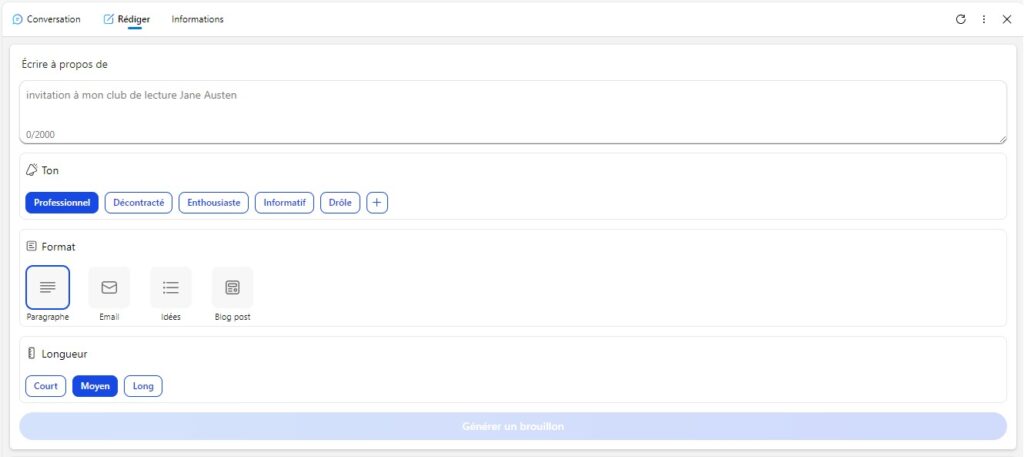
L’avantage de Bing Chat est d’offrir un accès rapide et direct aux informations. Les tableaux conversationnels et rédactionnels proposent des options à choisir pour que l’internaute affine ses besoins et bénéficie d’une réponse adaptée.
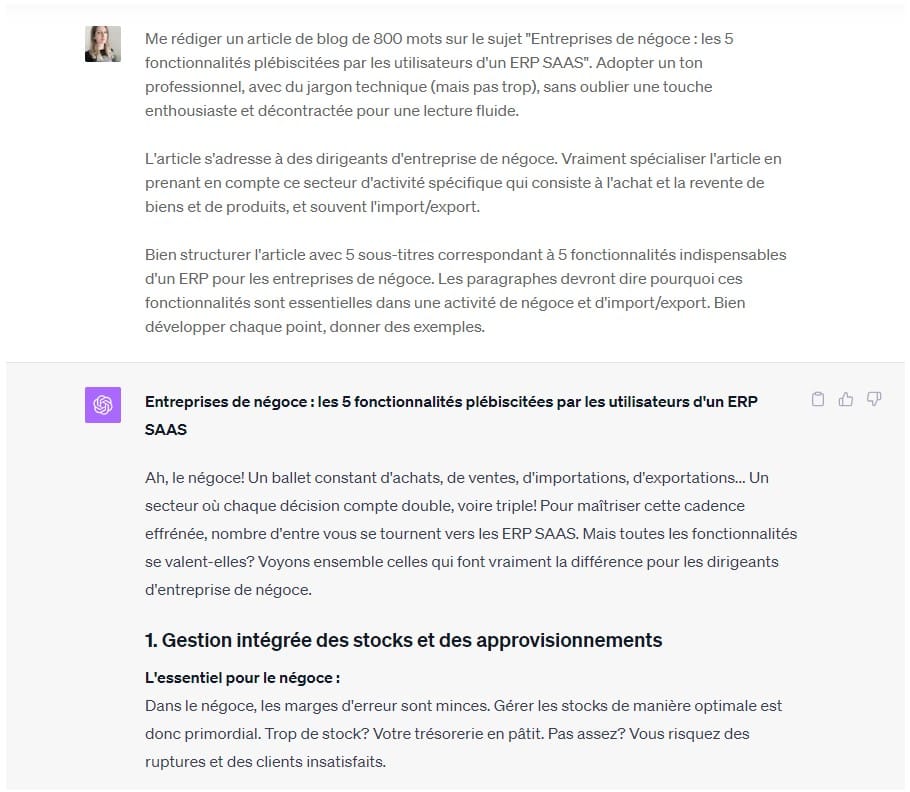
ChatGPT utilise une interface utilisateur tout aussi intuitive, mais un peu plus complexe à utiliser. Ici, il s’agit vraiment d’entrer dans une conversation avec l’intelligence artificielle pour détailler vos besoins. ChatGPT repose uniquement sur le prompt, il faudra donc discuter et préciser « manuellement » les attentes.
Capacités conversationnelles
Bing Chat utilise le modèle Microsoft Turing Natural Language Generation (T-NLG), basé sur une architecture neuronale révolutionnaire. T-NLG est capable de produire des textes cohérents, fluides et informatifs, en se basant sur les données du web.
ChatGPT utilise le modèle GPT-3 (et GPT-4), qui est le plus grand modèle de génération de texte au monde, avec 175 milliards de paramètres. Le chatbot d’OpenAI peut ainsi converser sur n’importe quel sujet, exprimer des opinions, des émotions, de l’humour, et même imiter des personnalités célèbres.
Néanmoins, Microsoft a récemment amélioré Bing Chat avec le modèle GPT-4 pour enrichir ses capacités conversationnelles et permettre la formulation de réponses plus créatives, mais toujours fiables.
Intégration et compatibilité
Bing Chat présente des avantages d’intégration avec la suite bureautique Microsoft 365, notamment avec sa toute nouvelle IA : Microsoft 365 Copilot. En dehors de la sphère Windows, ce chatbot est peu facile à intégrer.
A l’inverse, ChatGPT dispose d’une API plus ouverte, lui permettant de s’interfacer avec des outils tiers ou des applications comme Discord, Slack, Hubspot…
Protection et sécurité des données
Bing Chat et ChatGPT sont tous les deux soumis à des enjeux éthiques, liés à l’utilisation de l’IA et des données des utilisateurs.
Bing Chat respecte les principes de Microsoft en matière de protection des données. La charte de l’entreprise vise à garantir la fiabilité, la sécurité, la transparence et la responsabilité dans l’utilisation des informations. Microsoft s’engage à respecter les lois et les réglementations en vigueur, comme le RGPD. A cet effet, Bing Chat ne collecte ni ne stocke les conversations des utilisateurs, sauf si ces derniers y consentent explicitement.
ChatGPT obéit aux principes éthiques d’OpenAI, dont les valeurs s’appuient sur une IA positive et bienveillante. Tout comme Bing, ChatGPT protège les données des utilisateurs, en respectant les normes en vigueur et notamment le RGPD. L’outil ne récolte pas et n’archive aucune conversation, sauf si les internautes y consentent explicitement.
Même si les deux intelligences artificielles sont conscientes des enjeux de confidentialité, et s’efforcent de les respecter, il est important de rester vigilants et responsables dans les informations transmises.
Browse with Bing : Chat GPT surfe sur le web !
Si vous aimez le côté factuel et actualisé de Bing Chat, mais que vous préférez la fluidité conversationnelle de ChatGPT, alors la fonctionnalité « Browse with Bing » est faite pour vous !
Cette option, qui avait disparu de ChatGPT, est de retour pour le plus grand bonheur des utilisateurs.
Jusqu’à récemment, l’un des défis majeurs de l’IA d’OpenAI était son incapacité à parcourir le web. Bien que formée sur une vaste base de données, celle-ci s’est arrêtée en septembre 2021.
Cependant, en mai 2023, OpenAI a signé une alliance avec Microsoft pour permettre à son IA de naviguer sur Bing, afin d’extraire des données sur le moteur de recherche. Mais les utilisateurs ont réussi à esquiver les paywalls et à accéder à du contenu premium via le chatbot… La fonctionnalité a donc été temporairement désactivée.
Après cette interruption, “Browse with Bing” fait son grand retour pour les abonnés à ChatGPT Plus et ChatGPT Entreprise. Cette fonctionnalité devrait se déployer à l’ensemble de la communauté prochainement.
Comment activer l’option Browse with Bing sur ChatGPT ?
Pour l’utiliser, il suffit d’ouvrir une nouvelle conversation et de passer le curseur sur « GPT-4 ».
Un menu déroulant apparaît où vous pouvez sélectionner « Browse with Bing ».
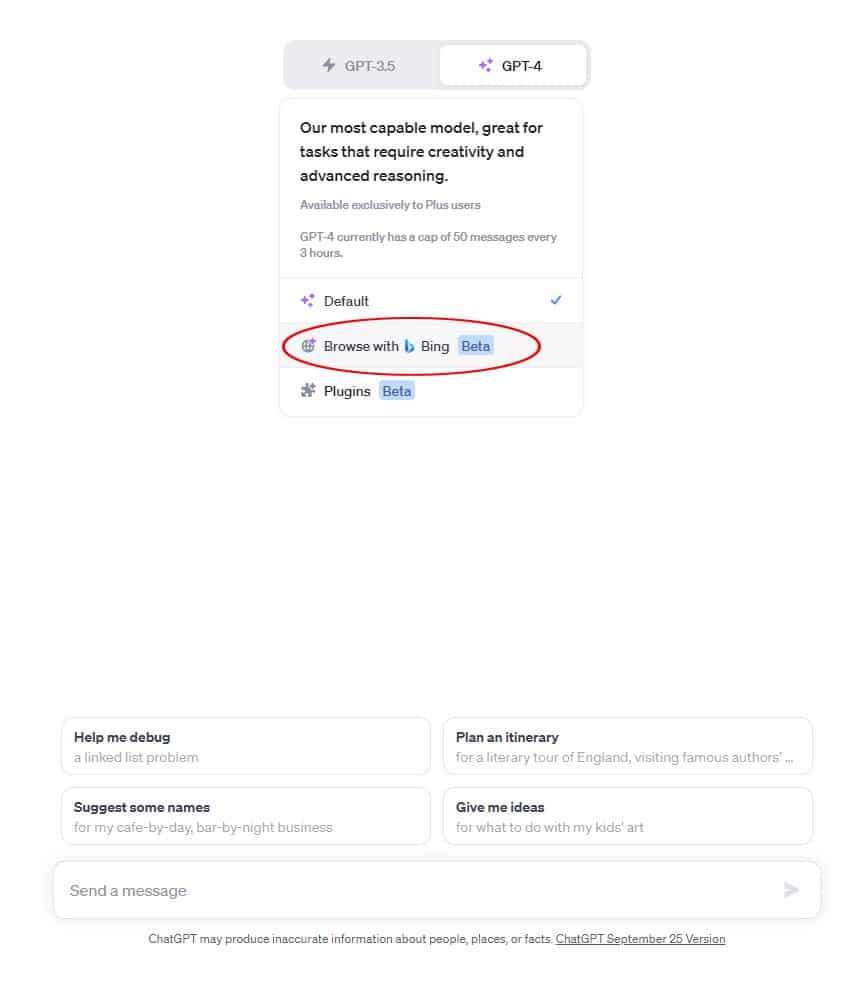
Tapez ensuite votre requête pour obtenir une réponse élaborée à partir des sources fournies par le moteur de recherche.
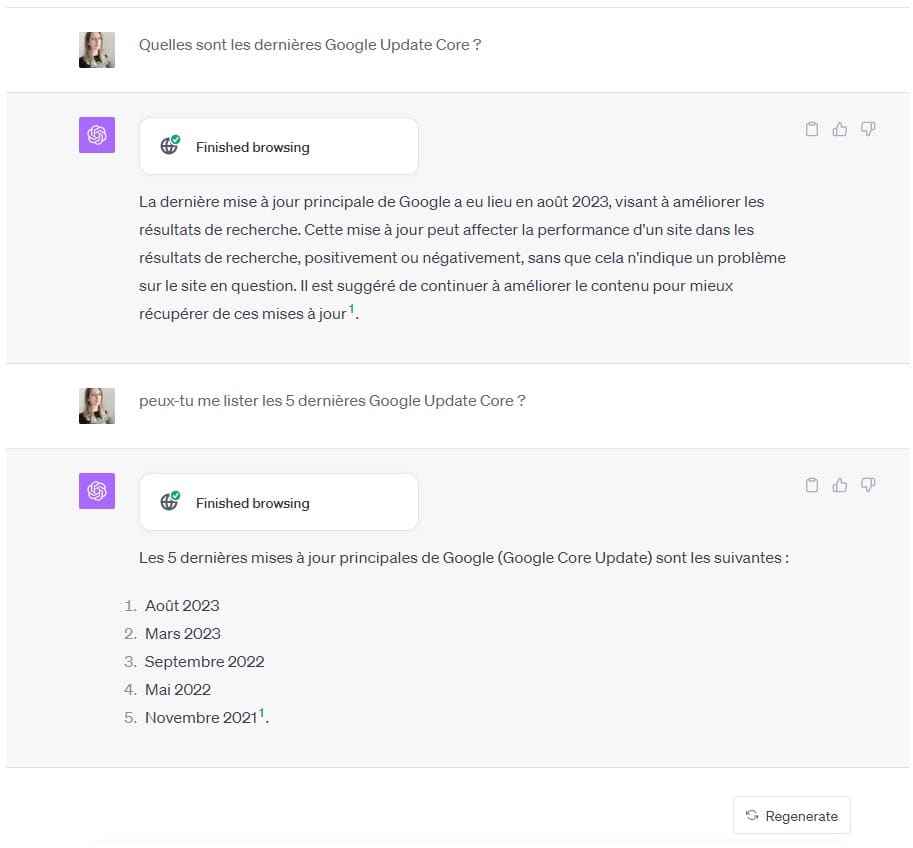
Notre astuce pour combiner l’IA de Bing et ChatGPT
La combinaison de Bing Chat et ChatGPT vise à offrir aux utilisateurs une intelligence artificielle qui, non seulement répond à leurs questions, mais les guide également à travers la vaste mer d’informations disponibles en ligne. Cette collaboration est un pas en avant vers l’avenir de l’interaction avec les IA.
En combinant les forces des deux chatbots, la réponse à la question « Bing Chat ou ChatGPT ? » devient évidente : « les 2, bien sûr ! ».
Besoin d’aide pour créer du contenu ou améliorer votre productivité ? Faites appel à un freelance sur notre plateforme, Codeur.com !


