Le fil d’Ariane, élément discret mais puissant de navigation, joue un rôle clé dans l’expérience utilisateur (UX) et le référencement naturel (SEO). Cependant, il est important de savoir comment l’implémenter et l’optimiser pour améliorer la visibilité de vos pages dans les moteurs de recherche.
Entrons ensemble dans l’univers du fil d’Ariane : son rôle, son affichage et les bonnes pratiques pour l’implémenter avec succès sur votre site Web !
Qu’est-ce que le fil d’Ariane ?
Le fil d’Ariane, ou “breadcrumb” en anglais, est un élément de navigation Web qui indique une position. Il aide les utilisateurs à comprendre leur emplacement actuel sur un site Web par rapport à la structure hiérarchique globale.
Typiquement affiché en haut d’une page, le fil d’Ariane liste les pages précédentes que l’utilisateur a traversées pour arriver à sa page actuelle. Il prend souvent la forme d’un chemin de navigation simple du type : Accueil > Catégorie > Sous-catégorie > Article, comme dans cet exemple issu du site France Travail.
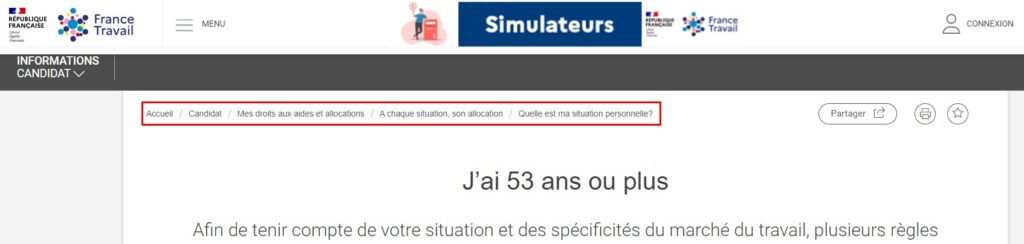
L’utilisation du fil d’Ariane améliore significativement l’expérience utilisateur (UX) sur un site Web. Il offre une voie claire pour remonter les niveaux hiérarchiques d’un site, sans avoir à utiliser le bouton de retour du navigateur.
L’importance du fil d’Ariane pour le SEO
Le fil d’Ariane, par sa structure et son rôle sur l’expérience utilisateur, influence le positionnement d’un site Web dans les moteurs de recherche.
L’UX, un facteur SEO important
L’importance de l’UX en tant que facteur SEO est largement démontrée ! Une navigation aisée et intuitive améliore la satisfaction des visiteurs. Ce facteur incite les moteurs de recherche à évaluer positivement le site et à le remonter dans les résultats de recherche.
Par ailleurs, une expérience utilisateur facilitée par le fil d’Ariane réduit le taux de rebond et augmente le temps passé sur les pages. Des indices que les moteurs de recherche interprètent de manière positive, ce qui profite à votre référencement naturel !
La structure du fil d’Ariane : une aide pour les robots de Google
Les moteurs de recherche comme Google utilisent le fil d’Ariane pour analyser la structure d’un site Web et l’indexer de manière pertinente. Cette hiérarchie claire de l’information contribue à améliorer le classement du site dans les résultats de recherche.
Les liens présents dans le fil d’Ariane renforcent également le maillage interne, distribuant la valeur de lien (link juice) à travers les pages de manière efficace.
Un affichage ergonomique dans les résultats de recherche
L’un des avantages les plus visibles du fil d’Ariane est sa capacité à apparaître directement dans les résultats de recherche de Google (SERP). Plutôt que d’afficher simplement l’URL, Google peut montrer le chemin de navigation complet, ce qui rend les résultats plus attrayants pour l’utilisateur, comme dans l’exemple ci-dessous :
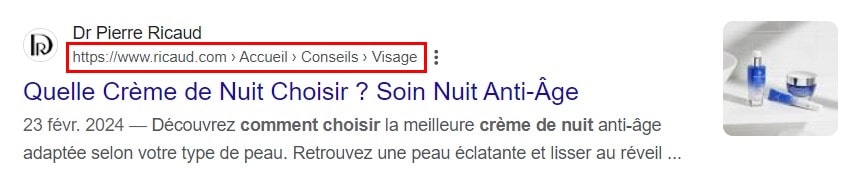
Un aspect qui peut augmenter le taux de clic (CTR) pour vos pages.
Comment construire votre fil d’Ariane avec des données structurées ?
Concevoir un fil d’Ariane optimisé pour le SEO implique l’intégration intelligente de données structurées. Ces dernières, grâce à un format de codage standardisé (Schema.org), communiquent aux robots de Google le modèle d’organisation de vos pages.
Il existe plusieurs méthodes d’implémentation des données structurées pour votre fil d’Ariane :
La méthode JSON-LD
Facile à implémenter et recommandé par Google, le format JSON-LD s’insère dans l’en-tête HTML, simplifiant sa maintenance. Son ajout au site est relativement simple, sans perturber le reste du code HTML, puis qu’il est contenu dans un bloc distinct du contenu principal de la page.
Bien qu’il n’influence pas directement l’affichage du fil d’Ariane pour l’utilisateur, il est primordial pour le SEO.
Exemple de code JSON-LD pour un fil d’Ariane :
<script type="application/ld+json">
{
  "@context": "https://schema.org",
  "@type": "BreadcrumbList",
  "itemListElement": [{
    "@type": "ListItem",
    "position": 1,
    "name": "Accueil",
    "item": "https://exemple.com"
  },{
    "@type": "ListItem",
    "position": 2,
    "name": "Catégorie",
    "item": "https://exemple.com/categorie"
  },{
    "@type": "ListItem",
    "position": 3,
    "name": "Sous-catégorie",
    "item": "https://exemple.com/categorie/sous-categorie"
  }]
}
</script>
Placez ce script dans la balise <head> de votre page HTML ou juste avant la balise de fermeture </body> pour indiquer le chemin de navigation.
Les formats RDFa et Microdonnées
L’implémentation du fil d’Ariane en utilisant le format RDFa ou les Microdonnées permet une intégration sémantique précise au sein de votre contenu HTML. Cette méthode améliore la lisibilité pour les moteurs de recherche et enrichit potentiellement l’affichage de vos pages dans les résultats de recherche.
Voici comment vous pourriez structurer votre fil d’Ariane en utilisant ces deux méthodes :
- Avec des attributs RDFa
RDFa (Resource Description Framework in attributes) ajoute des attributs spécifiques pour annoter le contenu HTML, ce qui aide les moteurs de recherche à comprendre la structure de navigation de votre site. Voici un exemple de code :
<div vocab="http://schema.org/" typeof="BreadcrumbList">
  <ol property="itemListElement" typeof="ListItem">
    <li>
      <a property="item" typeof="WebPage" href="https://exemple.com">
        <span property="name">Accueil</span></a>
      <meta property="position" content="1">
    </li>
    <li>
      <a property="item" typeof="WebPage" href="https://exemple.com/categorie">
        <span property="name">Catégorie</span></a>
      <meta property="position" content="2">
    </li>
    <li>
      <a property="item" typeof="WebPage" href="https://exemple.com/categorie/sous-categorie">
        <span property="name">Sous-catégorie</span></a>
      <meta property="position" content="3">
    </li>
  </ol>
</div>
- Avec les Microdonnées
Les Microdonnées suivent un schéma similaire à RDFa, mais utilisent des attributs itemscope, itemtype, et itemprop pour marquer le contenu HTML :
<ol itemscope itemtype="http://schema.org/BreadcrumbList">
  <li itemprop="itemListElement" itemscope itemtype="http://schema.org/ListItem">
    <a itemprop="item" href="https://exemple.com">
      <span itemprop="name">Accueil</span></a>
    <meta itemprop="position" content="1">
  </li>
  <li itemprop="itemListElement" itemscope itemtype="http://schema.org/ListItem">
    <a itemprop="item" href="https://exemple.com/categorie">
      <span itemprop="name">Catégorie</span></a>
    <meta itemprop="position" content="2">
  </li>
  <li itemprop="itemListElement" itemscope itemtype="http://schema.org/ListItem">
    <a itemprop="item" href="https://exemple.com/categorie/sous-categorie">
      <span itemprop="name">Sous-catégorie</span></a>
    <meta itemprop="position" content="3">
  </li>
</ol>
Ces deux méthodes permettent d’annoter clairement le fil d’Ariane de votre site.
Choisir entre RDFa et les Microdonnées dépend de votre préférence et de la compatibilité avec d’autres types de données structurées que vous pourriez déjà utiliser sur votre site.
Le format HTML
L’utilisation des balises HTML traditionnelles, sans données structurées supplémentaires, est la méthode la moins efficace en termes de SEO, mais reste une option pour structurer visuellement le fil d’Ariane. Il sera dans tous les cas nécessaire d’intégrer des balises HTML dans votre site pour afficher votre fil d’Ariane (que ce soit dans le thème de votre site ou via un plugin).
Exemple d’intégration fil d’Ariane en HTML :
<nav aria-label="Breadcrumb">
  <ol>
    <li><a href="https://exemple.com">Accueil</a></li>
    <li><a href="https://exemple.com/categorie">Catégorie</a></li>
    <li><a href="https://exemple.com/categorie/sous-categorie">Sous-catégorie</a></li>
    <li aria-current="page">Article actuel</li>
  </ol>
</nav>
Cet exemple montre un fil d’Ariane basique qui guide l’utilisateur depuis la page d’accueil jusqu’à la page actuelle. Utiliser l’attribut aria-label sur l’élément <nav> améliore l’accessibilité en définissant le rôle de navigation du bloc.
L’attribut aria-current=”page” indique quelle page est active, ce qui est utile pour l’accessibilité.
Via un plugin WordPress
Pour les novices en code ou les utilisateurs qui préfèrent une solution moins technique, l’utilisation d’un plugin WordPress peut grandement simplifier l’ajout de données structurées dédiées au fil d’Ariane. Parmi les extensions les plus populaires pour optimiser le chemin de navigation sur votre site, vous trouverez :
- Yoast SEO : En plus de ses nombreuses fonctionnalités pour l’optimisation SEO, ce plugin WordPress propose une option pour ajouter facilement un fil d’Ariane SEO-friendly à votre site.
- Breadcrumb NavXT : ce plugin supporte l’intégration des données structurées pour améliorer le SEO. Extrêmement flexible, il permet une personnalisation avancée pour s’adapter à la structure de votre site.
- Rank Math SEO : Similaire à Yoast SEO et doté d’intelligence artificielle, ce plugin dispose d’une interface intuitive pour personnaliser l’apparence et le comportement du fil d’Ariane sur votre site.
Ces plugins s’occupent de l’implémentation technique, vous permettant de vous concentrer sur d’autres aspects de votre site, comme la création de contenu de qualité !
Comment vérifier la bonne Implémentation des données structurées de fil d’Ariane ?
Vous avez installé les données structurées pour votre fil d’Ariane ? Parfait ! Il est temps de vérifier que tout est correctement paramétré.
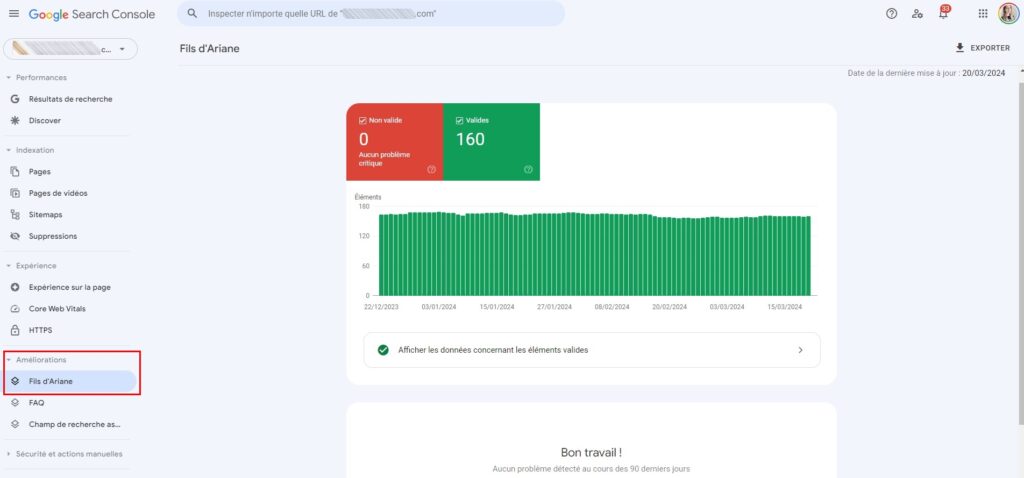
Connectez-vous à votre Google Search Console, puis rendez-vous dans la rubrique « Améliorations », en bas du menu à gauche. Vous verrez un lien « Fil d’Arianne ».
En cliquant dessus, l’outil indique d’éventuelles erreurs et comment les corriger. Si tous les signaux sont au vert, comme dans l’exemple ci-dessous, c’est que vous avez correctement installé les données structurées du fil d’Ariane !
Notre dernier conseil pour ajouter des données structurées de fil d’Ariane
L’intégration du fil d’Ariane, enrichi de données structurées, améliore à la fois l’expérience utilisateur (UX) et le référencement naturel (SEO) de votre site Web. Cette stratégie renforce la navigation intuitive et optimise votre visibilité dans les moteurs de recherche.
Pour maximiser l’efficacité du fil d’Ariane, collaborez avec un rédacteur Web SEO pour créer du contenu optimisé autour de votre activité et ainsi enrichir votre présence en ligne ! Postez dès maintenant votre annonce sur notre plateforme de rédaction, Redacteur.com !
L’article Comment ajouter des données structurées de fil d’Ariane ? est apparu en premier sur Redacteur.com.


