Dans le cadre de la transformation digitale des entreprises, la mise en place d’un ERP est devenue une nécessité.
De nombreux business ont décidé de confier l’élaboration et la mise en place de leur ERP à un développeur freelance pour les aider dans cette phase cruciale de leur développement.
Découvrez ce qu’est un ERP, ses différentes versions et les solutions existantes, comment créer un ERP sur mesure ainsi que nos conseils pour une création réussie.
Qu’est-ce qu’un ERP ?
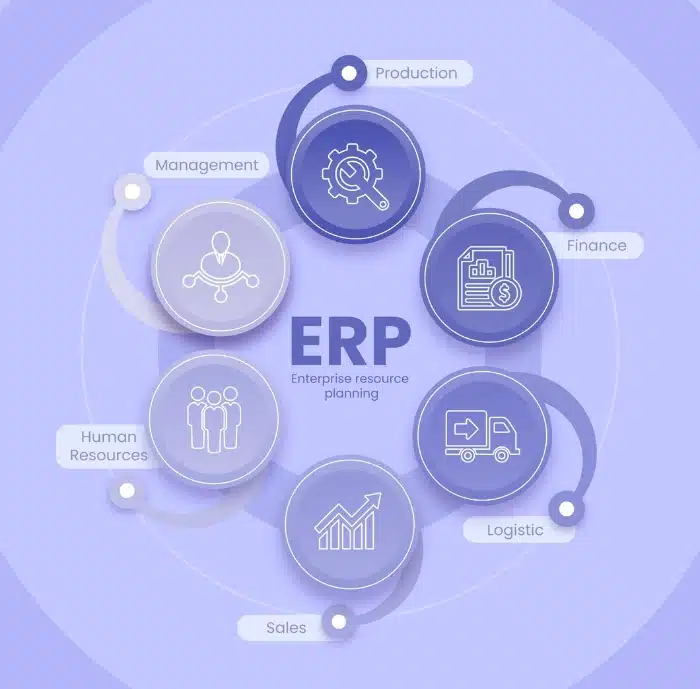
L’ERP(Entreprise Resource Planning) ou PRG (Progiciel de Gestion Intégré), est un progiciel que les entreprises utilisent pour la gestion de leur activité au quotidien (gestion des stocks et achats, gestion des risques, comptabilité, chaîne d’approvisionnement, etc.). L’ERP centralise les informations liées aux différents services de l’entreprise et compile les données entre elles sous forme d’une source unique d’information sans doublon et parfaitement fiable.
Sur cloud ou sur site, les ERP se présentent sous forme de plates-formes intégrées et complètes, véritables systèmes nerveux des entreprises. Celles-ci gèrent tous les aspects de l’entreprise, distribution et production, tout en garantissant la limpidité de votre processus métier, avec des accès différenciés en fonction des services et des utilisateurs.
Les différents types d’ERP
En fonction des besoins de votre entreprise, un choix entre différents ERP sera nécessaire.

Les ERP généralistes
C’est un logiciel passe-partout qui répondra aux besoins globaux d’une entreprise de façon simple et performante. Conçu pour s’adapter à tous les métiers, il possède des paramètres souples sur lesquels il est possible de jouer pour coller au mieux aux différents business (TPE, société…).
Néanmoins, si votre domaine d’activité présente un grand nombre de spécificités, ce type d’ERP risque d’être rapidement limité.
Les ERP spécialisés
Les ERP spécialisés sont conçus pour répondre avec exactitude aux besoins d’un corps de métier, d’un mode commercial ou d’un secteur d’activité particulier. En plus des fonctionnalités d’un ERP généraliste, il permet de prendre en compte des facteurs de développement ciblés.
Cependant, un tel outil conçu sur mesure peut offrir moins de souplesse qu’un ERP généraliste et présenter des contraintes en cas d’évolution des besoins ou de la profession s’il a été élaboré trop rapidement. Cette démarche prendra plus de temps que l’implantation d’un ERP généraliste si vous souhaitez qu’elle soit réalisée correctement.
Les différentes solutions d’ERP
En fonction de vos attentes et celles des utilisateurs de l’ERP, différentes solutions peuvent être mises en place :
Les ERP open-source
Les ERP open-source, tels que Compiere ou Openbravo, ne nécessitent pas d’acheter une licence, ce qui représente un gros avantage financier. Pour autant, ils ne sont pas gratuits, car certaines mises à jour ou maintenances techniques peuvent induire des coûts.
Il faudra également anticiper le coût de déploiement de l’ERP dans l’entreprise. Très prisés par les PME grâce à leurs prises en main et intégrations faciles, ils apportent une solution complète et rapide aux besoins généraux de ces structures.
Les ERP propriétaires
Également appelés “ERP On Permise”, les ERP propriétaires, dont il faut acheter la licence, sont hébergés sur les serveurs internes de l’entreprise, assurant un accès des données sur site par les utilisateurs et un système d’outils pour accomplir les processus quotidiens. Très à la mode il y a quelques années, les ERP propriétaires (SAP, Sage, Oracle, Cegid…) ne trouvent plus autant grâce auprès des utilisateurs.
Avec leurs coûts de maintenance et matériels élevés (périphériques de sauvegarde, serveurs, logiciels, installation sécurisée…), des fonctionnalités limitées (vitesse, flexibilité, absence de reporting…), ainsi que de collaborateurs de plus en plus nomades, les entreprises ont rapidement eu besoin de nouveaux services.
Néanmoins, la présence d’un SAV et d’un service de maintenance reste appréciée par certains utilisateurs, de même que de garder la main sur les données.
Les ERP en mode SaaS
Rapides et flexibles, les ERP en mode Saas (Software as a Service) ont le vent en poupe. Aussi bien adoptée par les start-ups, TPE et PME, que les grandes structures, cette solution accessible constamment et sur tous les appareils séduit via son système d’abonnement.
Les fournisseurs d’ERP en Saas offrent des solutions garantissant l’accessibilité, le stockage des données, des outils de reporting et d’intelligence des données, une sécurité renforcée avec des mises à jour effectuées en temps réel, sans intervention de l’utilisateur.
Avec des coûts initiaux faibles et une expertise externalisée, de nombreuses entreprises se sont déjà laissées séduire. Les éditeurs d’ERP propriétaires comme SAP, Cegid, Oracle et Sage, proposent d’ailleurs une version Saas de leurs créations. Cependant, vous ne serez plus seul maître à bord.
Pourquoi créer un ERP sur mesure ?
Créer son propre ERP, c’est investir dans un outil 100 % fonctionnel dont vous êtes propriétaire. Plutôt que de se contenter d’une solution convenant partiellement à vos besoins, la mise en place d’un ERP collant parfaitement à votre activité, ainsi qu’à votre culture d’entreprise demandera un peu plus d’efforts au démarrage, mais vous restez seul décideur et créez une solution qui fera prendre de la valeur à votre entreprise tout en améliorant ses performances.
Comment créer son ERP sur mesure ?
La création d’un ERP ne s’improvise pas. Pour un ERP réussi, passage obligatoire par les étapes suivantes :
Faire un état des lieux
Avant de définir où vous souhaitez aller, regardez d’où vous partez. La première étape consiste à diagnostiquer la situation actuelle de l’entreprise et de son système d’information en se posant des questions clés :
- Pourquoi mettre en place un ERP ?
- Quels flux d’informations sont déjà disponibles et quels outils sont en place actuellement ?
- Quel est le but central de ce déploiement ?
- Qui seront les utilisateurs de l’ERP ? /LI>
- Quels processus métiers sont touchés par cette mise en place ?
- Quels éléments garantiront la longévité de votre ERP ?
Vous pourrez ainsi rédiger précisément la définition des besoins de votre société, pour établir un cahier des charges factuel et réaliser l’implantation d’un ERP qui intègre les outils adaptés et compatibles avec votre CRM et vos process.
Recueillir les besoins des collaborateurs
En plus du soutien de la direction, l’implémentation d’un ERP aura besoin de données terrain pour accomplir avec brio sa tâche. Mettez donc vos collaborateurs dans la boucle en prenant le temps d’étudier leurs besoins et problématiques. De cette manière, vous ferez d’une pierre 3 coups en récupérant de précieuses données, en impliquant les futurs utilisateurs et en mettant en valeur leurs compétences.
Développer l’ERP par itérations
Constituez une équipe spécialement dédiée à l’organisation du projet. Celle-ci sera chargée de paramétrer votre logiciel afin qu’il réponde parfaitement au cahier des charges et aux besoins de l’ensemble des utilisateurs.
Avant de procéder au lancement, l’équipe testera plusieurs fois l’ERP pour qu’il soit le plus effectif possible dès sa mise en œuvre.
Déployer l’ERP et collecter des feedbacks
Après avoir choisi le système d’ERP le plus adapté, et constitué une équipe de travail dédiée, il est temps de procéder au déploiement de l’ERP. Le système ne sera certainement pas parfait du premier coup et il faudra nécessairement procéder à des changements petit à petit et ainsi avoir l’outil le plus performant possible.
Sollicitez vos collaborateurs afin de collecter des feedbacks pour orienter les besoins de modification ou de formation, et encore une fois, les impliquer dans le projet.
Former les équipes à votre ERP
À présent que l’ERP est implémenté, il est temps de former vos collaborateurs. Que ce soit pour la production, la gestion des stocks ou des paies, vos collaborateurs sont directement impactés par ce nouvel outil. Démystifiez-le et faites-leur prendre conscience des nouveaux avantages pour leurs travaux par la pratique et la formation.
Vous pouvez également mettre en place des modules de formation directement sur l’ERP via un support applicatif embarqué, pour une autoformation qui augmentera vos performances et diminuera les demandes de support.
Mesurer les données disponibles
Dès sa mise en place, votre ERP va collecter de nouvelles données précieuses, qui vous permettront de gérer l’évolution et le développement de votre business, que ce soit avec vos collaborateurs via le développement des processus et de la culture d’entreprise, ou avec vos clients, pour une meilleure expérience et/ou mise en place de produits et services plus performants.
Vous venez d’enclencher un changement perpétuel basé sur les données collectées, vous permettant d’être compétitif et au plus proche de votre cible en temps réel.
À qui faire appel pour créer un ERP ?
Si vous ne possédez pas les compétences en interne pour développer votre ERP sur mesure et que vous ne souhaitez pas recruter, vous pouvez également faire appel à un freelance pour assurer tout ou partie du projet.
Celui-ci disposera des connaissances et du matériel nécessaire pour une mise en place réussie, qu’il pourra mettre immédiatement à disposition de votre entreprise.
Notre astuce pour créer un ERP
Disposer d’un ERP sur mesure est un excellent moyen de développer son business avec des collaborateurs impliqués et rester dans l’air du temps, tant pour le développement de vos processus métiers que pour l’expérience de votre client cible.
Pour gagner un temps précieux et être accompagné d’experts, vous pouvez faire appel à un développeur sur notre plateforme de freelance afin de trouver rapidement la ou les personnes qui rendront votre projet d’ERP réalité.


