Site Web statique ou dynamique ? Aujourd’hui, la tendance est nettement à la deuxième option. Parce que les pages Web dynamiques sont beaucoup plus visitées par les internautes, et par conséquent, mieux référencées. Les développeurs et les agences Web ont donc tout intérêt à maîtriser la conception de ces sites interactifs, pour satisfaire la demande de leurs clients.
Mais même quand on connaît les bases du développement, les pages web dynamiques sont plus difficiles à créer que les statiques, et demandent des langages de script plus complexes. Heureusement, il existe des outils bien faits, complets, et sans codage, spécialement conçus pour la dynamisation des sites Web. Focus sur l’un des mieux notés par les utilisateurs de WordPress : Crocoblock.
Crocoblock, un pack multitâches qui facilite la vie des développeurs
Depuis 2018, Crocoblock travaille à développer des fonctionnalités qui facilitent la vie aux développeurs de sites Web. En leur offrant la possibilité de créer de nouveaux thèmes plus rapidement, et plus librement. C’est aussi Crocoblock, par exemple, qui a développé le concept Lego, une vraie avancée dans la conception des sites Web dynamiques complexes.
En relevant ces défis techniques successifs, la petite team Crocoblock est passée de 5 à 70 personnes, animées de la même ambition : faire preuve de créativité, tout en cherchant constamment des solutions pour améliorer leurs produits.
Aujourd’hui, Crocoblock, c’est un ensemble de produits et services qui offrent aux développeurs WordPress des solutions pour créer des sites Web dynamiques et personnalisés, répondant aux attentes précises de leurs clients. Pour preuve, la qualité du support Crocoblock a été évaluée à 4,9/5 par plus de 1000 utilisateurs.
Pourquoi utiliser Crocoblock pour créer un site Web dynamique ?
Le point fort de Crocoblock, et son avantage principal sur ses concurrents : proposer aux développeurs non pas juste un plugin, mais un pack de plugins tout-en-un. Une boîte à outils très complète, pour créer des sites Web dynamiques de qualité, destinés à toutes les niches, à l’aide de modules d’extension de WordPress sans code. C’est dans cette offre exhaustive et variée que réside la valeur ajoutée de Crocoblock.
Au total, le toolkit de Crocoblock contient une vingtaine de JetPlugins pour Elementor et Gutenberg, 200 widgets qui permettent de profiter pleinement des fonctionnalités d’Elementor, et plus de 60 templates prêts à utiliser, pour tous les modèles d’Elementor.
Mais comment utiliser ces produits, et comment en tirer le meilleur parti pour développer un site Web dynamique ? C’est ce que nous allons voir maintenant, en trois points-clés.
Conseil n°1 : créez votre contenu dynamique personnalisé avec Crocoblock
Si vous souhaitez créer un site Web dynamique réellement original, performant, et évolutif, les fonctionnalités de base du CMS WordPress ne suffisent pas. C’est là que les modules d’extension de Crocoblock deviennent nécessaires et avantageux. Nous vous conseillons donc de les utiliser dès le départ, pour structurer votre site, et construire votre contenu personnalisé.
Les widgets de Crocoblock vont vous permettre de créer des pages avec du contenu dynamique, comme des listings de publication, des groupes thématiques, des relations, des formulaires, des blocs de contenus personnalisés, des effets visuels. Vous pourrez aussi créer des fonctionnalités interactives (favoris, mentions j’aime…), et des pages d’options, plus pratiques que le panneau de personnalisation de WordPress.
Crocoblock vous propose de nombreux templates dynamiques prêts à l’emploi.
Vous avez aussi à votre disposition des options de mise en page variées : diaporama, grille, calendrier, carrousel… Et tout cela, sans aucune compétence en codage.
Autre avantage du toolkit de Crocoblock : sa compatibilité avec Elementor, l’éditeur natif de WordPress qu’on ne présente plus et avec Bricks Builder, le page builder montant que vous utilisez peut-être aussi.
Conseil n°2 : boostez votre WordPress avec les JetPlugins de Crocoblock
Une fois que vous aurez construit votre site, vous pourrez rendre son contenu encore plus attractif, en utilisant les JetPlugins de Crocoblock, des modules d’extension spécialement conçus pour enrichir les fonctionnalités de WordPress, chacun avec des options bien précises. Grâce à ces JetPlugins, vous allez pouvoir répondre encore mieux aux besoins spécifiques de votre site : ajout de formulaires, de landing page, d’avis clients, etc… Et optimiser au maximum les possibilités de WordPress.
Les JetPlugins de Crocoblock sont conçus à la fois pour Elementor et Gutenberg.
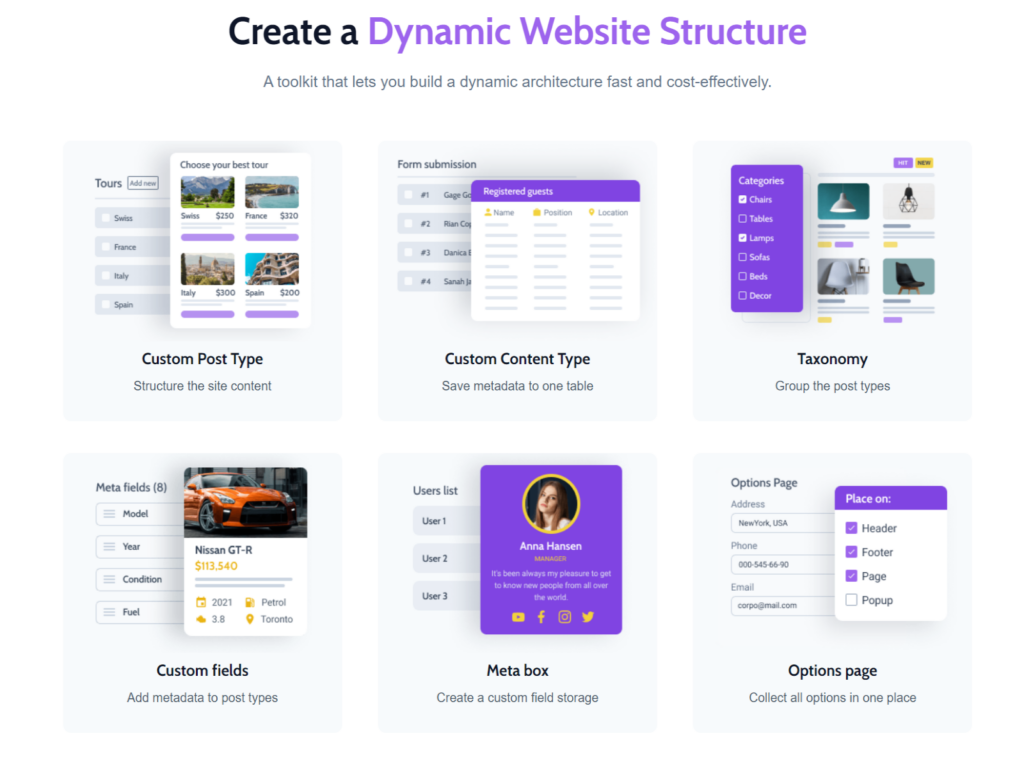
Dans cette phase d’amélioration de votre site, l’outil qui va vous être le plus utile, c’est JetEngine, le plugin phare de Crocoblock. JetEngine a été conçu dans l’esprit Lego, pour offrir aux créateurs Web une plus grande liberté, et plus d’opportunités de développement.
JetEngine va vous permettre de présenter vos données de manière encore plus dynamique et créative, grâce à neuf puissants blocs widgets dont Dynamic Filed, Dynamic Image et Dynamic Link. Vous pourrez booster votre contenu de plusieurs manières : modification du format, utilisation d’éléments dynamiques dans l’URL, et d’étiquettes pour les liens, images cliquables, ajouts d’URL dynamiques…
En outre, ces blocs widgets sont polyvalents. Vous pourrez donc les utiliser pour la création d’une liste de pages ou d’une page seule.
Conseil n°3 : choisissez les extensions Crocoblock adaptées à vos besoins
Nous avons vu les grands principes qui permettent de dynamiser un site Web, mais pour personnaliser au maximum votre site, il va falloir choisir les bons outils dans le pack Crocoblock, ceux qui répondent le mieux à vos besoins. C’est le dernier point-clé à appliquer : définir vos critères prioritaires, en fonction de la fonctionnalité de votre site, de son esthétisme, de la spécificité de votre secteur, et des besoins des utilisateurs finaux.
JetEngine sert à créer des pages avec du contenu dynamique.
- Si vous avez besoin d’ajouter un moteur de réservation, utilisez JetBooking.
- Si vous voulez intégrer à votre site une prise de rendez-vous en ligne, c’est JetAppointment qu’il vous faut.
- En revanche, si vous souhaitez travailler sur le design et les effets interactifs (portfolios, titres animés, sliders de comparaison, barres de progression…), c’est JetElement qui vous convient.
Chaque extension répond à un usage précis : à vous de déterminer le vôtre, et de vous constituer votre propre toolkit Crocoblock.


