Avez-vous constaté des erreurs de redirection sur votre site web ? La Google Search Console peut vous aider à identifier les problèmes et à les corriger rapidement.
Dans cet article, découvrez pourquoi les erreurs de redirection surviennent et comment les régler efficacement, afin d’améliorer l’expérience utilisateur et d’optimiser votre SEO.
Comprendre les erreurs de redirection de la Search Console
Les erreurs liées aux pages redirection ne sont pas seulement frustrantes, elles peuvent gravement impacter votre référencement naturel, tout comme votre image professionnelle. Décryptons ensemble le fonctionnement de ces transferts de liens et les anomalies couramment rencontrées.
Définition et types de redirections
Une redirection guide les utilisateurs et les moteurs de recherche d’une URL obsolète vers une URL active. Elles sont principales classées en deux types :
- Redirection 301 (permanente) : Utilisée pour indiquer le déplacement définitif d’une page. Elle transfère la quasi-totalité de la valeur SEO à la nouvelle URL.
- Redirection 302 (temporaire) : Indique un changement ponctuel. Elle s’utilise lors de la maintenance du site web ou lorsque le contenu est déplacé temporairement pour des raisons promotionnelles.
Pourquoi les redirections peuvent poser problème ?
Les transferts d’URL, malgré leur utilité, peuvent devenir une source de problèmes si elles ne sont pas gérées correctement :
- Impact sur l’indexation : une redirection incorrecte peut empêcher Google d’indexer correctement une page.
- Problèmes de duplication de contenu : mal configurées, elles génèrent des contenus en double, nuisibles au SEO.
- Dilution de la valeur des liens : des chaînes de redirections excessives peuvent diluer la valeur passée par les liens, réduisant ainsi l’autorité de la page cible.
- Augmentation du temps de chargement : un renvoi d’URL introduit un délai supplémentaire, dégradant l’expérience utilisateur et potentiellement votre classement dans les résultats de recherche.
Les causes courantes des erreurs Search Console des pages de redirection
Obstacles habituels, mais évitables, les erreurs de redirection nuisent significativement à la santé et à l’efficacité d’un site web. Voici les 8 erreurs de pages avec redirection les plus communes dans la Search Console.
Boucle de redirection
Une boucle de redirection survient lorsque deux ou plusieurs pages sont configurées pour se rediriger mutuellement, créant ainsi un cycle sans fin. Par exemple, la page A redirige vers la page B, qui à son tour redirige vers la page A… Aucune des deux pages ne peut être consultée.
Cette configuration entraîne, d’une part, une frustration pour l’utilisateur qui ne peut jamais atteindre le contenu désiré ; d’autre part, elle bloque les robots des moteurs de recherche, les empêchant d’indexer correctement les pages concernées.
URL incorrecte
Les erreurs peuvent également provenir de fautes de frappe. Parfois, un simple écart de saisie dans une règle de redirection entraîne les utilisateurs vers des pages inexistantes, ce qui conduit à des erreurs 404.
Configuration serveur incorrecte
Les erreurs de configuration sur les serveurs, comme des règles mal configurées dans les fichiers .htaccess pour Apache, des problèmes de paramétrages sur des serveurs Nginx ou IIS, ou des erreurs serveur 5xx sont parfois à l’origine d’une anomalie.
Souvent complexes, ces soucis nécessitent une expertise technique pour les corriger.
Problèmes de cache
Les redirections précédemment mises en cache par les navigateurs ou les serveurs peuvent également interférer avec de nouveaux transferts de liens.
Vider le cache du navigateur ou du serveur aide parfois à résoudre ce hic. Par ailleurs, vous vous assurez que les internautes et les moteurs de recherche interagissent avec les versions les plus récentes des pages.
Erreurs dans le code de redirection
Les redirections implémentées via des scripts de programmation, comme PHP ou JavaScript, peuvent être sujettes à des erreurs si le code est mal écrit. De plus, il est possible d’exclure des pages redirigées involontairement, ce qui les rend invisibles par Google et les internautes.
Problèmes de DNS
Des configurations DNS incorrectes sont parfois à l’origine d’erreurs de pages redirection détectées par la Search Console, surtout lorsqu’elles concernent des sous-domaines ou le passage de domaines différents.
Problèmes de configuration HTTPS/HTTP
Les erreurs de redirection entre les protocoles HTTP et HTTPS sont particulièrement problématiques. En effet, elles mènent à des boucles de redirection ou à des problèmes de contenu similaire. Pour gérer ces transitions de manière appropriée, nous vous conseillons de lire notre article « Search Console : corriger l’erreur “Autre page avec balise canonique correcte” ».
Identifier les erreurs des pages avec redirection dans Google Search Console
Comment identifier et corriger les erreurs de redirection signalées par Google Search Console ?
Etape 1 : Se connecter à la Search Console
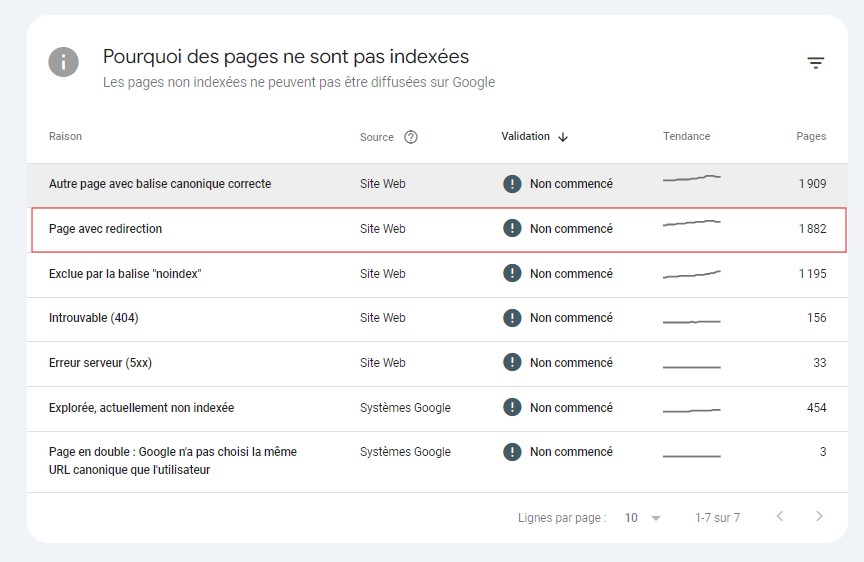
Pour commencer, accédez à la Google Search Console. Une fois connecté, naviguez vers la rubrique « Indexation », puis « Pages ». Rendez-vous sur l’encart « Pourquoi des pages ne sont pas indexées ? ». Vous verrez la raison « Page avec redirection » et le volume de pages concernées.
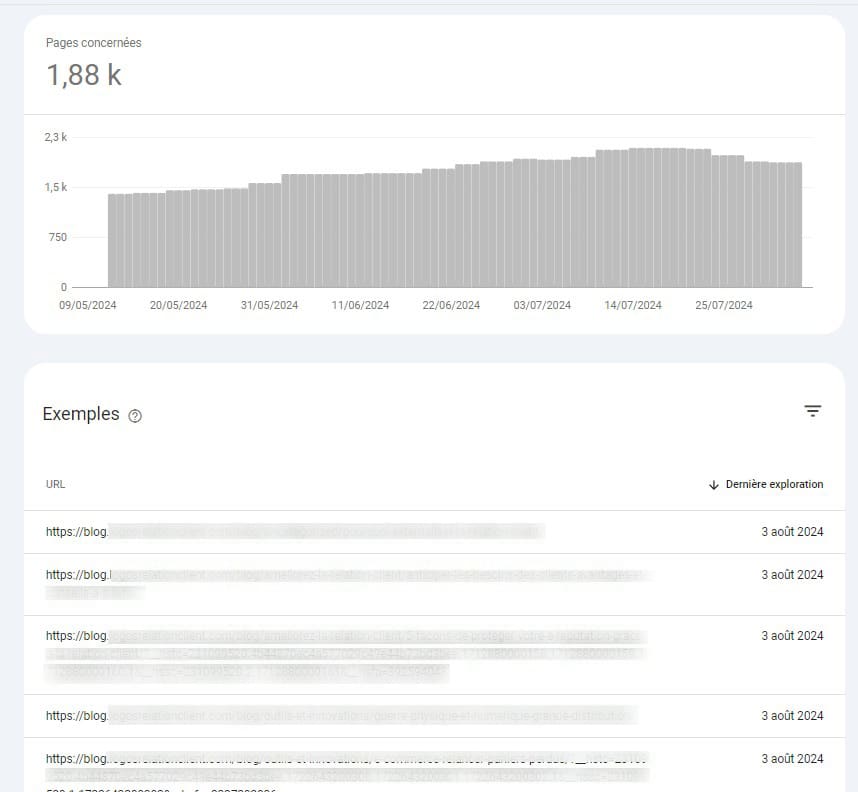
En cliquant dessus, vous obtenez un rapport qui détaille les URLs avec des redirections, ce qui facilite leur identification et leur correction.
Etape 2 : Identifier les anomalies de redirection
La détection des erreurs de redirection peut s’effectuer de plusieurs manières, en fonction de la taille et de la complexité de votre site web :
- Examen manuel : Pour les sites plus petits ou moins complexes, une revue manuelle des URLs signalées par la Search Console peut être suffisante. Examinez chaque lien pour comprendre pourquoi il est redirigé et corrigez les erreurs individuellement.
- Utilisation de crawlers : Pour les sites avec davantage de contenus, l’utilisation de crawlers tels que Screaming Frog ou OnCrawl est recommandée. Ces outils peuvent parcourir l’ensemble de votre site et identifier les redirections actives. Comparez ensuite ces données aux informations fournies par la Search Console pour découvrir les divergences ou les erreurs de redirection non captées initialement.
Etape 3 : Corriger les erreurs de redirection
Une fois identifiées, les pages avec des redirections inadaptées nécessitent une action rapide et précise pour éviter d’impacter négativement l’expérience utilisateur et le SEO.
- Vérification et mise à jour des redirections : Vérifiez que toutes les redirections sont intentionnelles et correctement configurées. Mettez à jour les règles de redirection, en vous assurant qu’elles utilisent le bon type (301 pour permanent, 302 pour temporaire) et qu’elles dirigent vers les URLs correctes.
- Optimisation des URL : Assurez-vous que les URLs de destination sont clairement structurées et optimisées pour le SEO. Évitez les liens complexes ou excessivement longs.
- Suivi et validation des corrections : Après avoir apporté les corrections, utilisez à nouveau la Search Console pour vérifier si les erreurs de redirection ont été résolues. Ce suivi est nécessaire pour s’assurer que les modifications apportées ont eu l’effet désiré et que le site est désormais exempt d’anomalies.
Si vous le pouvez, la meilleure solution reste d’aller modifier les URLs redirigées dans votre site pour qu’elles pointent directement vers la bonne URL.
Notre conseil pour anticiper les erreurs sur les pages de redirection
Anticiper et corriger rapidement les erreurs de redirection est important pour conserver votre place dans les résultats de recherche, ainsi qu’encourager les visiteurs à parcourir différentes pages. Pensez à vérifier régulièrement les erreurs remontées par la Google Search Console. Vous pouvez aussi utiliser des outils SEO pour une surveillance continue, avec des alertes en cas de changement ou de problème sur une URL.
Enfin, si vous cherchez à nettoyer votre site web pour améliorer votre référencement naturel, n’oubliez pas d’accorder aussi une attention particulière à vos contenus. Pour booster votre trafic et votre SEO, faites rédiger vos pages et articles par des professionnels, via notre plateforme de rédaction, Redacteur.com.
L’article Corriger les erreurs de la Search Console des pages avec redirection est apparu en premier sur Redacteur.com.


