Le fichier clients est un document précieux pour votre entreprise puisqu’il vous permet de répertorier l’ensemble de vos clients, voire même de vos prospects.
Utile pour vos actions de communication et/ou commerciales, il est indispensable de le tenir à jour et de fournir un maximum de renseignements.
Suivez nos conseils pour créer votre fichier clients et téléchargez gratuitement notre modèle pour créer le vôtre rapidement.

Pourquoi mettre en place un fichier clients ?
En plus de répertorier votre clientèle, le fichier clients possède de nombreux atouts et vous sera d’une grande utilité pour :
- Gagner du temps : en regroupant au même endroit vos clients vous gagnerez du temps lorsque vous rechercherez une information précise. Il sera également très simple de mettre à jour les coordonnées par exemple.
- Analyser votre clientèle : en répertoriant des informations précises sur vos clients vous pourrez analyser leurs habitudes de consommation et tirer des conclusions quant à votre stratégie commerciale.
- Mettre en place des actions de communication : grâce à votre fichier clients vous pourrez facilement exporter votre base et les informations souhaitées pour des publipostages et personnaliser des emailings.
- Mettre en place des actions commerciales : en connaissant les besoins, le budget ou encore les fréquences d’achat de vos clients, vous pourrez développer des offres adaptées et pertinentes.
À noter que pour gérer vos clients et prospects il existe également des logiciel CRM gratuits.
Que contient un fichier clients ?
Les données à renseigner dans votre fichier clients dépendent de votre secteur d’activité, mais dans tous les cas vous devez être le plus précis possible.
De manière générale, vous devrez indiquer pour chacun de vos clients (et éventuellement prospects) les informations suivantes :
- Type (client ou prospect)
- Nom et prénom
- Sexe (homme / femme)
- Adresse
- Date de naissance
- Date de prise de contact
- Téléphone
Vous pouvez ensuite rajouter l’historique des achats, les dates des rendez-vous commerciaux et/ou des entretiens téléphoniques, les actions prévues, le budget, le projet souhaité, la provenance du contact etc.
Plus vous renseignez d’informations, mieux vous connaissez votre cible.
Comment récolter des informations ?
Vous pouvez saisir de nouveaux clients lorsque ceux-ci effectuent un achat. Ils peuvent également vous fournir leurs coordonnées lors de l’élaboration d’un devis ou d’un bon de commande, directement sur un salon, lors de rendez-vous commerciaux ou lorsqu’ils prennent directement contact avec vous.
Pour les prospects, vous pouvez recueillir leurs informations en mettant en place des jeux concours, des formulaires en ligne ou encore en les invitant à créer une carte de fidélité.
Modèle de fichier clients Excel à télécharger
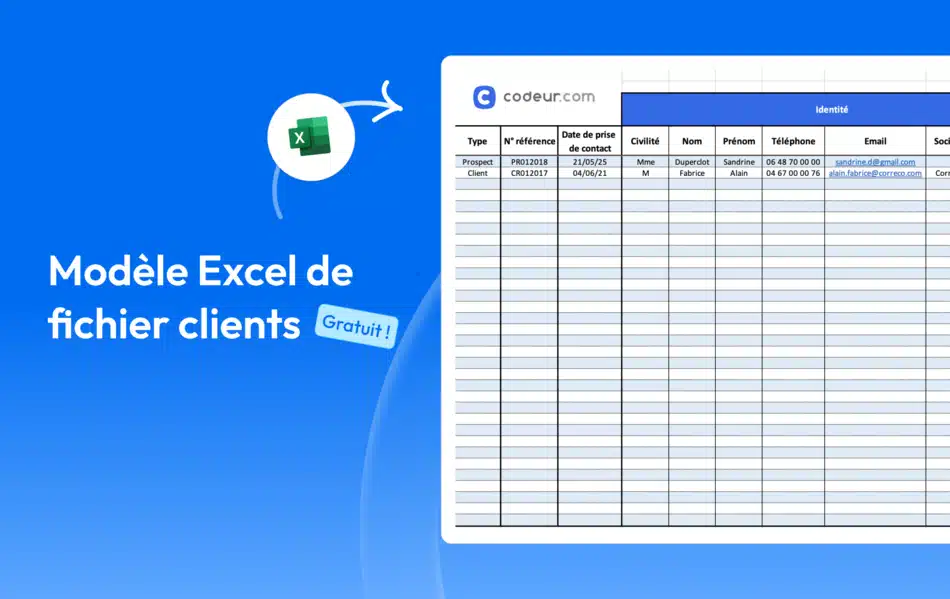
Pour vous aider à mettre en place votre fichier client vous pouvez télécharger gratuitement notre modèle Excel.
Ce fichier client Excel à télécharger est conçu pour toutes les entreprises qui ont besoin d’un exemple de base de données clients. Il est parfait pour les petites entreprises qui ne souhaitent pas investir dans un logiciel CRM complexe à prendre en main.
Afin de vous faciliter son utilisation, de nombreux champs sont déjà renseignés, vous n’avez plus qu’à compléter avec vos informations. Les cellules ont également été formatées et des listes déroulantes ont été créées pour vous permettre une saisie plus rapide.
Grâce à notre modèle de fichier clients, vous pouvez facilement l’adapter à votre secteur d’activité en supprimant ou en rajoutant des colonnes selon les informations supplémentaires que vous souhaitez récolter.
Accéder à votre fichier clients en ligne
Nous vous conseillons de mettre votre fichier client en ligne. Plutôt que d’utiliser le fichier excel directement sur votre ordinateur, préférez lui en version en ligne avec Google Sheets ou une alternative à Excel en ligne.
Cela vous permettra de créer un fichier client et d’y accéder depuis n’importe quel appareil qui dispose d’une connexion internet. De plus, vous ne ne risquez plus de perdre vos informations clients.


