Qu’il s’agisse de jeux à gros budget ou de jeux indépendants, la première étape dans le développement d’un jeu consiste à trouver un concept original qui mérite d’être porté à l’écran. Avec un peu de temps, de patience et de connaissance, tout le monde peut créer son propre jeu vidéo : grâce aux technologies actuelles et aux tutoriels de formation disponibles partout sur Internet, c’est en train de devenir une tendance !
Comme tout projet, le développement d’un jeu vidéo est un processus en plusieurs étapes qui demande :
- de l’organisation,
- de l’imagination,
- de la recherche
- de l’attention aux détails.
Que vous soyez concepteur professionnel employé dans un grand studio de jeux ou que vous utilisiez votre temps libre pour apprendre à créer votre premier jeu, tous les créateurs de jeux suivent les grandes étapes de développement dont nous allons parler dans cet article.
1. Trouver un concept de jeu vidéo
Commencez par lister quelques concepts de jeu pour déterminer le type de jeu que vous souhaitez créer.
Si c’est la première fois que vous créez un jeu, commencez par un projet modeste.
Explorez différents genres (jeu de tir, de rôles, de combat, de survie, de gestion…), puis voyez ce qui est actuellement populaire dans les médias (ou ce qui ne l’est plus). Notez toutes les idées de jeux vidéo qui vous viennent à l’esprit.
Une fois le brainstorming initial terminé, réfléchissez à l’univers et aux mécanismes de chaque jeu de votre liste. Réduisez la liste jusqu’à ce que vous trouviez le concept qui vous semble avoir le plus grand potentiel.
2. Créer un document de conception de jeu
La création de jeux implique toujours des recherches approfondies. Renseignez-vous sur le type de jeu que vous souhaitez créer et rédigez votre « Game Design Document » (document de conception de jeu).
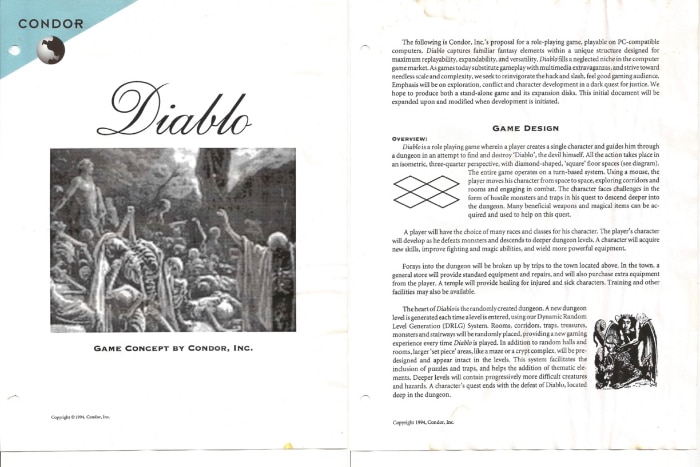
le Game Design Document du premier jeu PC Diablo
Ne négligez pas cette étape, même s’il s’agit d’un jeu en apparence simple.
Le Game Design Document est comme le squelette de votre projet : il décrit tous les détails importants de votre jeu :
- le scénario
- le genre,
- l’univers,
- l’audience visée,
- les objectifs,
- la mécanique,
- la stratégie marketing.
Ce document doit répondre à toutes les questions que le public cible va se poser sur le jeu, depuis son concept général jusqu’aux choix en matière de conception visuelle et sonore.
En tant que concepteur du jeu, vous devrez également y inscrire le langage de programmation que vous utiliserez, la taille de votre équipe de développement et les diverses ressources dont vous aurez besoin.
3. Commencer le développement du jeu vidéo
Maintenant que vous avez effectué vos recherches, vous pouvez commencer à développer votre jeu.
Vous devrez choisir le bon langage de programmation et le bon moteur de jeu pour votre concept, dont voici les plus populaires :
- Unity : moteur 3D, facile d’utilisation
- Unreal Engine : utilisé par de nombreux jeux très connus
- Project Spark : moteur 3D pour les utilisateurs de niveau intermédiaire
- Godot Engine : moteur open-source capable de faire de la 2D comme de la 3D
- Source : régulièrement mis à jour, ce moteur est très utilisé
- GameMaker Studio : moteur 2D parmi les plus populaires du marché
- RPG Maker Series : moteur conçu pour les RPG
4. Créer un prototype
Les prototypes peuvent vous aider à trouver des incohérences et une myriade d’autres problèmes dès le début de la conception. Il est important de résoudre ces problèmes à mesure qu’ils se présentent, car ils peuvent avoir un impact négatif sur l’expérience utilisateur et la réputation du jeu.
Assurez-vous que votre prototype possède toutes les facettes du jeu (le cadre, les quêtes, la conception des niveaux, les personnages, les effets sonores…)
Si vous créez un jeu de rôle (RPG), assurez-vous que vous pouvez suivre l’intrigue et que la motivation des personnages a un sens. Si vous créez un jeu de plates-formes ou d’aventure, assurez-vous que votre monde est immersif et explorable.
5. Créer le tutoriel du jeu vidéo
Pendant longtemps, la première expérience utilisateur (FTUE, pour « First Time User Experience ») d’un jeu vidéo était de suivre le tutoriel apprenant au joueur la prise en main du jeu, son but…
Les jeux devenant de plus en plus longs, et intégrant des mécanismes de plus en plus complexes, il est devenu impossible de tout enseigner dès le début du jeu. C’est ainsi que sont apparues de multiples sessions de tutoriels, présentées tout le long du parcours d’un jeu. Les tutoriels ont donc été dissociés de la FTUE, leur positionnement étant désormais étroitement liés au reste du jeu.
Si permettre de sauter ces moments est une exigence minimale dans les jeux d’aujourd’hui, sauter le tutoriel par frustration peut conduire à une mauvaise expérience dans le reste du jeu. Il est donc important de créer de bons tutoriels, qui ne froissent pas l’utilisateur.
Voyons donc quelques bonnes pratiques qui encourageront les joueurs à regarder ces passages didactiques sans entamer leur envie de poursuivre le jeu.
Intégrer le didacticiel dans le jeu
Malheureusement il existe un grand nombre de mauvais tutoriels, ce qui implique qu’aujourd’hui, la majorité des joueurs le sauteront presque toujours. Les joueurs décrivent souvent le tutoriel comme « la partie du jeu qui précède le plaisir ».
Il faut donc arrêter de considérer le didacticiel comme une partie isolée de l’expérience utilisateur. L’objectif est de faire en sorte que l’apprentissage du jeu se fonde si bien dans celui-ci que les joueurs ne puissent pas dire où se termine le tutoriel et où commence le jeu – ni même s’il y a un tutoriel tout court.
Une partie de l’apprentissage peut se dérouler au tout début du jeu, une autre à l’intérieur de celui-ci, voire tout au long, tandis qu’une autre peut n’être que le fruit d’expériences passées.

Il vaut mieux que le joueur fasse que lise
Un texte est riche en informations et facile à créer ; cependant, faire des choses est plus amusant et mémorisable. Il existe un compromis entre les 2, afin de transmettre de l’information.
Les développeurs de jeux appellent les actions que vous entreprenez dans le jeu comme étant la « mécanique » du jeu. Il est possible de combiner les objectifs d’apprentissage avec les mécanismes du jeu. C’est ainsi que l’on créé une expérience attrayante et éducative.
La base de cette règle est donc simple : il s’agit de guider le joueur à travers une action, en le motivant à effectuer cette action pour la première fois, par exemple à l’aide de lumières clignotantes et d’une flèche animée.
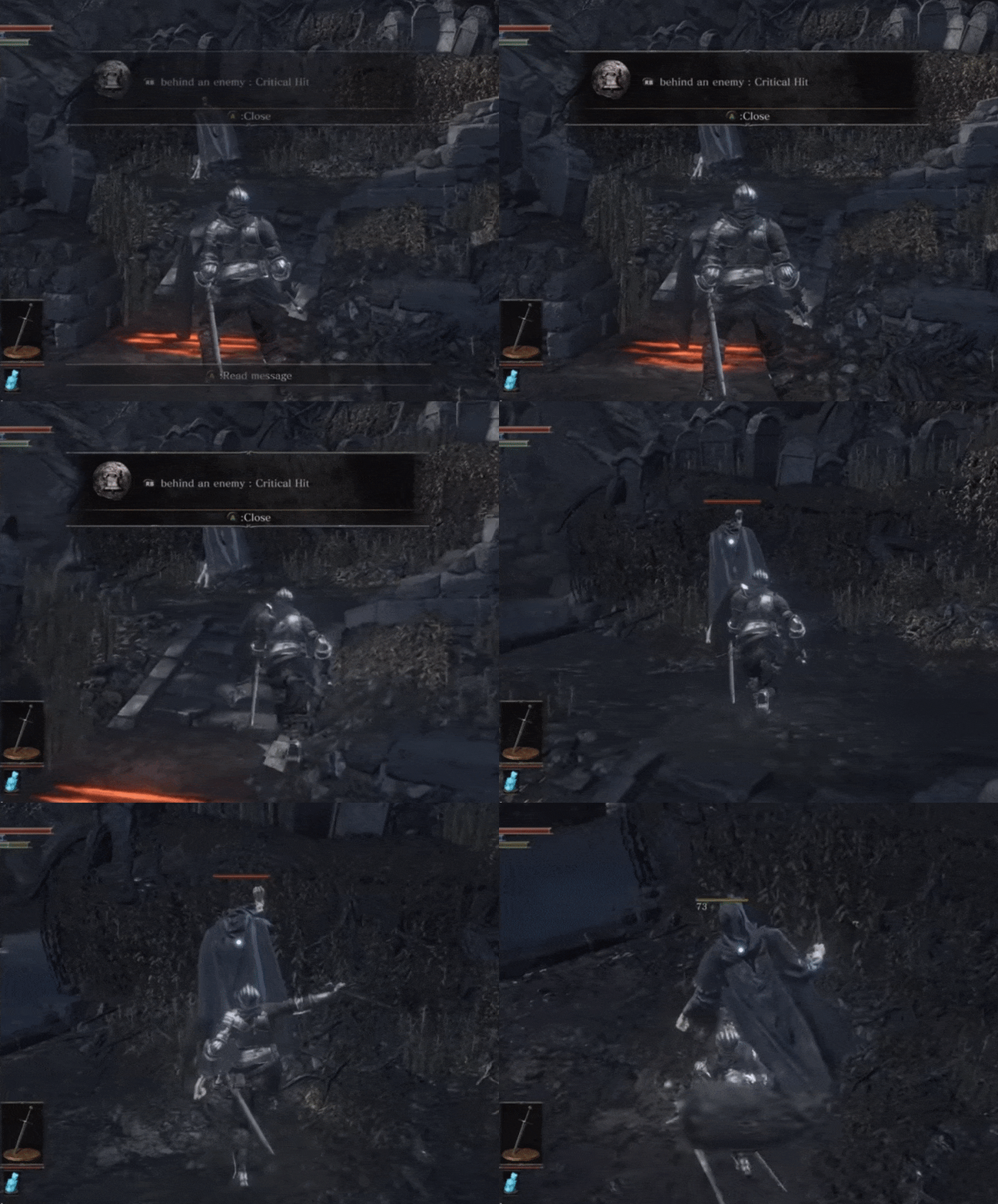
Utiliser moins de mots, et discrètement
En psychologie cela s’appelle « La loi de Miller » : Le nombre magique de sept, plus ou moins deux. Avoir un texte clair et concis que l’on peut lire d’un coup d’œil évite l’impression que le jeu ralentit.
Il ne doit donc pas y avoir plus de huit mots à l’écran en même temps. Bien sûr cette règle ne concerne que les textes didactiques ; le texte narratif peut évidemment être plus long.
Concevoir des textes brefs comporte deux avantages principaux : outre le fait que les règles simples sont plus faciles à retenir, plus le texte est long et moins les joueurs sont susceptibles de le lire.
Il est préférable de multiplier le nombre d’astuces didactiques courtes plutôt que de donner trop d’explications d’un coup.
Il faut veiller à l’affichage de ces messages et les penser de manière à ne pas interrompre le jeu. Il existe une différence subtile entre une bannière indicative et une boîte de dialogue. En général, une boîte de dialogue interrompt le cours du jeu, et impose que le joueur y réponde, en se focalisant sur un aspect bien précis du jeu. En plus d’éviter l’interruption, l’emploi d’une communication « passive » peut rester à l’écran jusqu’à ce que le joueur effectue l’action souhaitée.
Utiliser des visuels
Plus vos visuels sont forts, moins vous aurez à enseigner de choses aux joueurs. Il doit être suffisant regarder les objets du jeu pour en déterminer leur fonction.
Tirer parti de ce que les gens savent déjà
Les joueurs apportent dans le jeu toutes leurs expériences de jeu antérieures. Par exemple, il est de notoriété publique que les zombies sont stupides et doivent mourir, vous n’avez donc pas à le rappeler aux joueurs.
En déterminant quelle place un tutoriel occupera dans une série d’expériences, de l’état émotionnel attendu du joueur et de la charge cognitive à laquelle il sera confronté, toutes les décisions concernant les tutoriels peuvent façonner l’essentiel de l’expérience utilisateur de vos joueurs et de votre jeu.
6. Tester le jeu vidéo
Que vous effectuiez les tests vous-même ou que vous les confiez à des testeurs, chaque jeu doit être testé de manière approfondie avant sa sortie.
Les testeurs testent le gameplay d’un point de vue technique. L’équipe examine le titre plusieurs fois, rédige des rapports de bug détaillés et note tout « plantage ».
S’il s’agit d’un processus long, il est nécessaire : les joueurs sont moins enclins à jouer à un titre truffé de bugs ou d’erreurs, même si le jeu est gratuit.
7. Commercialiser le produit fini
Nous arrivons à la fin du processus de développement de jeu, vous devez commencer à le diffuser sur autant de plates-formes pertinentes que possible.
Créez un site Web pour votre jeu et utilisez les médias sociaux pour le promouvoir. Vous pouvez intégrer une démo jouable sur le site afin de susciter l’intérêt des joueurs pour le jeu complet.
Lorsque le jeu est prêt à sortir, proposez des exemplaires à prix réduit ou une version gratuite, afin de le mettre entre les mains du plus grand nombre
Conclusion
Bien qu’il n’y ait pas de formule préétablie pour créer le jeu vidéo parfait, il y a certaines bonnes pratiques auxquelles tous les concepteurs de jeux vidéo devraient se fier.
En suivant les étapes listées ci-dessus, nul doute que vous pourrez développer un jeu vidéo de qualité et remporter le succès souhaité. Si toutefois vous manquez de compétences en développement pour créer le jeu vidéo de vos rêves, n’oubliez pas que vous pouvez trouver rapidement un développeur freelance sur Codeur.com en postant une annonce gratuite.
Vous préférez créer un jeu mobile ou un site de jeux en HTML ? Suivez nos conseils dans ces articles dédiés !


