Que vous soyez sur X (anciennement Twitter) pour vous tenir informé des dernières tendances, suivre des experts de votre secteur ou simplement interagir avec un réseau professionnel, construire un fil d’actualité pertinent est essentiel. C’est la clé pour réussir à atteindre vos objectifs sur le site de micro-blogging.
Alors, comment optimiser votre fil d’actualité sur Twitter ? Voici nos meilleures recommandations !
Organiser votre réseau avec des Listes
L’une des fonctionnalités sous-utilisées sur X est la création de listes. Ces dernières permettent de regrouper des comptes par thèmes ou intérêts, afin de créer des flux séparés pour chaque catégorie. Ainsi, vous pouvez classer vos abonnements par concurrents, experts du secteur, médias spécialisés, sujets, prospects, clients… et ainsi affiner votre manière d’interagir avec chaque groupe.
Par ailleurs, cette pratique aide à mieux gérer votre veille professionnelle.
Pour ajouter ou retirer un utilisateur d’une liste, cliquez sur les 3 points en haut du profil et sélectionnez l’option ci-dessous :
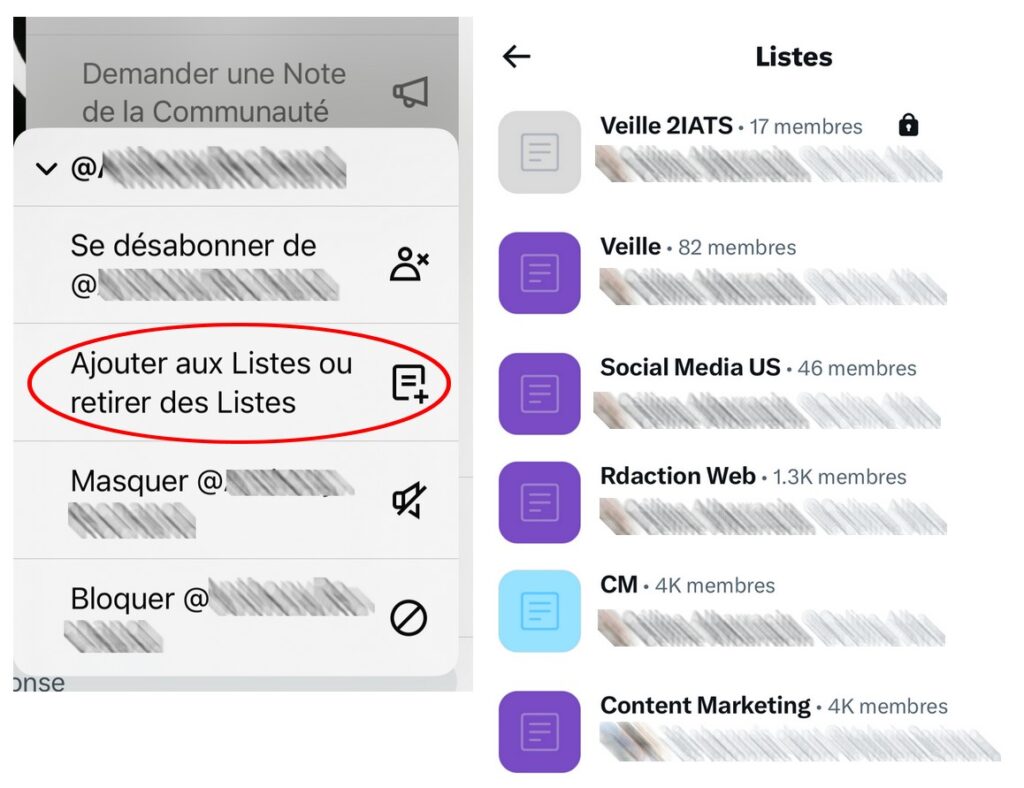
Bon à savoir : Vous pouvez rendre vos listes publiques ou privées selon vos besoins. Cela vous aide à garder un contrôle total sur les informations que vous souhaitez suivre en priorité.
Utiliser la fonction « Masquer » pour améliorer votre fil d’actualité X
Il existe des moments où vous ne pouvez pas vous permettre de vous désabonner d’un compte, qu’il s’agisse d’un collègue ou d’un ami, mais leurs tweets commencent à saturer votre fil. Plutôt que de vous désabonner, Twitter/X propose une solution élégante : masquer leurs publications. Cela vous permet de rester connecté sans voir leurs tweets pendant un certain temps (ou indéfiniment, si nécessaire).
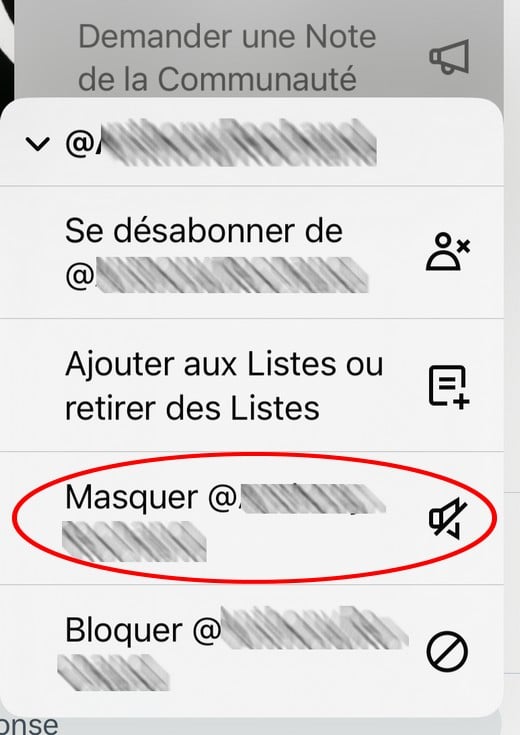
Cette fonction permet de préserver la relation tout en nettoyant efficacement votre fil d’actualité. Vous pouvez à tout moment annuler ce masquage pour recommencer à suivre leurs tweets.
Une solution idéale pour éviter les malentendus et garder un fil d’actualité pertinent.
Signaler un post non pertinent pour améliorer votre fil d’actualité Twitter / X
Sur X, vous pouvez indiquer à l’algorithme qu’une publication ne vous semble pas pertinente, ce qui personnalise votre fil d’actualité au fur et à mesure. Pour cela, il suffit de cliquer sur les trois petits points situés en haut à droite d’un tweet, puis de sélectionner “Ce post ne m’intéresse pas”.
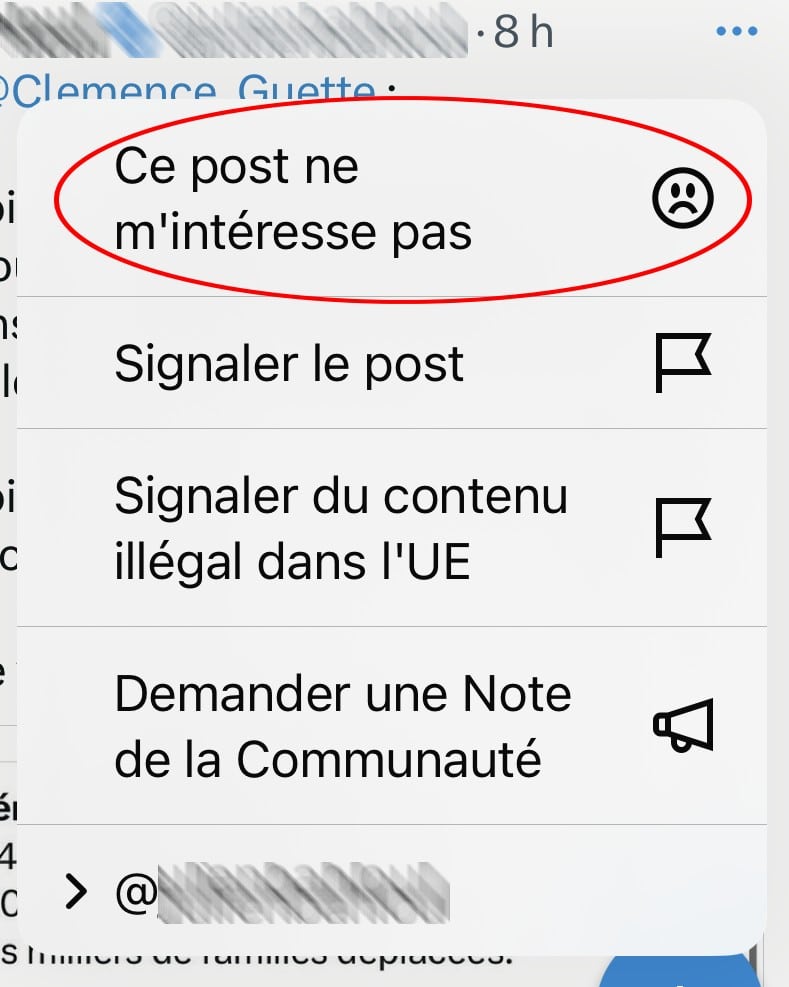
En indiquant régulièrement vos préférences, vous aidez l’algorithme à mieux comprendre ce que vous voulez voir. Ainsi, les contenus affichés sont davantage alignés avec vos objectifs professionnels ou personnels. Une option qui existe aussi pour améliorer votre fil d’actualité LiknkedIn.
Postez et engagez-vous au bon moment
Pour que votre fil soit enrichi avec du contenu pertinent, il est important de s’engager avec les bonnes personnes et aux bons moments. X favorise les tweets récents, donc le timing de vos interactions détermine le reste de votre flux.
Le fait de liker, retweeter et surtout répondre aux tweets influence ce que l’algorithme vous montre. Plus vous interagissez avec certains types de tweets ou certains comptes, plus X mettra en avant ce genre de contenu. Par ailleurs, l’engagement régulier avec votre communauté vous aide à percer plus rapidement sur Twitter !
Bonne pratique : Prenez l’habitude de répondre aux messages qui vous intéressent réellement. Cela renforce votre visibilité et influence également les sujets que vous verrez à l’avenir.
Utiliser les « Sujets » et les « Communautés » pour enrichir votre fil d’actualité sur Twitter (X)
Pour éviter d’être submergé par des tweets non pertinents, Twitter propose deux fonctionnalités puissantes : les Sujets et les Communautés.
Les sujets vous permettent de suivre des thèmes spécifiques liés à votre activité ou à vos centres d’intérêt. Parfois, le réseau social vous propose ces thèmes directement dans le fil d’actualité ou dans l’onglet « Explorer ».
Cependant, pour les trouver plus simplement, rendez-vous sur le profil d’un influenceur ou d’un média spécialisé que vous suivez. Cliquez sur les 3 points en haut à droite du profil et sélectionnez « Voir les sujets ». Une liste s’affiche alors dans laquelle vous pourrez choisir les topics qui vous intéressent.
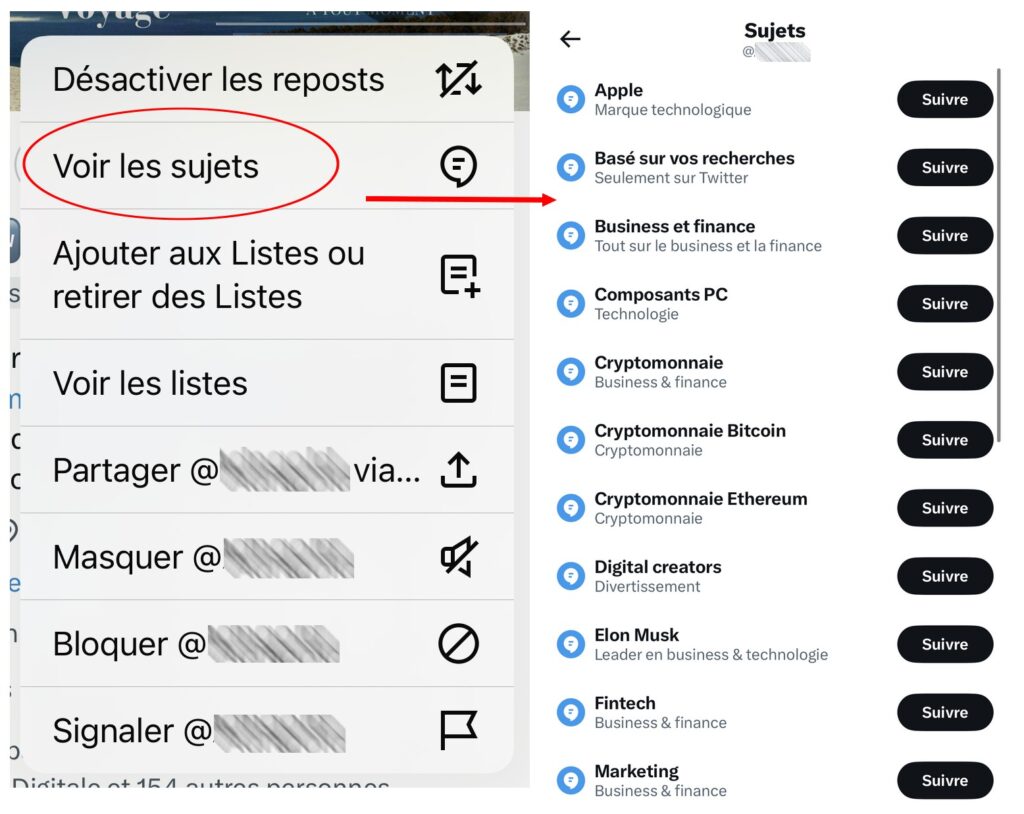
Vous verrez les messages autour de la thématique sélectionnée.
Les communautés, quant à elles, vous permettent de rejoindre des groupes centrés sur des discussions spécialisées. C’est un excellent moyen de vous connecter avec des utilisateurs partageant les mêmes centres d’intérêt et d’interagir dans un cadre plus ciblé. Pour les trouver, cliquez sur l’icône avec des personnes en bas de votre feed. X vous suggère des groupes, mais vous pourrez aussi rechercher des communautés via des mots-clés.

Utiliser les hashtags pour améliorer votre veille sur Twitter/X
Les hashtags sont un excellent moyen d’affiner votre veille sur X et de découvrir des comptes pertinents. Pour optimiser leur utilisation, choisissez des mots-clés en lien avec votre secteur d’activité et vos objectifs.
Si vous êtes dans le marketing, suivez des hashtags comme #DigitalMarketing ou #ContentStrategy. Pour une veille plus spécialisée, vous pouvez explorer des mots-clés plus précis ou de niche, comme #SEO ou #B2BMarketing.
Une bonne pratique consiste à observer ceux utilisés par les influenceurs, leaders d’opinion et concurrents de votre marché. Ainsi, vous accédez à du contenu pertinent, tout en découvrant des comptes à suivre pour améliorer la qualité de votre fil d’actualité.
Notre dernier conseil pour optimiser votre fil d’actualité X (Twitter)
Un fil d’actualité optimisé sur X peut faire toute la différence dans la manière dont vous utilisez la plateforme. En suivant ces astuces, vous transformerez votre fil en un outil puissant pour votre veille, votre networking et votre engagement sur les sujets qui vous tiennent à cœur.
Enfin, pour maximiser votre stratégie ce réseau social et atteindre vos objectifs professionnels, faites appel à un community manager freelance sur Codeur.com !


