Il n’y a pas que le Google Play Store pour bénéficier d’apps sympas sur votre smartphone ! Il est possible de télécharger une application APK Android grâce à un fichier spécifique. Certes, la manœuvre est légèrement plus complexe que de cliquer sur un bouton « Installer », mais elle vous permet de bénéficier d’outils inédits et parfois indispensables.
Recourir à une application APK Android, c’est s’offrir un large choix de softwares mobiles. Vous pouvez profiter des applis indisponibles dans l’app store ou en version bêta. Alors, comment télécharger et installer ces paquets de fichiers ? On vous dit tout !
Qu’est-ce qu’une application APK Android ?
APK est l’abréviation d’Android Package Kit. Ce format de fichier est utilisé par Android pour distribuer et installer les applications. Il contient tous les éléments nécessaires à une appli pour fonctionner correctement sur votre téléphone. Tout comme les systèmes Windows utilisent un fichier .exe pour installer un logiciel, l’APK fait de même pour Android. Autrement dit, lorsqu’un développeur Android termine la création d’une application Android, c’est l’APK qui va permettre de l’installer sur votre mobile.
Un APK est aussi un fichier d’archive, comme les fichiers ZIP et RAR. Ce qui signifie qu’il contient plusieurs dossiers, ainsi que des métadonnées utiles à l’application. Il s’avère que les APK sont une variante du format de fichier JAR (Java Archive), car une grande partie d’Android est construite avec le langage Java.
Tous les APK sont des fichiers ZIP à la base, mais ils doivent contenir des informations supplémentaires pour fonctionner correctement. Ainsi, tous les APK sont des ZIP… mais tous les ZIP ne sont pas des APK !
Une application APK Android nécessite donc l’installation de cette archive sur votre smartphone pour pouvoir fonctionner correctement.
Pourquoi installer une application APK Android ?
Plusieurs raisons peuvent vous pousser à télécharger une application APK sur votre smartphone Android :
- Bénéficier, en exclusivité, d’une nouvelle version Android
- Installer une application qui n’est pas disponible dans votre pays via le Play Store
- Télécharger une mise à jour en avance
- Tester une application avant qu’elle soit mise sur le store
- Réinstaller l’ancienne version d’une app (parce que la mise à jour ne vous convient pas ou n’est pas compatible avec votre smartphone)
- Installer des applications lorsque vous n’avez pas accès au Google Play Store
Comment les fichiers APK sont-ils créés ?
Lorsqu’un développeur crée une application Android, il utilise généralement Android Studio. Une fois que l’appli est prête, l’IDE la compile et la place dans un conteneur qui n’est rien d’autre qu’un fichier APK.
Les APK peuvent porter n’importe quel nom, mais doivent généralement conserver l’extension de fichier “.apk” pour que les systèmes d’exploitation sachent comment les interpréter. Lorsque vous ouvrez un APK, il contient les instructions d’installation et fournit des informations à votre appareil. Ce qui lui permet d’interpréter les données et de les retranscrire en appli.
Quand vous téléchargez ou mettez à jour une application sur Google Play, ce dernier installe automatiquement l’APK. L’app store agit donc comme un gestionnaire de paquets.
Toutefois, en raison de la nature ouverte d’Android, Google Play n’est pas le seul moyen de trouver et d’installer des APK. Il est facile d’obtenir un fichier APK via une autre plateforme et de l’installer manuellement. On vous dit comment dans la suite de cet article…
Comment télécharger une application APK Android ?
Pour télécharger une application APK Android sur votre smartphone ou tablette, rendez-vous dans votre navigateur web.
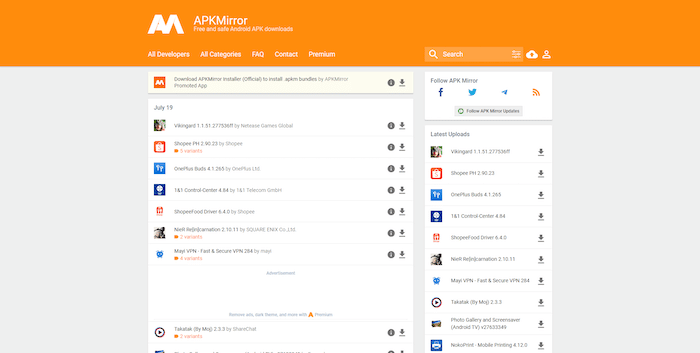
- Téléchargez l’application de votre choix.
- Depuis la barre des notifications, appuyez sur le fichier téléchargé et installez-le.
Si votre navigateur web refuse d’ouvrir le fichier après le téléchargement, vérifiez votre explorateur de fichiers. Allez dans le dossier “Téléchargements” de votre appareil, vous devriez retrouver l’APK.
Afin qu’il s’installe au mieux, pensez à bien lire les autorisations demandées et à accorder celles qui sont indispensables.
Comment autoriser l’installation d’un fichier APK sur Android ?
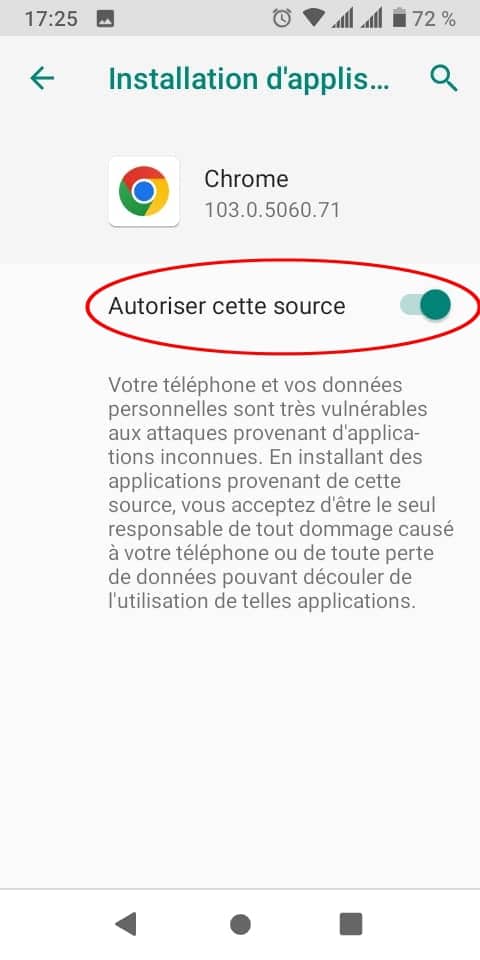
Parce que l’application APK Android ne provient pas de Google Play, le système d’exploitation ou votre navigateur peut refuser son installation sur le téléphone. Vous devez d’abord donner l’accès à ces applications dites “inconnues”.
Voici comment faire :
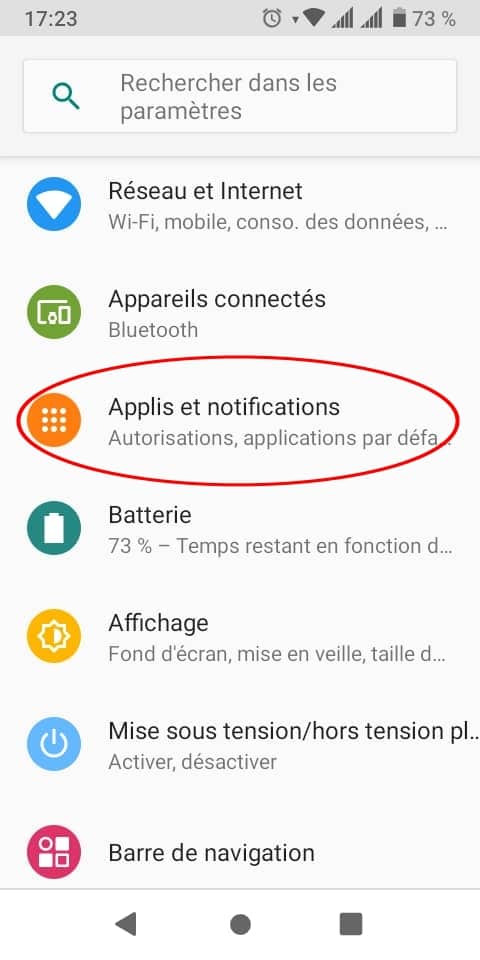
- Accédez aux paramètres de votre appareil et appuyez sur Applications & Notifications.
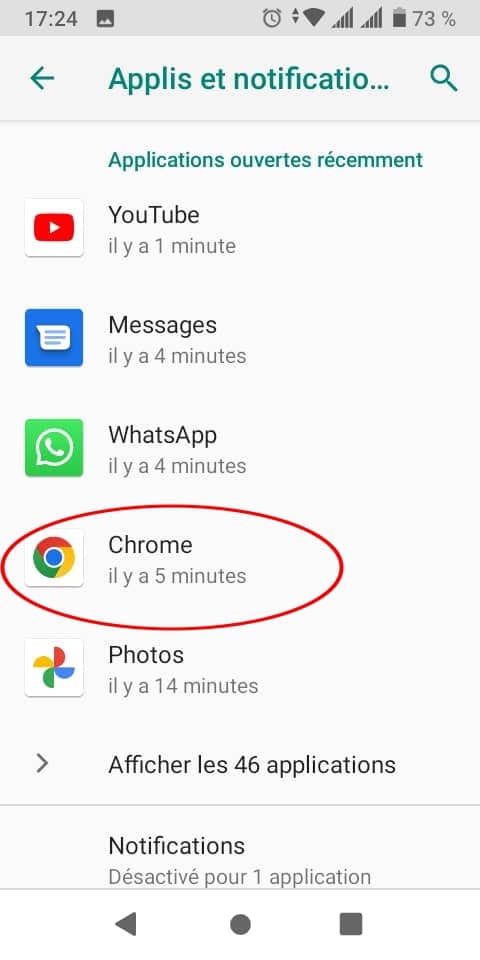
- Cliquez sur “Chrome” ou le navigateur que vous utiliserez pour télécharger l’APK Android.
- Appuyez sur Autorisations et activez le curseur “Autorisé” pour permettre l’installation des applications depuis cette source.
Sur certains smartphones Android, vous devez :
- Vous rendre dans les “Paramètres” puis “Sécurité”
- Ensuite, cliquez sur “Sources inconnues” pour autoriser l’installation d’applications ne provenant pas de Google Play
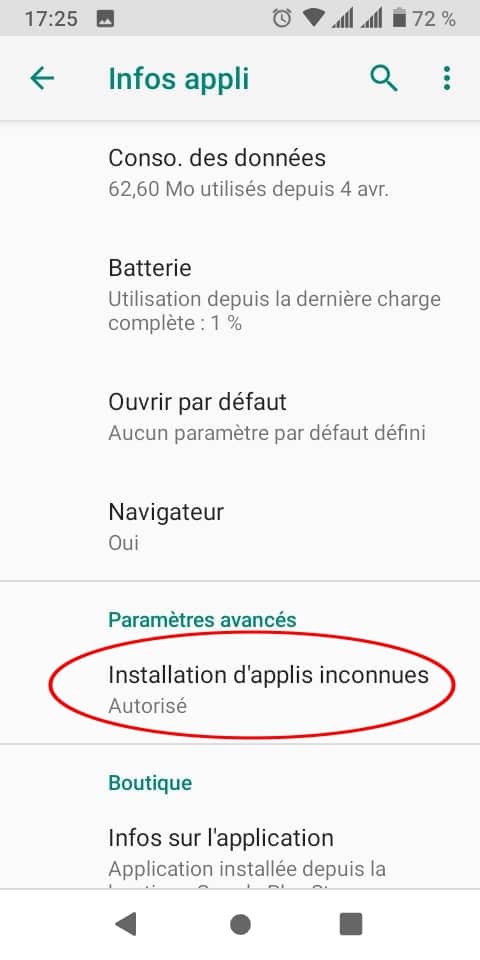
Il est aussi possible d’accorder les accès à votre application après téléchargement de l’apk depuis votre navigateur. En cliquant sur le fichier téléchargé pour l’installer, il vous sera demandé d’autoriser, au préalable, l’installation depuis les sources inconnues.
Pensez aussi à désactiver les fonctions de vérification proposées par Play Protect. L’outil risque de désinstaller votre application apk Android au motif qu’elle ne provient pas de l’app store officielle.
Faire appel à un développeur Android pour créer une application APK
Vous souhaitez créer votre propre application APK Android ? Notre conseil : faites appel à un développeur freelance, spécialiste d’Android !
Un développeur Android est chargé de concevoir et de créer des applications pour les appareils fonctionnant sous ce système d’exploitation. Ces applis Android sont généralement écrites en Java, mais il peut choisir un autre langage de programmation en fonction de vos besoins.
Ce freelance spécialisé dans le codage s’occupe principalement du processus de développement en créant les fonctionnalités de l’application. Il conçoit également l’interface utilisateur avec un chemin spécifique, favorisant la navigation et l’expérience du mobinaute. L’objectif est de le guider au mieux pour réaliser les actions attendues.
Le développeur Android se charge de créer l’architecture de l’app en écrivant un code propre. Son rôle sera aussi de minimiser ou supprimer les bugs susceptibles de provenir de l’application apk Android. En faisant appel à ce professionnel, vous bénéficiez d’une appli de qualité et vous garantissez la sécurité de vos données.
Comment choisir un développeur pour son application APK Android ?

Pour choisir le bon développeur Android pour votre application APK, voici quelques critères à vérifier :
La connaissance des langages de programmation
Les langages de programmation comme C, C++, C#, Java, Kotlin ou JavaScript s’avèrent importants pour tout développeur Android.
- Java : il constitue le langage officiel du développement Android et est pris en charge par Android Studio.
- Kotlin : c’est le nouveau langage officiel d’Android. Il est similaire, mais plus facile à coder que Java.
- C++ : Android Studio prend en charge C++ en combinaison avec Java NDK. Il est utilisé pour la création de jeux. Certains développeurs aiment s’en servir pour construire certains éléments d’une application.
- C# : ce langage est une alternative plus conviviale à C et C++. Il est aussi moins difficile à appréhender que Java.
- JavaScript : il permet de créer des applications en utilisant le même code que celui utilisé pour créer un site web.
Un développeur professionnel doit maitriser au moins 2 de ces langages.
Des connaissances supplémentaires en matière de logiciels
En plus des langages de programmation, votre développeur Android doit disposer d’autres connaissances techniques, telles que :
Une maîtrise des bases de données
La connaissance des bases de données s’avère importante pour tout développeur Android. Ce dernier devra maitriser les plus populaires comme MySQL, PostgreSQL, Redis, MongoDB, MariaDB, SQLite.
SQLite reste idéal pour les applications mobiles et utile pour le stockage permanent des données.
La connaissance d’Android Studio
Android Studio constitue un environnement de développement intégré (IDE) dans lequel les applications Android sont développées. Il fournit les outils pour créer rapidement un apk pour chaque type d’appareil fonctionnant sous ce système d’exploitation.
Pour travailler avec Android Studio, il faut connaître XML pour la conception et Java ou Kotlin pour l’écriture du code.
La connaissance du SDK Android et des différentes versions d’Android
SDK signifie « Software Development Kit » (Kit de Développement Logiciel). Il est constitué de modules de code Java qui permettent aux développeurs d’accéder aux fonctions des smartphones comme l’appareil photo, les contacts ou le GPS.
Il existe de nombreuses versions d’Android, un développeur freelance doit donc se maintenir à jour. Cela lui permettra de créer une application adaptée à tous les utilisateurs.
La connaissance des différentes API
API signifie « Application Protocol Interface » (Interface de Programmation d’Applications). Elle permet la communication entre différents programmes. Par exemple, si vous voulez ajouter la météo à votre application, vous devez vous servir d’une API.
Le développeur Android doit également prendre connaissance des directives de conception matérielle établies par Google pour éviter que votre APK soit considéré comme une menace pour les mobinautes.
Des soft skills
Au-delà des compétences techniques, le développeur Android de votre choix doit disposer de certaines qualités humaines, notamment :
Des compétences en communication
Le développement d’une application est un travail d’équipe. Le développeur devra échanger régulièrement avec vous ou votre équipe. La capacité d’écoute, ainsi qu’une facilité à répondre aux besoins reste un élément essentiel dans la création d’une application APK Android performante.
Le souci du détail
Le développeur devra écrire des centaines de lignes de code. Si un caractère ou une lettre n’est pas correct, le code ne fonctionnera pas. Le souci du détail lui permettra de concevoir une application exempte de bugs, dans les temps impartis.
La capacité d’adaptation
Le monde des applications mobiles est en constante évolution. De nouveaux langages de programmation peuvent apparaître, les normes peuvent changer et les logiciels évoluer. Un développeur d’applications doit être capable de s’adapter.
Notre astuce
Si vous aussi vous souhaitez développer une application APK Android performante, postez une annonce sur Codeur.com. Vous recevrez de nombreux devis provenant de développeurs Android freelances qualifiés avec les compétences requises !


