Optimiser votre site pour Google peut sembler complexe, mais avec quelques astuces de maillage interne, vous pourrez rapidement voir une différence. Il s’agit de faire les bons choix pour orienter aussi bien les utilisateurs que les moteurs de recherche.
Ce qu’il faut retenir :
- Un mauvais maillage interne freine la découverte de vos page par Google, passez-y du temps.
- Tous les liens internes ne se valent pas, préférez les liens au cœur du contenu plutôt qu’en header ou footer.
- Pour les liens internes : des ancres de liens internes exactes et variées sont la clé de votre succès.
- Pour les liens sortants : ils sont preuve de crédibilité, soignez vos source afin de pousser des sites crédibles et de confiance.
Liens entre vos pages : maîtrisez l’art des relations
Mais pourquoi les liens sont-ils si stratégiques ? Imaginez prendre le métro à Londres mais la station a enlevé tous les plans des lignes. Compliqué d’aller voir Big Ben, non ? Les liens internes guident vos visiteurs et les moteurs de recherche à travers votre site, leur permettant de trouver vos pages.
Texte d’ancrage descriptif : la clé du succès
Google recommande d’utiliser des textes d’ancrage clairs dans son maillage interne. Oubliez le classique “cliquez ici”. Préférez quelque chose de plus évocateur, comme “découvrez nos dernières astuces SEO”. Cela aide non seulement vos lecteurs à savoir où ils vont, mais aussi Google à comprendre la page : ancre du lien = sujet de la page pour le moteur !
Associez un mot-clé principal à votre page et utilisez-le comme ancre de liens. Tips : faites varier les ancres de liens avec les synonymes et différentes manière d’écrire (“assurance chien”, “assurance pour chien”, “assurance canine”, “mutuelle santé pour chien”).
Emplacement du lien : tous ne se valent pas !
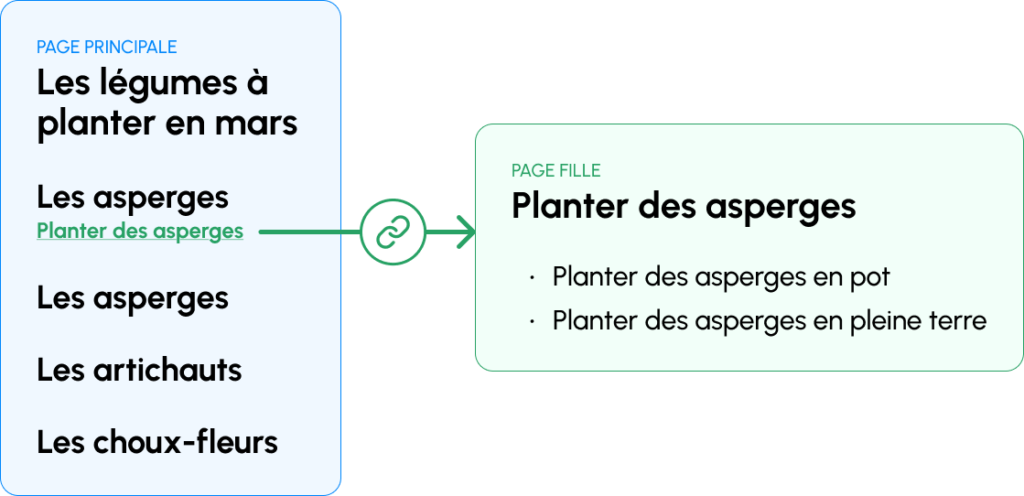
Les liens au sein du contenu principal de la page ont plus de valeur que les liens en header, footer et navigation. Utilisez votre texte pour intégrer des liens vers des pages dont le sujet est proche.
Tips : liez une page depuis un paragraphe qui parle de son sujet. Vous contextualisez l’ancre du lien.
Évitez la surcharge de liens
Une page bardée de liens dilue la puissance de chaque lien. Si une page fait 10 liens, alors chaque page cible reçoit 10% de sa puissance. Vous comprenez donc qu’ajouter trop de liens vers vos pages n’aura pas d’effet multiplicateur ! C’est une question d’équilibre.
Tips : liez les 5 à 10 pages les plus stratégiques depuis votre Home et assurez-vous qu’elles fassent, elles-même, des liens vers leurs pages filles.
<a href> le bon format des liens
Attention aux formats ! Google ne considère pas tout de la même manière :
- Utilisez la balise
<a>avec un attributhref. - Évitez les éléments non standards comme
<span>et<div>pour vos liens. - Evitez le javascript pour générer vos liens.
Comme expliqué dans la vidéo de Google ci-dessous, si l’élément ses comporte comme un lien, il vaudrait mieux que cela ressemble à un lien :
Liens sortants : une question de réputation
Les liens sortants sont les liens depuis votre site, vers des sites externes. Vus comme des recommandations, ils peuvent renforcer votre crédibilité, mais peuvent aussi la saper s’ils sont mal gérés. Vous ne recommanderiez pas un restaurant douteux à un ami, non ?
Les bonnes sources : assurez-vous de faire des liens vers des sites qui ont une forte autorité. Un lien vers une source fiable fait la différence, pour les moteurs comme pour les utilisateurs.
Le nofollow : parfois, vous voudrez indiquer aux moteurs de recherche de ne pas transmettre d’autorité à un lien. C’est là que le nofollow entre en jeu. Cela peut être utile pour les liens sponsorisés ou les commentaires de blog. Mais ne faites pas uniquement des liens nofollow, ce serait contre-productif !
Éviter les pièges courants
Certaines erreurs peuvent être coûteuses :
- Pensez à vérifier vos liens cassés ! Rien de plus frustrant pour un utilisateur que de tomber sur une page 404.
- Assurez-vous que chaque page importante est accessible en moins de trois clics depuis l’accueil.
- Pensez à ajouter des liens vers une page que vous venez de publier, au risque que Google ne la découvre pas.
L’article “SEO : pourquoi vos liens internes peuvent faire ou défaire votre classement” a été publié sur le site Abondance.


