Pour élargir votre audience sur LinkedIn, un profil actif et optimisé, associé à une page entreprise bien gérée, reste la meilleure stratégie. Les deux fonctionnent en synergie pour attirer plus d’attention sur vos contenus et générer des opportunités professionnelles.
Cependant, booster vos performances et atteindre vos objectifs passe par l’analyse minutieuse des métriques LinkedIn de votre profil ET de votre page.
Grâce à une évaluation combinée de ces 10 KPI LinkedIn, vous saurez comment maximiser votre visibilité pour gérer votre e-réputation, acquérir davantage de leads et obtenir de nouveaux partenariats.
Les 5 KPI LinkedIn à surveiller sur votre profil
Surveiller les indicateurs d’audience de votre profil vous aide à comprendre votre impact, à optimiser votre visibilité et à percer sur LinkedIn. Ces KPI se trouvent dans la section “Statistiques”, directement affichée sur votre profil.
1. Nombre de vues de profil
Le nombre de vues de profil mesure combien de fois votre profil a été consulté. Cet indicateur permet de comprendre votre visibilité et d’évaluer l’intérêt que vous suscitez.
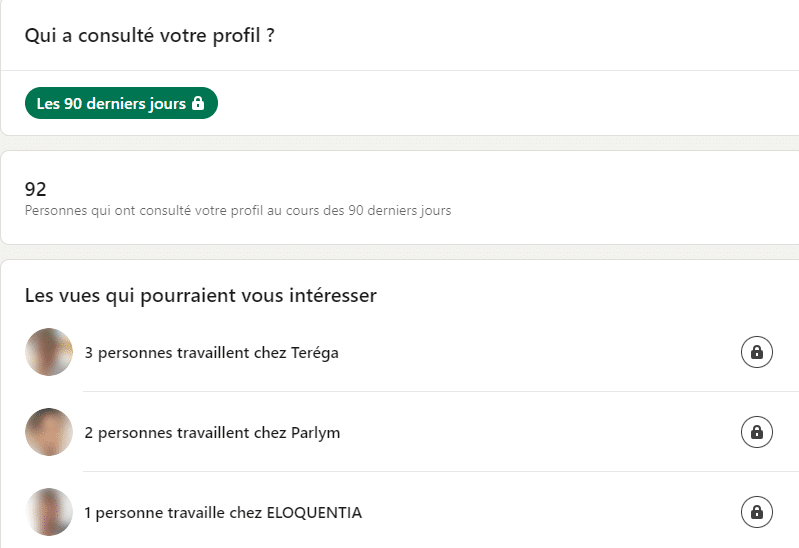
Une augmentation des vues de profil indique une meilleure reconnaissance et un intérêt accru de la part de votre réseau cible. Par exemple, une hausse peut résulter d’un post viral ou d’une participation active dans certains groupes. Dans tous les cas, ce KPI LinkedIn montre immédiatement si votre stratégie de communication est efficace… ou pas !
2. Taux d’engagement des publications
Le taux d’engagement se calcule ainsi :
(nombre de réactions / nombre d’abonnés) * 100
À savoir que les réactions regroupent les likes, commentaires et partages sur vos posts.
Ce KPI LinkedIn est important pour évaluer la pertinence de votre contenu et sa capacité à engager votre audience. Un taux d’engagement élevé montre que vos publications sont utiles et appréciées par votre réseau.
Pensez également à vérifier le taux d’engagement en fonction du format (carrousel, image, infographie, vidéo…) pour connaître les préférences de vos relations afin d’adapter votre ligne éditoriale.
De plus, pour augmenter les interactions, n’hésitez pas à poser des questions, à inciter à la discussion et au partage.
3. Croissance des relations, KPI LinkedIn phare pour votre audience
La croissance des abonnés désigne l’évolution de vos contacts. Si vous remarquez que ce chiffre est régulier, ou qu’il s’accélère, cela démontre l’efficacité de votre stratégie de contenu. Il témoigne de votre capacité à attirer de nouveaux membres dans votre réseau.
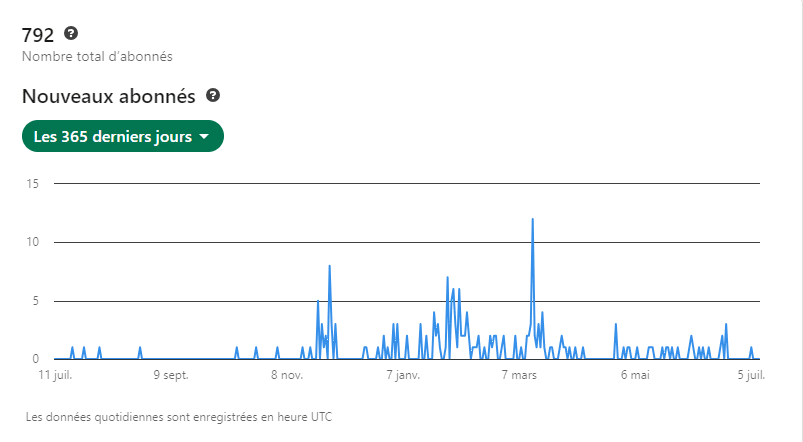
Suivre cette croissance permet d’ajuster votre ligne éditoriale, qu’il s’agisse du type de contenu, des hashtags utilisés, de la fréquence ou de l’heure de publication. Néanmoins, pour élargir votre audience et obtenir régulièrement de nouvelles relations, engagez-vous activement avec d’autres profils, participez à des discussions ou collaborez sur des articles liés à votre domaine d’expertise.
Qui sait ? En plus d’augmenter vos abonnés, vous obtiendrez peut-être un badge LinkedIn Top Voice. Un label qui va propulser votre notoriété !
4. Le nombre d’apparitions dans les recherches
Le nombre d’apparitions dans les recherches mesure combien de fois votre profil correspond à une requête des utilisateurs LinkedIn. Cet indicateur évalue la visibilité de votre profil et la pertinence des mots-clés que vous utilisez dans votre biographie ou dans votre expérience professionnelle. Un nombre élevé d’apparitions indique que votre profil est bien optimisé.
Pour améliorer ce KPI LinkedIn, surtout si votre objectif est de vendre vos services, assurez-vous d’inclure des mots-clés pertinents dans plusieurs sections de votre profil (titre, résumé, descriptions de poste, compétences…).
5. Mentions et tags dans les autres publications
Combien de personnes partagent vos articles en vous mentionnant ou vous recommandent dans leurs contenus ? Les mentions et tags indiquent que vous êtes reconnu comme une autorité ou une ressource pertinente dans votre domaine.
Ce KPI LinkedIn aide à mesurer votre influence sur le réseau social professionnel. Or, plus vous êtes mentionné, plus votre visibilité et votre crédibilité augmentent. Ce qui accroît fortement votre visibilité auprès d’une audience qualifiée.
Pour développer la visibilité de votre profil LinkedIn, des community managers LinkedIn freelances proposent leurs services pour améliorer votre personal branding. N’hésitez pas à faire appel à eux en déposant un projet gratuitement sur Codeur.com !
Les 5 KPI LinkedIn à surveiller sur votre page entreprise
Pour maximiser la portée et l’engagement de votre page entreprise, certains indicateurs spécifiques doivent être surveillés. Ces KPI peuvent être trouvés dans la section “Statistiques”, disponible à gauche de votre tableau de bord de page LinkedIn.
6. Le volume de la communauté
Le nombre d’abonnés nécessite une surveillance continue pour savoir si vos contenus fidélisent votre audience, tout en attirant de nouveaux followers.
Pour augmenter votre communauté, identifiez les formats et informations qui génèrent un maximum de partages pour les réitérer le plus souvent possible. De plus, pensez à publier régulièrement des contenus, en intégrant des hashtags performants, pour être visible auprès des professionnels intéressés par votre activité.
7. Impressions et portée des publications
Les impressions mesurent le nombre de fois que votre contenu a été affiché, tandis que la portée indique le nombre de membres uniques ayant vu vos publications. Ces métriques sont essentielles pour évaluer la visibilité et l’impact de vos posts.
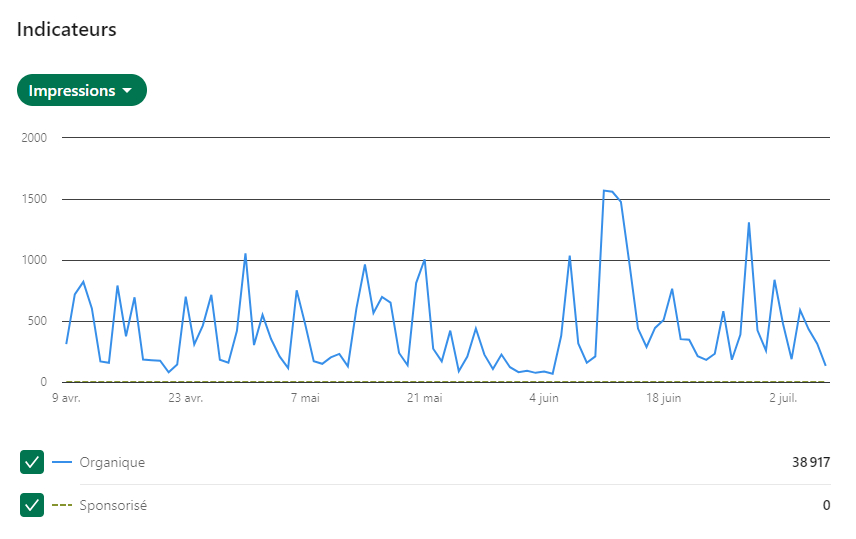
Un nombre élevé d’impressions et une portée importante montrent que votre contenu atteint un large public. Pour augmenter ces KPI Linkedin, utilisez des hashtags pertinents, publiez à des heures de forte activité et créez du contenu visuellement attrayant.
8. Démographie de l’audience, KPI LinkedIn hautement pertinent
Analyser les données démographiques de votre audience, comme l’industrie, le poste et la localisation permet, d’une part, de vérifier que vos contenus sont cohérents avec la cible que vous voulez attirer et, d’autre part, de personnaliser davantage vos publications pour mieux répondre aux attentes de votre audience.
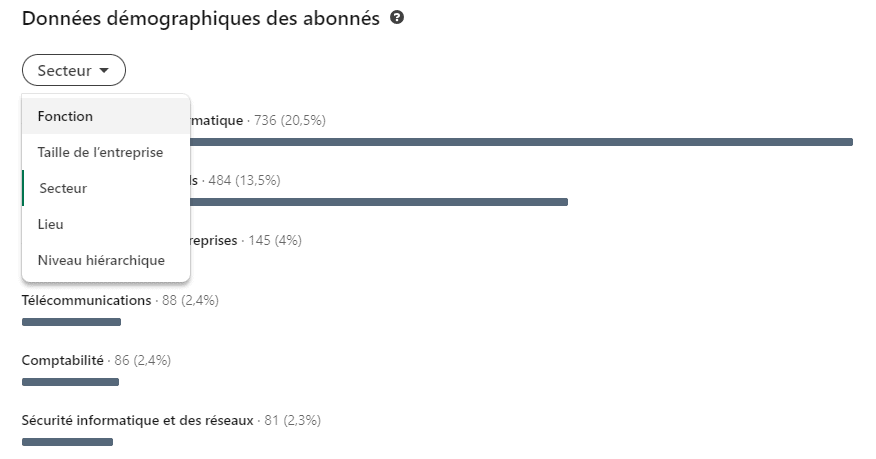
Notre conseil : utilisez ces informations pour ajuster vos messages et cibler plus précisément vos campagnes publicitaires.
9. Taux de clics (CTR) sur vos liens
Le taux de clics (CTR) sur vos annonces ou publications mesure l’efficacité de vos appels à l’action et l’attractivité de votre contenu. Si les abonnés cliquent sur un lien, c’est que vous avez suscité leur attention et qu’ils veulent en savoir plus sur votre entreprise ou vos offres.
Pour améliorer ce KPI LinkedIn, utilisez des appels à l’action clairs et attrayants, et assurez-vous que vos liens conduisent à des pages de destination pertinentes, bien conçues, notamment pour les mobiles. En effet, 57% des utilisateurs du réseau social B2B accèdent à la plateforme depuis leurs smartphones.
10. Taux de conversion des leads
Pour les campagnes publicitaires, le taux de conversion des leads mesure le pourcentage de visiteurs qui réalisent une action souhaitée, comme remplir un formulaire ou télécharger un contenu.
Ce KPI LinkedIn sert à évaluer l’efficacité de vos campagnes marketing et, surtout, à optimiser vos efforts pour améliorer votre retour sur investissement. Afin d’obtenir cet indicateur, il est nécessaire d’installer un pixel LinkedIn sur votre site internet.
Pour améliorer votre taux de conversion et mettre en place une stratégie sur LinkedIn, faites appel à un social media manager sur Codeur.com en déposant gratuitement un projet.
Notre dernier conseil pour élargir votre audience sur LinkedIn
Combiner l’analyse des KPI LinkedIn de votre profil et de votre page entreprise est efficace pour élargir votre audience. Par exemple, si vos publications personnelles génèrent beaucoup de vues de profil ou d’interactions, essayez de reproduire ce style de contenu sur votre page entreprise.
Utilisez également les données démographiques pour ajuster vos campagnes publicitaires et cibler plus précisément les personnes intéressées par votre activité.
Pour aller encore plus loin, faites appel à un social media manager sur Codeur.com. Cet expert vous aidera à analyser en profondeur vos KPI, affiner votre stratégie et optimiser vos efforts de marketing, aussi bien sur votre profil que sur votre page professionnelle !


