WordPress vient de passer à la vitesse supérieure avec la version 6.6, dite “Dorsey” ! Déployée le 16 juillet 2024, cette mise à jour apporte son lot de nouveautés et d’améliorations, mais aussi un petit hic technique.
Dans cet article, nous allons explorer les fonctionnalités fraîchement introduites et aborder le bug qui a surpris plus d’un utilisateur. Préparez-vous à découvrir comment ces évolutions vont impacter votre expérience WordPress !
Les principales nouveautés et améliorations de WordPress 6.6
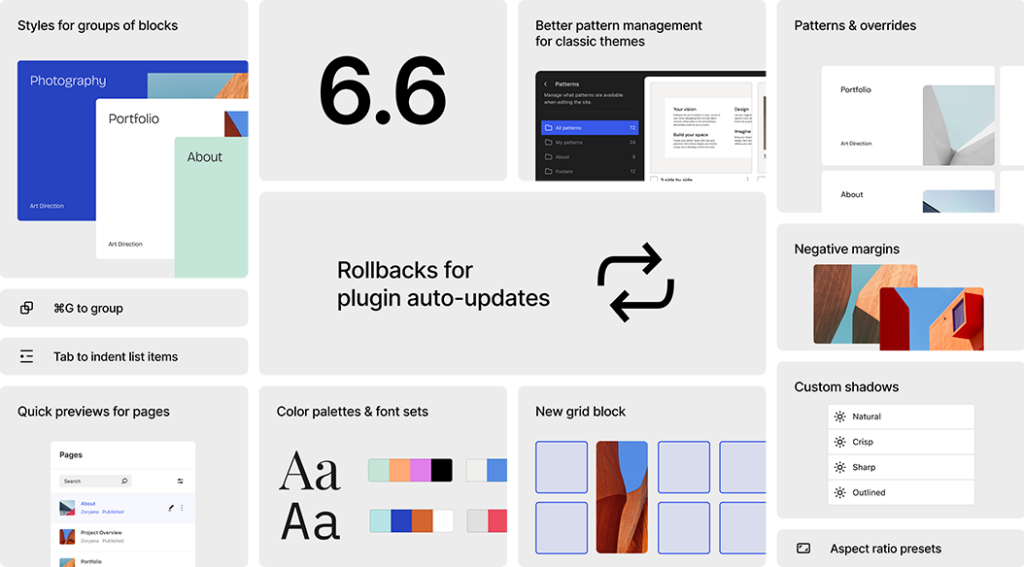
Commençons par les améliorations phares proposées par WordPress 6.6 ! De la flexibilité des blocs à la gestion avancée des styles, chaque nouveauté est conçue pour enrichir votre site web.
Bloc grille amélioré
Introduit dans la version 6.3, le bloc Grille a été optimisé. Désormais, il est possible de modifier la disposition de la grille en mode manuel. De plus, chaque élément peut s’étendre sur plusieurs lignes ou colonnes.
Une optimisation qui offre plus de flexibilité aux développeurs et designers, leur permettant de créer des mises en page dynamiques et personnalisées.
Améliorations des performances
La version 6.6 de WordPress améliore nettement les performances grâce à diverses optimisations. Par exemple, elle réduit les appels redondants WP_Theme_JSON, désactive le chargement automatique pour certaines options lourdes, introduit la directive data-wp-on-async, supprime les dépendances polyfill superflues et diminue de 40% le temps d’affichage des modèles dans l’éditeur.
Annulation de mises à jour automatiques
Les utilisateurs peuvent maintenant revenir à une version précédente d’un plugin après une mise à jour automatique. Cette fonctionnalité est importante pour la stabilité des sites, puisqu’elle permet de corriger rapidement les problèmes liés aux updates sans attendre un correctif officiel.
Images d’arrière-plan
Les utilisateurs peuvent définir des images d’arrière-plan à l’échelle du site via le fichier theme.json et l’éditeur de site. Cette capacité à uniformiser l’apparence du design améliore l’esthétique globale et la cohérence visuelle, bénéfique pour l’identité de marque.
Pré-configuration de couleurs et de typographies
Les développeurs de thèmes basés sur des blocs peuvent désormais enrichir leurs créations avec une multitude de palettes de couleurs et de styles de polices personnalisables. Cette capacité d’ajout procure une personnalisation plus poussée sans altérer le style global du site, ce qui garantit une uniformité visuelle, tout en diversifiant les options graphiques disponibles au sein d’un même thème.
Nouvelle gestion des compositions pour les thèmes classiques
Les thèmes classiques bénéficient désormais de l’expérience de création de modèles améliorée via l’éditeur de site de WordPress. Cette mise à jour offre une gestion des modèles plus complète et riche en fonctionnalités pour les utilisateurs.
Marges négatives
Il est maintenant possible d’appliquer des marges négatives dans la section Dimensions des blocs. Cette fonctionnalité procure une meilleure manipulation des espaces entre les éléments, ce qui offre un design plus précis et créatif.
Ombres personnalisées
WordPress 6.6 permet de modifier la position, l’envergure et l’intensité des ombres portées. Les webdesigners peuvent ainsi ajouter de la profondeur et du relief aux éléments graphiques, rendant les sites encore plus attractifs et modernes.
Le bug des liens soulignés : un hic malvenu
Cependant, malgré ces améliorations, un bug important a été découvert rapidement après le déploiement de la mise à jour WorPress 6.6. De nombreux utilisateurs ont signalé qu’elle provoquait l’apparition de soulignements intempestifs sur tous les liens de leurs sites.
À cet effet, la communauté WordPress a réagi avec des sentiments mitigés face à cette update. Alors que certaines des nouvelles fonctionnalités ont été bien accueillies, le bug des liens soulignés a provoqué des perturbations pour de nombreux utilisateurs.
Sur les forums de support, certains membres de la communauté ont proposé des correctifs temporaires, notamment en ajoutant des lignes de CSS personnalisées pour enlever les soulignements indésirables.
Si vous avez besoin d’aide pour corriger ce problème sur votre site, faites appel à un développeur WordPress freelance sur Codeur.com !
Les mesures prises par WordPress pour corriger le bug de 6.6
En réponse aux plaintes, l’équipe de développement de WordPress a rapidement reconnu le problème et travaille activement à une solution. Ils ont publié des instructions provisoires pour aider les utilisateurs à gérer le bug des liens soulignés en attendant une mise à jour corrective.
Selon Jean-Baptiste Audras, représentant de l’équipe Core, une version mineure pour corriger ce bug est en cours de développement et devrait être déployée sous peu.
Notre conseil pour installer la mise à jour WordPress 6.6
La version 6.6 de WordPress, bien que riche en nouvelles fonctionnalités et améliorations, a été marquée par un bug notable qui affecte de nombreux sites. Même si l’équipe se montre réactive, le problème n’est pas encore résolu. Nous vous recommandons d’attendre le correctif final pour installer cette mise à jour.
Cependant, si vous souhaitez installer WordPress 6.6 au plus vite, faites appel à un développeur sur notre plateforme de freelances, Codeur.com. Il pourra s’assurer de la parfaite compatibilité de vos thèmes et plugins avec cette update, tout en anticipant le bug des liens soulignés !


