78% des consommateurs oublient leur mot de passe et font une demande de réinitialisation.
Les emails « Mot de passe oublié » font donc pleinement partie de votre stratégie marketing. Mal configurés, ils peuvent vous faire perdre des clients et ternir votre image.
Alors, voici 6 astuces pour créer des emails de réinitialisation de mot de passe de qualité !
1. Éviter de ressembler à un email de phishing
Les emails de réinitialisation de mot de passe sont régulièrement utilisés par les hackers. Dans certains cas, ils imitent très bien la marque de l’expéditeur.
Si vous envoyez un email « Mot de passe oublié » qui comprend un texte bâclé et une URL maladroite, les destinataires hésiteront à faire confiance.
Dans la mesure du possible, incluez des informations pertinentes pour que vos emails se distinguent des tentatives d’hameçonnage. Utilisez un design professionnel qui ressemble à la charte graphique de votre marque. Soignez vos tournures de phrase et relisez bien l’email. S’il y a des fautes d’orthographe, ce sera forcément suspect !
2. Ajouter un lien en plus du bouton de réinitialisation
Le lien permettant de réinitialiser le mot de passe est l’élément le plus important de l’email. Il doit être visible et facile à cliquer. Idéalement : proposez un bouton coloré, centré, et visible sans avoir à faire définir le message.
Cependant, il peut arriver les boutons ne fonctionnent pas, selon les paramètres de messagerie du destinataire. Pour éviter une telle situation, ajoutez toujours un lien à côté ou en dessous, comme dans cet exemple :
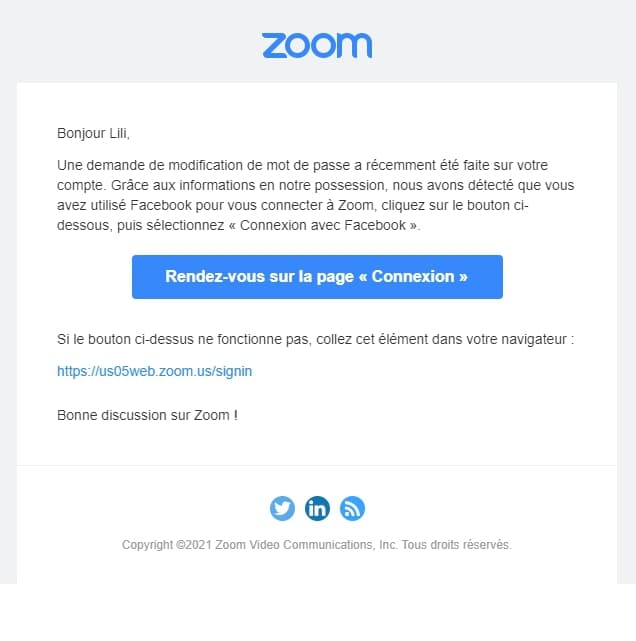
Ainsi, vos abonnés seront en mesure de réinitialiser leur mot de passe en copiant/collant le lien dans leur navigateur.
3. Proposer de l’aide supplémentaire
Tout le monde n’est pas doué en informatique. Il se peut que certains clients comprennent mal la procédure ou n’aient jamais eu à le faire. Pour leur faciliter la vie, proposez de les accompagner.
Plus il est facile de résoudre les problèmes de réinitialisation du mot de passe, plus les utilisateurs seront satisfaits.
Pour cela, il suffit d’indiquer le numéro de téléphone ou l’adresse électronique de votre service d’assistance. Si besoin, le destinataire pourra être guidé dans les étapes de réinitialisation.
4. Communiquer le délai d’expiration du lien de réinitialisation
Pour des questions de sécurité, il est conseillé de limiter la durée de validité du lien de réinitialisation du mot de passe.
Cependant, dans certains cas, ce lien expire avant que le destinataire ait eu l’occasion de vérifier sa boîte de réception. Il est donc essentiel de communiquer sur le délai d’expiration, comme dans cet exemple :
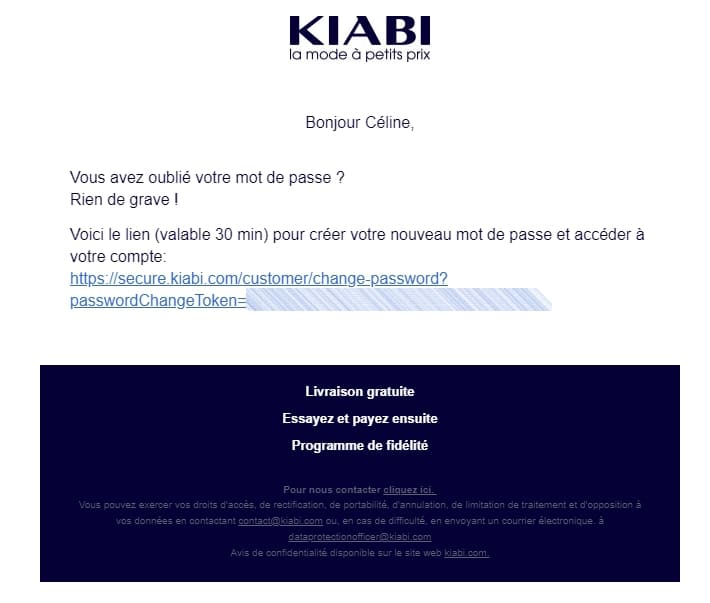
Il n’existe pas de norme, c’est selon vos préférences. Mais la recommandation générale est de 20 minutes à une heure.
Afin de contrer l’effet « lien expiré », vous pouvez ajouter un bouton qui permet de lancer une autre demande de réinitialisation de mot de passe en un clic.
5. Indiquer clairement l’objet
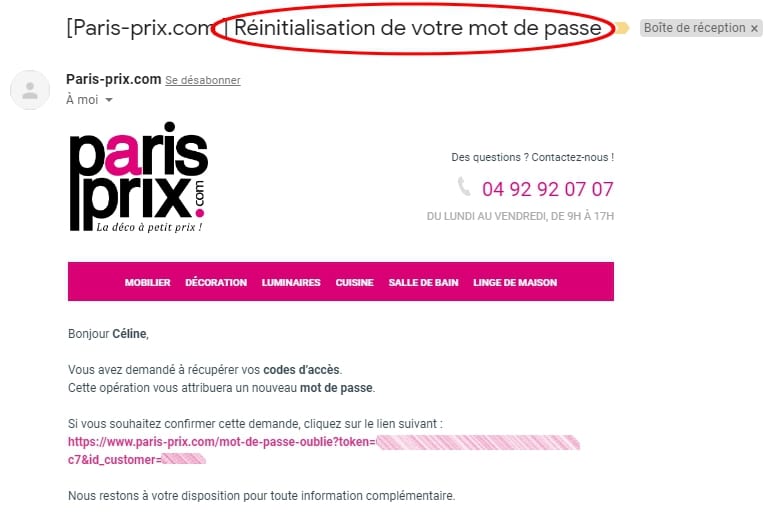
Contrairement à vos emails promotionnels, inutile de vouloir être original. L’objet du message doit être clair et compréhensible. Faites simple en indiquant « réinitialisation du mot de passe » ou « mot de passe oublié » afin que le destinataire comprenne immédiatement que c’est l’email qu’il attendait, comme dans cet exemple :
6. Renvoyer un email de confirmation
Certains utilisateurs peuvent oublier qu’ils ont réinitialisé précédemment leur mot de passe. Ils peuvent essayer de se reconnecter avec les anciens identifiants. Ce qui peut constituer une source de frustration.
Pour offrir une meilleure expérience à vos clients, envoyez un email de confirmation à l’utilisateur qui a oublié son mot de passe. Cet email doit contenir les informations relatives à la réinitialisation comme la date et l’heure.
Pour renforcer encore plus la sécurité et la confiance, incluez un lien pour protéger le compte du client s’il n’est pas à l’origine de la demande.
Avec la multiplication des outils et sites e-commerce, les consommateurs doivent se souvenir de plusieurs mots de passe. Ce qui n’est pas toujours évident !
S’ils ont besoin de réinitialiser leurs codes sur votre site internet, il est essentiel de leur faciliter l’expérience pour s’assurer qu’ils continueront d’utiliser vos services ou de commander sur votre site !
Besoin d’aide pour créer et paramétrer vos emails ? Trouvez un consultant en email marketing rapidement sur Codeur.com !


