Vous venez de publier un nouvel article sur votre blog ou une nouvelle page sur votre site internet, et vous avez fait toutes les optimisations nécessaires pour améliorer votre référencement naturel.
Oui mais voilà : tout ces efforts seront invisibles si Google n’indexe pas votre contenu dans sa base de données !
Comment savoir si votre nouveau site, ou contenu, prendra une heure ou une semaine à être visible dans les résultats de recherche ? Comment faire pour réduire le temps entre la publication et l’indexation de votre nouvelle URL ?
Nous savons que l’indexation d’un contenu par Google peut prendre de quelques jours à quelques semaines.
Heureusement, il existe des mesures simples que vous pouvez prendre pour une indexation plus efficace. Nous allons voir comment accélérer le processus ci-dessous.
1. Demander l’indexation à Google
Le moyen le plus simple d’obtenir l’indexation de votre site est d’en faire la demande via la Google Search Console.
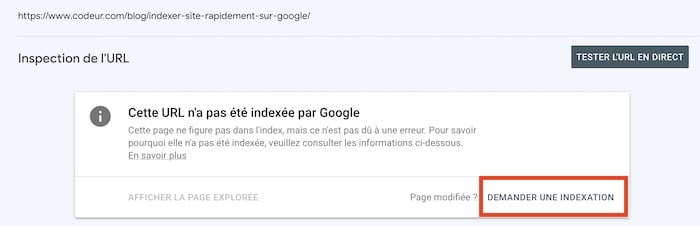
Pour ce faire, rendez-vous sur l’outil d’inspection des URL et collez l’URL que vous souhaitez voir indexée dans la barre de recherche. Attendez que Google vérifie l’URL : si elle n’est pas indexée, cliquez sur le bouton « Demander l’indexation ».
Comme mentionné en introduction, si votre site est nouveau, il ne sera pas indexé du jour au lendemain. En outre, si votre site n’est pas correctement configuré pour permettre à Googlebot de l’explorer, il est possible qu’il ne soit pas indexé du tout. Continuons !
2. Optimiser le fichier Robots.txt
Le fichier Robots.txt est un fichier que Googlebot reconnaît comme une consigne concernant ce qu’il doit ou ne doit pas explorer. Les autres robots des moteurs de recherche comme Bing et Yahoo reconnaissent également les fichiers Robots.txt.
Vous pouvez utiliser les fichiers Robots.txt pour aider les robots d’exploration à donner la priorité aux pages les plus importantes, afin de ne pas surcharger votre propre site de requêtes.
Vérifiez également que les pages que vous souhaitez indexer ne soient pas indiquées comme non-indexables. D’ailleurs, c’est notre prochain point sur la checklist.

3. Balises Noindex
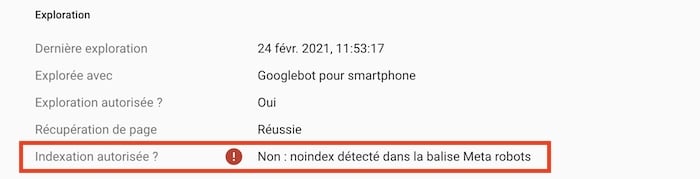
Si certaines de vos pages ne sont pas indexées, c’est peut-être parce qu’elles ont des balises « noindex ».
Ces balises indiquent en effet aux moteurs de recherche de ne pas indexer les pages. Vérifiez la présence de ces deux types de balises :
Les balises Meta
Vous pouvez vérifier quelles pages de votre site Web peuvent avoir des balises noindex en recherchant les avertissements « page noindex ». Si une page est marquée comme noindex, supprimez cette balise et soumettez l’URL à Google, pour qu’elle soit indexée.
Les balises X-Robots
A l’aide de la Search Console de Google, vous pouvez voir quelles pages ont une balise « X-Robots » dans leur en-tête HTML.
Utilisez l’outil d’inspection des URL : Après avoir entré une page, recherchez la réponse à la question « Indexation autorisée ? ».
Si vous voyez les mots « Non : ‘noindex’ détecté dans la balise « X-Robots-Tag »», vous savez qu’il y a quelque chose que vous devez supprimer.
4. Utiliser un plan de site
Une autre technique assez répandue pour accélérer l’indexation Google de votre contenu est d’utiliser un sitemap.
C’est tout simplement un fichier qui permet de donner à Google des informations sur les pages, images ou vidéos présentes sur votre site web. Cela vous permet aussi d’indiquer au moteur de recherche la hiérarchie entre vos pages, ainsi que les dernières mises à jour à prendre en compte.
Utiliser un plan de site peut s’avérer particulièrement utile pour l’indexation Google dans les cas suivants :
- Votre site héberge beaucoup de pages et de contenus différents : cela vous assure que Google n’en oublie pas.
- Vous n’avez pas relié toutes vos pages entre elles : un plan de site vous permet d’indiquer à Google les relations entre vos différentes URL, et de trouver d’éventuelles pages orphelines.
- Votre site est encore trop récent pour posséder des backlinks ou liens externes entrants : cela vous permet d’alerter Google sur la présence de vos pages.
Vous pouvez envoyer votre plan de site dans l’outil « SiteMap » de la Search Console et signaler sa présence dans votre fichier robots.txt

5. Surveiller les balises canoniques
Les balises canoniques indiquent aux robots d’exploration si une certaine version d’une page est préférée.
Si une page ne possède pas de balise canonique, Googlebot pense qu’il s’agit de la page préférée et que c’est la seule version de cette page : il indexera donc cette page.
Mais si une page possède une balise canonique, Googlebot suppose qu’il existe une autre version de cette page – et n’indexera pas la page sur laquelle il se trouve, même si cette autre version n’existe pas !
Utilisez l’outil d’inspection des URL de Google pour vérifier la présence de balises canoniques.
6. Travailler le linking interne
Les liens internes aident les robots d’exploration à trouver vos pages Web. Votre sitemap présente l’ensemble du contenu de votre site Web, ce qui vous permet d’identifier les pages qui ne sont pas liées.
- Les pages non liées, appelées « pages orphelines » sont rarement indexées.
- Éliminez les liens internes en nofollow. Lorsque Googlebot rencontre des balises nofollow, il signale à Google qu’il doit supprimer de son index le lien cible marqué.
- Ajoutez des liens internes sur vos meilleures pages. Les robots découvrent du nouveau contenu en explorant votre site Web et les liens internes accélèrent ce processus. Rationalisez l’indexation en utilisant des pages de haut rang pour créer des liens internes vers vos nouvelles pages.

7. Liens externes
Google reconnaît l’importance d’une page, et lui accorde sa confiance lorsqu’elle est conseillée par des sites faisant autorité. Les backlinks issus de ces sites indiquent à Google qu’une page doit être indexée.
8. Partager sur les réseaux sociaux
Google surveille également les réseaux sociaux, et notamment Twitter, pour lequel il semble très rapide.
Partager vos nouveaux contenus sur ces réseaux sociaux permet d’amener rapidement Googlebot sur votre page. Plus elle est explorée rapidement, plus vite elle sera indexée.
Besoin d’un consultant SEO pour vous aider à référencer votre site plus rapidement et améliorer votre position dans les résultats de moteurs de recherche ? Postez un projet gratuitement sur Codeur.com et recevez vos dix premiers devis dans l’heure !


