Dans quel cas faire une redirection d’URL ? Quelles sont les différentes redirections existantes (300, 301, 304…) et laquelle appliquer selon sa situation ? Réponse dans cet article.
Qu’est-ce qu’une redirection d’URL ?
Une redirection d’URL est un mécanisme qui permet de renvoyer automatiquement un internaute (et les moteurs de recherche) d’une adresse web vers une autre. Elle est utilisée lorsqu’une page a changé d’adresse, a été supprimée ou fusionnée avec une autre. Par exemple, si vous déplacez un article de blog, la redirection évite que les visiteurs arrivent sur une page d’erreur (404). En SEO, c’est une pratique essentielle pour préserver le référencement et transférer l’autorité de l’ancienne page vers la nouvelle. Les redirections les plus courantes sont la 301 (permanente) et la 302 (temporaire), selon que le changement d’adresse est définitif ou non.
Si cette pratique est très utile, elle reste parfois complexe à réaliser. Il existe en effet plusieurs types de redirection d’URL et il convient de choisir la bonne, celle adaptée à votre situation, pour ne pas dégrader l’expérience utilisateur ni votre référencement naturel.
Quelles sont les différentes redirections d’URL existantes ?
Il existe plusieurs types de redirections d’URL, chacune ayant une fonction spécifique selon le contexte et l’objectif recherché. Les voici :
- La redirection 301 (permanente) indique que la page a été déplacée définitivement vers une nouvelle adresse. Elle transfère presque entièrement la valeur SEO de l’ancienne page vers la nouvelle et doit être utilisée lors d’un changement d’URL durable.
- La redirection 302 (temporaire) signale que le déplacement n’est que provisoire — utile, par exemple, lors d’une refonte ou d’un test de page.
- La redirection 307, plus récente, remplace la 302 dans les protocoles modernes (HTTP/1.1) et conserve les méthodes de requête.
- La redirection meta refresh, exécutée côté navigateur après quelques secondes, mais peu recommandée pour le SEO.
- Balise canonique : n’est pas une redirection à proprement parler, mais elle indique aux moteurs de recherche quelle version d’une page doit être considérée comme la principale pour éviter le contenu dupliqué.
Quand utiliser une redirection d’URL ?
Une redirection d’URL peut être utilisée selon de nombreuses situations auxquelles vous serez certainement confronté un jour. Parmi les plus courantes, on peut citer les suivantes.
Le changement de nom de domaine
Lorsque votre nom de domaine est trop long ou n’est plus représentatif de votre activité vous êtes souvent contraint de le changer.
Une redirection d’URL est nécessaire pour rediriger les internautes qui tombent sur votre ancien site vers votre nouveau site.
L’accès à une même page web via des URL différentes
Lorsqu’un même contenu est accessible via différentes URL, cela crée du duplicate content, ce qui est très mauvais pour votre référencement naturel. C’est souvent le cas pour la page d’accueil d’un site.
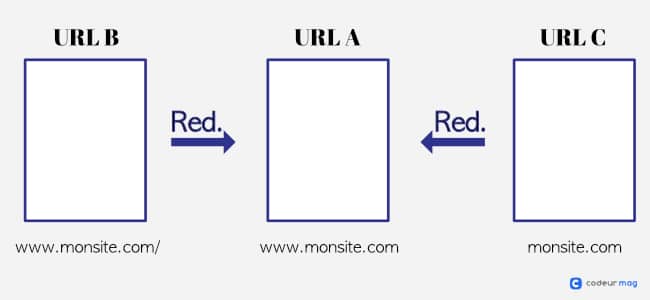
Admettons que votre page d’accueil peut être visitée via trois URL : URL A, URL B et URL C. Grâce à une redirection, vous pouvez par exemple rediriger tous les utilisateurs qui arrivent sur les URL B et C vers l’URL A. Cela indique à Google la page qui doit être indexée et confère plus d’autorité à cette dernière.
La modification des URL
La modification d’URL peut être utile lorsque vous mettez à jour votre site et que vous touchez à la structure de vos URL. Prenons l’exemple d’un site e-commerce : votre produit intitulé “tasse de thé” est accessible via l’url suivante : www.monsite.com/categorie/vaisselle/tasse-de-the.
Si vous décidez de retirer le répertoire “catégorie” pour simplifier et réduire la longueur de vos URL, votre produit sera alors accessible via www.monsite.com/vaisselle/tasse-de-the.
Si vous ne créez pas de redirection, il est probable que des internautes tombent sur une erreur 404 en cliquant sur l’ancienne URL. Cela peut arriver si un site tiers a linké votre produit avant le changement opéré sur vos URL.
L’accès à un site multilingue
Si vous exercez votre activité à l’international et que vous possédez votre site dans différentes langues, vous pouvez créer des redirections d’URL. Celles-ci permettent d’afficher aux internautes la bonne version du contenu selon leur position géographique.
Les redirections d’URL peuvent aussi être mises en place si vous fusionnez deux sites web, si vous supprimez une page web ou encore si vous ne souhaitez plus utiliser le “www” (ou inversement).
Les grands types de redirection d’URL
Il existe deux types de redirection d’URL :
- La redirection côté client ;
- La redirection côté serveur.
Cette dernière est exécutée par un serveur comme son nom l’indique, tandis que la première est réalisée directement par le “client”, bien souvent le navigateur de l’utilisateur.
Les redirections côté serveur
Les redirections côté serveur sont les plus courantes. Pour qu’un internaute soit redirigé vers une URL, une requête HTTP est effectuée vers le serveur web. Ce dernier délivre alors un code de statut HTTP qui précise la redirection à réaliser.
Le code de statut correspond au nom des redirections. Ces dernières peuvent être temporaires ou permanentes.
| Code de statut HTTP | Redirection | Temporaire ou permanent |
| 301 | Redirection 301 | Permanent |
| 302 | Redirection 302 | Temporaire |
| 307 | Redirection 307 | Temporaire |
Les redirections côté client
Si ces redirections sont moins utilisées, c’est notamment parce qu’elles présentent plusieurs inconvénients en termes de SEO. Pour n’en citer qu’un, les moteurs de recherche ne remarquent pas toujours les redirections côté client et lorsque cela arrive, l’autorité de l’ancienne page web n’est pas transférée sur la nouvelle.
Néanmoins, il est bon de connaître les deux types de redirection côté client :
- La Meta refresh : elle redirige automatiquement l’utilisateur vers une autre URL après un délai, comme après un paiement en ligne ;
- La redirection JavaScript : elle demande au navigateur, via du code JavaScript, de charger une autre URL
Quelle redirection d’URL choisir ?
Il existe plusieurs types de redirections. Découvrez quel type de redirection choisir en fonction des différentes situations que vous pouvez rencontrer.
La redirection 301
C’est certainement la redirection d’URL la plus utilisée pour rediriger des pages. Vous devez la mettre en place si vous voulez rediriger de façon permanente les utilisateurs qui arrivent sur une page qui a été supprimée ou déplacée, ou pour laquelle la structure du permalien a été modifié.
Le code 301 indique plusieurs choses à Google :
- La page en question n’est plus disponible à cette URL ;
- La page ne doit plus être indexée ;
- Le jus de lien de l’ancienne page doit être transféré sur la nouvelle.
Vous comprenez donc qu’une redirection 301 vous permet de conserver l’autorité de votre ancienne page.
Attention : Avant de mettre en place une telle redirection, assurez-vous que votre ancienne URL ne sera plus utilisée, car vous pourrez difficilement revenir en arrière.
Pour mettre en place une redirection entre deux pages, ouvrez votre fichier .htaccess et insérez le code suivant :
Redirect 301 /ancienne-page https://example.com/nouvelle-pageAutre solution, vous pouvez insérer dans le code source HTML de la page à rediriger (section <head>) le code PHP suivant :
header("Location: https://example.com/nouvelle-page", true, 301);
exit();
Pour des cas plus complexes, faites appel à un développeur freelance qualifié. La modification du fichier .htaccess ne doit pas être prise à la légère. En effet, en cas d’erreur, cela peut causer d’importants dommages sur votre site.
Concernant WordPress, des plugins gratuits existent pour rediriger les pages.
La redirection 302
Cette redirection temporaire indique que le contenu a été trouvé, mais qu’il se situe actuellement sur une autre URL. Vous pouvez donc rediriger temporairement les visiteurs vers cette autre page web.
À l’origine, la redirection 302 n’impliquait aucun transfert d’autorité, ce qui explique pourquoi elle est si peu utilisée. Mais ajourd’hui, la donne semble avoir changé.
Vous pouvez l’utiliser lorsque le contenu d’une URL A a été déplacé temporairement vers une URL B, ou lorsque vous voulez rediriger vos visiteurs vers la bonne version linguistique de votre site.
Comme pour la redirection 301, vous pouvez effectuer une redirection 302 via le code source de la page à rediriger ou directement depuis le fichier .htaccess. Dans le premier cas, insérez le code PHP suivant :
header("Location: https://example.com/nouvelle-page", true, 302);
exit();
Vous pouvez également modifier le fichier .htaccess pour faire une redirection 302 entre deux pages :
Redirect 302 /ancienne-page https://example.com/nouvelle-pageLa redirection 307
Alors que la redirection 302 est plus complexe, la redirection 307 indique clairement qu’une URL A a été déplacée pour une courte durée. Cette redirection est à utiliser si votre site est en maintenance par exemple.
Puisqu’il s’agit d’une redirection temporaire, les moteurs de recherche ne prennent pas en compte l’autorité de l’ancienne URL.
Comme pour la redirection 302, vous pouvez l’indiquer en PHP :
header("Location: https://example.com/nouvelle-page", true, 307);
exit();
ou en modifiant le fichier .htacess :
Redirect 307 /ancienne-page https://example.com/nouvelle-pageLes redirections doivent être utilisées dans des cas bien précis et avec parcimonie. Pour qu’elles soient pertinentes et n’aient pas d’impact négatif sur votre SEO, prenez le temps d’analyser votre situation pour choisir la bonne redirection a effectuée.
Comment créer une redirection d’URL sur WordPress facilement ?
Sur WordPress, il existe plusieurs façons de créer une redirection d’URL pour éviter les erreurs 404 et préserver le SEO. La méthode la plus simple consiste à utiliser un plugin dédié, comme Redirection ou Yoast SEO Premium, qui permettent de configurer facilement des redirections 301 ou 302 sans toucher au code.
Pour les utilisateurs plus avancés, il est également possible de créer une redirection directement via le fichier .htaccess (pour les serveurs Apache) ou via les règles de réécriture sur Nginx, en ajoutant la ligne correspondante à l’URL source et à l’URL cible. Enfin, WordPress propose aussi la fonction native “URL de redirection” dans certains thèmes ou extensions SEO, permettant de rediriger une page ou un article vers une nouvelle adresse de manière simple et rapide.
Si vous préférez confier cette tâche à un expert, n’hésitez pas à faire appel à un développeur WordPress. Ce professionnel saura configurer vos redirections proprement, optimiser vos performances et éviter toute erreur technique pouvant impacter votre référencement.


