C’est un constat implacable : les images ralentissent votre site. Mais ces dernières sont toujours essentielles et vous ne pouvez donc pas les ignorer au nom de la performance. Le tarif d’un site internet WordPress ne comprend pas toujours son optimisation.
Comme beaucoup de sites, vous pouvez utiliser un plugin WordPress de compression pour optimiser vos images afin qu’elles prennent beaucoup moins de place.
Les plugins d’optimisation d’images WordPress pullulent ces derniers temps, vous disposez donc de plusieurs options. Dans cet article, nous allons découvrir quels sont les plugins de compression d’images les plus populaires, pour peut-être vous aider à trouver le meilleur d’entre eux.
À lire aussi : 10 techniques pour réduire le poids de vos images
Imagify : le meilleur plugin pour compresser des images WordPress
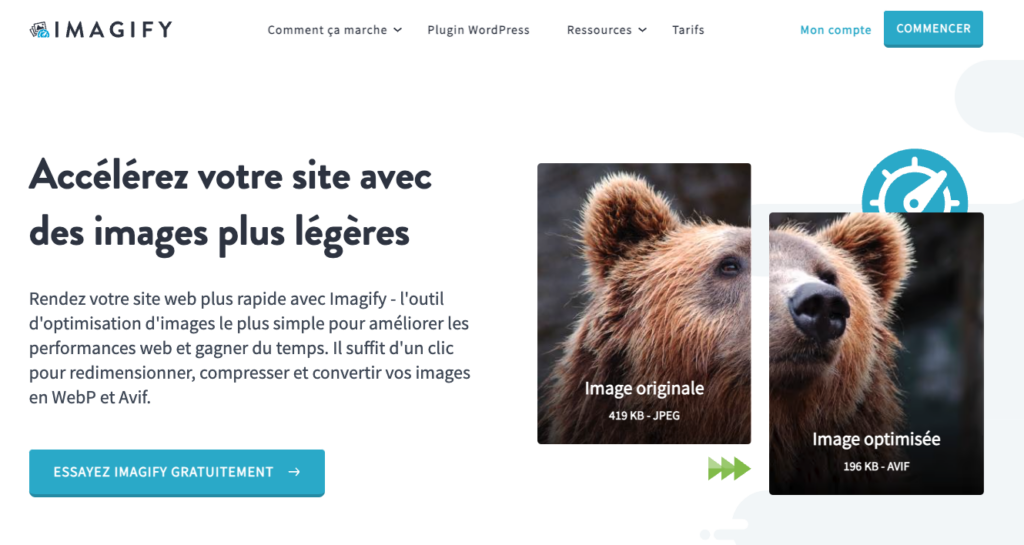
Imagify est certainement le meilleur plugin pour compresser des images sur WordPress.
Disponible en français, Imagify vous permet de transformer des images jpeg au format WebP et Avif. Ce changement de format permet de compresser les images de votre site WordPress sans en altérer la qualité.
En version gratuite, suffisante pour les plus petits sites, Imagify permet de compresser 20Mo par mois, soit environ 200 images (avec une taille maximale de 2Mo par image importée). Sinon, il est possible d’utiliser une version payante à 4,99$ par mois pour 500Mo/mois ou 9,99$ par mois pour une utilisation illimitée de l’outil.
WP Smush : un excellent plugin pour optimiser des images WordPress
WP Smush est de loin le plugin d’optimisation et de compression d’images le plus populaire pour WordPress, avec plus d’un million d’installations actives à l’heure actuelle. C’est un plugin facile à utiliser, réalisé par l’équipe de développeurs de WPMU DEV pour optimiser rapidement les images de votre site WordPress. Il est bien sûr compatible avec WordPress dans sa version multisite.
Le prix : Ce plugin vous offre une version gratuite et une version payante. La version gratuite peut être téléchargée à partir du dépôt WordPress. La version payante est en fait comprise dans un ensemble d’outils (parmi lesquels WP Smush). La version payante coûte 49$ par mois.
Dans la version gratuite de WP Smush, vous ne pouvez optimiser les images de votre site qu’avec la compression sans perte (si vous voulez la compression avec perte, vous devrez passer à la version premium). Vous disposez également de l’option « lazy load », ainsi que de la possibilité d’optimiser jusqu’à 50 images en même temps. Vous pourrez également redimensionner les images (définir les paramètres de largeur et de hauteur maximales) et repérer rapidement les images qui ralentissent votre site.
À lire aussi : 50+ techniques et outils pour optimiser vos images pour le web
ShortPixel : un plugin d’optimisation d’images WordPress

ShortPixel vous aidera à optimiser les images de votre site en effectuant un redimensionnement et une compression sans aucune perte de qualité d’image. C’est un outil d’optimisation d’images facile à utiliser pour WordPress, qui vous permettra de choisir entre la compression avec ou sans perte d’images.
Ce plugin fonctionne très rapidement, et de manière automatique, appréciable surtout sur un site particulièrement lourd en images. Parmi les fonctionnalités appréciables, ShortPixel stocke vos images originales dans un dossier séparé et permet de comparer le fichier original avec sa version compressée, afin de voir la différence de qualité et de taille.
Le prix : Ce plugin propose un plan gratuit pour 100 compressions par mois, puis échelonne ses tarifs de 5 à 30$. Le tarif est très attractif et Shortpixel commence à détrôner WP Smush dans le cœur de nombreux propriétaires de sites web !
Compress JPEG & PNG images
Ce service de compression d’images, fourni par Tiny PNG, se compose d’un outil en ligne de compression des images et d’un plugin, que vous pouvez trouver sur le dépôt WordPress.
Tiny JPG est donc d’abord un outil en ligne (gratuit) qui vous permet de compresser les fichiers JPEG et PNG. Le plugin vous aide à intégrer ce service à votre site wordpress.
Comme la plupart des plugins de compression d’images, cet outil changera automatiquement la taille de vos images lorsque vous les téléchargerez sur WordPress, et il fera de même pour les images déjà existantes – une par une, ou en masse, selon la manière dont vous choisissez de le faire.
Le prix : Une fois que vous avez installé le plugin, vous obtenez gratuitement une clé API qui, à l’instar de ShortPixel, vous donnera droit à 100 images gratuites par mois. Si vous souhaitez compresser plus de 100 images par mois, vous devrez payer une petite redevance, à partir de 0.009$ par image.
EWWW : un bon plugin pour compresser vos images WordPress

EWWW dispose d’une interface un peu désuète et qui mériterait un petit lifting.
EWWW propose l’optimisation des fichiers JPG, PNG, GIF et PDF. Il existe des options de compression avec et sans perte. Le principal avantage d’EWWW est qu’il n’y a pas de limite à la taille des fichiers ou au nombre d’images téléchargées.
En outre, la version gratuite d’EWWW effectue les optimisations sur votre propre serveur web, alors que tous les autres outils utilisent des serveurs externes. C’est une bonne chose pour les sites axés sur la protection de la vie privée. Mais cela peut mettre votre serveur à rude épreuve si vous optimisez un grand nombre d’images à la fois.
Le prix : Gratuit
Comment choisir ?
C’est bien beau, mais du coup, comment savoir quel plugin est fait pour vous ? Résumons.
- Imagify : Certainement le meilleur outil gratuit pour compresser des images et excellent en version payante.
- Smush : Pour une compression sans perte gratuite et illimitée (avec un maximum de 1 Mo par image).
- ShortPixel : Pour une optimisation parmi les meilleures et son interface élégante.
- TinyPNG : Pour une excellente optimisation et la plus simple de toutes les interfaces.
- EWWW : Pour la gratuité totale et aucune limite de taille de fichier. Mais n’oubliez pas qu’il fonctionne sur votre propre serveur.
Avec l’un de ces 4 plugins, vous pourrez améliorer la vitesse de votre site WordPress sans difficultés.
Suivez notre tutoriel pour installer un plugin facilement sur WordPress si vous ne savez pas comment vous y prendre.
Vous souhaitez aller plus loin dans l’optimisation de votre site WordPress ? Vous aimeriez créer des visuels uniques pour l’illustrer ? Des développeurs WordPress et graphistes freelances vous attendent sur Codeur.com. Publiez votre projet gratuit et recevez leurs devis en quelques minutes.


