Vous souhaitez que votre marque gagne en visibilité et vous cherchez de nouvelles opportunités ? C’est le moment d’intégrer YouTube dans votre stratégie marketing.
Avec plus de 2 milliards d’utilisateurs mensuels, la plateforme vidéo représente une vraie aubaine pour de nombreuses entreprises. Sans compter que YouTube est le second moteur de recherche après Google !
Mais encore faut-il encore arriver à se faire une place sur la plateforme vidéo la plus connue au monde.
Dans cet article, l’idée est de vous donner 10 conseils pour améliorer de manière efficace votre SEO sur YouTube. Allons-y !
1. Comprendre l’algorithme de YouTube
Il est de notoriété public à présent que l’algorithme de YouTube crée un flux de recommandations personnalisées, selon le niveau de satisfaction des utilisateurs. Pour l’optimisation, l’algorithme prend le pas sur le moteur de recherche.
70% du trafic proviendrait plus des recommandations faites par la plateforme que de la recherche directe.
Il est donc essentiel de bien comprendre le fonctionnement de cet algorithme pour étendre votre visibilité.
Voici les mesures de comportement utilisateur à prendre en compte dans les statistiques :
- Durée du visionnage par l’utilisateur.
- Pourcentage de vidéo regardé.
- Taux de clics.
2. Les mots-clés
À l’instar du contenu écrit, les mots-clés sont essentiels pour l’optimisation du référencement organique sur YouTube.
Pour chercher les mots-clés pertinents associés à vos vidéos, il est recommandé d’utiliser la suggestion automatique de YouTube. Il suffit donc de taper une requête dans la barre de recherches pour voir apparaître toutes les suggestions de mots-clés associés. Exactement comme sur Google.
Assurez-vous de placer votre mot-clé principal dans le nom de votre fichier avant le téléchargement sur votre chaîne. C’est un conseil SEO simple mais efficace !
À lire aussi : YouTube : 10 outils pour booster votre SEO
3. Ajouter des liens sur la bannière de votre chaîne YouTube
Vous pouvez personnaliser votre chaîne YouTube et ajouter des liens vers votre site web ou vos réseaux sociaux.
Vous augmentez alors vos chances que l’utilisateur s’intéresse à votre marque.
Pour cela, cliquez sur “personnalisez la chaîne”, allez sur la section “Liens” et cliquez sur l’icône de modification pour ajouter les liens souhaités.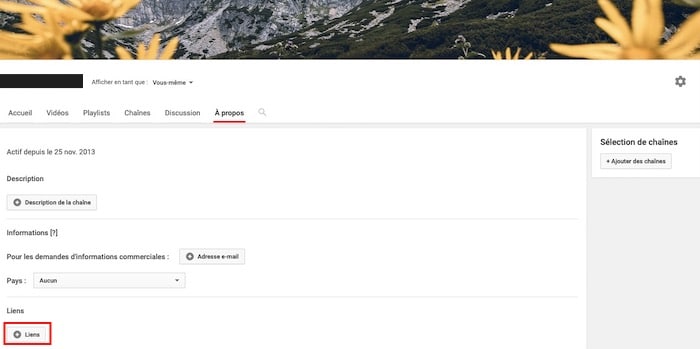

Découvrez aussi comment créer une bannière irrésistible pour votre chaîne YouTube.
4. Ajouter des sous-titres à vos vidéos
Ajouter des sous-titres est un excellent moyen d’augmenter le trafic naturel d’une chaîne YouTube. Les sous-titres sont en effet pris en compte par les moteurs de recherche.
Activer cette fonction sur votre chaîne est un atout pour votre référencement.
Attention : Cependant veillez à ce que le sous-titrage de vidéo soit exact, l’automatisation peut réserver quelques surprises !
L’ajout de sous-titres facilite le travail de l’algorithme et permet d’augmenter vos chances de visibilité sur YouTube.
À lire aussi : Javascript SEO : les bonnes pratiques pour améliorer votre référencement
5. Structurer votre chaîne
Une fois que vous avez mis quelques vidéos bien optimisées en ligne, vous pouvez organiser votre chaîne pour améliorer l’expérience utilisateur.
YouTube organise les vidéos par défaut selon leur popularité ou dans l’ordre de publication.
Mettez-vous un instant à la place de votre audience et pensez à la façon dont elle va naviguer sur votre chaîne.
Pour organiser vos contenus vidéos, vous pouvez créer des playlists. Il suffit de sélectionner “personnaliser la chaîne”, de cliquer sur l’onglet playlists puis d’en créer une nouvelle.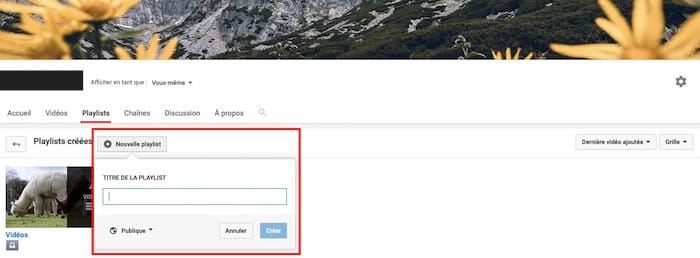
À lire aussi : 5 étapes pour auditer la chaîne YouTube de votre marque
6. Optimiser les tags et les descriptifs des vidéos
Faire un descriptif de vos vidéos est une étape à ne pas négliger pour optimiser le référencement. Les 100 premiers mots sont les plus importants car ce sont eux qui apparaissent dans les résultats de recherche YouTube.
Vos mots-clés doivent être intégrés dans le contenu le plus naturellement possible. La plupart du temps, cela se fait automatiquement si vous faites un descriptif détaillé et précis de votre vidéo.
Optimiser votre descriptif est le meilleur moyen d’apparaître dans la barre latérale des suggestions de vidéos de YouTube.
N’oubliez pas d’intégrer vos mots-clés dans les tags, ils seront très utiles dans l’optimisation de votre référencement.
7. Ajouter la fonction d’intégration
Vous souhaitez que les utilisateurs partagent en masse vos vidéos ? N’hésitez pas également les intégrer sur votre site web ou votre blog et à inciter les utilisateurs à le faire sur leur propre site internet. Vous pouvez même intégrer vos vidéos à vos newsletters !
Facilitez-leur la tâche en activant la fonction d’intégration sur YouTube. Pour l’activer, allez sur le “gestionnaire de vidéos” de votre compte YouTube puis sélectionnez “modifiez” sous la vidéo sur laquelle vous souhaitez activer l’intégration. Enfin dans “paramètres avancés”, cochez l’option “intégration”.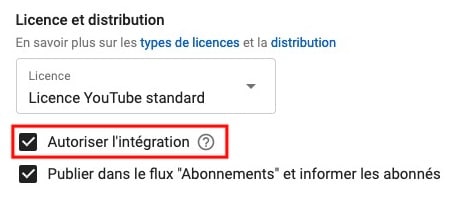
YouTube offre un grand potentiel pour développer la communication d’une marque. En suivant ces conseils vous pourrez optimiser votre chaîne YouTube et vous servir de ce canal de diffusion pour augmenter votre visibilité. Pour aller plus loin, vous pouvez également suivre les conseils de Redacteur.com et lire notre article pour booster votre visibilité sur YouTube.
SEO YouTube : qu’est-ce que c’est ?
Aujourd’hui, la vidéo est l’un des formats les plus consommés par les utilisateurs. YouTube s’est hissé parmi les moteurs de recherche les plus consultés en quelques années. À l’heure actuelle, il est le deuxième plus grand moteur de recherche. Et pour cause, on y trouve de nombreux formats de contenu boostés par un référencement web optimal.
Les référencement naturel sur Google consiste à mettre en œuvre un certain nombre de techniques marketing pour promouvoir ses vidéos sur le web.
L’objectif d’un créateur de contenu qui travaille son SEO sur YouTube est que ses vidéos apparaissent en tête des résultats lorsque les internautes recherchent du contenu. C’est un excellent moyen pour lui de développer sa communauté en attirant du trafic organique sur sa chaîne YouTube.
Comment référencer une vidéo sur YouTube ?
Nous vous invitons vivement à optimiser le SEO de vos vidéos YouTube pour développer la notoriété de votre chaîne et de votre contenu. Pour cela, de multiples techniques s’offrent à vous.
D’une part, il vous faudra travailler le contenu textuel de vos titres, de vos descriptions et des sous-titres. Il est primordial de rédiger des titres contenant des mots-clefs cibles. Mots-clefs qui sont également à retrouver dans les descriptions et les sous-titres de vos vidéos pour une optimisation efficace.
D’autre part, bien connaître l’algorithme de YouTube est nécessaire pour s’adapter à lui. En développant de l’engagement sur vos vidéos, YouTube considérera votre contenu comme digne d’intérêt et n’hésitera donc pas à le mettre en avant.
Qu’est-ce que l’engagement sur une vidéo YouTube ?
Plus les utilisateurs interagissent avec votre contenu, plus vos vidéos seront susceptibles d’apparaître en haut des résultats de recherche sur YouTube. L’engagement sur une vidéo YouTube se traduit par la réalisation d’actions par les utilisateurs ayant visionné votre contenu.
Les indicateurs d’engagement sont les abonnements à votre chaîne YouTube, les likes (pouces bleus) les partages mais aussi les commentaires. À noter tout de même que ces différentes actions n’ont pas la même valeur. Aux yeux de YouTube, un “j’aime” sur une vidéo a beaucoup moins d’impact qu’un partage par exemple.
Plus vous parviendrez à susciter des réactions de la part des personnes qui visionnent votre contenu, plus vous obtiendrez un taux d’engagement élevé. Ce dernier est un indicateur clef pour YouTube qui n’hésitera pas à booster le contenu de votre chaîne.
Un taux d’engagement sur YouTube se calcule en faisant la différence entre le nombre de likes/commentaires et le nombre de vues d’une vidéo.
Notre astuce
Offrez-vous les services d’un expert YouTube freelance ! Pour cela, rien de plus simple : décrivez votre problématique sur Codeur.com, recevez les devis de community managers, échangez avec eux grâce à une messagerie privée, et sélectionnez l’expert qui répond le mieux à vos besoins (et votre budget !).


