On a tendance à croire que tout repose sur le modèle. GPT, Gemini, Mistral, Claude, LLaMA… Comme si la magie venait d’eux seuls. Et si ce n’était pas (que) le cas ? Si la vraie différence se jouait dans la façon de leur parler ? C’est l’idée centrale du document publié par Lee Boonstra, tech lead chez Google, qui livre une véritable méthode pour dialoguer avec un LLM. Et spoiler : on est loin des prompts “magiques” trouvés sur LinkedIn.
Ce qu’il faut retenir :
- Les performances d’un LLM dépendent autant de ses paramètres que de la qualité du prompt fourni.
- Des réglages comme la temperature, le top-K ou le top-P influencent fortement la cohérence ou la créativité des réponses.
- Des techniques comme le zero-shot, few-shot, ou le Chain of Thought permettent de guider plus finement le raisonnement de l’IA.
- Google propose désormais une véritable méthode de travail pour structurer, tester et documenter ses prompts de manière professionnelle.
- Des approches avancées comme Tree of Thoughts ou Self-consistency ouvrent la voie à des usages plus complexes et fiables.
Comprendre les leviers de génération d’un LLM
Temperature : votre curseur de créativité
Vous aimez les réponses stables, sans surprise ? Ou vous préférez un soupçon de folie dans la sortie d’un modèle ? C’est là que le paramètre “temperature” entre en jeu.
Plus la valeur est basse (autour de 0), plus le modèle devient prévisible, presque robotique. Pratique pour des tâches comme le calcul, la classification ou la rédaction réglementaire. À l’inverse, une temperature autour de 0.8–1 injecte de la variété dans les propositions. Idéal pour écrire un poème, un email accrocheur ou générer plusieurs variantes de meta descriptions.
Pas de bon ou mauvais réglage, juste une question d’intention.
Top-K et top-P : comment limiter (ou élargir) le champ des possibles
Ces deux paramètres filtrent les choix du modèle avant qu’il décide quel mot écrire ensuite.
- Top-K : le modèle choisit parmi les K mots les plus probables. K=1 ? Il choisit toujours le plus probable. K=40 ? Il a plus de marge pour innover.
- Top-P : ici, on ne fixe pas un nombre de mots, mais un seuil de probabilité cumulative. P=0.9 signifie que le modèle ne peut puiser que dans un ensemble de mots dont les probabilités totalisent 90 %.
Ces réglages influencent directement la tonalité des réponses. Et leur combinaison avec la temperature peut créer… de la magie ou un chaos bavard.
Longueur de sortie : le piège silencieux
Un modèle ne “devine” pas quand s’arrêter. C’est vous qui fixez un nombre maximal de tokens à générer. Trop court, et la réponse est coupée. Trop long, et le modèle peut radoter ou partir hors sujet. Ce point est crucial pour des techniques comme ReAct ou Chain of Thought, où chaque étape du raisonnement compte.
On a les bases. Maintenant, voyons comment utiliser ces leviers à travers les techniques de prompting les plus efficaces.
Maîtriser les techniques de prompting
Zero-shot : l’approche directe, sans filet
C’est le format brut : une consigne, aucun exemple. Utile quand la tâche est simple ou standard. Mais attention, le modèle peut interpréter de travers.
Un prompt comme :
Classifie ce commentaire : “Ce film est lent, mais touchant.”
…peut donner des résultats aléatoires. Le modèle hésite, il manque de repères.
Few-shot : montrer la voie par l’exemple
Vous fournissez 2 ou 3 cas similaires bien ficelés, et le modèle s’aligne sur ce modèle. C’est particulièrement utile pour des formats normés (JSON, tableaux, etc.) ou des tâches métier précises. Un peu comme montrer un exemple à un collègue avant de lui demander de faire la suite.
System, role et contextual prompting : cadrer la mission
- System prompting : on fixe les règles. “Tu réponds toujours en JSON”, “Tu agis comme un auditeur SEO”, etc.
- Role prompting : on donne un personnage au modèle. Un guide touristique, un avocat, un recruteur.
- Contextual prompting : on fournit du contexte en amont. “Tu écris pour un blog sur les jeux rétro”, par exemple.
Ces techniques donnent un cadre, ce qui permet au modèle de mieux cerner ce qu’on attend de lui. Et surtout, de ne pas improviser inutilement.
Chain of Thought : forcer le raisonnement
Une simple instruction suffit : “Réfléchis étape par étape.” Et là, surprise : le modèle ne donne plus juste une réponse, mais déroule une logique, une déduction. C’est particulièrement efficace sur les calculs, les scénarios, ou les questions de logique.
Et ça ouvre la voie à des techniques encore plus poussées.
Quelques cas d’usage concrets à adapter à vos projets
Vous faites du contenu, du dev, de la data ou de l’analyse sémantique ? Voici quelques scénarios réalistes :
- Parsing d’une commande client : transformer “je veux une pizza large moitié mozza moitié pepperoni” en un objet JSON structuré.
- Classification de sentiment : taguer des avis clients selon leur tonalité, même ambivalente.
- Relecture de code : demander à l’IA d’expliquer une fonction JS ou Python, ligne par ligne.
- Traduction contextuelle : reformuler un titre pour YouTube, un snippet SEO ou une baseline commerciale.
À condition d’avoir le bon prompt, évidemment.
Techniques avancées pour prompts exigeants
Self-consistency : voter pour la bonne réponse
Vous lancez le même prompt plusieurs fois avec des réglages créatifs. Ensuite, vous comparez les réponses… et gardez celle qui revient le plus souvent. C’est une manière élégante de stabiliser les sorties d’un modèle.
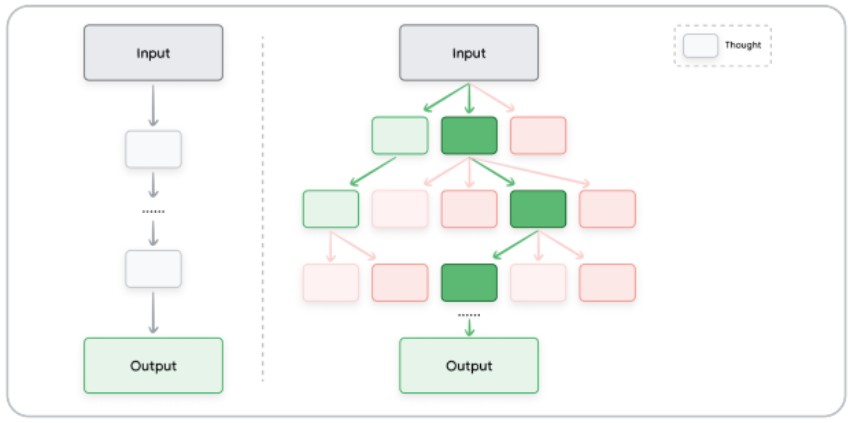
Tree of Thoughts : penser comme un arbre
Au lieu d’un raisonnement linéaire, le modèle explore plusieurs pistes en parallèle, comme un arbre décisionnel. Cela permet de sortir des réponses plus riches, plus complexes, parfois inattendues… mais pertinentes.
Automatic Prompt Engineering : l’IA qui conçoit ses propres instructions
On demande au LLM de générer des variantes de prompts pour une même tâche, puis on les évalue automatiquement. Ça parait méta, mais c’est redoutable dans les cas à grande échelle (chatbots, assistants, automatisation).
Structurer ses prompts : bonnes pratiques à adopter
Il ne suffit pas d’avoir une bonne idée. Encore faut-il bien la formuler. Voici quelques principes simples, mais efficaces :
- Documentez vos itérations : version du modèle, temperature, prompt exact. C’est fastidieux ? Oui. Mais c’est comme le SEO : ce qu’on ne mesure pas, on ne maîtrise pas.
- Soyez explicite : “Analyse le code ci-dessous” ne suffit pas. Précisez ce que vous attendez : explication ligne par ligne, détection d’erreurs, reformulation…
- Imposez un format : JSON, tableau, bullet points… Moins de place à l’interprétation, plus de contrôle.
- Testez en équipe : chacun aura des intuitions différentes. C’est souvent là que les meilleurs prompts émergent.
Et si, finalement, le prompt était le nouveau brief créatif ? Celui qui fait la différence entre un LLM qui vous aide vraiment… et un LLM qui brode sans fin.
Maîtriser les paramètres comme la temperature ou le top-K, savoir doser entre zero-shot et few-shot, oser des approches comme Chain of Thought ou ReAct… tout cela ne s’improvise pas. Mais avec un peu de méthode (et beaucoup de tests), on peut transformer un simple modèle de langage en un vrai copilote métier.
Vous utilisez déjà ces techniques dans vos projets ? Vous avez trouvé un format qui fonctionne particulièrement bien pour générer du contenu, structurer des données ou automatiser certaines tâches SEO ?
Partagez vos retours d’expérience en commentaire — bonnes idées, astuces ou galères, tout nous intéresse.
L’article “L’art du prompting selon Lee Boonstra (Tech Lead chez Google)” a été publié sur le site Abondance.


