Google vient de publier une série de guides pratiques (Playbooks) dédiés à l’optimisation des fiches Google Business Profile (GBP), déclinés par secteur d’activité. Une ressource directement issue de Google, à ne pas négliger si vous travaillez le référencement local.
Ce qu’il faut retenir :
- Google a publié plusieurs guides GBP adaptés par vertical (restaurants, hôtels, activités, services) ainsi qu’un guide généraliste.
- Ces guides ont été envoyés directement par e-mail aux propriétaires de fiches.
- Un profil complet génère 7 fois plus de clics et 5 fois plus de vues qu’un profil incomplet.
- Les recommandations générales couvrent 13 points d’optimisation, des horaires aux avis en passant par les posts et les liens de réservation.
Des guides officiels par secteur d’activité
Début mars 2026, Google a envoyé un e-mail à de nombreux propriétaires de fiches pour les informer de la publication de nouveaux guides dédiés à Google Business Profile. L’information a notamment été relayée par Glenn Gabe sur Search Engine Roundtable, après que Daniel Hale l’a alerté via LinkedIn.
Ces guides sont disponibles sous forme de PDF et couvrent les verticales suivantes :
- Restaurants & Cafés
- Hôtels & Hébergements
- Tours opérateurs & activités
- Entreprises de services (plombiers, nettoyage, etc.)
- Guide général pour toutes les autres activités
Google a également publié une annonce dans les forums officiels GBP. Si votre activité ne correspond à aucun des secteurs listés, le guide général recense les bonnes pratiques universelles applicables à n’importe quelle fiche.
Pourquoi optimiser sa fiche GBP : les chiffres avancés par Google
Le guide général publié par Google rappelle l’enjeu de ces optimisations avec plusieurs données issues de ses données internes et du Google Economic Impact Report :
- Les fiches complètes reçoivent 7 fois plus de clics que les fiches incomplètes
- Les profils mis à jour régulièrement génèrent 5 fois plus de vues
- 29 % des clients sont plus enclins à considérer un achat auprès d’une entreprise disposant d’un profil détaillé
- Chaque mois en 2024, Google a facilité plus de 2 milliards de connexions directes (appels, demandes d’itinéraire, messages, réservations, avis) pour plus de 19 millions d’entreprises américaines

Les 13 points d’optimisation recommandés
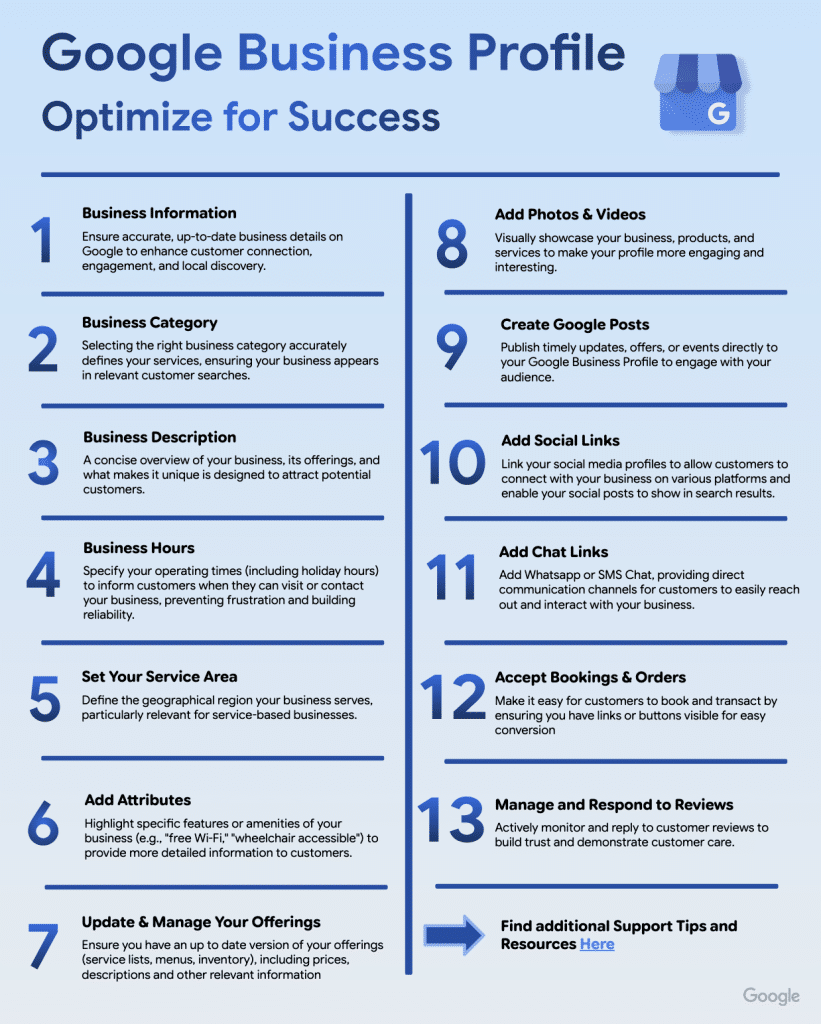
Le guide pratique général s’articule autour de 13 leviers d’action concrets. Voici ce que Google recommande :
1. Informations de base
Nom, catégorie, description, horaires : ces quatre éléments constituent le socle de toute fiche. Ils conditionnent directement votre visibilité dans Google Search et Google Maps.
2. Catégorie d’activité
Google permet d’ajouter jusqu’à 10 catégories : une principale et neuf secondaires. La catégorie principale définit votre cœur de métier ; les secondaires permettent d’apparaître sur des recherches plus spécifiques et d’élargir votre audience.
3. Description de l’entreprise
Google propose désormais une fonctionnalité de description générée par IA, accessible directement depuis l’interface d’édition de la fiche (bouton “Suggérer une description”). La description peut ensuite être modifiée avant publication.
4. Horaires d’ouverture
96 % des clients sont plus susceptibles de visiter un établissement qui affiche ses horaires, et 91 % des consommateurs effectuent une recherche en ligne avant de se déplacer. Google insiste particulièrement sur la mise à jour des horaires exceptionnels (jours fériés, périodes de fêtes).
5. Zone de desserte
Pour les entreprises qui se déplacent chez leurs clients (artisans, services à domicile) ou qui combinent vitrine physique et livraison, il est possible de définir jusqu’à 20 zones de desserte. La limite recommandée est d’environ 2 heures de trajet depuis le siège de l’entreprise.
6. Attributs
Les attributs permettent de mettre en avant des caractéristiques spécifiques : “Wi-Fi gratuit”, “accessible en fauteuil roulant”, “terrasse”, “animaux acceptés”, etc. Ces informations s’affichent directement dans Google Search et Maps, et aident les clients à trouver rapidement les établissements correspondant à leurs critères.
7. Gestion des offres
Menus, listes de services, inventaire : Google recommande de maintenir ces informations à jour avec les descriptions et les prix. 1 client sur 3 consulte les offres d’une entreprise avant de s’y rendre.
8. Photos et vidéos
Les chiffres avancés sont significatifs :
- 90 % des personnes sont plus susceptibles de visiter un établissement qui dispose de photos sur Google
- Les entreprises avec photos reçoivent 42 % de demandes d’itinéraire supplémentaires
- Elles enregistrent également 35 % de clics en plus vers leur site web
9. Google Posts
Google recommande de publier au moins une fois par semaine, en alternant trois types de posts : Actualités, Événements et Offres. Il conseille d’inclure des mots-clés pertinents, une image de qualité et une date. À titre d’exemple, Crate & Barrel a enregistré +31 % de vues sur Google Maps et +6 % sur Google Search après avoir intégré les Google Posts dans sa stratégie, via Uberall.
50 % des clients recherchent des promotions ou des réductions lorsqu’ils effectuent une recherche sur une entreprise en ligne.
10. Liens vers les réseaux sociaux
Il est possible de lier Facebook, Instagram, X (Twitter) et YouTube directement à la fiche. Cela permet aux posts sociaux d’apparaître dans les résultats de recherche. Painting with a Twist a ainsi obtenu +9 % d’impressions GBP, +10 % de clics web et d’appels téléphoniques, et +14 % d’utilisateurs provenant de Google après avoir connecté ses réseaux sociaux.
20 % des clients consultent les réseaux sociaux d’une entreprise avant de s’y rendre.
11. Chat (WhatsApp & SMS)
Google permet d’ajouter un lien WhatsApp ou un numéro de téléphone pour les SMS directement depuis la fiche. 67 % des gens préfèrent envoyer un message à une entreprise plutôt que de l’appeler ou lui écrire un e-mail, et 60 % indiquent que WhatsApp est leur canal de messagerie préféré pour interagir avec un commerce.
12. Réservations et commandes
Via le programme “Reserve with Google”, disponible dans plus de 88 pays, les clients peuvent réserver un rendez-vous ou passer commande directement depuis la fiche, sans avoir à naviguer vers un autre site. Il est possible d’ajouter soit un lien de réservation personnalisé, soit un partenaire de réservation intégré (générant un bouton “Réserver” natif). 77 % des consommateurs s’attendent à pouvoir réserver des services en ligne.
13. Gestion des avis
91 % des consommateurs utilisent les avis pour évaluer les entreprises locales, et 65 % disent qu’ils sont plus susceptibles de choisir une entreprise qui répond à ses avis. Google recommande de répondre à tous les avis, positifs comme négatifs. Il est également possible de générer des QR codes depuis la fiche pour encourager les clients à laisser un avis (à placer sur les reçus, menus ou devantures).
Vérification et gestion de la fiche
Le guide pratique aborde aussi des points plus techniques souvent négligés :
- La vérification de la fiche est indispensable pour pouvoir modifier les informations et interagir avec les clients. Google propose cinq méthodes de vérification, automatiquement assignées selon la catégorie d’activité. La vérification peut prendre jusqu’à 5 jours ouvrés.
- L’ajout de plusieurs gestionnaires est vivement conseillé pour éviter de se retrouver bloqué en cas de départ d’un collaborateur. Un seul propriétaire principal est possible, mais la propriété peut être transférée. Google recommande de vérifier régulièrement la liste des gestionnaires pour n’y conserver que les personnes habilitées.
Le guide recense également les ressources de support disponibles : centre d’aide, formulaire de contact, forum communautaire GBP avec des “Product Experts” capables d’escalader les cas complexes directement à Google. Un tableau de résolution des problèmes courants est également fourni (suspension de fiche, faux avis, accès perdu, numéro incorrect, etc.).
L’article “Google lance des guides pratiques pour optimiser votre fiche Google Business Profile” a été publié sur le site Abondance.


