Envie de faire un simple site vitrine avec PrestaShop ? C’est possible ! Même si ce CMS est surtout connu pour ses fonctionnalités e-commerce, vous pouvez désactiver le panier d’achat et les autres options de vente en ligne afin d’utiliser PrestaShop pour la création de votre site vitrine.
Votre site web devient alors un catalogue pour présenter vos produits et nouvelles collections. Les visiteurs bénéficieront de toutes les informations sur vos offres, ainsi que les renseignements pour trouver vos produits et services. Bien entendu, votre site vitrine avec PrestaShop leur permettra de vous contacter directement si besoin.
Comment utiliser PrestaShop pour gérer votre site vitrine ? Pourquoi le faire ? Toutes les réponses sont dans cet article !
Qu’est-ce que PrestaShop ?
Avant de répondre pleinement à la question « comment faire un site vitrine avec PrestaShop ? », rappelons que cette solution open-source permet avant tout de construire et développer une boutique en ligne.
D’ailleurs, selon PrestaShop, plus de 300 000 marchands se servent du CMS pour gérer leur e-commerce. Avec ses 300 fonctionnalités intégrées pour ajouter des méthodes de paiement, contrôler l’expédition, gérer les stocks, optimiser la liste des produits ou encore améliorer les relations avec les fournisseurs ou les clients, cette solution a tout pour plaire !
PrestaShop est l’une des plateformes de création de sites e-commerce les plus puissantes du marché : elle possède une interface conviviale pour gérer votre activité en ligne.
Plus encore : ce CMS peut aussi vous permettre de créer un « simple » site vitrine et d’afficher votre catalogue auprès de vos prospects, ainsi que des conseils et articles de blog. Par exemple, le site vitrine PrestaShop de Bonne Gueule accueille le visiteur avec un webzine riche en informations utiles :

Quel est l’intérêt ? C’est ce que nous allons voir dans la suite de cet article !
Pourquoi faire un site vitrine Prestashop ?
PrestaShop est un CMS avant tout ! Il est possible de désactiver les fonctionnalités liées à l’e-commerce et de s’en servir pour simplement créer un site vitrine. Et les avantages sont nombreux…
Créer un catalogue intuitif
Les options natives de PrestaShop en font la solution idéale pour afficher un catalogue digital intuitif. Le visiteur aura l’occasion de mieux connaître vos produits, de parcourir vos offres et d’être séduit par vos propositions. Il disposera toujours d’un outil de référence pour ses commandes ou pour découvrir vos nouveautés.
Votre site vitrine PrestaShop servira autant à promouvoir vos biens et services auprès d’une nouvelle audience, qu’à fidéliser vos clients existants. Une pierre deux coups !
Faire connaître votre marque et vos valeurs
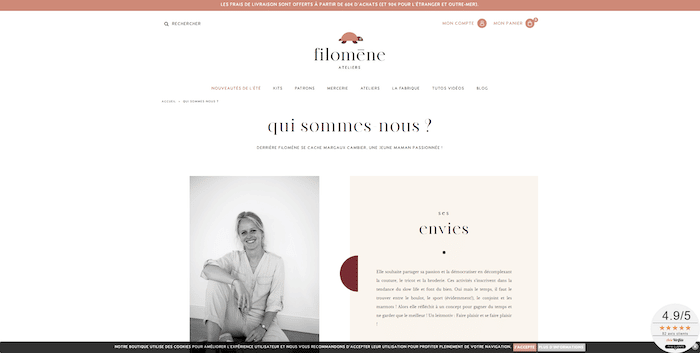
Vous aurez la possibilité de créer des pages qui récapitulent vos engagements et présentent votre entreprise ainsi que vos équipes. Cela permet d’humaniser votre marque, mais aussi d’établir un lien de proximité avec vos visiteurs.
Voici un exemple de site vitrine PrestaShop où la page « Qui sommes-nous ? » est particulièrement bien construite :
Améliorer la visibilité de votre établissement
Faire un site vitrine avec PrestaShop, c’est profiter de fonctionnalités SEO avancées ! Ce CMS permet de construire des URLs adaptées au référencement et d’optimiser les balises title, le méta titre, la méta description et tous les attributs liés au SEO.
Des paramètres indispensables pour positionner votre catalogue produits sur des requêtes pertinentes.
Attirer du trafic en point de vente
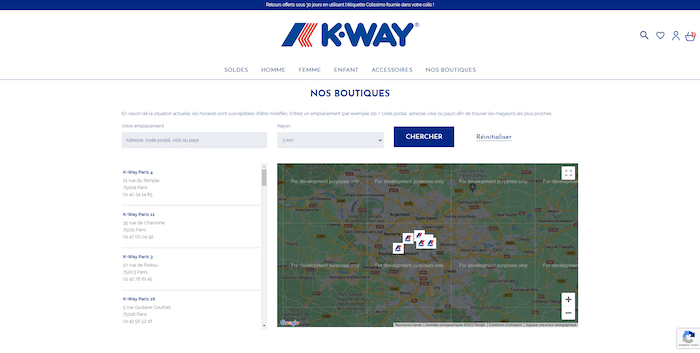
Grâce à l’organisation en catégories et sous-catégories des fiches produits, vous fluidifiez la navigation à travers vos offres. Vous pourrez relier chaque article à une fiche pour offrir des détails au visiteur… et lui donner envie de vous contacter ou de consulter la liste de vos distributeurs pour se rendre en magasin.
Si vous avez vos propres points de vente, vous pourrez aussi l’afficher sur vos pages et ainsi attirer du trafic dans vos enseignes, comme dans cet exemple de site vitrine PrestaShop :
Profiter d’une présence internationale
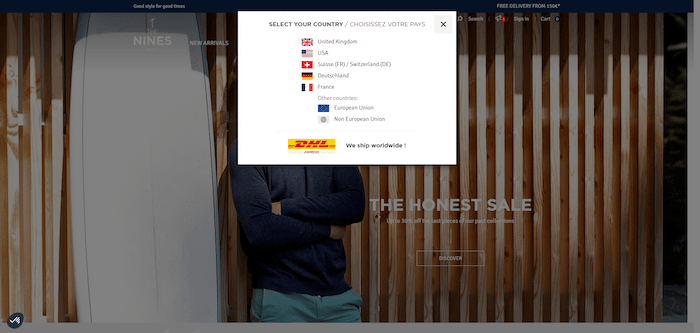
PrestaShop prend en charge plus de 75 langues dans le monde et peut géolocaliser chaque visiteur, pour lui afficher la bonne traduction. Pour ce faire, le CMS propose des packs linguistiques qui traduisent vos pages, sans en modifier le code.
Faire évoluer facilement son site vitrine Prestashop en e-commerce
Faire un site vitrine avec PrestaShop, c’est penser sur le long terme. En effet, aujourd’hui, vous n’avez besoin que d’un catalogue, mais d’ici quelques mois ou années, vous pourriez avoir envie de le faire évoluer en e-commerce. Avec PrestaShop, cela pourra se faire rapidement et simplement !
Mieux connaître vos consommateurs
PrestaShop fournit un tableau de bord qui diffuse plus de 20 rapports sur le nombre de visiteurs de votre site vitrine, leur profil, leur comportement et leur point de conversion. Vous profitez de données pertinentes pour mieux comprendre vos acheteurs, cerner leurs besoins et améliorer la stratégie de croissance de votre entreprise.
Les inconvénients de PrestaShop pour un site vitrine
Étant donné que PrestaShop est spécifiquement conçu pour les e-commerces, l’utiliser pour un site vitrine peut présenter quelques inconvénients. Il est essentiel de les connaître avant de choisir ce CMS.
Peu de fonctionnalités gratuites
Même si le téléchargement et l’installation de PrestaShop restent gratuits, de nombreux thèmes, des fonctionnalités et des add-ons sont payants.
Cependant, la version gratuite reste suffisante pour un site vitrine de petites ou moyennes entreprises qui n’ont pas besoin de modules avancés. Ceux disponibles sur la marketplace s’adressent principalement aux e-commerces.
Vous pourrez toujours créer des pages de tarifs, de contact ou même une section de blog et une galerie photos, à moindre prix.
Un design peu dynamique
Prestashop est livré avec une conception assez décente pour gérer un site vitrine gratuit ou à petit budget. Néanmoins, le design proposé par le CMS manque d’une touche moderne et dynamique, même s’il fournit les fonctions de base.
De ce fait, un site vitrine PrestaShop n’est pas adapté aux portfolios de créateurs, webdesigners ou photographes, par exemple.
Manque de support officiel
Contrairement à d’autres solutions de gestion de sites web, PrestaShop ne dispose pas d’équipes de support officielles pour vous aider en cas de bug ou de défis techniques. Vous devrez payer une formule complémentaire pour obtenir l’assistance des experts de la plateforme.
Cependant, il existe une communauté active de 700 000 utilisateurs prêts à vous aider, ainsi que de la documentation détaillée et des pages d’assistance sur Facebook et Twitter. Le seul bémol est que ces ressources répondent essentiellement aux questions liées à la vente en ligne et à l’utilisation de PrestaShop pour gérer sa boutique.
Comment faire un site vitrine PrestaShop ?
Vous êtes convaincu(e) et vous souhaitez utiliser PrestaShop pour un site vitrine ? Voici les étapes à respecter.
1. Réserver un nom de domaine et un hébergement
Pour faire un site vitrine PrestaShop, vous aurez besoin d’un nom de domaine (NDD)
et d’un hébergeur. Nous avons déjà consacré de nombreux articles à ces sujets sur le blog. Si vous avez besoin d’aide pour choisir votre NDD, vous pouvez consulter notre guide « 6 bonnes pratiques pour réserver le nom de domaine idéal ».
Quant à l’hébergement, nous vous conseillons de lire notre comparatif 2022 des meilleurs hébergeurs web pour trouver celui qui correspond à vos besoins.
2. Télécharger PrestaShop
En tant que CMS open-source, PrestaShop met à votre disposition les fichiers nécessaires à l’installation de votre site vitrine. Ils sont disponibles sur le site de PrestaShop.

Vous devrez ensuite les installer sur un serveur local ou directement chez votre hébergeur.
Nous vous recommandons de faire appel à un développeur web sur Codeur si vous êtes débutant. Vous êtes assuré d’avoir un site vitrine PrestaShop opérationnel, prêt à être personnalisé !
3. Désactiver les fonctionnalités e-commerce
Un site vitrine PrestaShop n’a pas besoin de fonctionnalités e-commerce. Vous devrez donc désactiver plusieurs paramètres pour éviter les bugs et d’entraver l’expérience utilisateur.
Parmi les éléments à désactiver, on retrouve :
- Le tunnel de commande : choix du moyen de paiement, de livraison, emails de suivi de commande, etc ;
- Le bouton d’ajout au panier: très important pour éviter le côté déceptif des utilisateurs qui passeraient du temps à remplir le panier… pour finalement ne pas pouvoir commander !
- Les modules de gestion de commandes et de gestion de stocks: ils alourdissent votre site pour rien ;
- Les emails automatiques : de rappels et de relance des clients ;
- Les statistiques de vente et le chiffre d’affaires: afin de simplifier votre tableau de bord.
4. Veiller à l’activation des paramètres importants pour un site vitrine PrestaShop
Selon vos objectifs, votre site vitrine WordPress aura besoin de certaines fonctionnalités, disponibles par défaut :
- La possibilité pour le visiteur de télécharger des documents PDF comme les guides d’utilisation, ou votre catalogue produits ;
- L’option de recherche et de filtrage des résultats sur les pages ;
- Le classement de vos produits ou services en catégories et en sous-catégories ;
- L’intégration d’une page de contact accompagnée d’un formulaire pour collecter les coordonnées, questions avant-vente ou SAV, ainsi que les demandes de devis ;
- L’activation de pages de présentation de vos activités et des partenaires de votre entreprise ;
- La personnalisation de vos catalogues selon le profil du visiteur (B2B ou B2C, par exemple, ou selon la taille de l’entreprise, le genre ou tout autre critère lié à votre stratégie de qualification).
5. Personnaliser son site vitrine
C’est parti ! Il est temps de choisir un thème PrestaShop et de le personnaliser avec votre charte graphique. Très intuitif, le CMS vous permet de créer un catalogue sur mesure, d’ajouter des pages uniques et de proposer une expérience utilisateur fluide.
Le but est d’entraîner les visiteurs dans votre univers, de créer un lien avec eux (et leurs valeurs) et de les inciter à choisir vos produits.
Notre astuce
Faire un site vitrine avec PrestaShop peut être difficile pour un débutant. Si l’outil offre de nombreuses fonctionnalités et vous permet d’envisager d’utiliser la fonction e-commerce à l’avenir, il n’est pas toujours évident à prendre en main. Pour vous aider, publiez une annonce sur Codeur.com et trouvez un développeur PrestaShop qui pourra vous accompagner pour créer un site vitrine opérationnel de A à Z !


