Après X Blue (ex-Twitter Blue), Mark Zuckerberg dévoile Meta Verified pour les entreprises ! Jusqu’ici réservé aux profils personnels, le fameux badge bleu va devenir accessible aux comptes professionnels. Cette coche, disponible sur Instagram et Facebook, indique que le compte est authentique et reconnu, tout en ouvrant l’accès à de nouvelles fonctionnalités.
Vous avez besoin d’un accompagnement sur vos réseaux sociaux ? Faites appel à un community manager freelance sur Codeur.com.
Qu’est-ce que le badge vérifié Meta ? Pourquoi et comment l’obtenir ? Toutes les réponses se trouvent dans cet article !
Qu’est-ce que Meta Verified ?
Dans un communiqué publié sur son blog, le mardi 19 septembre, Meta informe les utilisateurs de Facebook et Instagram que, prochainement, les entreprises pourront adhérer à l’option payante Meta Verified for Businesses. Cela leur permettra de décrocher un insigne de validation et d’accéder à divers outils avancés sur les deux réseaux sociaux du groupe et l’application de messagerie instantanée WhatsApp.
Initialement présentée en février et mise en place graduellement au cours de l’été, Meta Verified était d’abord réservée aux profils individuels désireux de marquer leur empreinte sur Facebook et Instagram.
Se basant sur le modèle rémunéré de X (anciennement Twitter), qui a concocté une offre similaire, Meta Verified offre non seulement un badge confirmant la légitimité du compte, mais aussi divers privilèges tels qu’une sécurité renforcée, un contact privilégié avec le support client et des stickers uniques pour les Reels et Stories.
Le tout est proposé sous forme d’abonnement, tarifé à 16.99 euros pour un compte Facebook ou Instagram et 28.99 euros pour les deux.
Pourquoi adhérer à Meta Verified ?
Adhérer à Meta Verified, que ce soit en tant que créateur de contenus indépendant ou entreprise, présente plusieurs avantages pour les utilisateurs de Facebook et Instagram :
Authenticité accrue
En possédant un badge vérifié, les pages sont perçues comme plus authentiques et dignes de confiance par les autres utilisateurs. Face aux faux comptes qui usurpent l’identité d’influenceurs, de marques ou d’entreprises, dans un objectif frauduleux, cette coche bleue rassure les abonnés et les incite à s’abonner.
Sécurité renforcée
Meta Verified offre une sécurité renforcée et une surveillance proactive des comptes vérifiés, garantissant ainsi une meilleure protection contre les tentatives de piratage ou d’usurpation d’identité. En effet, les comptes vérifiés bénéficient d’un suivi actif pour repérer les fraudeurs qui visent les individus et entreprises profitant d’une croissance d’audience sur Facebook et Instagram.
Même si Meta ne détaille pas le mécanisme de cette protection, il est probable que la firme de Mark Zuckerberg fera appel à ses ressources impressionnantes en intelligence artificielle.
Visibilité et crédibilité
Pour les personnes qui utilisent leurs communautés Facebook et Instagram pour exercer une activité en ligne, les marques ou les entreprises, posséder un badge vérifié Meta augmente la visibilité de leurs publications et renforce leur crédibilité aux yeux de leur audience et des marques partenaires.
Fonctionnalités exclusives
Outre la vérification, les abonnés bénéficient d’autres fonctionnalités exclusives qui enrichissent leur expérience sur les deux plateformes dont notamment des autocollants uniques pour les Reels et stories, la possibilité d’ajouter des liens dans les stories Instagram (sans attendre les 10 000 followers), ou de diffuser des vidéos en direct avec une meilleure qualité.
Grâce à tous les avantages cités préalablement, le badge vérifié de Meta facilite l’interaction avec la communauté et favorise l’engagement, ainsi que la fidélisation des abonnés.
Les critères pour obtenir le badge vérifié Meta
Pour pouvoir prétendre au badge vérifié sur Facebook et Instagram, il faut respecter certains critères définis par Meta. Ainsi, votre compte doit être :
- Authentique : c’est-à-dire qu’il doit représenter une personne réelle et active, une entité légale ou une marque déposée.
- Populaire : pour prétendre au badge vérifié Meta, le compte doit bénéficier d’une certaine notoriété ou influence dans son domaine d’activité.
- Unique : il ne doit pas exister d’autres comptes similaires ou dupliqués, la ligne éditoriale doit également être unique.
- Complet : le profil doit disposer d’un avatar, d’une biographie et d’au moins une publication.
- Public : les profils privés ne peuvent pas obtenir de badge Meta Verified.
Meta Verified est-il disponible en France ?
Pour le moment, Meta Verified est accessible aux États-Unis, Canada, Royaume-Uni, Australie, Nouvelle-Zélande, Inde, Brésil… et en France, depuis récemment ! Cependant, si vous n’avez pas encore l’option Meta Verified sur vos comptes, il est possible de rejoindre la liste d’attente pour accélérer le processus.
Les étapes pour obtenir le badge Meta Verified
Si vous pensez remplir les critères pour accéder à Meta Verified, vous pouvez soumettre votre demande de badge vérifié via 2 méthodes : sur l’application ou l’interface web.
S’inscrire à Meta Verified via l’application Facebook ou Instagram
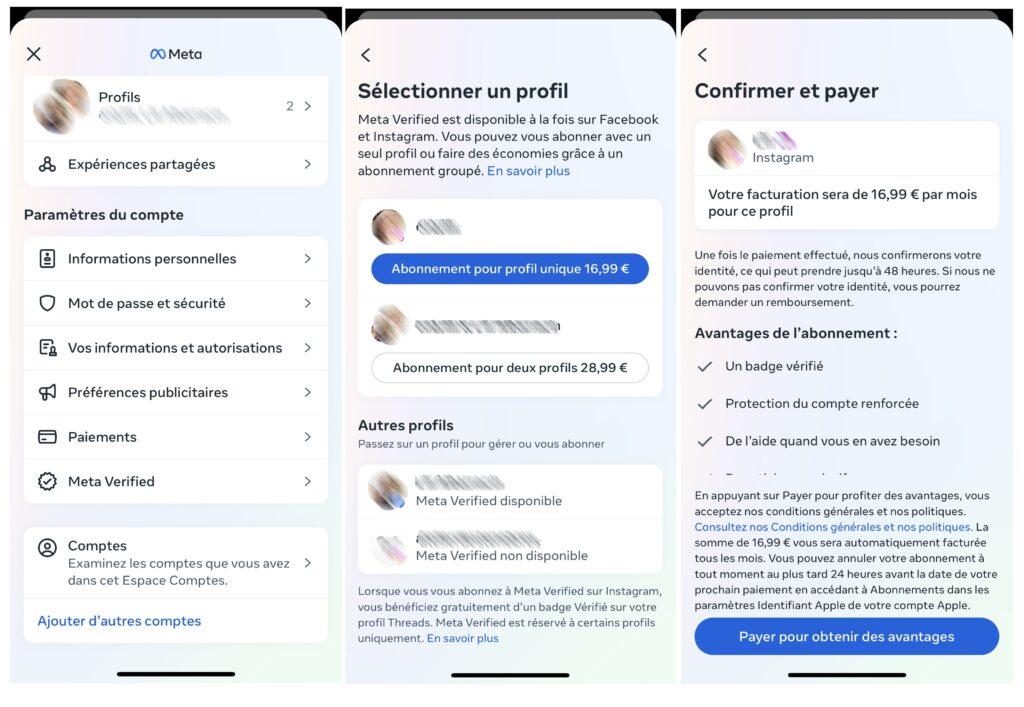
- Lancez l’application Instagram ou Facebook et naviguez vers vos Paramètres.
- Sélectionnez Espace Comptes, puis cliquez sur Meta Verified.
- Si Meta Verified est accessible pour votre compte, vous verrez s’afficher “Meta Verified disponible”. Choisissez la page pour laquelle vous souhaitez le badge, parcourez les avantages proposés et cliquez sur Continuer.
- Configurez ou validez votre mode de paiement puis sélectionnez « Payer pour obtenir des avantages ».
- Finalisez la validation en uploadant une photo d’un document d’identité (carte d’identité ou passeport). Ce dernier doit coïncider avec le nom et la photo présents sur votre compte Instagram ou Facebook.
S’inscrire à Meta Verified via Facebook desktop
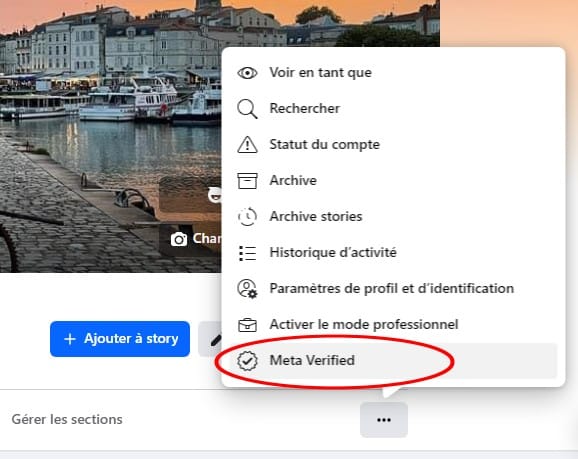
Sur la page ou le profil Facebook à vérifier, cliquez sur les 3 points et sélectionnez « S’abonner à Meta Verified ». Suivez le processus pour vous inscrire et régler l’abonnement.
Si votre demande est acceptée, vous recevrez une notification vous informant que votre badge vérifié a été activé. Si votre demande est refusée, vous pourrez retenter votre chance après 30 jours en respectant les critères énoncés ci-dessus.
Notre astuce pour obtenir un badge vérifié sur Meta
S’inscrire à Meta Verified ne garantit pas nécessairement une portée et une visibilité accrues ! Pour bénéficier de tous les avantages de ce badge, votre contenu doit continuer à respecter les règles de Facebook et Instagram. Il reste utile de comprendre et s’adapter au fonctionnement des algorithmes de ces deux réseaux sociaux pour optimiser votre portée.
Pensez aussi à faire appel à un social media manager sur Codeur.com pour améliorer votre stratégie sur les réseaux sociaux et augmenter votre notoriété !


