Vous le savez, Notion est l’un de meilleurs outils de productivité NoCode ! Ses nombreuses fonctionnalités, le large choix de templates et son interface hautement personnalisable font de lui un outil performant. Notion accompagne votre vie dans tous ses moments : du travail à la maison. Organiser sa vie n’a jamais été aussi simple !
Seulement, lorsqu’on débute, on craint le « syndrome de la page blanche » : les possibilités sont telles, qu’on ne sait pas par où commencer. Il n’est pas facile de matérialiser ses idées sur son espace de travail Notion.
Alors comment réaliser un espace de travail fonctionnel et puissant ? Le plus simple et rapide est de reproduire des templates déjà prêts : en effet, l’immense communauté d’utilisateurs Notion réalise quotidiennement des templates de qualité, très souvent publics et surtout gratuits. Vous pouvez donc importer les templates qui vous plaisent, parmi des centaines.
Un autre atout de Notion, c’est que même en copiant le template d’un autre utilisateur, vous pouvez continuer de le modifier ou le personnaliser, autant que vous le voulez.
Voyons ensemble quelques templates populaires pour bien démarrer sur Notion.
Les Templates Notion du côté personnel
Agenda
Un template à utiliser à la manière d’un agenda hebdomadaire et amené à servir tous les jours. Prenez le temps une fois par semaine pour y inscrire vos rendez-vous et tâches à accomplir, et vous pouvez en organiser le suivi. Le template propose de visualiser votre « semaine en un coup d’œil ».
À lire aussi : Comment utiliser Notion pour s’organiser ?
Goal-Project-Tasks Template
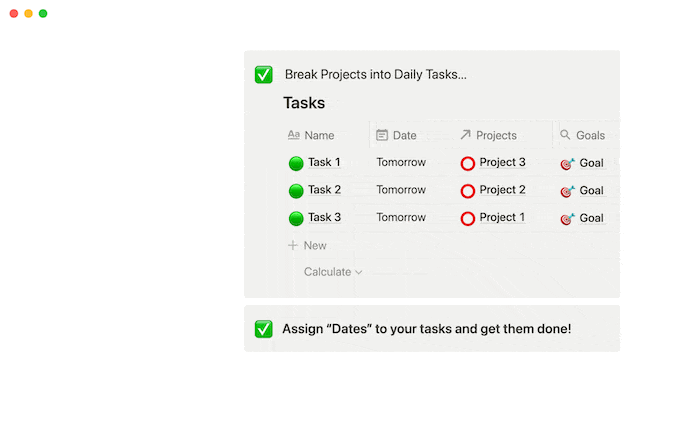
August Bradley, l’esprit du « Life Design Studio », a créé ce template qu’on pourrait traduire par « Objectif-Projet-Tâches » pour aligner les actions quotidiennes sur les aspirations de la vie. Améliorez votre concentration en reliant vos objectifs globaux aux projets et chaque projet à des tâches granulaires.
La fonction « relation » de Notion fonctionne ici très bien pour connecter les données de deux tableaux différents, et vous permet de vous concentrer sur la tâche à accomplir. Utilisez ce modèle pour voir clairement comment vos objectifs de haut niveau s’intègrent à vos tâches quotidiennes.
Meal Planner
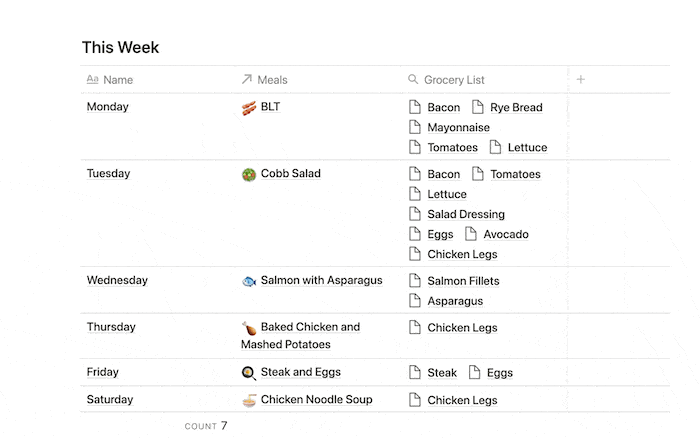
Simplifiez votre emploi du temps en planifiant ce que vous allez manger pendant la semaine et quels ingrédients vous devrez acheter. Ce template vous permet de saisir des recettes et des idées de repas à tout moment, de les planifier sur une base hebdomadaire et de générer votre liste de courses pour ne rien oublier !
Habit tracker
Où en êtes-vous des bonnes résolutions prises en ce début d’année 2022 ? Grâce à ce « tableau de suivi des habitudes » que vous remplissez chaque jour, vous pouvez peut-être les respecter. Répartissez les habitudes par jour ou par mois pour suivre facilement vos routines saines. Personnalisez les habitudes que vous souhaitez suivre, ajoutez des notes ou des images dans la sous-page de chaque journée pour rester motivé.
Les templates Notion du côté Professionnel
Nous le savons, les startups en phase de démarrage n’ont pas beaucoup de temps pour créer des processus clés, qu’il s’agisse d’organiser leur collecte de fonds, le fonctionnement de l’équipe marketing ou de celle de vente à partir de zéro.
J’ai déniché un « système d’exploitation » pour startups, afin de vous aider à installer en quelques minutes un tableau de bord complet, grâce à un ensemble de plusieurs templates. Ces modèles sont basés sur l’expérience de centaines de startups qui ont trouvé leurs cent premiers clients et ont levé des fonds avec succès. Nous allons voir quels sont les templates proposés, certains sont sans doute taillés pour vous !
Notion’s startup OS
- Company home : Toute entreprise a besoin d’un endroit où les informations importantes sont disponibles et faciles à trouver. Grâce à ce template, vous serez en mesure de regrouper tout ce dont votre entreprise a besoin pour bien fonctionner. Organisez tout, de la mission et des valeurs de votre entreprise au répertoire de vos employés.
- Pitch deck : Soyons honnêtes : Powerpoint est mort. Cependant, vous avez besoin de présenter vos projets plus ou moins de la même manière. Vous pouvez impressionner les investisseurs avec une page interactive créée sur Notion. Anticipez toutes les questions qu’ils pourraient se poser sur votre entreprise, et organisez le tout de façon à ne pas les submerger d’informations. Grâce aux galeries Notion, vous allez présenter vos principaux cas d’utilisation, vos clients, et votre équipe. Ajoutez du texte, des images et des détails dans chaque sous-page de la galerie pour que les intéressés puissent choisir d’en savoir plus sur ce qui les interpelle.
- Fundraising tracker : Envoyer accidentellement un e-mail à un investisseur que vous avez déjà présenté, ou se présenter à une réunion sans l’avoir préparée, c’est comme la version réelle de ce rêve où vous vous présentez à un rendez-vous en pyjama. Utilisez donc ce modèle comme un endroit unique où vous pouvez suivre chaque contact et l’historique de vos communications avec lui. Suivez différents types de données dans la même base, qu’il s’agisse du montant moyen des chèques, de la teneur ou la fréquence des e-mail… Affichez les contacts par statut pour voir quels investisseurs vous avez gagnés ou perdus, et quelle est votre progression. Cliquez ensuite sur la sous-page de chaque investisseur pour ajouter des notes de réunion, des liens vers leurs sites Web ou pour préparer votre présentation.
- Investor update : Au lieu d’envoyer un courriel désorganisé aux investisseurs, utilisez ce modèle Notion pour leur donner un aperçu plus complet et plus digeste de vos progrès. Un e-mail professionnel, correctement formaté, bien structuré et clair, voilà le but de ce template.
- Data room : Une data room peut s’avérer être un outil précieux pour votre startup pendant le processus de collecte de fonds : elle permet aux investisseurs potentiels d’avoir une vision approfondie de votre activité. Ce template vous permettra d’être rapidement opérationnel et vous donnera un emplacement central pour stocker vos documents, les détails de votre activité et autres données importantes.
- Team wiki : Dupliquez le template de wiki d’équipe autant de fois que nécessaire pour donner à chaque équipe sa propre page. Remplacez ensuite les en-têtes ou les pages par ceux qui correspondent à votre équipe. Donnez à chaque équipe de votre entreprise une page d’accueil personnalisée où elle peut organiser les différents processus, les projets et les connaissances spécifiques à sa mission. Ces wikis d’équipe permettent également aux autres équipes de trouver plus facilement les informations dont elles ont besoin lorsqu’elles travaillent de manière transversale.
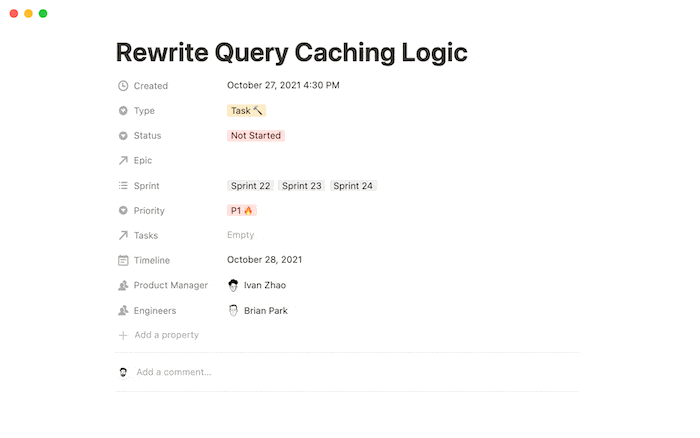
- Roadmap : Utilisez ce modèle pour suivre tous vos projets. Organisez vos projets par épopées, sprints, tâches et bogues. Vous pouvez afficher la base de données de différentes manières pour voir les projets par statut, ingénieur ou chef de produit. Gagnez du temps en utilisant les modèles conçus pour chaque type de tâche. Vous pouvez en ajouter d’autres si nécessaire, ainsi que d’autres propriétés personnalisées pour suivre les informations importantes.
- Sales CRM : Votre entonnoir de vente n’a pas besoin de ressembler à un logiciel SaaS. Notion vous offre une page propre pour définir uniquement les champs dont vous avez besoin pour suivre les prospects. Et chaque enregistrement est sa propre page Notion, où vous pouvez prendre des notes sur chaque point de contact. Ce modèle vous permet de commencer avec les éléments de base.
Meeting notes
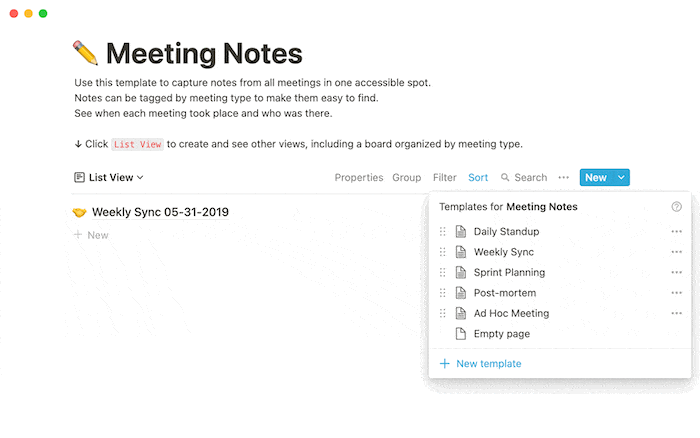
Capturez les notes de toutes les réunions en un seul endroit. Les notes peuvent être étiquetées par type de réunion pour les rendre plus faciles à trouver. Voyez quand chaque réunion a eu lieu et qui y assistait. Ainsi, n’importe qui peut voir ce qui a été discuté pendant les réunions et obtenir le compte-rendu complet. Cette fonctionnalité est particulièrement utile pour les nouveaux employés qui souhaitent avoir une idée de la manière dont les décisions ont été prises, de l’historique des relations, des précédents pour les nouveaux projets, etc.
Kanban
Vous avez sans doute déjà essayé plusieurs logiciels Kanban différents, mais vous avez constaté qu’ils devenaient souvent incontrôlables : tout le monde y va de sa petite colonne, créé de nouvelles relations, au point que vous finissez par passer plus de temps à gérer le flux de travail qu’à vous occuper de la tâche à accomplir, c’est pourquoi vous devriez regarder de près ce template de tableau Kanban de Notion.
Il n’est pas rempli de fonctionnalités compliquées. Au lieu de cela, il ressemble au tableau Kanban de base que vous pouvez créer dans Notion d’un simple clic avec un flux de travail simple : Ajoutez les tâches que vous devez accomplir dans la première colonne, déplacez-les vers la deuxième pendant que vous travaillez dessus, puis vers la troisième lorsque vous avez terminé.
Vous pouvez toujours assigner des tâches à d’autres personnes et fixer des échéances à l’heure et à la minute près et également définir un rappel dans Notion pour qu’il soit envoyé à un moment qui vous convient – de la même manière que la fonction de rappel de Microsoft Outlook, de sorte que vous pouvez être informé des tâches qui arrivent à échéance le lendemain ou la veille.
Notre astuce pour mettre en place Notion
Notion peut vous permettre de mettre en place une organisation personnelle ou professionnelle très efficace. Si vous avez besoin d’aide pour mettre en place un template particulier, vous pouvez faire appel à un freelance en déposant une annonce sur Codeur.com.


