En lançant votre entreprise, la recherche du meilleur outil pour gérer vos activités est l’une de vos premières préoccupations. Et c’est bien normal !
Un logiciel de gestion optimal vous accompagne dans la facturation, l’administration de vos dépenses, le suivi de projets, l’optimisation de la relation client et dans l’automatisation des tâches chronophages. Ceci, dans le but d’améliorer votre productivité et celle de vos équipes.
Mais, une question clé demeure : comment choisir entre les nombreux outils disponibles sur le marché ? Dans un premier temps : en vérifiant les 6 critères listés par notre partenaire Axonaut, ci-dessous !
1. Une fonction CRM au point !
La bonne gestion de votre entreprise passe par un suivi efficace de vos prospects et clients. C’est la clé pour optimiser la satisfaction client, améliorer vos campagnes marketing et vos offres commerciales.
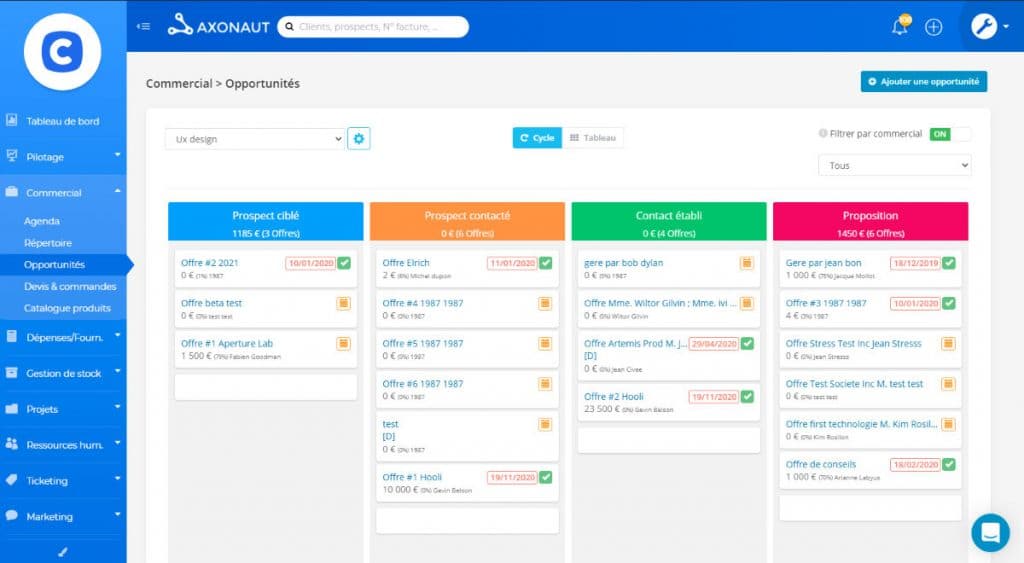
Avant d’opter pour un logiciel de gestion, vérifiez qu’il propose un CRM complet et performant qui vous permet de :
- Définir et suivre vos cycles de vente
- Suivre les tâches et relations commerciales
- Suivre les statistiques de démarchage, les opportunités commerciales et le chiffre d’affaires
- Segmenter vos campagnes emailing
2. Des outils pour améliorer votre relation client
Le CRM ne fait pas tout dans la relation client ! Un outil de gestion performant offre un véritable portail à vos consommateurs. L’objectif est de leur permettre, via un espace attitré et sécurisé, de consulter l’état de leur commande et de vous contacter en toute simplicité.
Côté back-office, ce portail vous affiche les factures (par client), les tâches en cours, les tickets de supports, ainsi que les projets partagés.
Des fonctionnalités que vous retrouvez sur Axonaut.com, notamment. Ce dernier propose même un espace SAV collaboratif, où vos équipes partagent et commentent des idées pour améliorer vos prestations.
3. Un module de facturation précis
La facturation de vos prestations, voilà un pan essentiel dans l’administration de votre entreprise. Votre logiciel de gestion doit donc vous rendre cette tâche facile.
De la création de devis jusqu’à leur transformation en facture, il est essentiel de fluidifier le processus pour gagner du temps. Le must ? Réaliser cette opération en un clic et apposer votre signature électronique. Cela évite le papier et rend l’envoi au client plus rapide.
Autre fonction importante : la gestion des factures d’acompte, d’avancement et de soldes. Le tout, en plusieurs langues pour faciliter vos activités avec des partenaires internationaux.
Bien entendu, pour une image de marque professionnelle, il est important de pouvoir personnaliser vos factures en y ajoutant le logo de votre entreprise, vos conditions particulières et la TVA. Le tout dans le respect de la loi 2018 relative à la facturation.
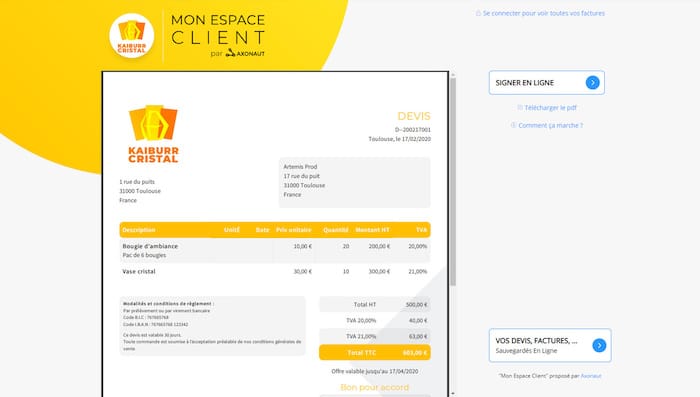
En plus de ces fonctionnalités, avec Axonaut, vous pouvez générer des bons de commande et de livraison en un clic. La plateforme offre également la possibilité de régler leurs factures via virements ou cartes bancaires en toute sécurité. Sans oublier la fonction de relance automatique des impayés via emails et courriers.
4. Une gestion des stocks optimisée
Une gestion des stocks au point permet d’éviter la perte de commandes, les ruptures de stocks imprévus, tout en optimisant les coûts de stockage. L’objectif est de pouvoir honorer au mieux vos commandes, afin de satisfaire vos clients.
Avec un logiciel de gestion performant, vous suivez les commandes passées par votre entreprise, les livraisons effectuées ainsi que l’évolution du stock. Si vous disposez d’un atelier ou d’une usine de fabrication, tournez-vous vers un outil qui permet de suivre la fabrication des produits, la valeur du stock et les commandes passées à l’entrepôt.
Certains logiciels de gestion peuvent aider une entreprise à déterminer l’option la plus rentable pour exécuter une commande en fonction des stocks disponibles et de la localisation de l’acheteur. Cela peut être via un magasin, un entrepôt ou un partenaire d’exécution tiers, par exemple. Pensez également à vérifier ce critère si vous disposez de plusieurs points de vente, filiales ou lieux de stockage !
5. Une gestion de projets plus aisée
Gérer une équipe, planifier des tâches, maîtriser les délais… Voilà des défis à relever pour la croissance de votre entreprise ! Parmi les critères phares d’un bon logiciel de gestion, vous trouverez les options concernant le management de projet. D’autant plus si vous œuvrez sur un secteur où les travaux sont longs et complexes.
Assurez-vous qu’un module de gestion de projets soit annexé à l’outil, pour profiter d’un aperçu en temps réel de l’avancement de votre mission, ainsi que des dépenses effectuées pour respecter le budget.
Si celui-ci offre la possibilité de planifier les tâches pour vos collaborateurs et de gérer le temps passé à chaque étape, c’est encore mieux !
6. Une option de gestion des ressources humaines
La gestion des ressources humaines, voilà un vrai casse-tête quand on lance son entreprise. Entre les associés, les salariés et les freelances, le facteur humain n’est pas toujours le plus facile à manager… Sauf avec un outil adapté !
Au moment de choisir votre logiciel de gestion, assurez-vous qu’il dispose de fonctions RH intuitives. Celui-ci doit vous permettre d’enregistrer toutes les données sur vos employés via un registre du personnel (une sorte de CRM pour vos collaborateurs !).
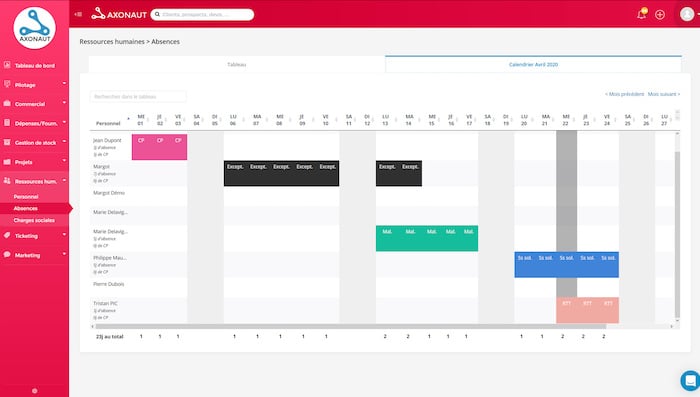
Avec un outil comme celui proposé par Axonaut, par exemple, en plus de sauvegarder les informations sur vos salariés et prestataires, vous pouvez enregistrer les évaluations de performance, suivre les heures travaillées, gérer les congés /absences/arrêts maladie, ainsi que les charges sociales.
Conclusion
Il est possible de disposer d’outils spécialisés pour chacun de ces critères. Cependant, cela n’améliore pas la réactivité tant recherchée ! Sans oublier, les risques d’erreur et de doublons, ainsi que le poids financier représenté par l’utilisation de plusieurs solutions.
Axonaut rassemble toutes ces fonctionnalités dans son outil pour faciliter le pilotage de votre entreprise. Alors, si vous ne devez en choisir qu’un, vous savez vers lequel vous tourner…


