Google vient de dévoiler une fonctionnalité expérimentale conçue pour le rapport de performance de la Search Console. L’objectif est de vous faire gagner du temps : au lieu de configurer manuellement vos vues, vous pouvez désormais utiliser le langage naturel pour filtrer et comparer vos données d’analyse du trafic organique.
Ce qu’il faut retenir :
- Une nouvelle configuration assistée par IA traduit vos phrases en filtres et paramètres dans le rapport Performance.
- Elle gère automatiquement l’application de filtres, les comparaisons de dates complexes et la sélection des métriques pertinentes.
- La fonctionnalité est limitée au rapport Résultats de recherche (pas de Discover ni Google News).
- Il s’agit d’une aide à la configuration : l’IA ne peut pas trier le tableau ni exporter les données.
Une configuration simplifiée par le langage naturel
Annoncée le jeudi 4 décembre 2025, cette nouveauté vise à réduire l’effort nécessaire pour isoler les données précises. Concrètement, vous décrivez l’analyse que vous souhaitez obtenir, et l’IA transforme votre demande en réglages techniques immédiats.
L’outil se concentre sur trois actions principales :
- Appliquer des filtres : L’IA peut restreindre les données par requête, page, pays, appareil, apparence dans les résultats ou plage de dates.
- Configurer des comparaisons : Elle automatise la mise en place de comparaisons temporelles (par exemple, comparer ce trimestre au même trimestre de l’année précédente) sans configuration manuelle.
- Sélectionner les métriques : Selon votre question, elle choisit d’afficher les Clics, les Impressions, le CTR moyen ou la Position moyenne.
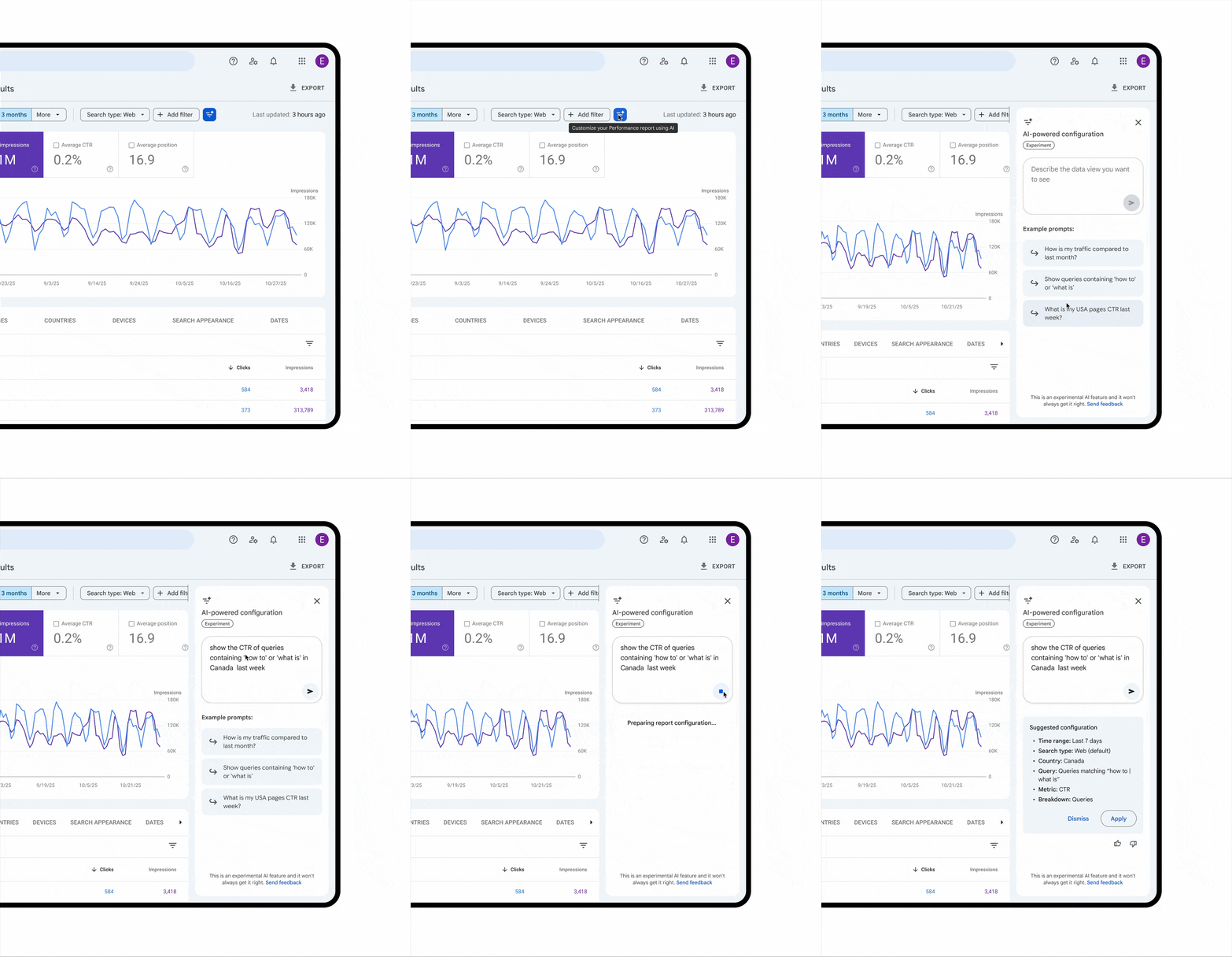
Exemples d’utilisation
Google propose plusieurs cas d’usage pour illustrer la flexibilité de l’outil :
- Filtrage précis : « Montre-moi les requêtes sur mobile contenant le mot ‘sports’ sur les 6 derniers mois. »
- Comparaison complexe : « Compare le trafic pour mes pages contenant ‘/blog’ ce trimestre par rapport au même trimestre l’an dernier. »
- Sélection de métriques : « Montre-moi le CTR moyen et la position moyenne de mes requêtes en Espagne sur les 28 derniers jours. »
Limites et précautions
Google précise que cette fonctionnalité est en déploiement progressif sur un nombre limité de sites. Étant encore au stade expérimental, elle comporte quelques contraintes importantes à connaître :
- Périmètre restreint : Elle ne fonctionne que pour le rapport de performance des résultats de recherche. Les rapports Discover et Actualités (News) ne sont pas pris en charge.
- Risque d’erreur : L’IA peut mal interpréter une demande. Il est impératif de toujours vérifier les filtres suggérés par l’outil avant d’analyser les chiffres.
- Pas d’actions sur les données : L’IA configure l’affichage (filtres, métriques), mais elle ne peut pas effectuer d’actions comme trier les colonnes du tableau ou exporter les résultats.
L’article “Google Search Console intègre l’IA pour configurer vos rapports instantanément” a été publié sur le site Abondance.


