C’est le printemps, les beaux jours reviennent… ainsi qu’une mise à jour WordPress 6.5 ! Lancée le 2 avril, cette update apporte plusieurs nouveautés et améliorations significatives au plus célèbre des CMS.
Avec l’objectif d’enrichir l’expérience des utilisateurs, d’offrir davantage de personnalisation et d’optimiser le travail des développeurs, WordPress 6.5 a franchi une étape majeure en résolvant 344 tickets ! Cette mise à jour se distingue par l’introduction de 99 améliorations et nouvelles fonctionnalités, tout en apportant 210 correctifs à divers bugs, soulignant ainsi son engagement à fournir une plateforme toujours plus performante et adaptable aux besoins de sa communauté.
Tour d’horizon des principales fonctionnalités clés introduites dans cette mise à jour printanière de WordPress !
Nouvelle bibliothèque de polices, la personnalisation ultime
Dans la version 6.5, la bibliothèque de polices propose une gestion améliorée et personnalisée des polices sur votre site WordPress. Directement depuis l’éditeur de blocs, vous pouvez désormais ajouter des typographies locales ou piocher dans la vaste collection de Google Fonts.
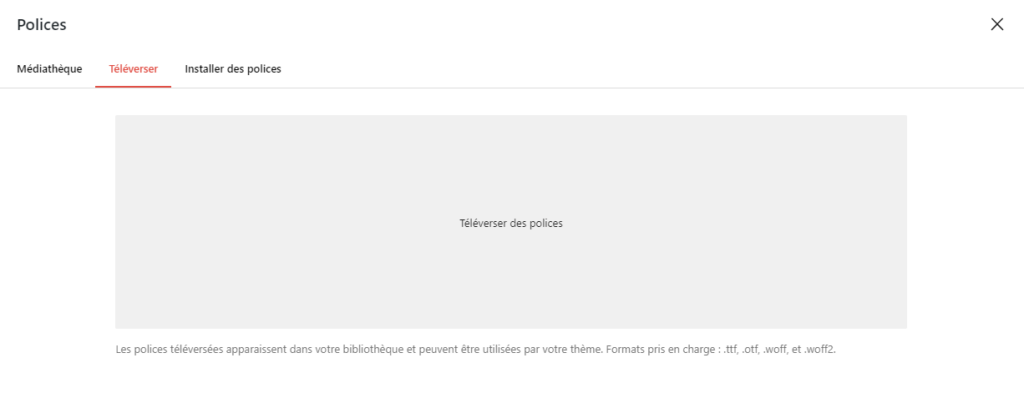
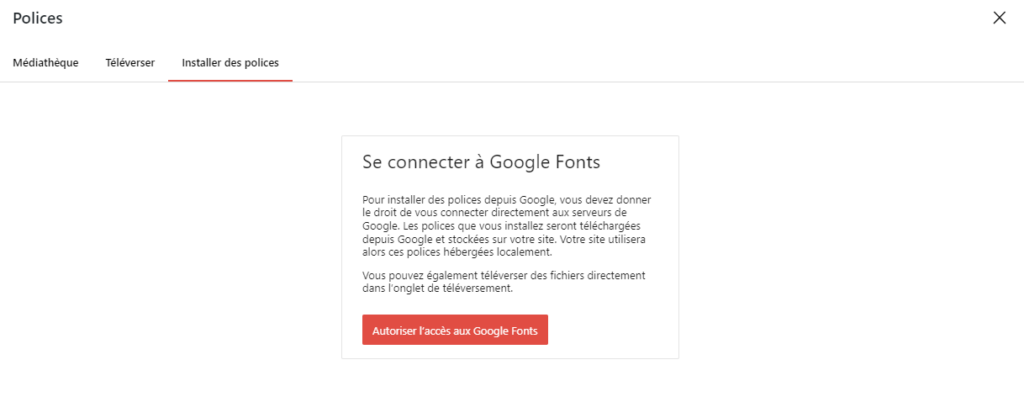
Vous avez même la possibilité de désinscrire une collection de polices et de contrôler leur répertoire de téléchargement .
Cette liberté permet de donner vie à vos idées de design sans être limité par les choix de polices de votre thème.
Navigation et design réinventés : les améliorations de l’éditeur de blocs
Si vous avez déjà travaillé sur des pages longues ou composées de nombreux blocs, vous savez combien il peut être fastidieux de naviguer entre eux. Avec les nouvelles améliorations de l’éditeur de blocs, vous pouvez maintenant renommer les blocs dans la vue liste, ce qui vous aide à maintenir une organisation impeccable de votre contenu.
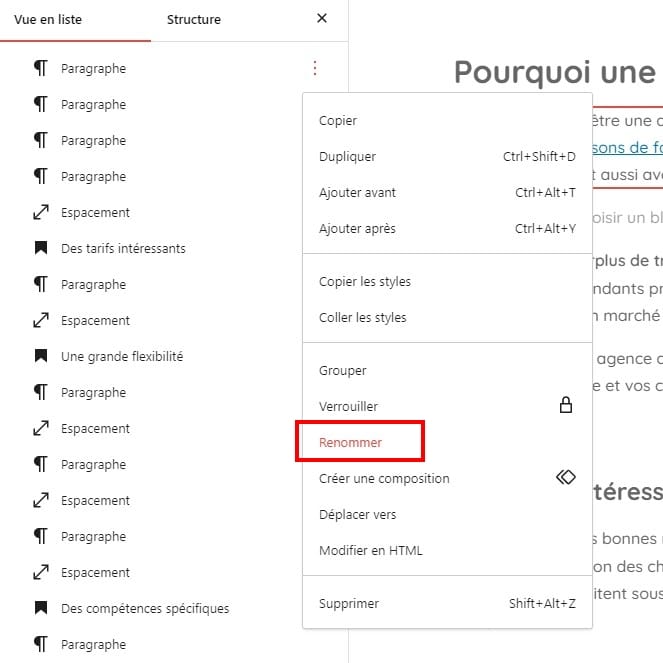
Ajoutez à cela l’effet d’ombre portée, désormais disponible pour les blocs d’images et de colonnes, et vous voilà équipé pour créer des pages d’une dimension et d’une profondeur captivantes.
Révisions de style améliorées dans WordPress 6.5
Changer d’avis est humain et WordPress 6.5 l’a bien compris. L’introduction d’une vue améliorée des révisions de style vous permet de visualiser plus aisément les modifications passées, grâce à un aperçu visuel direct des changements sur votre page.
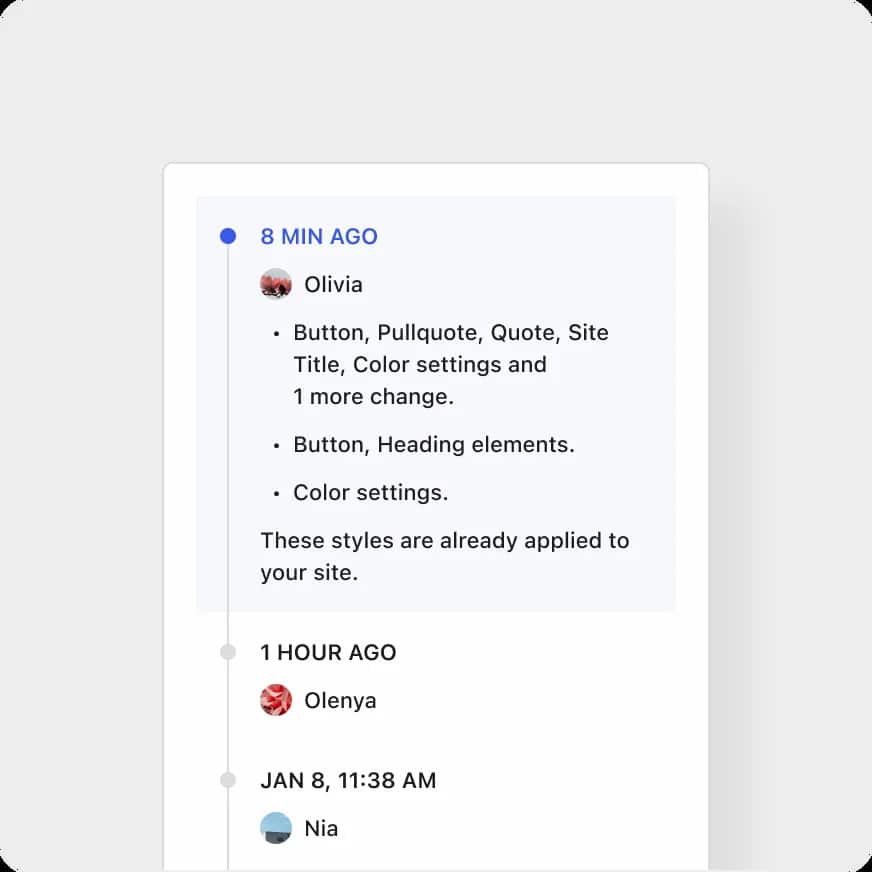
Que vous expérimentiez avec les couleurs, les dispositions ou d’autres éléments de style, cette fonctionnalité assure que vous pouvez toujours retrouver votre chemin dans le labyrinthe des modifications. Résultat : le processus de design devient plus intuitif et moins intimidant.
Expériences plus dynamiques avec l’API d’interactivité
Pour les développeurs, l’API d’interactivité est un véritable terrain de jeu. En permettant de construire des expériences communicatives directement avec les blocs WordPress, sans rechargement de page, cette API multiplie les possibilités créatives.
Des quiz dynamiques aux sliders captivants, en passant par des animations hypnotiques, cette nouveauté rend les sites plus vivants et dynamiques pour les visiteurs. L’objectif ? Faire en sorte que votre site suscite l’engagement des utilisateurs.
Améliorations des performances et de l’accessibilité
Cette version apporte des améliorations significatives en termes de performance et d’accessibilité. L’éditeur de blocs et l’éditeur de site filent désormais à la vitesse de l’éclair, rendant la création et l’édition de contenu plus fluide que jamais.
Concernant les sites multilingues, une nouvelle bibliothèque légère réduit considérablement le temps de chargement, assurant que vos visiteurs du monde entier accèdent à votre contenu sans attendre.
Mais ce n’est pas tout ! Avec plus de 65 améliorations en matière d’accessibilité, WordPress 6.5 s’assure que votre site soit confortable pour tous, en affinant les réglages de contraste, en optimisant le positionnement des éléments et en rendant la navigation au clavier intuitive.
Le terrain de jeu des développeurs s’élargit avec WordPress 6.5
WordPress 6.5 introduit également de nombreuses fonctionnalités destinées aux développeurs :
- Support de WP CLI et instances multisites dans le playground : Le playground de WordPress supporte désormais directement WP CLI et les instances multisites dans le navigateur, facilitant le test des contributions sans quitter l’environnement de développement.
- Support pour PHP 8.3 : WordPress 6.5 offre une compatibilité avec PHP 8.3, ainsi que le support des extensions PHP mbregex et OpenSSL, améliorant ainsi la sécurité et la performance.
- Fixation d’un problème de téléchargement de ZIP sur Mac : Un correctif a été appliqué pour résoudre un problème de téléchargement des fichiers ZIP créés sur Mac, qui étaient auparavant marqués comme “Archive Incompatible”.
- Support de feuille de style pour block.json : Il est maintenant possible de définir une feuille de style pour vos blocs via la propriété viewStyle dans block.json, ce qui ne charge la feuille de style qu’en front-end.
Gestion des dépendances entre plugins
Avec l’introduction de la gestion des dépendances entre plugins dans WordPress 6.5, fini le casse-tête ! Les auteurs d’extensions peuvent clairement indiquer quels autres modules sont nécessaires pour que le leur fonctionne correctement.
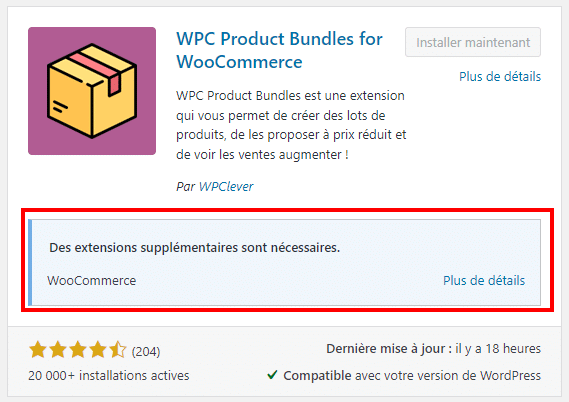
Cette nouvelle fonctionnalité améliore considérablement l’expérience utilisateur grâce à l’élimination des erreurs de dépendance et l’amélioration de la gestion de l’écosystème de plugins.
Optimisation Front-End : lancement de l’API des modules JavaScript
WordPress 6.5 équipe les développeurs avec une nouvelle API pour l’enregistrement et l’enfilement des modules JavaScript. Cette API rend la gestion des scripts ES modules plus fine, ce qui permet aux programmeurs d’optimiser le chargement des scripts sur leurs sites.
Notre conseil pour mettre à jour WordPress 6.5 efficacement
Ces améliorations et nouveautés font de WordPress 6.5 une mise à jour importante, tant pour les utilisateurs que pour les développeurs. Le CMS tend, comme toujours, vers plus de flexibilité, performance et accessibilité.
Comme toujours, avant de mettre à jour vers WordPress 6.5, sauvegardez votre site et vérifiez la compatibilité des thèmes et plugins. Après l’update, testez votre site et réactivez les plugins de mise en cache.
Pour une mise à jour sans accroc, nous vous conseillons de faire appel à un développeur WordPress freelance sur Codeur.com !


