Près de 70% des consommateurs ne complètent pas leurs transactions avant de quitter une boutique en ligne. Heureusement, il est possible de diminuer ce chiffre grâce aux « wishlists » !
Les listes de souhaits permettent aux clients de lister les articles qu’ils ne sont pas encore prêts à acheter. Ils peuvent ajouter des produits de leur choix, sans avoir besoin de créer un panier, et revenir plus tard pour finaliser leur achat. Mais comment s’assurer qu’ils reviendront pour terminer leur commande ? Voici nos conseils !
1. Utiliser un plug-in performant
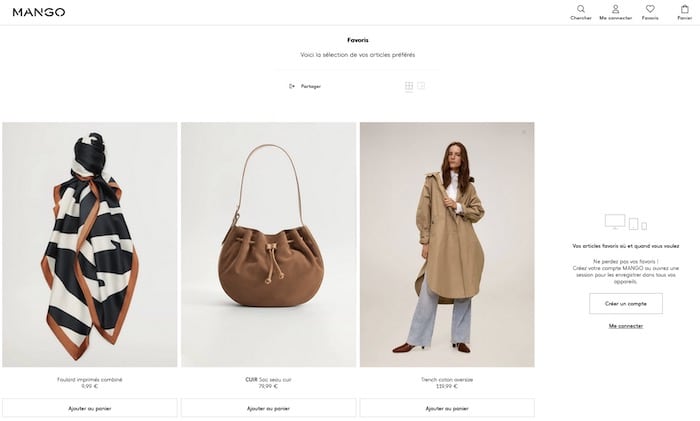
La première étape pour convertir les wishlists en véritable achat est de trouver un plug-in performant.
Dans de nombreux cas, les clients ajoutent les produits et attendent ensuite les soldes ou des bons de réduction pour les acheter. Il arrive qu’un internaute sauvegarde aussi un article qui est momentanément en rupture de stock.
Un plugin wishlist efficace doit :
- Rappeler au consommateur le retour en stock des produits ;
- Notifier les clients qui le souhaitent en cas de nouveaux produits ;
- Disposer d’options pour le partage sur les réseaux sociaux ;
- Offrir des garanties de confidentialité pour les utilisateurs ;
- Vous permettre d’identifier les produits les plus “souhaités”.
Évidemment, le plug-in doit aussi être facile à utiliser pour les visiteurs de votre site e-commerce.
2. Placer la wishlist aux endroits pertinents
Pour augmenter les chances de conversion, la wishlist doit être placée à un endroit stratégique. Idéalement, le bouton doit se trouver sur chaque page de produit. L’objectif est de réduire les frictions pendant la navigation et de permettre au visiteur de conclure son achat, plus tard, sur un autre appareil.
Placez également la wishlist sur chaque image de produit. Il suffit d’ajouter un cœur sur les photos pour que les clients puissent les marquer comme favoris. Le tout, sans avoir à créer un compte au préalable.
Enfin, la liste de souhaits doit rester visible et accessible depuis le panier d’achats et lors du paiement. Pourquoi ? Pour encourager les clients à ajouter des articles depuis leurs listes, afin de préparer leurs prochaines commandes.
3. Rappeler aux visiteurs d’enregistrer la wishlist
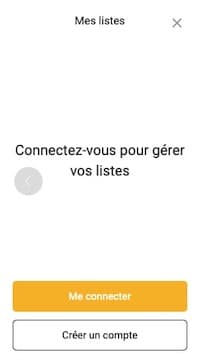
Les clients peuvent oublier d’enregistrer leur wishlist avant de quitter votre site. Dans ce cas, vous perdrez des opportunités de vente !
Incitez-les à laisser leur adresse email pour sauvegarder leurs souhaits et demandez leur accord pour envoyer des notifications en rapport avec les produits ajoutés.
À partir de cette sauvegarde, vous pourrez mener des campagnes personnalisées. Ce qui nous amène justement au point suivant…
4. Utiliser les données de la wishlist pour créer des campagnes personnalisées
Profitez des informations obtenues à partir des listes de souhaits pour alimenter votre stratégie marketing.
C’est la saison des soldes ? Regardez quels types de produits se retrouvent le plus dans vos wishlists et mettez-les en promotion !
Vous pouvez également personnaliser vos emails en recommandant des produits similaires à ceux présents dans la liste des clients. Par exemple, si un visiteur enregistre un pantalon, vous pouvez lui en proposer d’autres de la même marque ou un haut assorti.
Pensez aussi à rappeler que les produits favoris de vos visiteurs les attendent. Dans votre email, précisez à nouveau les articles ajoutés à la wishlist et ajoutez un code de réduction pour favoriser l’achat !
5. Suivre les produits ajoutés pour déterminer les tops (potentielles) ventes
Les wishlists offrent un aperçu de la pensée et l’aspiration de vos clients. Vous pouvez facilement identifier les tendances : quels articles les internautes conservent-ils pour plus tard ? Ces derniers auront un point commun, comme la saisonnalité. L’idée est d’anticiper les futurs produits star afin d’en commencer la promotion dès aujourd’hui.
Si les visiteurs qui ont mis l’article en wishlist tombent sur vos promotions, vos partenariats influenceurs ou vos articles de blog sur le sujet, ils seront plus enclins à se convertir en acheteurs.
6. Proposer une wishlist engageante
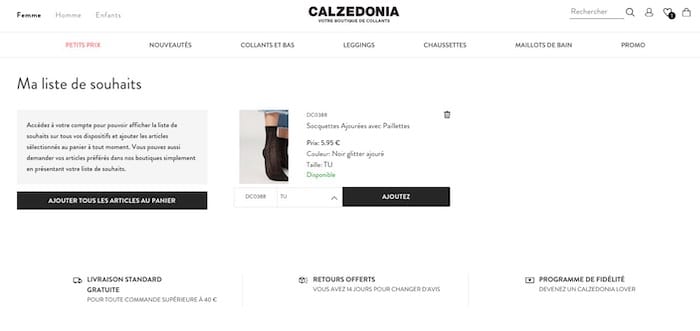
Soyez créatifs dans le design ! La wishlist doit être sympa à utiliser et à partager. Aux approches des fêtes ou des anniversaires, donnez envie aux utilisateurs d’envoyer leur liste à leurs amis ou à leur famille.
Pensez aussi aux fonctions à annexer pour rendre votre liste de souhaits plus pertinente :
- Donner la possibilité de classer et de catégoriser les produits ;
- Faire en sorte que les utilisateurs puissent cocher les articles achetés ou commandés ;
- Offrir la possibilité de renommer la liste de souhaits ;
- Faciliter le transfert des produits vers le panier d’achats ;
- Autoriser la création de plusieurs wishlists.
À lire aussi : 20 sets d’icônes terrifiants pour Halloween
Les wishlists offrent une belle opportunité de conversion des visiteurs. Utilisez un plug-in performant et placez le bouton dans les endroits stratégiques pour inciter les internautes à l’utiliser. Enfin, servez-vous des données récoltées pour affiner vos campagnes marketing afin que vos listes de souhaits permettent d’optimiser votre chiffre d’affaires !
Des développeurs experts des plateformes e-commerce peuvent vous aider à installer ces fonctionnalités. Postez votre projet sur Codeur.com pour recevoir leurs devis gratuitement.
Vous voulez le faire vous-même ? Suivez nos tutoriels pour ajouter des plug-ins sur WordPress, Joomla!, Prestashop et Magento !


