Cette recette est assez simple mais un peu longue. prévois un peu de temps, celui que tu utiliseras maintenant sera celui que tu ne perdra pas plus tard. l’ingredient principal de cette recette est la Sauvegarde UpdraftPlus. Allez, on passe à l’action.


Recette N°6 Mettre ses données au frais pour bien les conserver
Description
Cette recette est assez simple mais un peu longue. prévois un peu de temps, celui que tu utiliseras maintenant sera celui que tu ne perdra pas plus tard. l'ingredient principal de cette recette est la Sauvegarde UpdraftPlus. Allez, on passe à l'action.Ingrédients
Instructions
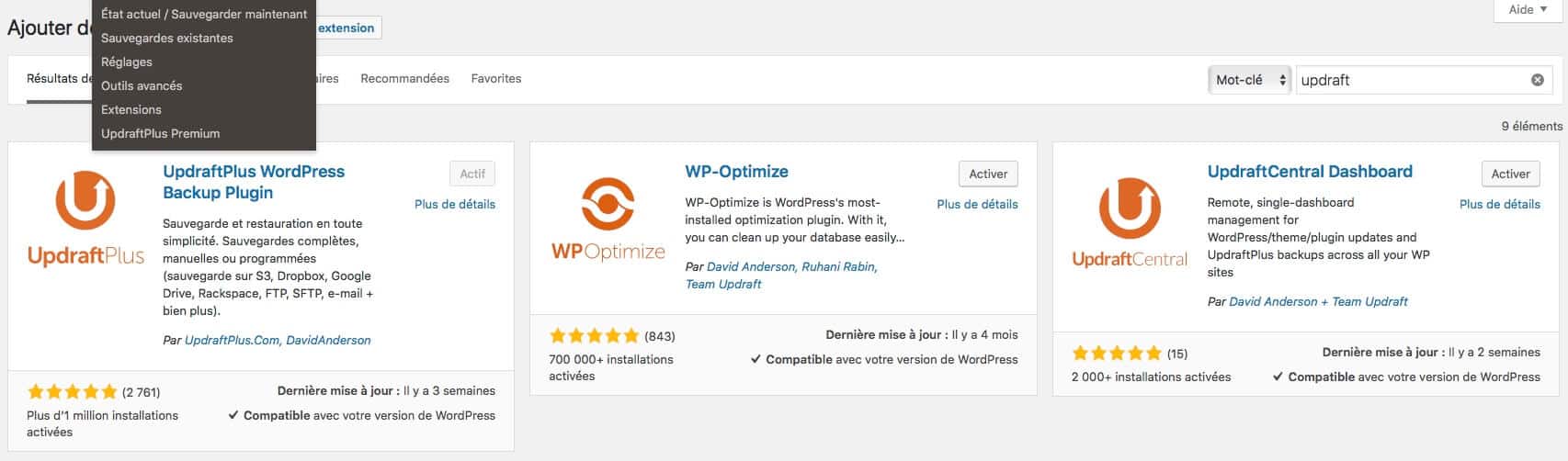
- Va dans Extensions>Ajouter et tape updraft dans la boite de recherche. Tu devrais obtenir ceci (cf image jointe) Installer le plugin. (Tu peux installer ces trois extensions qui sont fort utiles mais n'active que la première pour l'instant.)

- Clique sur le lien qui s'affiche dans ton tableau de bord Wordpress ou va dans Réglages>Sauvegardes Updraftplus
- Cliques sur l'onglet Règlages et choisi la fréquence de tes sauvegardes. Pour une phase de lancement où l'activité est plus intense, je choisi 12 heures et 5 sauvegardes pour les fichiers, 4 heures et 10 sauvegardes pour ma base de données
- Tu peux cocher la case Courriel pour recevoir un rapport puis clique sur Enregistre
- Retourbe sur l'onglet État Actuel et clique sur Sauvegarde