Même si faire appel à un développeur Shopify freelance reste le meilleur moyen d’obtenir un commerce en ligne performant avec un excellent design, vous pouvez aussi utiliser un thème Shopify gratuit.
Si vous démarrez votre entreprise et que vous avez peu de budget à investir, la plateforme Shopify propose des thèmes gratuits modernes et faciles à prendre en main. Vous pouvez donc créer un site web professionnel et beau sans devoir payer un design personnalisé.
Vous cherchez le thème Shopify gratuit qui s’adapte parfaitement à votre future boutique en ligne ? Voici la liste des 10 meilleurs thèmes gratuits pour créer votre e-commerce.
10 thèmes Shopify gratuits pour votre boutique
1. Minimal : thème Shopify gratuit pour vêtements
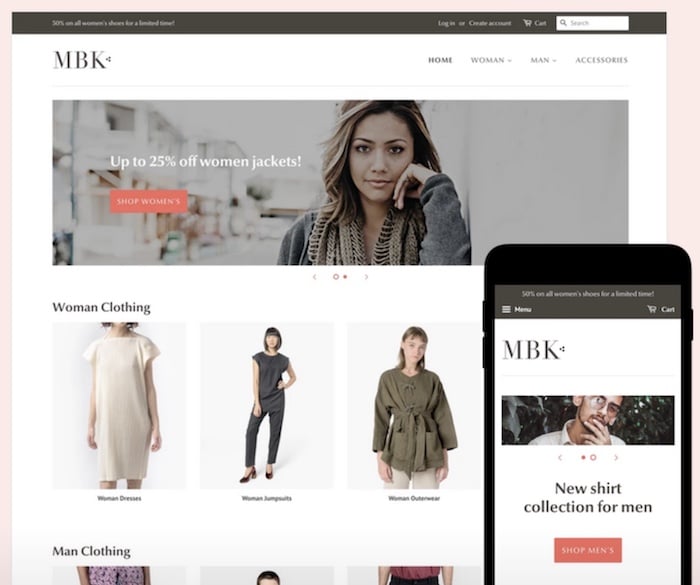
La plupart des thèmes gratuits sont simples et épurés comme le thème Minimal. Vous pouvez personnaliser facilement ce thème et mettre en avant votre produit en utilisant les fonctionnalités suivantes :
- La possibilité de choisir entre 3 coloris différents
- la fonctionnalité zoom pour voir le détail du produit
- l’intégration d’une vidéo de présentation de votre marque en page d’accueil
- des systèmes de filtres et de recommandations pour faciliter la recherche et la navigation sur le site de l’utilisateur.
2. Supply : thème Shopify gratuit pour retail
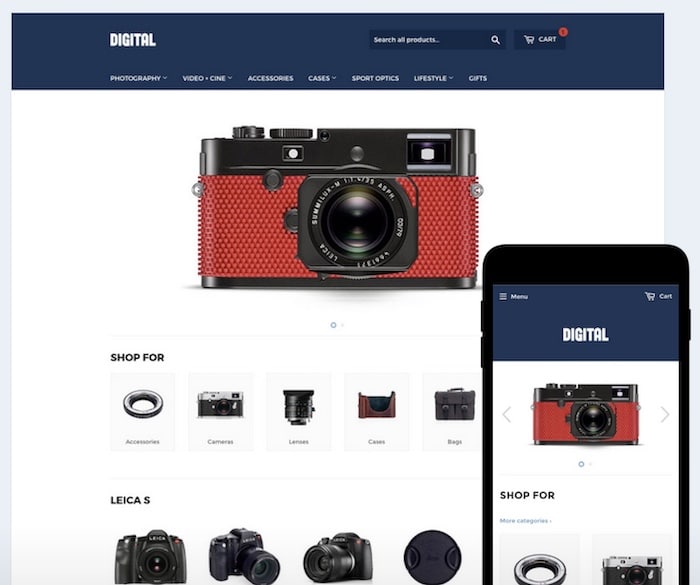
Ce thème offre seulement les fonctionnalités essentielles pour réaliser une belle page d’accueil et proposer un design épuré, ni plus ni moins. Une fois encore, tout est conçu pour mettre le produit en avant avec :
- 2 styles à disposition
- un catalogue oversize tendance
- un système avancé de filtres pour faciliter la navigation de l’utilisateur.
3. Debut : thème Shopify gratuit pour la mode
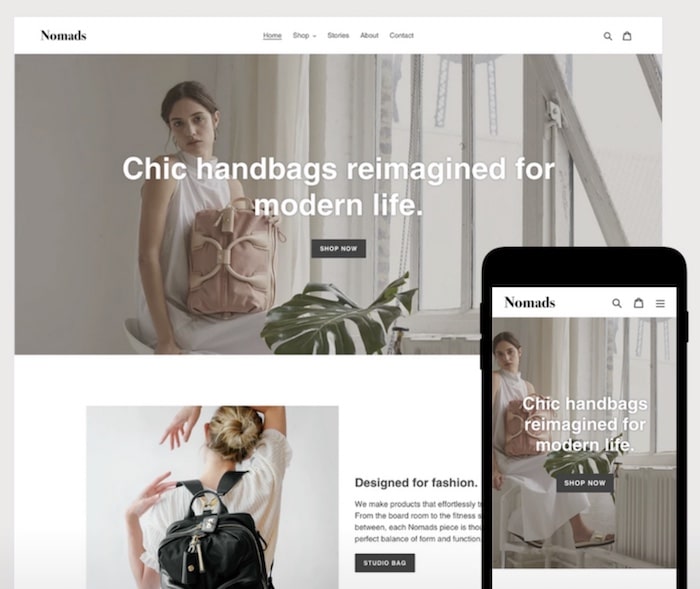
Ce thème possède de nombreuses fonctionnalités à la hauteur d’un thème premium ! De plus, il offre une présentation moderne et attractive avec :
- 2 styles à disposition
- un système de filtres pour optimiser l’expérience utilisateur
- une fonction de predictive search
- la mise en avant des avis clients
- possibilité d’intégrer des bannières promotionnelles.
4. Thalia : thème Shopify gratuit élégant
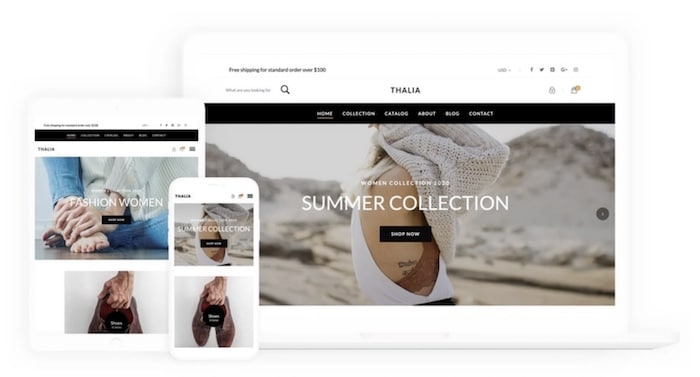
Si vous souhaitez créer un site web élégant rapidement, voici le thème qu’il vous faut. Le design épuré est particulièrement adapté au domaine de la mode mais il convient également à d’autres secteurs d’activité. Le thème Thalia propose :
- un système de filtres
- intégration d’un diaporama sur la page d’accueil
- de nombreux paramètres de personnalisation comme la typographie, les couleurs ou les options de mise en page.
5. Narrative : thème Shopify gratuit lifestyle
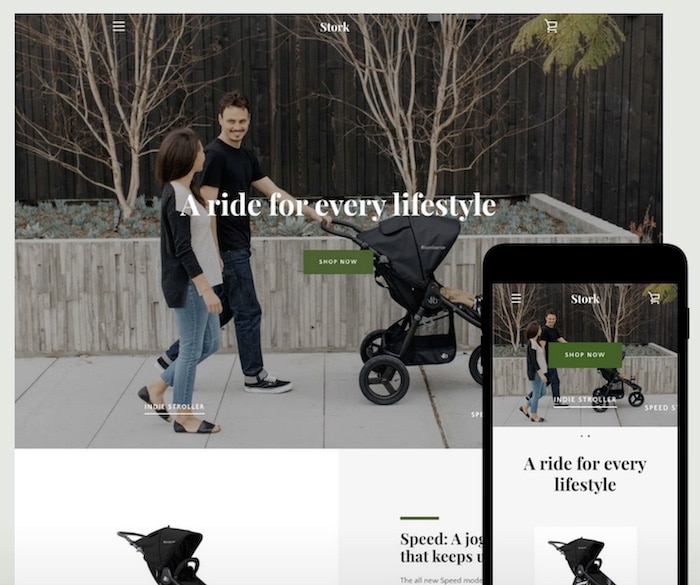
Narrative est un thème simple et efficace plus orienté sur le storytelling, il permet de mettre en avant votre marque avec :
- 4 styles à disposition
- un thème branding-friendly avec vidéo en page d’accueil
- Le thème est responsive et optimisé pour le référencement naturel.
6. Express : thème Shopify gratuit pour la food
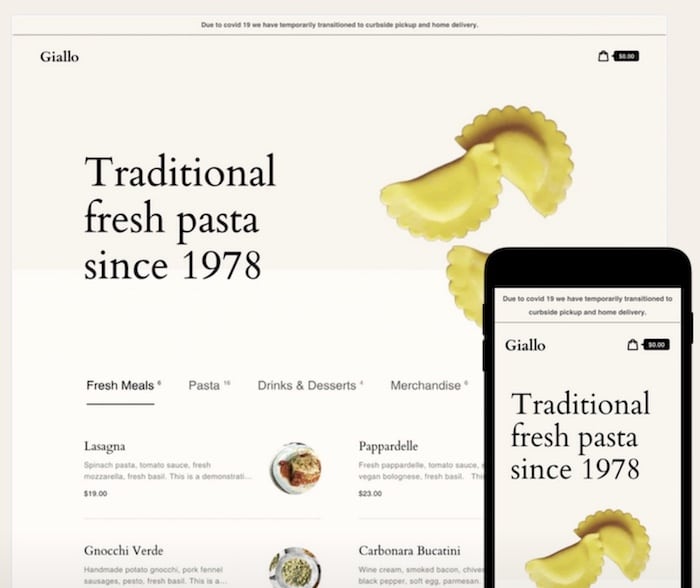
Ce thème gratuit vous permet de présenter vos produits sur une seule page pour optimiser l’acte d’achat. Il s’agit d’une mise en avant immédiate, il est donc adapté aux petits catalogues e-commerce :
- Thème responsive adapté aux mobiles
- navigation déroulante
- styles et palettes de couleurs intégrés.
7. Simple : thème Shopify gratuit sobre
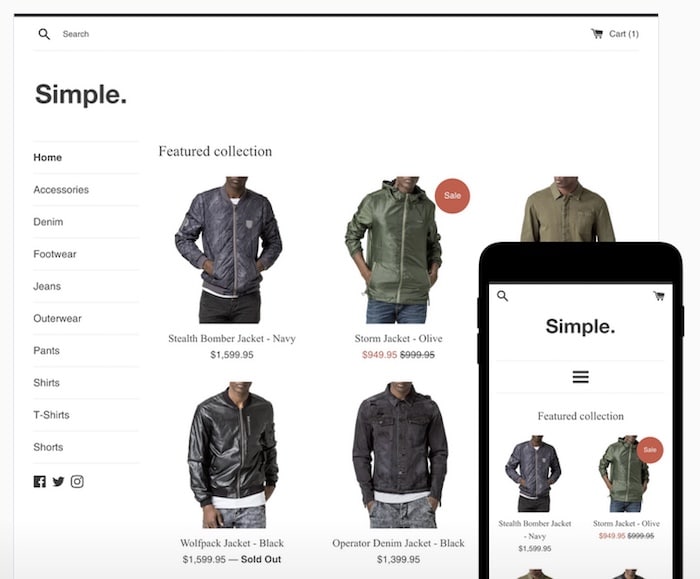
Ce thème porte parfaitement son nom puisqu’il est très épuré et facile à prendre en main. Il offre trois styles de présentation possibles. Les différentes présentations proposent beaucoup d’espaces blancs mais contrairement aux autres thèmes épurés, vous avez la possibilité de proposer un grand catalogue de produits avec le thème Simple. Il inclut :
- une version responsive adaptée aux mobiles
- une fonction zoom sur les produits
- des animations à intégrer aux images
- un système de recommandations d’autres produits
8. Boundless : thème Shopify gratuit idéal pour les collections
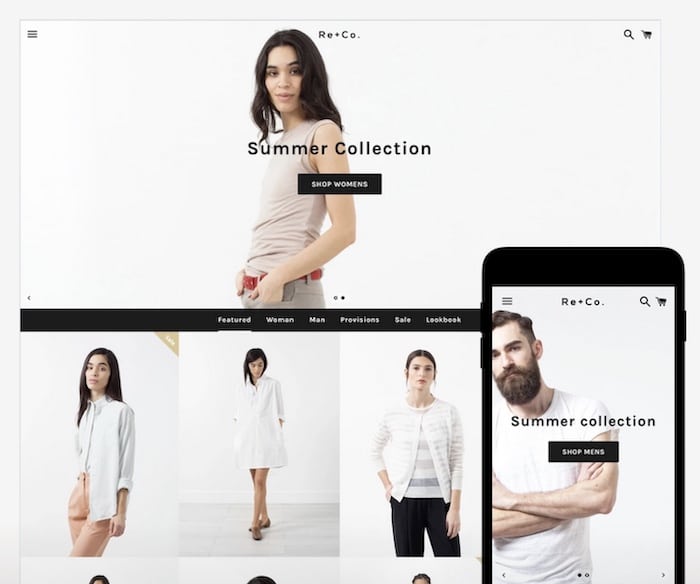
Boundless met l’image et donc le produit en vedette avec l’utilisation de très grands formats sur la page d’accueil, ce qui ne sera pas adapté à tous les objectifs. Bien utilisé, ce thème a ses avantages et les images de votre collection présentées en pleine largeur plairont sans doute à vos prospects. Boundless propose :
- 2 styles à disposition
- animation visuelle en page d’accueil
- images oversize.
9. Fashe : thème Shopify gratuit tendance
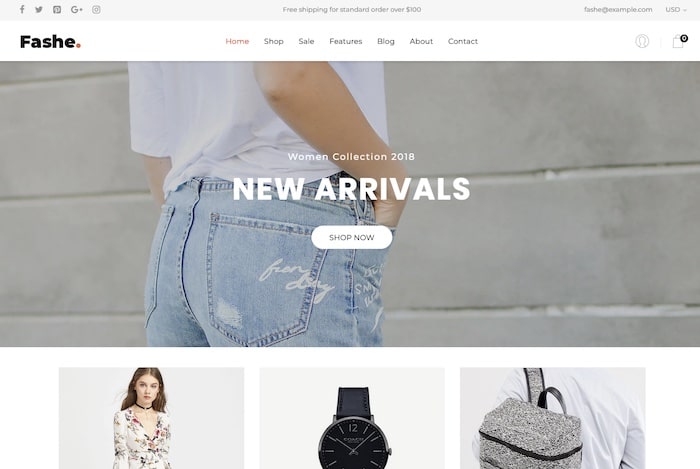
Le thème Fashe présente les produits de manière visuelle et les met en valeur avec des animations. Il propose de nombreuses fonctionnalités qui s’adaptent à tous types de e-commerce :
- fonction de filtrage très avancée
- ajout rapide au panier
- produits recommandés
10. Brooklyn : thème Shopify gratuit
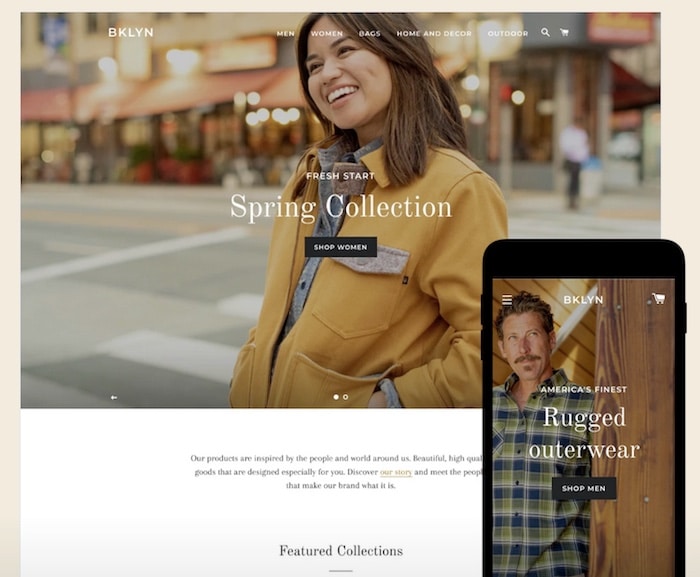
Brooklyn est un thème classique et élégant avec quelques touches modernes qui plaisent beaucoup aux utilisateurs. Il offre les fonctionnalités essentielles pour créer une boutique en ligne performante avec :
- 2 styles au choix
- présentation dynamique de vos produits
- possibilité d’inclure une vidéo de présentation sur la page d’accueil.
Il ne vous reste plus qu’à choisir le thème gratuit idéal pour créer votre e-commerce sur la plateforme Shopify !
Vous ne savez pas comment installer votre thème ou le customiser ? Retrouvez tous nos tutoriels Shopify pour personnaliser votre boutique et augmenter vos ventes !
Pour gagner du temps ou éviter tout faux pas qui pourrait nuire à votre site, vous pouvez aussi faire appel aux services d’experts Shopify. Retrouvez les meilleurs professionnels sur Codeur.com.
8 conseils pour choisir le thème Shopify gratuit idéal
Mariés au premier regard ! En e-commerce, la première impression joue un grand rôle dans la décision d’achat. 94% des acheteurs n’ont pas confiance dans un site web avec un mauvais design.
Voilà pourquoi le choix du thème pour votre boutique Shopify reste déterminant pour attirer, engager et convertir vos visiteurs. Un design accessible, professionnel, rassure les internautes et facilite leur expérience avec votre e-commerce.
Pour vous aider à choisir parmi les milliers de thèmes proposés par Shopify, voici 8 conseils à prendre en compte !
1. Lister vos besoins
C’est la base ! Pour trouver le thème Shopify parfait pour votre e-commerce, listez les caractéristiques et fonctionnalités dont vous avez besoin. Par exemple :
- De grands aperçus produits
- Un lecteur vidéo intégré
- Une fonction de recherche avancée
- Un blog
- Un slider en page d’accueil
En trouvant un thème doté de la plupart des fonctionnalités que vous recherchez, vous pourrez réduire les coûts de développement. Pensez à bien activer la démo des thèmes repérés pour vérifier que les options indispensables sont présentes.
2. Déterminer votre budget
Les tarifs des thèmes Shopify vont du simple au triple. Voilà pourquoi vous devez déterminer calculer le budget à accorder au template de votre e-commerce.
Voici les facteurs qui impactent le prix du thème :
- Le développeur : les développeurs plus expérimentés affichent des tarifs supérieurs. Cependant, vous pouvez être sûr de la qualité du thème et du service technique proposé.
- La flexibilité : le niveau de personnalisation de votre thème a un impact sur son prix. Si vous avez besoin d’un thème très personnalisé, cela vaut le coup (coût !) d’opter pour un design flexible.
- Le niveau de fonctionnalité: les thèmes avec des fonctionnalités marketing supplémentaires, comme des formulaires ou des fonctions de référencement, coûtent plus cher. L’avantage est que vous pouvez sûrement économiser sur votre budget marketing, à côté.
3. Considérer votre secteur d’activité
La plupart des thèmes sont développés pour vendre des produits spécifiques. Lorsque vous choisissez un thème Shopify, assurez-vous qu’il est conçu pour votre activité.
Par exemple, un e-commerce de produits et accessoires high-tech ne peut pas choisir un thème construit pour une galerie d’art. Les besoins des internautes diffèrent ! Ceux en quête d’un nouveau smartphone ont besoin de filtres de recherche avancée. Par ailleurs, ils s’attendent à un design épuré et ultra moderne.
Les amateurs d’art n’ont pas besoin de fonction de recherche avancée. Par contre, ils veulent voir de belles photos et se projeter avec l’œuvre dans leur salon ou dans leur chambre. Le design du thème devra être créatif et minimaliste, pour laisser toute la place aux peintures, sculptures ou autre objet d’art.
4. Tenir compte de la taille du catalogue de produits
Certains thèmes Shopify ont un catalogue produits limité. Faites attention à cet élément au moment de choisir le template de votre boutique ! Surtout si vous vendez de nombreux produits.
5. Privilégier les thèmes légers et adaptés aux mobiles
Les thèmes légers se concentrent davantage sur les performances en évitant d’intégrer des éléments et fonctionnalités qui ralentissent votre site. Leur principal objectif est d’aider les clients à naviguer dans votre boutique et à effectuer l’action souhaitée depuis leur smartphone.
D’après une étude de la FEVAD, 81% des cyberconsommateurs utilisent leur mobile pour préparer leurs achats et 63% des 25-34 ans l’utilisent pour acheter en ligne. Autant dire qu’un thème Spotify mobile-friendly est indispensable !
6. Penser aux outils de référencement et de comptabilité
Un classement optimal dans les résultats des moteurs de recherche est utile pour attirer plus de visiteurs sur votre boutique Shopify. Si vous arrivez vous classer de manière organique, vous pourrez faire des économies sur vos campagnes payantes.
Certains thèmes Shopify intègrent des fonctions SEO qui vous aident à booster votre trafic naturel. Avant de choisir le template parfait, vérifiez les fonctionnalités suivantes :
- Génération automatique de sitemap
- Prise en charge des extraits Google
- Métadonnées personnalisées
- Blog intégré
7. Considérer l’optimisation du processus de paiement
Votre page de paiement peut faire ou défaire une vente ! Des études ont révélé que les e-commerces perdent environ 75 % des ventes à cause de l’abandon de panier. Ces mêmes enquêtes montrent que l’une des principales raisons de cet abandon est un processus de paiement compliqué.
Or, certains thèmes Shopify offrent des fonctionnalités qui améliorent le processus de paiement comme :
- Des barres de progression
- Des résumés de commande détaillés
- Des boutons de retour
- Des icônes de progression
Ces éléments accompagnent plus facilement les internautes vers la conversion.
8. S’assurer de l’assistance technique du concepteur
À l’avenir, vous aurez besoin de modifier certains paramètres, d’intégrer de nouvelles fonctionnalités à votre thème, d’obtenir une mise à jour ou simplement de mettre à niveau votre pack. À cet effet, il est préférable de bénéficier d’une assistance rapide et efficace de la part des développeurs du thème Spotify.
Ainsi, avant de télécharger un template, vérifiez les témoignages clients concernant le service technique.
Votre thème Shopify influence l’expérience utilisateur et vos ventes. Voilà pourquoi il est essentiel de suivre ces conseils pour choisir le meilleur template possible.
Besoin d’aide pour créer une boutique Shopify qui vous corresponde ? Trouvez un développeur Shopify sur la plateforme freelance Codeur.com en postant votre annonce gratuitement !


